
1. مقدمه
The Bang & Olufsen Beolit 17 is a portable wireless Bluetooth speaker designed to deliver immersive 360-degree sound. Constructed with premium materials such as anodized aluminum and full-grain leather, it offers durability and a refined aesthetic. This manual provides essential information for setting up, operating, and maintaining your Beolit 17 speaker.
۲. چه چیزهایی در جعبه است؟
- Beolit 17 Portable Speaker
- کابل شبکه
- راهنمای شروع سریع
3. راه اندازی
3.1 شارژ اولیه
Before first use, fully charge your Beolit 17. Connect the included USB-C charger to the speaker and a power outlet. A full charge takes approximately 2.5 hours.
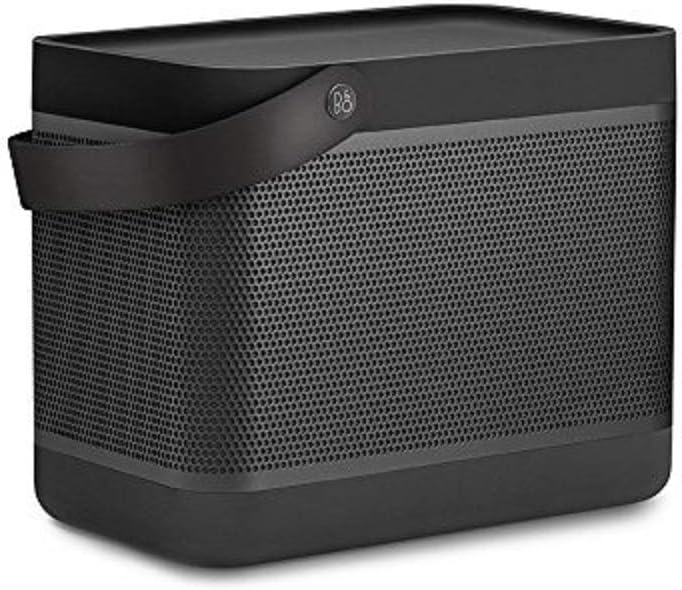
Figure 1: Bang & Olufsen Beolit 17 Speaker (Stone Grey)
3.2 جفت شدن بلوتوث
- Power on the Beolit 17 by pressing the power button located on the top panel.
- Activate Bluetooth pairing mode on the speaker. Refer to the Quick Start Guide for specific button presses.
- On your mobile device (smartphone, tablet, etc.), go to Bluetooth settings and select 'Beolit 17' from the list of available devices.
- Once connected, the speaker will indicate successful pairing.

Figure 2: Top Control Panel of Beolit 17
4. دستورالعمل های عملیاتی
4.1 کنترل های اساسی
- دکمه پاور: برای روشن یا خاموش کردن بلندگو فشار دهید.
- دکمه بلوتوث: Press to enter pairing mode or connect to a previously paired device.
- دکمههای تنظیم صدا (+/-): میزان صدای پخش را تنظیم کنید.
- دکمه اتصال: This customizable button can be configured via the Beoplay App for various functions such as alarm, last played song, or tone touch settings.
4.2 Beoplay App Integration
Download the Beoplay App for enhanced control and customization options. The app allows you to:
- سفارشی سازی صدا حرفه ایfiles (ToneTouch).
- Configure the 'Connect' button for specific actions.
- وضعیت باتری را زیر نظر داشته باشید.
- فریمور بلندگو را بهروزرسانی کنید.
- Pair two Beolit 17 speakers for stereo sound.

Figure 3: Beolit 17 in a Home Setting
5. تعمیر و نگهداری
5.1 تمیز کردن
Wipe the speaker with a soft, dry cloth. Avoid using abrasive cleaners or solvents that may damage the finish. The anodized aluminum grille and polymer frame are designed for durability.
5.2 مراقبت از باتری
To prolong battery life, avoid fully discharging the speaker frequently. Charge the speaker regularly, especially if it will be stored for an extended period. The Beolit 17 offers up to 24 hours of battery life at background listening volumes and up to 4 hours at typical listening volumes.

Figure 4: Beolit 17 with Leather Carrying Handle
6 عیب یابی
6.1 بدون برق
- Ensure the speaker is fully charged. Connect it to the mains power using the provided cable and charger.
- بررسی کنید که آیا پریز برق کار می کند.
۵.۳ مشکلات اتصال بلوتوث
- مطمئن شوید که بلندگو در حالت جفتسازی بلوتوث است (چراغ نشانگر چشمک میزند).
- مطمئن شوید که بلوتوث دستگاه شما فعال و در محدوده پوشش (تا 10 متر) باشد.
- سعی کنید دستگاه را در تنظیمات بلوتوث گوشی خود فراموش کنید و دوباره جفتسازی کنید.
- بلندگو و دستگاه همراه خود را مجدداً راهاندازی کنید.
6.3 Sound Distortion or Low Volume
- میزان صدا را در بلندگو و دستگاه متصل خود تنظیم کنید.
- منبع صدا را از نظر مشکلات کیفیت بررسی کنید.
- Ensure no obstructions are blocking the speaker's sound output.
7. مشخصات
| ویژگی | جزئیات |
|---|---|
| نام مدل | بیولیت 17 |
| ابعاد | 7.5 x 5.3 x 9 اینچ |
| وزن مورد | 5.95 پوند |
| فناوری اتصال | بلوتوث 4.2، USB |
| حداکثر توان خروجی بلندگو | 240 وات |
| محدوده فرکانس | 37 تا 20,000 هرتز |
| عمر باتری | Up to 24 hours (background listening), up to 4 hours (typical listening) |
| زمان شارژ | 2.5 hours (at 15V - 3A) |
| منبع تغذیه | شارژ باتری |
| روش کنترل | لمس کنید |
| اجزای شامل | Beolit 17, mains cable, Quick Start Guide |
8. گارانتی و پشتیبانی
The Bang & Olufsen Beolit 17 comes with a limited warranty. For detailed warranty information, product registration, or technical support, please refer to the official Bang & Olufsen webبه سایت مراجعه کنید یا با خدمات مشتریان آنها تماس بگیرید. فاکتور خرید خود را برای درخواست گارانتی نگه دارید.