
1. اطلاعات ایمنی مهم
Please read this entire instruction manual before installation and use. Failure to do so may result in property damage, serious injury, or death. If you do not understand these instructions, or have doubts about the safety of the installation, please contact a qualified installer.
- ظرفیت وزنی: Do not exceed the maximum weight capacity of 45 kg (99 lbs). This mount is designed for flat screens between 23 and 55 inches.
- نوع دیوار: Ensure the mounting surface can safely support the combined weight of the equipment and all attached hardware. This mount is suitable for solid concrete walls, brick walls, and wood stud walls. Do not install on drywall alone.
- ابزار: برای نصب از ابزار مناسب استفاده کنید.
- مونتاژ: Do not use this product for any purpose not explicitly specified by Vivanco. Do not use damaged components.
2. محتویات بسته
Verify that all components are present and undamaged before beginning installation. If any parts are missing or defective, do not proceed with installation.
- مونتاژ صفحه دیواری
- بازوهای براکت تلویزیون (۲ عدد)
- کیت سختافزار نصب (پیچ، لنگر، واشر، فاصلهدهنده)
- راهنمای دستورالعمل
3. ابزار مورد نیاز (شامل نمی شود)
- مداد
- یابنده گل میخ (برای نصب گل میخ چوبی)
- با متههای مناسب (چوب یا مصالح بنایی) متهکاری کنید
- سطح
- آچار بکس یا آچار فرانسه قابل تنظیم
- پیچ گوشتی فیلیپس
- نوار اندازه گیری
4. راه اندازی و نصب
Follow these steps carefully to ensure a secure installation of your Vivanco WAP 410 wall mount.
- تعیین محل نصب: با در نظر گرفتن موارد زیر، یک مکان مناسب روی دیوار خود انتخاب کنید viewing angles, height, and proximity to power outlets. Use a stud finder to locate wood studs if applicable.
- علامت گذاری سوراخ های مته: Hold the wall plate assembly against the wall at the desired height and use a level to ensure it is straight. Mark the drill hole locations with a pencil.
- سوراخ های پایلوت را دریل کنید: Drill pilot holes at the marked locations. The size of the drill bit will depend on your wall type and the anchors/screws provided.
- صفحه دیواری را وصل کنید: Secure the wall plate assembly to the wall using the appropriate screws and anchors. Ensure all screws are tightened firmly.
- براکتهای تلویزیون را به تلویزیون وصل کنید: Carefully place your TV face down on a soft, clean surface. Attach the two TV bracket arms to the back of your TV using the screws and spacers that fit your TV's VESA mounting pattern (100x100mm to 400x400mm). Ensure the brackets are centered and securely fastened.
- تلویزیون را روی دیوار نصب کنید: With assistance, carefully lift the TV and hook the TV bracket arms onto the wall plate assembly. Ensure the TV is securely seated on the mount.
- تلویزیون را محکم روی پایه قرار دهید: Use the safety screws or locking mechanisms on the TV bracket arms to secure the TV to the wall plate, preventing accidental dislodgement.
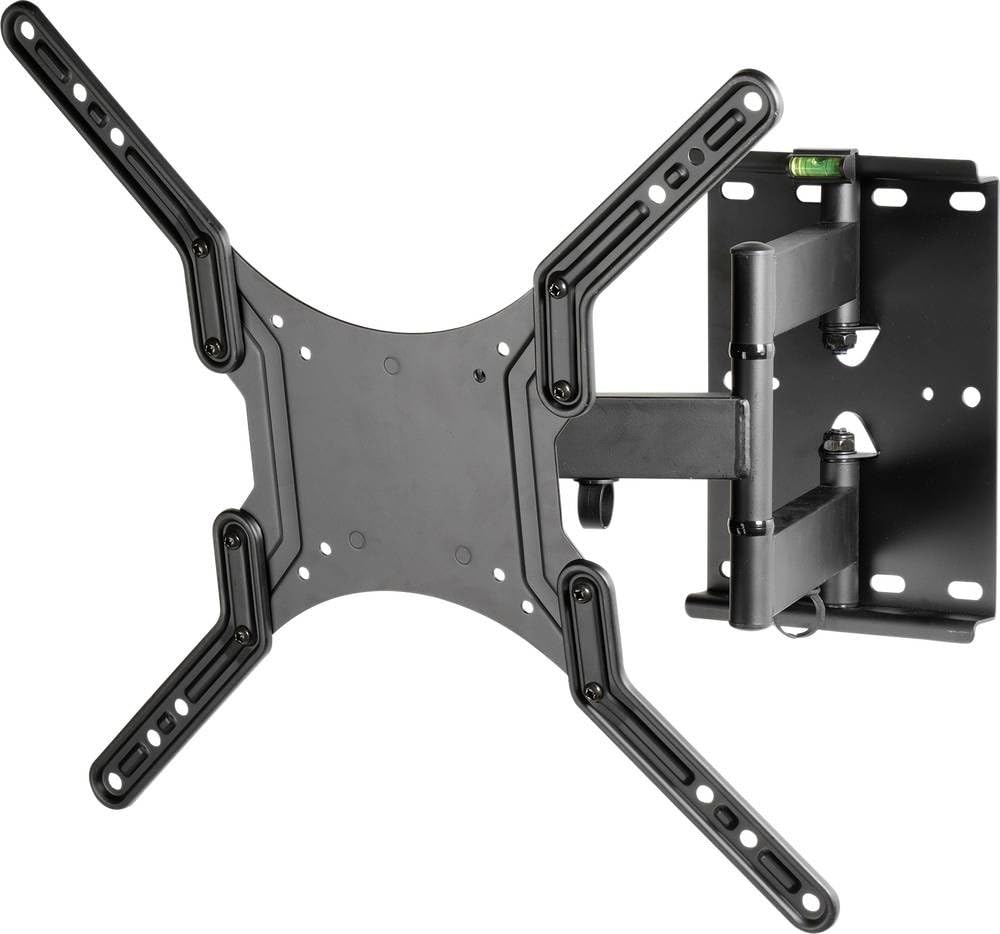
This image illustrates the Vivanco WAP 410 flat screen wall mount, highlighting its adjustable features. The green arrows indicate the range of motion for both swivel and tilt, allowing for optimal viewing angles. The mount is designed for flat screens and features a robust metal construction.
5. دستورالعمل های عملیاتی
The Vivanco WAP 410 wall mount offers flexibility for optimal viewing.
- تنظیم شیب: To adjust the vertical tilt angle of your TV, loosen the tilt adjustment knobs or bolts on the side of the TV bracket arms. Adjust the TV to the desired angle, then securely tighten the knobs/bolts to lock the position.
- تنظیم چرخش: The articulated arm allows you to swivel the TV horizontally. Gently push or pull the TV to the left or right to achieve your preferred viewing angle. Ensure the movement is smooth and does not strain the mount or wall.
- گسترش/انقباض: The mount can be extended away from the wall or pushed back closer to the wall. Carefully pull or push the TV to adjust the distance.
Always ensure that cables are not pinched or strained during adjustments.
6. تعمیر و نگهداری
Regular maintenance ensures the longevity and safe operation of your wall mount.
- تمیز کردن: Clean the mount with a soft, dry cloth. Do not use abrasive cleaners or solvents, as they may damage the finish.
- بررسی های دوره ای: به صورت دورهای تمام پیچها و مهرهها را بررسی کنید تا مطمئن شوید که محکم هستند. در صورت لزوم، دوباره آنها را محکم کنید.
- بررسی آسیب: Regularly inspect the mount for any signs of wear, damage, or corrosion. If any damage is observed, discontinue use and contact Vivanco support.
7 عیب یابی
If you encounter issues with your Vivanco WAP 410 wall mount, refer to the following common problems and solutions.
- تلویزیون تراز نیست: Ensure the wall plate is level during installation. If the TV is slightly off-level, some mounts allow for minor post-installation leveling adjustments. Check the level bubble on the mount if present.
- Difficulty adjusting tilt/swivel: Ensure all adjustment knobs or bolts are sufficiently loosened before attempting to move the TV. If movement is still stiff, check for any obstructions or overtightened components. Do not force movement.
- کوه ناپایدار به نظر میرسد: Immediately remove the TV from the mount. Re-check all wall mounting screws and TV bracket screws for proper tightness. Ensure the wall type is appropriate and anchors are correctly installed. Consult a professional if uncertainty persists.
8. مشخصات
| شماره مدل | 37598 |
| نام تجاری | Vivanco |
| مواد | فلز |
| رنگ | مشکی |
| حداکثر ظرفیت وزنی | 45 کیلوگرم (99 پوند) |
| اندازه های صفحه نمایش سازگار | ۵.۴ تا ۷.۲ اینچ |
| سازگاری با VESA | 100x100mm تا 400x400mm |
| نوع حرکت | Tiltable, Swivel, Extendable |
| وزن مورد | 3700 گرم |
9. گارانتی و پشتیبانی
For warranty information or technical support, please refer to the documentation included with your purchase or visit the official Vivanco webسایت. فاکتور خرید خود را برای موارد گارانتی نگه دارید.