
مقدمه
This manual provides comprehensive instructions for the proper setup, operation, maintenance, and troubleshooting of your Pilot 842 Hi Tecpoint V7 Cartridge System Pen. Please read this manual thoroughly before using your pen to ensure optimal performance and longevity.
راه اندازی
Your Pilot 842 Hi Tecpoint V7 pen uses a cartridge system for ink. Follow these steps to install an ink cartridge:
- Unscrew the barrel: Gently twist the pen barrel counter-clockwise to separate it from the grip section and nib.
- Insert the ink cartridge: Take a new Pilot ink cartridge. The cartridge has a narrow end and a wider end. Insert the narrow end of the cartridge firmly into the back of the nib section until you feel a click. This action punctures the cartridge, allowing ink to flow.
- Reassemble the pen: Screw the barrel back onto the grip section clockwise until it is secure.
- Prime the nib (if necessary): If the ink does not flow immediately, hold the pen nib-down for a few minutes or gently shake it to encourage ink flow to the nib. You may also lightly press the cartridge to help push ink forward.
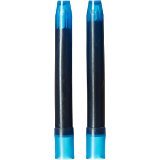
Image: Two blue ink cartridges, ready for installation into the pen. These cartridges provide the ink supply for the writing instrument.
عملیاتی
Using your Pilot 842 Hi Tecpoint V7 pen is straightforward:
- کلاهک را بردارید: Pull the cap straight off the pen. Avoid twisting, as this can loosen the barrel.
- نوشتن: Hold the pen comfortably and apply light pressure to write. The V7 Hi Tecpoint nib is designed for smooth, consistent ink flow.
- Recap after use: Always replace the cap firmly after each use to prevent the ink from drying out and to protect the nib.
تعمیر و نگهداری
Proper maintenance ensures the longevity and performance of your pen:
- Cleaning the nib: If ink flow becomes inconsistent, gently wipe the nib with a soft, damp, lint-free cloth. For more stubborn clogs, you can flush the nib section with cool water after removing the ink cartridge. Allow it to dry completely before reinserting a cartridge.
- تعویض کارتریج: When the ink runs out, follow the steps in the 'Setup' section to replace the empty cartridge with a new one.
- ذخیره سازی: Store your pen horizontally or nib-down when not in use to keep the nib moist. Avoid extreme temperatures and direct sunlight.
عیب یابی
در اینجا راه حل هایی برای مشکلات رایجی که ممکن است با آنها روبرو شوید، آورده شده است:
- No ink flow or skipping:
- Ensure the ink cartridge is fully inserted and punctured.
- Check if the cartridge is empty and replace if necessary.
- Clean the nib as described in the 'Maintenance' section.
- Ensure the pen cap was securely replaced after previous use.
- Leaking ink:
- Ensure the barrel is screwed on tightly.
- Check for any cracks or damage to the pen body or nib section.
- Avoid shaking the pen vigorously.
مشخصات
| سازنده | خلبان |
| مدل | 842 Hi Tecpoint V7 Cartridge System Pen |
| رنگ جوهر | آبی |
| نوع بسته شدن | جمع شدنی |
| وزن مورد | 180 گرم |
| ابعاد مورد (LxWxH) | 45.7 x 10 x 2 سانتی متر |
گارانتی و پشتیبانی
For warranty information or technical support, please refer to the official Pilot webبه سایت مراجعه کنید یا با فروشگاه محلی خود تماس بگیرید. رسید خرید خود را به عنوان مدرک خرید نگه دارید.