
1. مقدمه
This manual provides essential information for the safe and efficient operation of your Argox OX-330 Barcode Monochrome Printer. Please read this manual thoroughly before using the printer and retain it for future reference. The Argox OX-330 is designed for direct thermal and thermal transfer printing, offering a resolution of 203 dpi for clear and precise label output.
2. اطلاعات ایمنی
- منبع تغذیه: Use only the power adapter supplied with the printer. Ensure the power outlet matches the voltage الزامات
- قرار دادن: Place the printer on a stable, level surface. Avoid locations with excessive dust, humidity, or direct sunlight.
- تهویه: منافذ تهویه را مسدود نکنید. از جریان هوای کافی در اطراف چاپگر اطمینان حاصل کنید.
- رسیدگی: بلافاصله پس از چاپ، از لمس هد چاپ خودداری کنید، زیرا ممکن است داغ باشد.
- تمیز کردن: Disconnect the power cord before cleaning the printer. Use a soft, dry cloth. Do not use liquid or aerosol cleaners.
- تعمیرات: Do not attempt to repair the printer yourself. Refer all servicing to qualified service personnel.
3. محصول تمام شدview
The Argox OX-330 is a compact desktop thermal label printer capable of both direct thermal and thermal transfer printing. It features 8MB DRAM (5MB user available) and 4MB Flash ROM (2MB user available) for efficient data processing and storage.
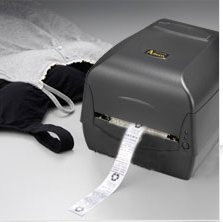
شکل 3.1: Argox OX-330 Barcode Monochrome Printer. This image shows the printer actively producing a label, demonstrating its primary function.
اجزای کلیدی:
- سر چاپ: Responsible for transferring the image onto the label.
- Media Guides: Ensure proper alignment of labels.
- کنترل پنل: Includes buttons and indicator lights for printer status and basic operations.
- پورت برق: برای اتصال آداپتور برق
- پورت های داده: For connecting to a computer (e.g., USB, Wi-Fi).
- Media Compartment: Where label rolls and ribbons (for thermal transfer) are loaded.
4. راه اندازی
4.1 باز کردن بسته بندی
- چاپگر و تمام لوازم جانبی را با دقت از بستهبندی خارج کنید.
- بررسی کنید که تمام اجزای ذکر شده در محتویات بسته موجود باشند.
- هرگونه فیلم محافظ یا مواد بستهبندی را از چاپگر جدا کنید.
4.2 اتصال برق
- آداپتور برق را به پورت برق چاپگر وصل کنید.
- سیم برق را به یک پریز برق مناسب وصل کنید.
- Do not power on the printer until all other connections are made.
4.3 اتصال به رایانه
The Argox OX-330 supports Wi-Fi connectivity for seamless integration with your PC.
- اتصال وای فای: Refer to the separate Wi-Fi setup guide for detailed instructions on connecting your printer to a wireless network. This typically involves installing the printer driver and utility software on your PC.
- USB Connection (if applicable): If using a USB cable, connect one end to the printer and the other to an available USB port on your PC.
۴.۲ بارگذاری برچسبها و ریبون
The OX-330 supports both Direct Thermal and Thermal Transfer printing methods. The loading procedure varies slightly depending on the method.
- پوشش بالایی چاپگر را باز کنید.
- Adjust the media guides to the width of your label roll.
- Place the label roll onto the media spindle, ensuring the labels feed correctly.
- برای انتقال حرارت printing, also load the ribbon according to the diagrams inside the printer's media compartment. Ensure the ribbon is taut and correctly threaded.
- پوشش بالایی را ببندید.
5. دستورالعمل های عملیاتی
5.1 روشن/خاموش کردن
- روشن کردن: دکمه روشن/خاموش روی چاپگر را فشار دهید. چراغ نشانگر روشن خواهد شد.
- برای خاموش کردن: دکمه پاور را فشار داده و نگه دارید تا چاپگر خاموش شود.
۴.۴ نصب درایور و نرمافزار
Before printing, install the appropriate printer drivers and label design software on your PC. These are typically provided on a CD with the printer or available for download from the Argox official webبرای نصب، دستورالعملهای روی صفحه را دنبال کنید.
۴.۲ چاپ برچسب
- Ensure the printer is powered on and connected to your PC (via Wi-Fi or USB).
- Open your label design software or application from which you wish to print.
- Create or open your label design.
- Go to the 'Print' option in your software.
- Select the Argox OX-330 as your printer.
- Configure print settings such as label size, print quantity, and printing method (Direct Thermal or Thermal Transfer) if applicable. The printer supports a resolution of 203 dpi.
- Click 'Print'. The printer will begin printing your labels.
6. تعمیر و نگهداری
Regular maintenance ensures optimal performance and extends the life of your Argox OX-330 printer.
۶.۱ تمیز کردن هد چاپ
The print head is a critical component and should be cleaned regularly, especially if print quality degrades.
- چاپگر را خاموش کنید و سیم برق را جدا کنید.
- برای دسترسی به هد چاپ، پوشش بالایی را باز کنید.
- Using a lint-free cloth moistened with isopropyl alcohol (99% pure), gently wipe the print head surface.
- قبل از بستن پوشش و اتصال مجدد برق، اجازه دهید هد چاپ کاملاً خشک شود.
6.2 نظافت عمومی
- قسمت بیرونی چاپگر را با یک پارچه نرم و خشک پاک کنید.
- Use a soft brush or compressed air to remove dust and debris from inside the media compartment.
7 عیب یابی
This section addresses common issues you might encounter with your Argox OX-330 printer.
7.1 بدون برق
- مطمئن شوید که سیم برق به طور محکم به چاپگر و پریز برق وصل شده است.
- با وصل کردن دستگاه دیگری به پریز برق، از سالم بودن آن اطمینان حاصل کنید.
۶.۲ کیفیت چاپ ضعیف
- هد چاپ را همانطور که در بخش 6.1 توضیح داده شده است، تمیز کنید.
- Ensure you are using the correct type of labels for your printing method (Direct Thermal or Thermal Transfer).
- Check if the ribbon (for thermal transfer) is correctly loaded and not depleted.
- Adjust print darkness settings in your printer driver.
۵.۲ چاپگر پاسخ نمیدهد
- Check the connection between the printer and your PC (Wi-Fi or USB).
- هم چاپگر و هم رایانه خود را مجدداً راه اندازی کنید.
- Ensure the correct printer driver is installed and updated.
- Check the printer's status indicator lights for error messages.
۶.۳ برچسبهایی که به درستی جا نمیافتند
- Ensure labels are loaded correctly and the media guides are adjusted to the label width.
- هرگونه مانعی را در مسیر رسانه بررسی کنید.
- Calibrate the printer for the label size if necessary (refer to printer utility software).
8. مشخصات
| ویژگی | مشخصات |
|---|---|
| نام تجاری | آرگوکس |
| نام مدل | OX-330 |
| فناوری چاپ | Thermal (Direct Thermal & Thermal Transfer) |
| وضوح چاپ | 203 نقطه در اینچ |
| خروجی چاپگر | تک رنگ |
| فناوری اتصال | وای فای |
| حافظه | 8MB DRAM (5MB user available), 4MB Flash ROM (2MB user available) |
| دستگاه های سازگار | PC |
| نوع رسانه چاپ | برچسب ها |
| وزن مورد | 1800 گرم |
| ابعاد محصول (D x W x H) | ۱۸ عمق × ۳۵ عرض × ۳۰ ارتفاع (سانتیمتر) |
| ویژگی خاص | فشرده |
| چاپ دو طرفه | بله |
| دوبلکس | خودکار |
9. گارانتی و پشتیبانی
9.1 اطلاعات گارانتی
The Argox OX-330 Barcode Monochrome Printer comes with a 1 سال گارانتی from the date of purchase. This warranty covers manufacturing defects under normal use. It does not cover damage caused by misuse, accidents, unauthorized repairs, or consumables.
9.2 پشتیبانی فنی
For technical assistance, troubleshooting beyond this manual, or warranty claims, please contact Argox customer support. Refer to the Argox official website or your purchase documentation for contact details and support resources.