1. مقدمه
ممنون از خریدتونasing the Vivitar 4-Device Jumbo Universal Remote Control. This remote is designed to simplify your home entertainment experience by controlling up to four different audio/video devices from a single unit. It is compatible with most major brands of televisions, Blu-Ray players, DVD players, VCRs, cable boxes, satellite receivers, and home theater systems. Please read this manual thoroughly to ensure proper setup and operation.
2. راه اندازی
2.1 نصب باتری
The Vivitar Jumbo Universal Remote requires two (2) AAA batteries (not included).
- درپوش محفظه باتری را در پشت ریموت کنترل قرار دهید.
- روی زبانه فشار دهید و پوشش را به سمت پایین بکشید.
- دو باتری AAA جدید را وارد کنید و مطمئن شوید که ترمینالهای مثبت (+) و منفی (-) با نمودارهای داخل محفظه مطابقت دارند.
- درپوش محفظه باتری را دوباره در جای خود قرار دهید تا محکم جا بیفتد.
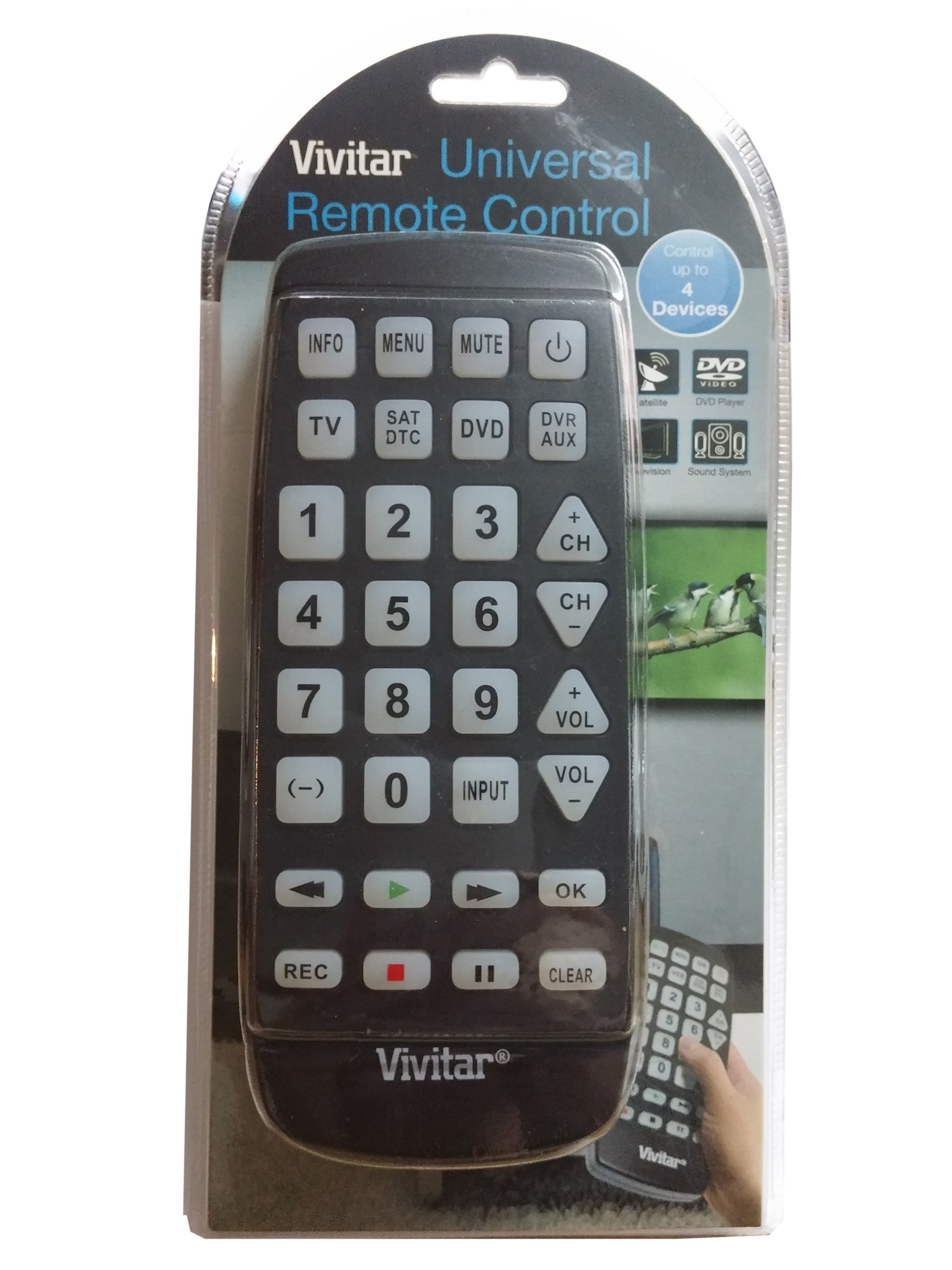
تصویر: جلو view of the Vivitar 4-Device Jumbo Universal Remote Control, showing its large buttons and ergonomic design. The battery compartment is located on the rear.
2.2 Programming Your Remote (Code Entry Method)
To program the remote for your specific device, you will need to enter a 3-digit code corresponding to your device's brand. A list of common codes is usually provided in a separate code booklet (not included in this digital manual).
- دستگاهی را که میخواهید کنترل کنید (مثلاً تلویزیون، پخشکننده DVD) روشن کنید.
- را فشار داده و نگه دارید تنظیم کنید button on the remote until the red indicator light illuminates.
- در حین برگزاری تنظیم کنید, press the desired device button (e.g., TV, دی وی دی, CBL) once. The red indicator light will blink once and then remain lit.
- را آزاد کنید تنظیم کنید دکمه
- Enter the 3-digit code for your device brand using the number buttons. After entering the third digit, the red indicator light should turn off.
- با فشار دادن دکمه، ریموت را آزمایش کنید قدرت button. If the device turns off, the code was accepted. If not, repeat the process with the next code listed for your brand.
توجه: If your device does not respond after trying all codes for its brand, proceed to the Auto Code Search method.
2.3 جستجوی کد خودکار
If you cannot find a working code for your device, the remote can search for it automatically.
- دستگاهی را که می خواهید کنترل کنید روشن کنید.
- را فشار داده و نگه دارید تنظیم کنید button until the red indicator light illuminates.
- در حین برگزاری تنظیم کنید, press the desired device button (e.g., TV, دی وی دی, CBL) once. The red indicator light will blink once and then remain lit.
- را آزاد کنید تنظیم کنید دکمه
- کنترل را به سمت دستگاه بگیرید و چندین بار فشار دهید قدرت دکمه (یا CH+ for TV/VCR, بازی کنید for DVD/VCR) slowly, pausing briefly after each press. The remote is sending different codes with each press.
- As soon as your device turns off (or performs the desired function), immediately press the تنظیم کنید button once to save the code. The red indicator light will turn off.
- Test the remote's functions (Volume, Channel, Playback) to ensure all controls work correctly. If not, repeat the auto code search.
۳. کار کردن با کنترل از راه دور
Once programmed, operating your Vivitar Jumbo Universal Remote is straightforward.
۳.۱ انتخاب دستگاه
To control a specific device, press the corresponding device button at the top of the remote (TV, دی وی دی, CBL, AUX). The remote will then send commands only to the selected device.
3.2 توابع اساسی
- قدرت: دستگاه انتخاب شده را روشن یا خاموش میکند.
- VOL+/VOL-: Increases or decreases the volume of the selected device.
- CH+/CH-: Changes the channel up or down on the selected device.
- نادیده گرفتن: صدا را بی صدا یا لغو می کند.
- دکمه های تعداد (0-9): Used for direct channel entry or code programming.
- PLAY/PAUSE/STOP/REW/FF: Controls playback functions for DVD, Blu-Ray, or VCR devices.
- منو: به منوی دستگاه انتخاب شده دسترسی پیدا میکند.
- راهنما: Displays the program guide (for Cable/Satellite boxes).
- ورودی/منبع: Changes the input source on your TV.
4. تعمیر و نگهداری
4.1 تمیز کردن
برای تمیز کردن کنترل از راه دور خود، از یک پارچه نرم و کمی زبر استفاده کنید.amp cloth. Do not use abrasive cleaners, solvents, or harsh chemicals, as these can damage the remote's finish or internal components. Ensure no liquid enters the remote.
4.2 تعویض باتری
Replace batteries when the remote's performance degrades or the indicator light fails to illuminate. Always replace both batteries at the same time with new AAA batteries. Do not mix old and new batteries, or different types of batteries. Remove batteries if the remote will not be used for an extended period to prevent leakage.
4.3 ذخیره سازی
ریموت کنترل را در جای خشک و خنک و دور از نور مستقیم خورشید و دمای شدید نگهداری کنید.
5 عیب یابی
۷.۳ کار نکردن ریموت
- بررسی باتری ها: مطمئن شوید که باتریها به درستی و با قطب صحیح (+/-) وارد شدهاند و خالی نشدهاند. در صورت لزوم، باتریهای AAA نو را جایگزین کنید.
- خط دید: Make sure there is a clear line of sight between the remote and the device you are trying to control. Obstructions can block the infrared signal.
- انتخاب دستگاه: Confirm you have pressed the correct device button (TV, DVD, CBL, AUX) for the device you intend to control.
5.2 Device Not Responding to Commands
- کد نادرست: The remote may be programmed with an incorrect code. Try reprogramming the remote using a different code from the code list for your device's brand, or use the Auto Code Search method.
- سازگاری دستگاه: While this remote is universal, some older or very new devices may not be compatible.
5.3 Indicator Light Not Illuminating
- This usually indicates dead or incorrectly inserted batteries. Replace batteries and check polarity.
5.4 Resetting the Remote
If you encounter persistent issues, you can try resetting the remote to its factory default settings. Remove the batteries, wait for 30 seconds, then reinsert them. You will need to reprogram all your devices after a reset.
6. مشخصات
| شماره مدل: | 4330255290 |
| برند: | Vivitar |
| ابعاد محصول: | 11.3 x 1.8 x 5.6 اینچ |
| وزن مورد: | 13.1 اونس |
| نوع باتری: | 2 x AAA (شامل نمی شود) |
| تعداد دستگاه ها: | 4 (TV, DVD, Cable/Satellite, AUX) |
| ویژگی خاص: | سازگاری جهانی |
| نوع کنترلر: | کنترل دکمه |
7. گارانتی و پشتیبانی
7.1 گارانتی محدود
Vivitar warrants this product against defects in materials and workmanship for a period of one (1) year from the original date of purchase. This warranty does not cover damage caused by misuse, abuse, accident, unauthorized modification, or normal wear and tear. Proof of purchase is required for all warranty claims.
7.2 پشتیبانی مشتری
For technical assistance, troubleshooting, or warranty inquiries, please contact Vivitar Customer Support. Refer to the Vivitar official webسایتی برای جدیدترین اطلاعات تماس، از جمله شماره تلفنها و آدرسهای ایمیل.