
1. مقدمه
This manual provides essential information for the proper setup, operation, and maintenance of your Sony SLV-FT5 VHS Video Cassette Recorder (VCR). Please read these instructions thoroughly before using the unit to ensure optimal performance and safety.
2. اطلاعات ایمنی
هنگام استفاده از این محصول، همیشه اقدامات احتیاطی ایمنی اولیه را رعایت کنید تا خطر آتشسوزی، برقگرفتگی و آسیبدیدگی کاهش یابد.
- دستگاه را در معرض باران یا رطوبت قرار ندهید.
- در کابینت را باز نکنید. سرویس دهی فقط به افراد واجد شرایط.
- تهویه مناسب را تضمین کنید؛ منافذ تهویه را مسدود نکنید.
- فقط از منبع تغذیه مشخص شده برای این دستگاه استفاده کنید.
- دستگاه را از منابع گرما و نور مستقیم خورشید دور نگه دارید.
3. راه اندازی
3.1 باز کردن بسته بندی
Carefully remove the VCR and all accessories from the packaging. Verify that all components are present: the SLV-FT5 VCR unit, remote control, and necessary connection cables (e.g., RCA audio/video cables).
۵.۲ اتصال به تلویزیون
To connect the VCR to your television, use the provided RCA audio/video cables. Match the colored plugs to the corresponding colored jacks on both the VCR and your TV (Yellow for Video, White for Left Audio, Red for Right Audio).

شکل 1: Rear panel of the Sony SLV-FT5 VCR. This image displays the various input and output ports, including RCA jacks for audio and video, and the power input. The product label with model number SLV-FT5 and power specifications (100V 18W 50/60Hz) is also visible.
3.3 اتصال برق
Plug the VCR's power cord into a standard electrical outlet (AC 100V, 50/60Hz). Ensure the power outlet is easily accessible.
3.4 راه اندازی کنترل از راه دور
Open the battery compartment on the back of the remote control and insert two AA batteries, observing the correct polarity (+/-). Close the compartment securely.

شکل 2: The Sony RMT-V219 remote control, designed for the SLV-FT5 VCR. This image also shows the included RCA audio/video cables, which are typically used for connecting the VCR to a television.
۷. کار با دستگاه ضبط ویدیو
4.1 روشن/خاموش کردن
را فشار دهید قدرت button on the VCR's front panel or the remote control to turn the unit on or off.
4.2 Loading and Unloading a VHS Tape
- در حال بارگذاری: Insert a VHS cassette into the tape slot on the front of the VCR with the tape window facing forward. The VCR will automatically pull the tape in.
- بارگیری: را فشار دهید بیرون راندن button on the VCR or remote control. The tape will be ejected.
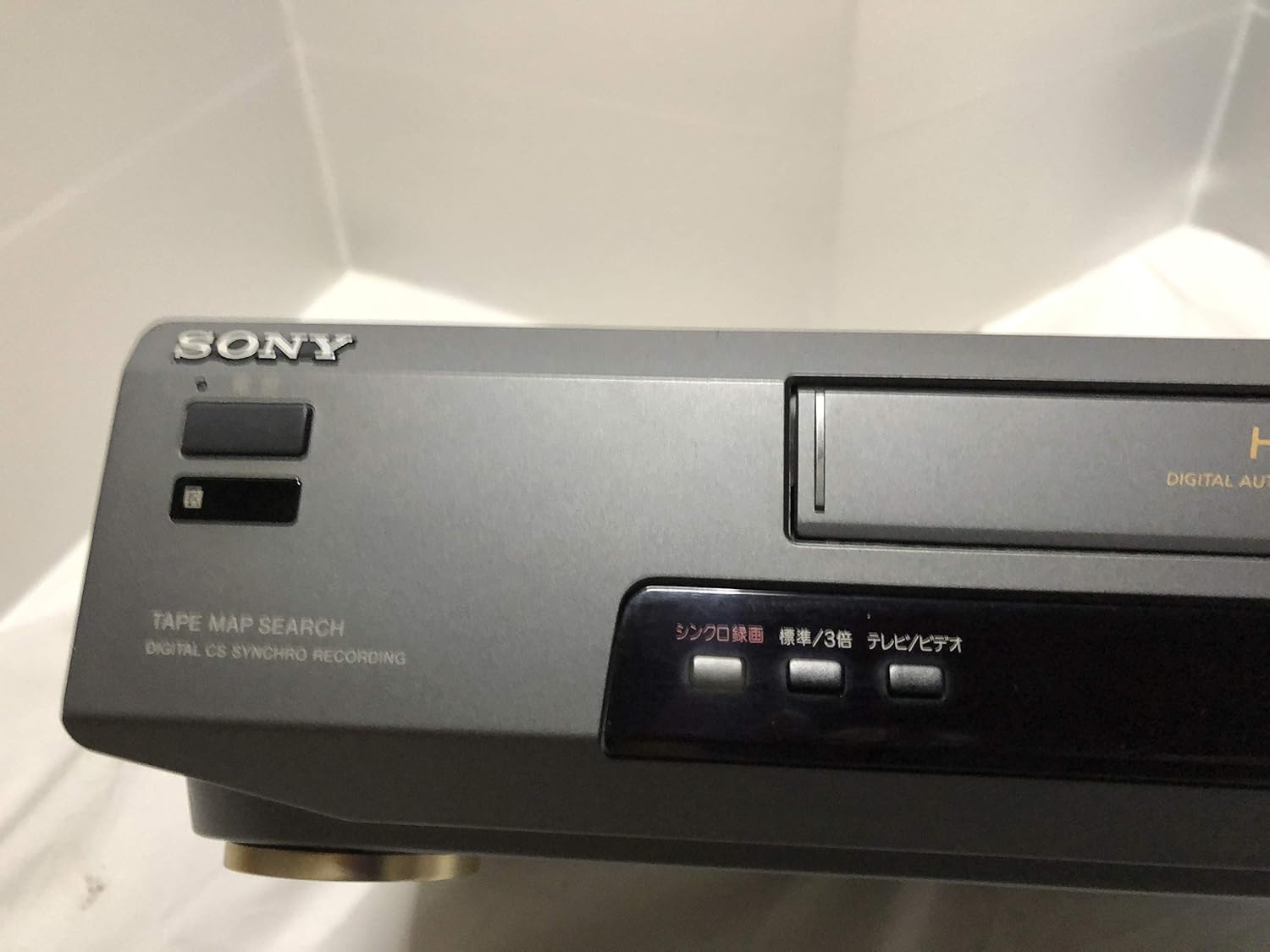
شکل 3: Front left section of the Sony SLV-FT5 VCR. This view highlights the tape loading slot and the 'TAPE MAP SEARCH' feature, which assists in navigating recorded content on a tape.
4.3 پخش
After loading a tape, press the بازی کنید button (►) on the VCR or remote control to begin playback. Use the مکث (∥), توقف (■), عقب (◀◀), and سریع به جلو (►►) buttons to control playback.

شکل 4: Front right section of the Sony SLV-FT5 VCR. This image displays the main playback controls (Play, Stop, Rewind, Fast Forward, Pause) and additional buttons for 'Quick Timer' and 'Tracking' adjustments.
4.4 ضبط
To record, ensure a blank or recordable tape is inserted. Select the desired input source (e.g., TV channel). Press the ضبط (●) button on the VCR or remote control. Press توقف (■) برای پایان دادن به ضبط.
4.5 Tracking Adjustment
If the picture quality during playback is poor (e.g., horizontal lines or noise), use the ردیابی buttons on the front panel or remote control to fine-tune the tape's alignment with the VCR's heads.
5. تعمیر و نگهداری
5.1 تمیز کردن واحد
Wipe the exterior of the VCR with a soft, dry cloth. For stubborn stains, use a cloth lightly dampبا یک محلول شوینده ملایم بشویید، سپس خشک کنید. از پاک کننده ها یا حلال های ساینده استفاده نکنید.
۴ تمیز کردن سر
Over time, VCR heads can accumulate dirt, leading to poor picture and sound quality. Use a commercially available dry-type VHS head cleaning cassette according to its instructions. Avoid wet-type cleaners as they can damage the heads.
5.3 ذخیره سازی
When not in use for extended periods, disconnect the VCR from the power outlet. Store the unit in a cool, dry place, away from dust and direct sunlight.
6 عیب یابی
If you encounter issues with your VCR, refer to the following common problems and solutions before seeking professional service.
| مشکل | علت احتمالی | راه حل |
|---|---|---|
| بدون قدرت | سیم برق قطع شده است؛ مشکل در پریز برق | اتصال سیم برق را بررسی کنید؛ یک پریز برق دیگر را امتحان کنید. |
| بدون تصویر/صدا | Incorrect TV input; loose A/V cables | Select correct TV input (e.g., Video 1, AV); ensure A/V cables are securely connected. |
| کیفیت تصویر پایین (برفکی، خطوط) | Dirty VCR heads; tracking issue; old/damaged tape | Clean VCR heads; adjust tracking; try a different tape. |
| نوار خارج نمیشود | Power issue; mechanical malfunction | Ensure power is on; try pressing EJECT multiple times. If issue persists, seek service. |
| کنترل از راه دور کار نمی کند | باتریهای از کار افتاده؛ حسگر مسدود شده | Replace batteries; ensure no obstacles between remote and VCR sensor. |
7. مشخصات
| ویژگی | مشخصات |
|---|---|
| نام تجاری | سونی |
| شماره مدل | SLV-FT5 |
| نوع رسانه | VHS |
| قطعنامه | 720 x 480 پیکسل |
| وزن محصول | 4160 گرم |
| حالت خروجی صدا | استریو |
| فرمت های صوتی پشتیبانی شده | Monaural, Stereo |
| رمزگذاری ویدیو | آنالوگ |
| دستگاه های سازگار | تلویزیون |
| سازگاری با ویدئوی ورودی | NTSC |
| برق مورد نیاز | 100V, 18W, 50/60Hz |
8. گارانتی و پشتیبانی
For warranty information and customer support, please refer to the documentation included with your purchase or visit the official Sony webسایت. فاکتور خرید خود را برای موارد گارانتی نگه دارید.