
مقدمه
ممنون از خریدتونasing the Marantz CD5005 CD Player. This manual provides detailed instructions for the proper setup, operation, and maintenance of your new audio component. The CD5005 is designed to deliver high-quality audio playback from various disc formats, including CD, CD-R, CD-RW, MP3, and WMA files. It features high-quality audio components such as the CS4398 DAC and Marantz HDAM SA2, ensuring exceptional sound reproduction. Please read this manual thoroughly before using the unit to ensure optimal performance and longevity.
دستورالعمل های ایمنی
Always follow these basic safety precautions when operating the CD5005 CD Player:
- منبع تغذیه: دستگاه را فقط به پریز برق متناوب ولت وصل کنیدtage در پنل عقب مشخص شده است.
- تهویه: تهویه کافی را تضمین کنید. منافذ تهویه را مسدود نکنید. از نصب در فضاهای محدود خودداری کنید.
- آب و رطوبت: دستگاه را در معرض باران، رطوبت یا نم بیش از حد قرار ندهید. اشیاء پر از مایعات را روی دستگاه قرار ندهید.
- گرما: دستگاه را از منابع گرما مانند رادیاتور، بخاری، اجاق گاز یا سایر وسایلی که گرما تولید میکنند، دور نگه دارید.
- تمیز کردن: قبل از تمیز کردن، دستگاه را از پریز برق جدا کنید. فقط از یک پارچه خشک استفاده کنید.
- سرویس دهی: خودتان اقدام به سرویس دستگاه نکنید. تمام مراحل سرویس را به پرسنل خدمات واجد شرایط ارجاع دهید.
- دست زدن به دیسک: دیسکها را از لبههایشان بگیرید. از لمس سطح براق آنها خودداری کنید. دیسکها را تمیز و عاری از هرگونه خراش نگه دارید.
محتویات بسته
بررسی کنید که بسته شما حاوی موارد زیر باشد:
- Marantz CD5005 CD Player
- سیم برق قابل جدا شدن
- Audio Cables (L/R Analog)
- Digital Audio Cable (Coaxial)
- واحد کنترل از راه دور
- باتریهای قلمی برای کنترل از راه دور (x2)
- Quick Setup Guide (Printed)
- Interactive CD-ROM Manual (except Japan)
محصول تمام شده استview
پنل جلو

شکل 1: جلو view of the Marantz CD5005 CD Player. This image shows the disc tray, display, control buttons, and headphone jack on the front panel.
The front panel of the CD5005 features the disc tray, a clear dual-line display, essential playback control buttons (Play, Pause, Stop, Skip), and a headphone output with a dedicated volume control. The power button is located on the left side.
پنل عقب

شکل 2: عقب view of the Marantz CD5005 CD Player. This image displays the various input and output terminals, including analog audio outputs, digital coaxial and optical outputs, and the AC power inlet.
The rear panel provides connectivity options including gold-plated analog audio outputs, digital coaxial output, and digital optical output for connecting to an amplifier or receiver. A remote control input/output terminal is also present for system integration, along with the detachable AC power inlet.
کنترل از راه دور
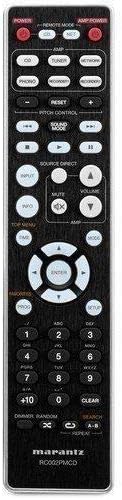
Figure 3: The remote control unit for the Marantz CD5005 CD Player. This remote allows for comprehensive control of the CD player's functions, including playback, track selection, pitch control, and display dimmer.
The included remote control unit provides full functionality for the CD5005, including features not available on the front panel such as pitch control, display dimmer, track randomization, and various repeat functions. It also allows for control of other compatible Marantz components.
راه اندازی
1. تعیین سطح
Place the CD5005 on a stable, level surface away from direct sunlight, heat sources, and excessive vibration. Ensure there is adequate space around the unit for proper ventilation.
۲. اتصال کابلهای صوتی
Choose one of the following methods to connect the CD5005 to your ampتقویت کننده یا گیرنده:
- اتصال آنالوگ: Use the supplied L/R analog audio cables to connect the AUDIO OUT jacks on the CD5005 to the corresponding CD input jacks on your amplifier. Ensure red plugs connect to red jacks (right channel) and white plugs to white jacks (left channel).
- Digital Coaxial Connection: Use the supplied digital coaxial cable to connect the COAXIAL DIGITAL AUDIO OUT jack on the CD5005 to a digital coaxial input on your ampزنده کننده یا گیرنده
- اتصال نوری دیجیتال: Use an optical digital audio cable (not supplied) to connect the OPTICAL DIGITAL AUDIO OUT jack on the CD5005 to a digital optical input on your ampزنده کننده یا گیرنده
توجه: Do not connect both analog and digital outputs to the same input on your amplifier simultaneously, as this may cause interference or unexpected behavior. Select the appropriate input on your amplifier after connecting.
۱. اتصال سیم برق
Connect the detachable power cord to the AC inlet on the rear panel of the CD5005, then plug the other end into a suitable AC wall outlet.
4. نصب باتری های کنترل از راه دور
Open the battery compartment on the back of the remote control unit. Insert two AA batteries, ensuring correct polarity (+/-) as indicated inside the compartment. Close the cover securely.
دستورالعمل های عملیاتی
Basic CD Playback
- را فشار دهید قدرت برای روشن کردن دستگاه، دکمه روی پنل جلویی یا کنترل از راه دور را فشار دهید.
- را فشار دهید باز کردن/بستن برای باز کردن سینی دیسک
- Place a CD, CD-R, CD-RW, MP3, or WMA disc onto the disc tray with the label side facing up.
- را فشار دهید باز کردن/بستن button again to close the disc tray. The unit will read the disc.
- را فشار دهید بازی کنید دکمه شروع پخش
- برای توقف پخش، دکمه را فشار دهید مکث دکمه. برای ادامه، دوباره فشار دهید.
- برای متوقف کردن پخش ، توقف دکمه
- استفاده کنید پرش دکمههایی برای حرکت بین آهنگها
Advanced Features (Remote Control)
- کنترل پیچ: استفاده کنید کنترل زمین buttons on the remote to adjust the playback speed and pitch.
- نمایش متن سی دی: If a disc supports CD Text, the display will show track and artist information. Use the نمایش button on the remote to cycle through display modes.
- تکرار پخش: را فشار دهید تکرار کنید button on the remote to select repeat modes (e.g., repeat one track, repeat all tracks, repeat A-B segment).
- پخش تصادفی: را فشار دهید تصادفی button on the remote to play tracks in a random order.
- خروجی هدفون: Connect headphones to the front panel headphone jack. Adjust the LEVEL knob next to the jack to control headphone volume independently. Note that plugging in headphones does not mute the main analog or digital outputs.
- کنترل برنامه: The CD5005 supports app control via RC-5 with a compatible Marantz network player. Refer to the network player's manual for details on this integration.
تعمیر و نگهداری
تمیز کردن واحد
Wipe the exterior surfaces of the CD5005 with a soft, dry cloth. Do not use abrasive cleaners, waxes, or solvents, as these can damage the finish. Avoid spraying liquids directly onto the unit.
Disc Handling and Care
- Always hold discs by their edges to prevent fingerprints and scratches on the playing surface.
- If a disc is dirty, wipe it gently from the center outwards with a soft, lint-free cloth. Do not use circular motions.
- Do not use solvents such as benzene, thinner, or commercially available record cleaners, as they may damage the disc.
- وقتی از دیسکها استفاده نمیکنید، آنها را در جعبههای مخصوص خودشان نگهداری کنید تا از گرد و غبار و خراشیدگی در امان باشند.
- Avoid exposing discs to direct sunlight or high temperatures for extended periods.
عیب یابی
If you experience issues with your Marantz CD5005, refer to the following common problems and solutions:
| مشکل | علت احتمالی | راه حل |
|---|---|---|
| بدون قدرت | سیم برق محکم وصل نشده است. | اتصال سیم برق به دستگاه و پریز برق را بررسی کنید. |
| بدون خروجی صدا | اتصال کابل صوتی نادرست؛ ورودی اشتباه انتخاب شده است ampزنده تر ؛ ampصدای پخش کننده خیلی کم است. | اتصالات کابل صدا را بررسی کنید. ورودی صحیح را روی دستگاه خود انتخاب کنید. amplifier. Increase ampحجم برفک. |
| دیسک پخش نمیشود / خطای «دیسک موجود نیست» | دیسک به اشتباه وارد شده است؛ دیسک کثیف یا خراشیده است؛ فرمت دیسک پشتیبانی نمیشود. | Insert disc with label side up. Clean the disc. Try a different disc. Ensure disc format (CD, CD-R/RW, MP3, WMA) is supported. |
| Skipping or intermittent playback | Disc is dirty or scratched; unit is subject to vibration. | دیسک را تمیز کنید. دستگاه را روی یک سطح پایدار و دور از لرزش قرار دهید. |
| کنترل از راه دور کار نمی کند | Batteries are depleted or inserted incorrectly; obstacle between remote and unit; remote sensor blocked. | Replace batteries, ensuring correct polarity. Remove any obstacles. Ensure the remote sensor on the unit is clear. |
If the problem persists after trying these solutions, please contact Marantz customer support.
مشخصات
| ویژگی | جزئیات |
|---|---|
| شماره مدل | CD5005 |
| سازگاری با دیسک | CD, CD-R/RW, MP3, WMA |
| مبدل دیجیتال به آنالوگ (DAC) | CS4398 |
| Analog Output Circuit | Marantz HDAM SA2 |
| خروجی ها | Analog L/R (Gold-plated), Digital Coaxial, Digital Optical, Headphone |
| ویژگی های خاص | Pitch Control, CD Text Display, App Control (via RC-5 with Marantz network player), Auto Standby |
| مصرف برق (استاندبای) | کم |
| ابعاد محصول (عرض D ارتفاع H ارتفاع) | 17.3 x 14.6 x 4.1 اینچ (43.9 x 37.1 x 10.4 سانتیمتر) |
| وزن مورد | 11.02 پوند (5.0 کیلوگرم) |
| سازنده | مارانتز |
| رنگ | مشکی |
گارانتی و پشتیبانی
For warranty information and customer support, please refer to the warranty card included with your product or visit the official Marantz webسایت. فاکتور خرید خود را برای موارد گارانتی نگه دارید.
رسمی مارانتز Webسایت: www.marantz.com