
مقدمه
This manual provides comprehensive instructions for the setup, operation, and maintenance of your VTech CS6829-2 2-Handset Cordless Phone with Answering System. This system is designed for home use, offering features such as caller ID, a digital answering machine, backlit keypad, and a full duplex speakerphone for enhanced communication.
آنچه در جعبه است
مطمئن شوید که همه اقلام در بسته شما موجود است:
- واحد پایه
- 2 گوشی بی سیم
- شارژر
- 2 آداپتور
- 2 بسته باتری
- سیم خط تلفن
- براکت دیواری
- راهنمای شروع سریع
راه اندازی
Follow these steps to set up your VTech CS6829-2 phone system:
- واحد پایه را وصل کنید:
Plug one end of the telephone line cord into the TEL LINE jack on the back of the base unit. Plug the other end into a telephone wall jack. Plug the small end of the power adapter into the POWER jack on the back of the base unit. Plug the large end of the power adapter into a wall outlet not controlled by a wall switch.
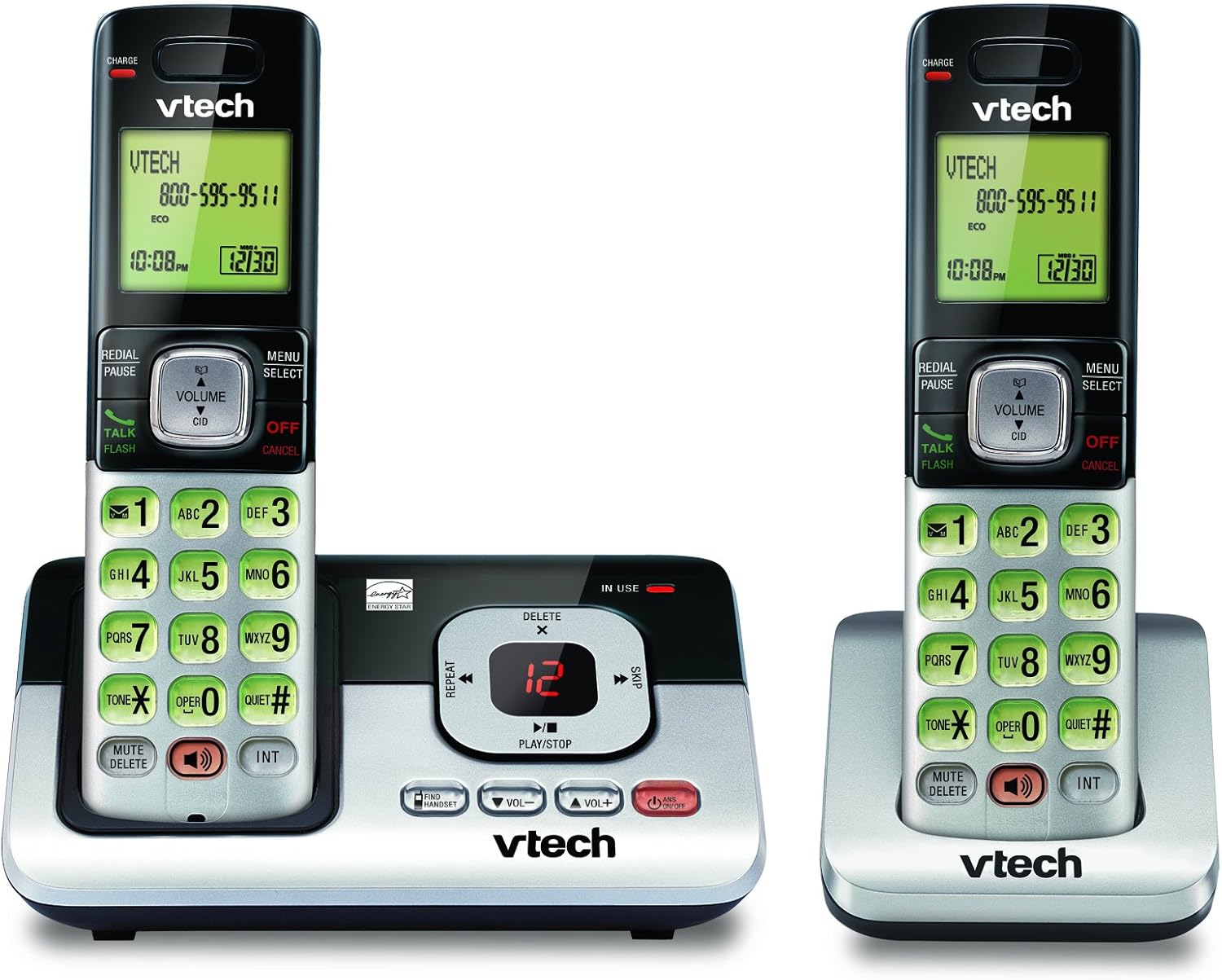
Image: The VTech CS6829-2 base unit with one handset docked, and a second handset with its charging cradle. This illustrates the main components of the phone system.
- نصب باتری گوشی:
Open the battery compartment cover on the back of each handset. Connect the battery pack connector securely into the jack inside the compartment. Place the battery pack with the label facing up and tuck the wires inside the compartment. Close the battery compartment cover.
- شارژ گوشیها:
Place each handset in the base unit or charger with the display facing up. The CHARGE light on the handset will illuminate, indicating proper charging. Allow the handsets to charge for at least 16 hours before initial use for optimal battery performance.

تصویر: زاویه دار view of the VTech CS6829-2 base unit with one handset docked, and the second handset in its separate charging cradle. This shows how the handsets are placed for charging.
- تنظیم تاریخ و زمان:
After the handsets are charged, follow the on-screen prompts or refer to the quick start guide to set the date and time. This is important for accurate caller ID and answering system timestamps.
دستورالعمل های عملیاتی
برقراری و پاسخگویی به تماس ها
- برای برقراری تماس: را فشار دهید صحبت / فلش or any dialing key to get a dial tone, then dial the phone number.
- برای پاسخ به تماس: وقتی تلفن زنگ می زند ، را فشار دهید صحبت / فلش یا هر کلید شماره گیری
- برای پایان دادن به تماس: را فشار دهید خاموش/لغو or place the handset back in the base unit/charger.
سیستم پاسخگویی دیجیتال
- پخش پیامها: روی واحد پایه، فشار دهید PLAY/STOP. On a handset, press MENU/SELECT, scroll to "Answering System", then select "Play Messages".
- Recording an Outgoing Announcement: On the base unit or handset, navigate to the answering system menu and select "Record OGM" (Outgoing Message).
- حذف پیام ها: While a message is playing, press حذف کنید روی دستگاه پایه یا گوشی.
عملکرد بلندگو
- To Use Speakerphone: در طول تماس ، دکمه را فشار دهید SPEAKER button on the handset. Press it again to switch back to the handset earpiece.
ویژگی های کلیدی
- Digital Answering System with LED Indicator and Volume Control: This system records up to 14 minutes of messages, announcements, and memos. An LED indicator notifies you of new messages. Volume control keys on the base allow easy adjustment of message playback volume.
- Caller ID / Call Waiting — Stores up to 50 Calls: Displays the name, number, time, and date of incoming calls, helping you identify callers before answering.
- بلندگوی کامل دوبلکس: The handset features a full duplex speakerphone, enabling natural two-way conversations where both parties can speak and be heard simultaneously.
- صفحه کلید و صفحه نمایش با نور پس زمینه: The entire keypad and LCD screen on the handset illuminate, ensuring clear visibility and easy dialing even in low-light conditions.
- ECO Mode Power-Conserving Technology: This technology optimizes power consumption for extended battery performance and energy efficiency.
- حالت بی صدا: Allows you to silence the ringer on both the handset and base unit immediately or for a set period, providing peace and quiet when needed.
تعمیر و نگهداری
- تمیز کردن: تلفن و پایه را با یک پارچه نرم و لطیف تمیز کنید.amp از اسپریهای تمیزکننده یا پاککنندههای مایع استفاده نکنید.
- مراقبت از باتری: Replace batteries when they no longer hold a charge. Use only the specified battery type. Dispose of old batteries responsibly according to local regulations.
- شرایط محیطی: از قرار دادن گوشی در معرض نور مستقیم خورشید، نزدیک منابع گرما یا در مناطقی با رطوبت بیش از حد خودداری کنید.
عیب یابی
If you experience issues with your phone, try the following solutions:
| مشکل | راه حل |
|---|---|
| بدون شماره گیری | Ensure the telephone line cord is securely plugged into both the base unit and the wall jack. Check that the power adapter is plugged into a working electrical outlet. |
| گوشی شارژ نمیشود. | Ensure the handset is properly seated in the base unit or charger. Clean the charging contacts on both the handset and base/charger with a dry cloth. Verify the power adapter is connected. |
| کیفیت صدای پایین / استاتیک. | Move the handset closer to the base unit. Avoid placing the phone near other electronic devices (e.g., microwaves, computers) that may cause interference. Check the telephone line cord for damage. |
| سیستم پاسخگویی پیامها را ضبط نمیکند. | مطمئن شوید که سیستم پاسخگویی روشن است. بررسی کنید که آیا حافظه پر است یا خیر؛ در صورت لزوم پیامهای قدیمی را حذف کنید. |
مشخصات
| ویژگی | جزئیات |
|---|---|
| شماره مدل | CS6829-2 |
| ابعاد محصول | 5.77 x 3.41 x 6.77 اینچ |
| وزن مورد | 1.41 پوند |
| باتری ها | 2 باتری خاص محصول مورد نیاز (شامل) |
| نوع سیستم پاسخگویی | دیجیتال |
| حافظه تماس گیرنده | تا ۶۸ تماس |
| زمان ضبط سیستم پاسخگویی | تا 14 دقیقه |
| رنگ | مشکی/نقره ای |
| نوع تلفن | بی سیم |
گارانتی و پشتیبانی
برای اطلاعات گارانتی و پشتیبانی فنی، لطفاً به کارت گارانتی ارائه شده همراه محصول خود مراجعه کنید یا از وبسایت رسمی VTech دیدن کنید. webرسید خرید خود را به عنوان مدرک خرید برای درخواستهای گارانتی نگه دارید.
شما همچنین می توانید بازدید کنید فروشگاه VTech در آمازون برای اطلاعات بیشتر در مورد محصول و منابع پشتیبانی.