
VTech CS6629
VTech VTCS6629 DECT 6.0 Expandable Speakerphone User Manual
مدل: CS6629 | برند: VTech
محصول تمام شده استview
The VTech VTCS6629 DECT 6.0 Expandable Speakerphone with Caller ID & Call Waiting is a single-handset system designed for clear communication. It features DECT 6.0 technology for superior sound quality and range, and is expandable with additional handsets.
ویژگی های کلیدی عبارتند از:
- Backlit Keypad and Display for easy visibility in various lighting conditions.
- Eco Mode Power-conserving Technology to optimize battery life.
- Quiet Mode to silence ringers for undisturbed periods.
- 50 Name and Number Phonebook Directory for convenient contact storage.
- Digital Answering System with up to 15 minutes of recording capacity.
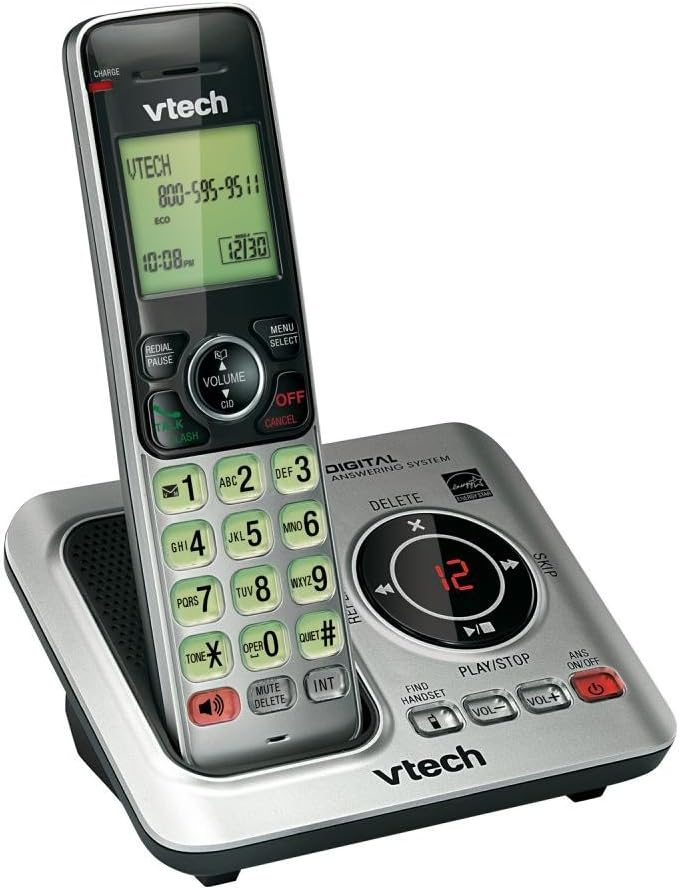
Image: The VTech CS6629 cordless phone handset resting in its charging base. The handset features a backlit display showing "VTECH 800-595-9511" and the time "10:08 PM". The base includes controls for the digital answering system, such as Play/Stop, Skip, Delete, and volume adjustments, along with a message counter displaying "12".
راهنمای راه اندازی
- نصب باتری:
The handset requires 1 AAA battery (included). Open the battery compartment cover on the back of the handset, insert the battery according to the polarity markings, and close the cover. Place the handset in the charging cradle to charge for at least 10 hours before initial use.
- واحد پایه را وصل کنید:
Connect the small end of the power adapter to the POWER jack on the back of the telephone base. Plug the large end of the power adapter into a wall outlet not controlled by a wall switch.
- خط تلفن را وصل کنید:
یک سر سیم خط تلفن را به جک TEL LINE در پشت پایه تلفن وصل کنید. سر دیگر سیم خط تلفن را به پریز دیواری تلفن وصل کنید.
- راه اندازی اولیه:
Once powered on and charged, the handset display will prompt you to set the date and time. Follow the on-screen instructions using the navigation and SELECT buttons.
دستورالعمل های عملیاتی
برقراری و دریافت تماس
- برای برقراری تماس: را فشار دهید صحبت / فلش or SPEAKER، سپس شماره تلفن را شماره گیری کنید.
- برای پاسخ به تماس: را فشار دهید صحبت / فلش or SPEAKER وقتی تلفن زنگ می زند
- برای پایان دادن به تماس: را فشار دهید خاموش/لغو or place the handset back in the charging cradle.
عملکرد بلندگو
در طول تماس ، دکمه را فشار دهید SPEAKER button to switch between handset and speakerphone mode. Press it again to return to handset mode.
شناسه تماس گیرنده و انتظار تماس
When a call comes in, the caller's name and number will appear on the handset display if you subscribe to Caller ID service. If you have Call Waiting, a tone will indicate an incoming call while you are on the phone. Press صحبت / فلش برای رفتن به تماس جدید.
راهنمای دفترچه تلفن
The phonebook can store up to 50 names and numbers. To add an entry, press MENU/SELECT, navigate to "Phonebook", and follow the prompts to add a new entry. To dial from the phonebook, press مدیر (Directory) and scroll to the desired entry, then press صحبت / فلش.
سیستم پاسخگویی دیجیتال
The integrated digital answering system can record up to 15 minutes of messages. The message counter on the base unit displays the number of new messages.
- برای پخش پیامها: را فشار دهید PLAY/STOP روی واحد پایه
- برای حذف پیام ها: در حین پخش پیام، را فشار دهید حذف کنید روی واحد پایه
- To Turn Answering System On/Off: را فشار دهید ANS ON/OFF روی واحد پایه
حالت بی صدا
Activate Quiet Mode to silence all ringers on the telephone base and all handsets for a set period. This feature is useful for undisturbed periods. Refer to the handset menu for activation and duration settings.
کنترل صدا
در حین تماس، فشار دهید حجم صدا ▲ or حجم ▼ on the handset to adjust the earpiece volume. On the base unit, use VOL+ و VOL- to adjust speaker volume during message playback or speakerphone calls.
Intercom Function (INT)
If you have multiple VTech CS6629 handsets, you can use the intercom feature to communicate between them. Press INT on the handset and select the desired handset to call.
Find Handset
اگر گوشی خود را گم کردید، دکمه دستی پیدا کنید on the telephone base. All registered handsets will ring, allowing you to locate them.
تعمیر و نگهداری
- تمیز کردن: Clean the telephone and base unit with a soft, slightly damp از اسپریهای تمیزکننده یا مواد شیمیایی قوی استفاده نکنید.
- مراقبت از باتری: To maintain optimal battery performance, fully charge the handset battery for 10 hours before first use. If the phone will not be used for an extended period, remove the battery to prevent leakage.
- شرایط محیطی: از قرار دادن گوشی در معرض دمای شدید، نور مستقیم خورشید یا رطوبت خودداری کنید.
عیب یابی
| مشکل | راه حل |
|---|---|
| بدون شماره گیری | Ensure the telephone line cord is securely plugged into both the telephone base and the wall jack. Check if other phones on the same line are working. |
| Handset does not charge or hold a charge. | Ensure the power adapter is securely connected. Clean the charging contacts on the handset and base with a dry cloth. The battery may need replacement after extended use (typically 1-2 years). |
| کیفیت صدای ضعیف (صدای خفه، نویز زیاد). | Move the handset closer to the base unit. Avoid placing the base unit near other electronic devices (TVs, microwaves, computers) that may cause interference. Check the telephone line cord for damage. |
| امکان برقراری یا دریافت تماس وجود ندارد. | Verify the telephone line is active. Ensure the handset is registered to the base. If the issue persists, try resetting the phone by unplugging the power adapter from the base for a few minutes, then plugging it back in. |
| سیستم پاسخگویی پیامها را ضبط نمیکند. | Ensure the answering system is turned ON. Check if the memory is full; delete old messages to free up space. |
مشخصات
| ویژگی | جزئیات |
|---|---|
| ابعاد محصول | 6.7 x 4.7 x 3.8 اینچ |
| وزن مورد | 0.317 اونس |
| شماره مدل | CS6629 |
| باتری ها | 1 باتری قلمی مورد نیاز (شامل) |
| سازنده | VTech |
| کشور مبدا | ایالات متحده آمریکا |
| رنگ | سفید/خاکستری |
| نوع تلفن | بی سیم |
| منبع تغذیه | شارژ باتری |
| نوع شماره گیر | صفحه کلید تکی |
| نوع سیستم پاسخگویی | دیجیتال |
| دستگاه های سازگار | VTech CS6609 accessory handset, up to 5 handsets |
| ظرفیت ضبط | دقیقه 15 |
گارانتی و پشتیبانی
This VTech product is manufactured by VTech. For warranty information and technical support, please refer to the documentation included with your purchase or visit the official VTech support webرسید خرید خود را به عنوان مدرک خرید نگه دارید.
سلب مسئولیت حقوقی:
این محصول حاوی مواد شیمیایی شناخته شده در ایالت کالیفرنیا است که باعث سرطان و نقایص مادرزادی یا سایر آسیب های تولید مثل می شود.