
مقدمه
This manual provides detailed instructions for the installation, operation, and maintenance of your VTech VTCS6619 DECT 6.0 Expandable Speakerphone with Caller ID. Please read this manual thoroughly before using your new telephone system to ensure proper functionality and to take full advantage از ویژگی های آن
محتویات بسته
بررسی کنید که بسته شما حاوی موارد زیر باشد:
- Cordless Phone with Caller ID/Call Waiting
- Telephone Base Unit
- آداپتور برق
- سیم خط تلفن
- Rechargeable Battery for Handset
- پوشش گوشی
راه اندازی
Follow these steps to set up your VTech VTCS6619 telephone system.
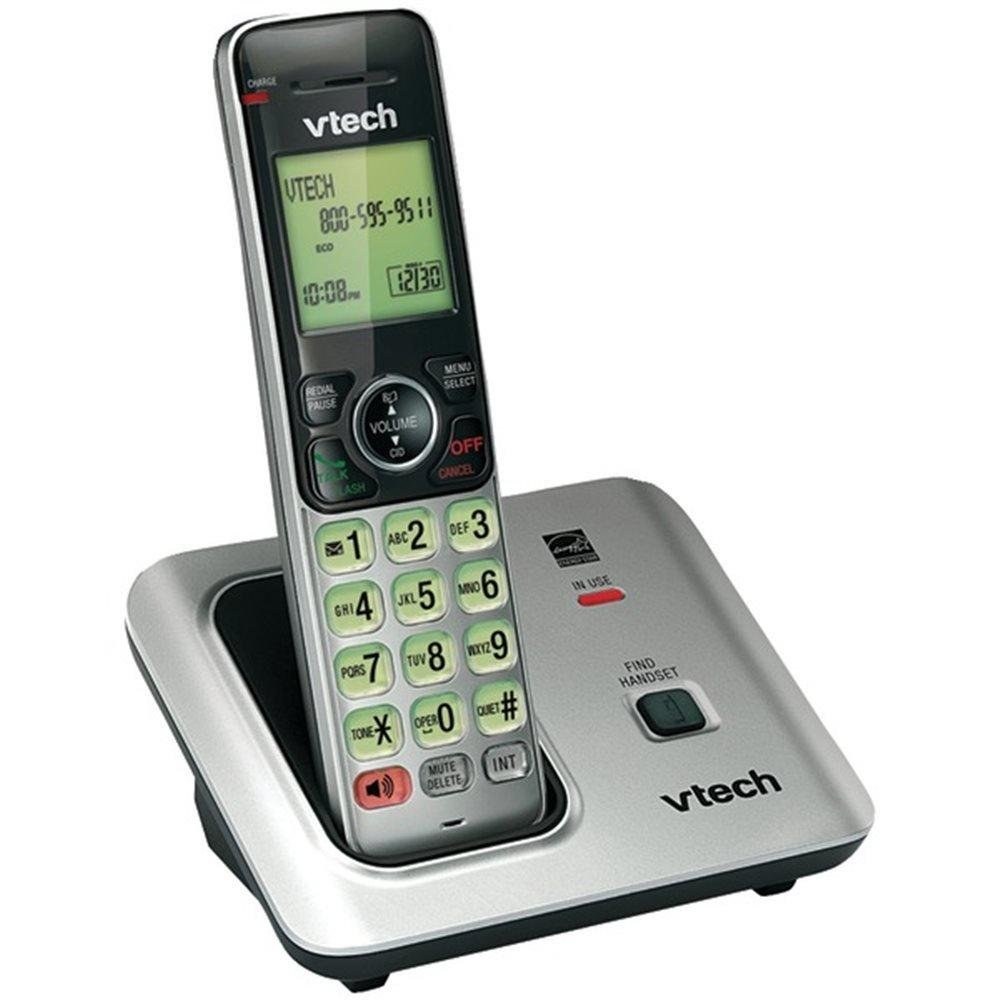
Image: The VTech VTCS6619 DECT 6.0 Cordless Speakerphone with Caller ID, showing the black handset and base unit.
1. نصب باتری
- درب محفظه باتری در پشت گوشی را باز کنید.
- دوشاخه باتری را محکم به جک داخل محفظه وصل کنید.
- بسته باتری را با برچسب UP قرار دهید و سیمها را به طور مرتب داخل محفظه قرار دهید.
- درپوش محفظه باتری را ببندید.
۲. اتصال واحد پایه
- سر کوچک آداپتور برق متناوب را به جک برق پشت پایه تلفن وصل کنید.
- سر بزرگ آداپتور برق متناوب را به پریز دیواری که توسط کلید دیواری کنترل نمیشود، وصل کنید.
- یک سر سیم خط تلفن را به جک TEL LINE در پشت پایه تلفن وصل کنید.
- سر دیگر سیم خط تلفن را به پریز دیواری تلفن وصل کنید.
۳. شارژ گوشی
Once the battery is installed and the base unit is connected, place the handset on the telephone base. The CHARGE light on the handset will illuminate, indicating that the battery is charging. Allow the handset to charge for at least 10 hours before initial use.
دستورالعمل های عملیاتی
This section details the basic functions and features of your VTech VTCS6619 phone.
برقراری و دریافت تماس
- برای برقراری تماس: را فشار دهید صحبت / فلش or SPEAKER، سپس شماره تلفن را شماره گیری کنید.
- برای پاسخ به تماس: وقتی تلفن زنگ می زند ، را فشار دهید صحبت / فلش or SPEAKER.
- برای پایان دادن به تماس: را فشار دهید OFF/CLEAR or place the handset back on the telephone base.
عملکرد بلندگو
برای فعال کردن بلندگوی تلفن در حین تماس، دکمه SPEAKER دکمه. برای بازگشت به حالت پخش صدای گوشی، دوباره آن را فشار دهید.
شناسه تماس گیرنده و انتظار تماس
The phone displays the caller's name and number (if available) before you answer. If you subscribe to Call Waiting service, the phone will alert you to an incoming call while you are on another call. Press فلش برای جابجایی بین تماس ها
کنفرانس تلفنی
The VTech VTCS6619 supports 3-way conference calls. While on a call, you can add a third party by pressing the فلش button, dialing the new number, and then pressing فلش again to connect all parties.
سیستم پاسخگویی دیجیتال
The integrated digital answering system records incoming messages when you are unavailable. Access messages by pressing the PLAY/STOP button on the base or through the handset menu. Refer to the full user guide for detailed instructions on setting up your outgoing message and managing messages.
تعمیر و نگهداری
Proper care ensures the longevity of your telephone system.
تمیز کردن
Clean the telephone and base unit with a soft, damp cloth. Do not use cleaning sprays or liquid cleaners, as they may damage the finish or electrical components.
مراقبت از باتری
To maintain optimal battery performance, avoid exposing the handset to extreme temperatures. If the phone will not be used for an extended period, remove the battery to prevent leakage.
عیب یابی
If you experience any issues with your phone, refer to the following common problems and solutions:
| مشکل | راه حل |
|---|---|
| بدون صدای شماره گیری | مطمئن شوید که سیم خط تلفن به طور محکم به دستگاه پایه و پریز برق وصل شده است. بررسی کنید که آیا آداپتور برق متناوب (AC) به درستی وصل شده است یا خیر. |
| کیفیت صدای ضعیف | Move the handset closer to the base unit. Check for interference from other electronic devices. Ensure the battery is fully charged. |
| شارژ نشدن گوشی | Verify the handset is correctly placed on the base unit. Clean the charging contacts on both the handset and base with a dry cloth. Check the power connection to the base unit. |
| عدم نمایش شناسه تماس گیرنده | Ensure you have subscribed to Caller ID service from your telephone service provider. The feature may not work if the caller has blocked their number. |
مشخصات
- برند: VTech
- مدل: VTCS6619
- نوع تلفن: بی سیم
- رنگ: مشکی
- تعداد باتری: 1 باتری قلمی مورد نیاز (شامل)
- مواد: پلاستیک
- منبع تغذیه: شارژ باتری
- نوع شماره گیر: لحن
- ابعاد مورد (L x W x H): 6.9 x 5.2 x 6.7 اینچ
- نوع سیستم پاسخگویی: دیجیتال
- وزن مورد: 1 پوند
- دستگاه های سازگار: VTech CS6619 handsets, basic answering machines
- قابلیت تماس کنفرانسی: 3 طرفه
- عملیات چند خطی: عملیات تک خطی
- زمان آماده به کار تلفن: دقیقه 7200
- شناسه تماس گیرنده: بله
گارانتی و پشتیبانی
Your VTech VTCS6619 telephone system is covered by a 1 سال گارانتی محدود from the date of purchase. This warranty covers defects in material and workmanship under normal use. For warranty service or technical support, please refer to the contact information provided in your product packaging or visit the official VTech webسایت برای جزئیات خدمات مشتری.
لطفا رسید خرید خود را به عنوان مدرک خرید برای درخواست گارانتی نگه دارید.