
جبرا BT2046
راهنمای کاربر هدست بلوتوث Jabra BT2046
مدل: BT2046
مقدمه
This manual provides comprehensive instructions for the Jabra BT2046 Over the Ear Bluetooth Headset. It covers setup, operation, maintenance, and troubleshooting to ensure optimal performance and longevity of your device. The Jabra BT2046 is designed for hands-free communication, offering convenience and clarity.
محتویات بسته
- هدست بلوتوث Jabra BT2046
- شارژر
- Earhook (pre-attached or separate)
- EarGels/Eartips (various sizes, if included)
- راهنمای شروع سریع (این دفترچه راهنما به عنوان یک راهنمای دقیق عمل میکند)
هدست تمام شدview

شکل 1: بالا view of the Jabra BT2046 Bluetooth Headset, showing the main body and the integrated earhook.
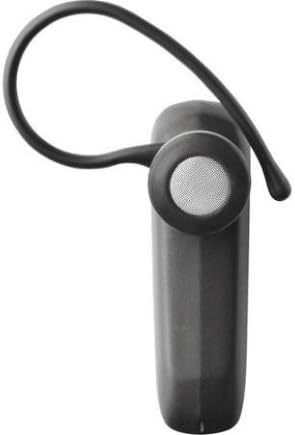
شکل 2: سمت view of the Jabra BT2046 Bluetooth Headset, highlighting the earhook designed for over-the-ear wear and the speaker component.
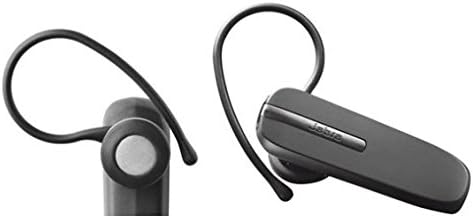
شکل 3: Two distinct views of the Jabra BT2046 Bluetooth Headset, illustrating its compact design and the earhook from different perspectives.
اجزای کلیدی:
- دکمه چند منظوره: Used for power on/off, pairing, answering/ending calls.
- دکمه های صدا: Adjust call volume.
- میکروفون: For voice input during calls.
- سخنران: برای خروجی صدا
- پورت شارژ: برای اتصال شارژر.
- نشانگر LED: Displays status (e.g., charging, connected, low battery).
راه اندازی
1. شارژ هدست
Before first use, fully charge your Jabra BT2046 headset.
- شارژر را به درگاه شارژ هدست وصل کنید.
- شارژر را به پریز برق وصل کنید.
- The LED indicator will illuminate to show charging status. It typically turns solid when fully charged.
- A full charge usually takes approximately 2 hours.
2. روشن/خاموش کردن
- روشن کردن: Press and hold the Multi-function Button for approximately 3 seconds until the LED indicator flashes.
- برای خاموش کردن: Press and hold the Multi-function Button for approximately 3 seconds until the LED indicator turns off.
3. جفت شدن با دستگاه بلوتوث
The Jabra BT2046 can be paired with Bluetooth-enabled devices such as cellphones, computers, and tablets.
- از خاموش بودن هدست اطمینان حاصل کنید.
- Press and hold the Multi-function Button for approximately 5-6 seconds until the LED indicator flashes blue rapidly. This indicates the headset is in pairing mode.
- در دستگاه بلوتوث خود، بلوتوث را فعال کنید و دستگاههای جدید را جستجو کنید.
- Select "Jabra BT2046" from the list of found devices.
- اگر از شما رمز عبور خواسته شد، عدد «0000» (چهار صفر) را وارد کنید.
- Once paired, the LED indicator on the headset will change to a slow blue flash or solid blue, and your device will confirm the connection.
توجه: The headset can typically remember multiple paired devices, but can only be actively connected to one at a time for calls.
کار با هدست
مدیریت تماس
- پاسخ به تماس: دکمه چند منظوره را یک بار فشار دهید.
- پایان تماس: Press the Multi-function Button once during an active call.
- رد تماس: Press and hold the Multi-function Button for approximately 2 seconds when a call is incoming.
- شماره گیری مجدد آخرین شماره: Double-press the Multi-function Button when the headset is idle.
- شماره گیری صوتی (در صورت پشتیبانی از طریق تلفن): Press the Multi-function Button once when the headset is idle.
کنترل صدا
- Use the Volume Up (+) or Volume Down (-) buttons on the headset to adjust the call volume.
پوشیدن هدست
The Jabra BT2046 is designed for over-the-ear wear. Gently place the earhook over your ear and position the speaker comfortably in your ear canal. Adjust the earhook for a secure and comfortable fit.
تعمیر و نگهداری
تمیز کردن
- هدست را با یک پارچه نرم، خشک و بدون پرز پاک کنید.
- از مواد شیمیایی خشن، حلال های پاک کننده یا شوینده های قوی استفاده نکنید.
- از ورود رطوبت به داخل هرگونه روزنه و شکاف جلوگیری کنید.
ذخیره سازی
- Store the headset in a cool, dry place, away from extreme temperatures and direct sunlight.
- اگر برای مدت طولانی باتری را انبار میکنید، برای حفظ طول عمر آن، آن را به صورت دورهای شارژ کنید.
عیب یابی
| مشکل | علت احتمالی | راه حل |
|---|---|---|
| هدست روشن نمیشود. | باتری تخلیه شده است. | هدست را به طور کامل شارژ کنید. |
| Cannot pair the headset with my device. | هدست در حالت جفتسازی نیست؛ بلوتوث دستگاه خاموش است؛ دستگاه خیلی دور است. | Ensure headset is in pairing mode (rapid blue flash). Turn on Bluetooth on your device. Move headset closer to device (within 10 meters/33 feet). Try restarting both devices. |
| No sound or poor sound quality during calls. | صدا خیلی کم است؛ هدست به عنوان خروجی صدا انتخاب نشده است؛ تداخل صدا. | Increase headset volume. Ensure your phone's audio is routed to the headset. Move away from other electronic devices. |
| هدفون مرتباً قطع و وصل میشود. | خارج از محدوده؛ باتری ضعیف؛ تداخل | Stay within Bluetooth range. Charge the headset. Reduce interference sources. |
مشخصات
| ویژگی | جزئیات |
|---|---|
| نام مدل | BT2046 |
| فناوری اتصال | بی سیم (بلوتوث) |
| فناوری ارتباطات بی سیم | بلوتوث |
| قرار دادن گوش | بالای گوش |
| فاکتور فرم | بالای گوش |
| مواد | پلاستیک |
| وزن مورد | 10 گرم (0.353 اونس) |
| ابعاد محصول | 2.09 x 0.63 x 0.98 اینچ |
| زمان مکالمه تلفنی | تا ۳۰۰ دقیقه (۵ ساعت) |
| زمان آماده به کار تلفن | تا ۴۸ ساعت (۳ روز) |
| دستگاه های سازگار | Cellphones, Computers, Tablets, Other Bluetooth-enabled Devices |
| نوع کنترل | کنترل رسانه |
| ویژگی های خاص | سبک وزن |
| UPC | 519808822467، 519808912304 |
گارانتی و پشتیبانی
Specific warranty information for the Jabra BT2046 headset is typically provided with the product packaging or can be found on the official Jabra webسایت. لطفاً به سازنده مراجعه کنید webبرای اطلاع از بهروزترین شرایط و ضوابط گارانتی، به وبسایت مراجعه کنید.
For technical support, frequently asked questions, or to download additional resources, please visit the official Jabra support page or contact their customer service.
Ask a question about this manual
Ask about setup, troubleshooting, compatibility, parts, safety, or missing instructions. Manuals+ will review the question and use this page’s manual context to help answer it.