
مقدمه
The Jabra Music Street2 Bluetooth Stereo Headset is designed to provide high-quality audio and hands-free communication. This manual provides essential information for the proper use, maintenance, and troubleshooting of your device. Please read it carefully before use.
راه اندازی
1. شارژ هدست
Before first use, fully charge the headset. Connect the micro-USB charging cable to the charging port on the headset and the other end to a USB power source.
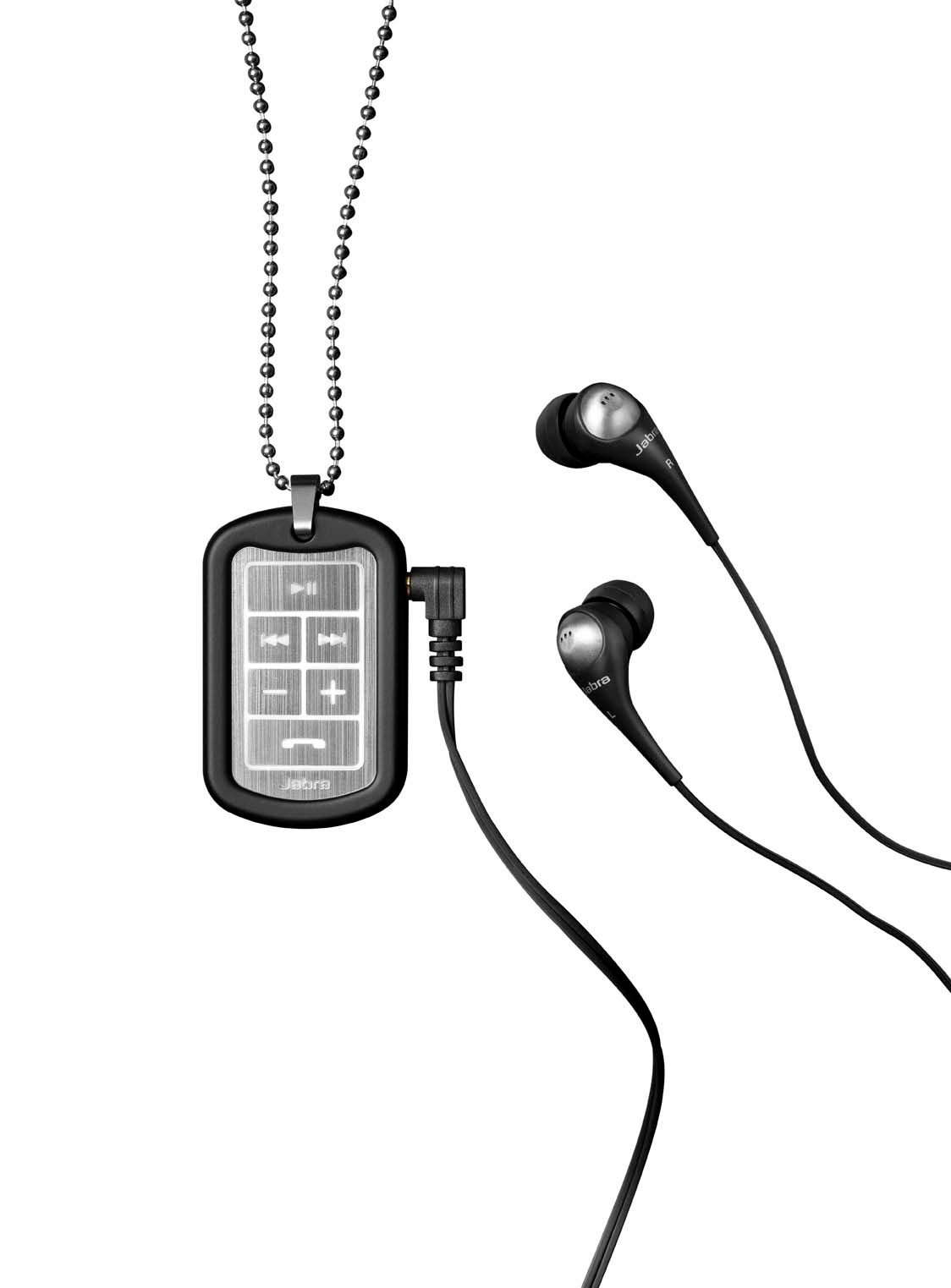
Image: The Jabra Music Street2 headset, highlighting the micro-USB charging port located on the side of the control unit.
- شارژ کامل معمولاً تقریباً 2 ساعت طول میکشد.
- نشانگر LED وضعیت شارژ را نشان میدهد (مثلاً قرمز برای شارژ، آبی برای شارژ کامل).
2. جفت شدن با دستگاه بلوتوث
- اطمینان حاصل کنید که هدست خاموش است.
- Press and hold the Multi-function button (usually the play/pause button) for approximately 5-7 seconds until the LED indicator flashes blue rapidly. This indicates pairing mode.
- در دستگاه بلوتوثدار خود (گوشی هوشمند، تبلت و غیره)، به تنظیمات بلوتوث بروید و بلوتوث را فعال کنید.
- جستجو برای available devices. "Jabra Street2" should appear in the list.
- Select "Jabra Street2" to connect. If prompted for a passcode, enter "0000" (four zeros).
- پس از جفت شدن موفقیتآمیز، نشانگر LED به آرامی به رنگ آبی چشمک میزند.
The headset can remember multiple paired devices but can only be connected to one at a time.
دستورالعمل های عملیاتی
روشن/خاموش برق
- روشن کردن: دکمه چند منظوره را فشار داده و نگه دارید تا چراغ LED به رنگ آبی چشمک بزند.
- خاموش: دکمه چند منظوره را فشار داده و نگه دارید تا چراغ LED به رنگ قرمز چشمک بزند و سپس خاموش شود.
کنترل موسیقی
- پخش/مکث: دکمه چند منظوره را یک بار فشار دهید.
- آهنگ بعدی: Press the "Next Track" button (usually marked with a forward arrow).
- آهنگ قبلی: Press the "Previous Track" button (usually marked with a backward arrow).
- افزایش صدا: دکمه "+" را فشار دهید.
- کاهش حجم: دکمه "-" را فشار دهید.
مدیریت تماس
- پاسخ به تماس: دکمه چند منظوره را یک بار فشار دهید.
- پایان تماس: در حین تماس، دکمه چندمنظوره را یک بار فشار دهید.
- رد تماس: دکمه Multi-function را به مدت 2 ثانیه فشار داده و نگه دارید.
- شماره گیری مجدد آخرین شماره: وقتی در حال مکالمه نیستید، دکمه چندمنظوره را دو بار فشار دهید.
- شماره گیری صوتی: Press the Multi-function button once when not on a call (if supported by your phone).
The headset automatically switches between music and calls.
تعمیر و نگهداری
- Keep the headset dry. Moisture can damage the electronic circuits.
- از دمای بسیار بالا اجتناب کنید. دمای بالا میتواند عمر دستگاههای الکترونیکی را کوتاه کند، به باتریها آسیب برساند و برخی از پلاستیکها را تاب بردارد یا ذوب کند.
- Do not attempt to open the headset. Unauthorized modifications can damage the unit and void your warranty.
- Clean the headset with a soft, dry cloth. Do not use harsh chemicals or detergents.
- وقتی برای مدت طولانی از هدست استفاده نمیکنید، آن را در جای خشک و خنک نگهداری کنید.
عیب یابی
بدون قدرت
- مطمئن شوید که هدست کاملاً شارژ شده است. آن را به منبع تغذیه وصل کنید و نشانگر شارژ را بررسی کنید.
نمی توان با دستگاه جفت کرد
- Make sure the headset is in pairing mode (LED flashing blue rapidly).
- Ensure Bluetooth is enabled on your device and it is within range (typically 10 meters or 33 feet).
- Try turning off and on both the headset and your Bluetooth device.
- If previously paired, try deleting "Jabra Street2" from your device's Bluetooth list and re-pairing.
بدون صدا یا کیفیت صدای ضعیف
- میزان صدا را هم در هدست و هم در دستگاه متصل خود بررسی کنید.
- مطمئن شوید که هدست به درستی به دستگاه شما متصل است.
- برای جلوگیری از تداخل، به دستگاه خود نزدیکتر شوید.
- Ensure the ear buds are correctly inserted and fit snugly to block external noise.
Calls Not Switching Automatically
- Verify that the headset is the active audio device for calls on your phone's Bluetooth settings.
- Some phone models may require manual selection of the audio output during a call.
مشخصات
| نام مدل | Jabra Music Street2 |
| نسخه بلوتوث | 3.0 + EDR |
| محدوده بی سیم | تا 10 متر (33 فوت) |
| زمان صحبت | تا 8 ساعت |
| زمان آماده به کار | تا 9.5 روز |
| زمان شارژ | تقریبا 2 ساعت |
| قابلیت اتصال | Bluetooth, 3.5 mm Jack (for wired connection if applicable) |
| ویژگی ها | Virtual surround sound, power bass, noise-blocking ear buds, automatic music/call switching |
گارانتی و پشتیبانی
Jabra products are covered by a limited warranty. For specific warranty terms and conditions, please refer to the warranty card included with your product or visit the official Jabra webسایت
For technical support, frequently asked questions, or to download the latest software/firmware updates, please visit the official Jabra support page:
You may also contact Jabra customer service directly for assistance.