
1. مقدمه
This manual provides instructions for the VTech ATT-CL80100 DECT 6.0 accessory handset. This handset is designed to expand your existing compatible VTech/ATT DECT 6.0 cordless phone system. It is compatible with ATT models CL81100, CL81200, CL81300, CL82100, CL82200, CL82300, CL82350, CL82400, CL82500, CL82600, CL84100, and CL84200. Please read this manual thoroughly before using your new accessory handset.
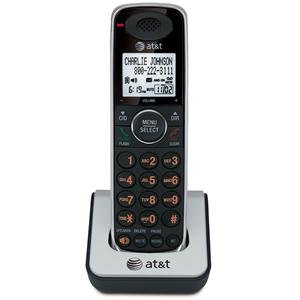
Image 1.1: The VTech ATT-CL80100 accessory handset. This image shows the front view of the cordless handset, typically including the display, keypad, and speaker.
2. راه اندازی
Before using your new accessory handset, it must be registered to your existing compatible base unit and its battery must be charged.
2.1 محتویات بسته
مطمئن شوید که بسته شما شامل موارد زیر است:
- ATT-CL80100 Accessory Handset
- Handset Battery Pack
- Handset Charger with Power Adapter
- دفترچه راهنمای کاربر (این سند)
2.2 نصب باتری
- درب محفظه باتری در پشت گوشی را باز کنید.
- رابط باتری را محکم به جک داخل محفظه وصل کنید.
- بسته باتری را داخل محفظه قرار دهید.
- درپوش محفظه باتری را دوباره در جای خود قرار دهید تا صدای کلیک ایجاد شود.
۲.۴ شارژ کردن گوشی
- Plug the small end of the charger's power adapter into the back of the handset charger.
- سر بزرگ آداپتور برق را به یک پریز برق استاندارد وصل کنید.
- Place the handset face forward into the charger cradle. The charge indicator light on the handset should illuminate, indicating proper charging.
- Allow the handset to charge for at least 12 hours before initial use. A full charge ensures optimal battery performance.
۳.۴ ثبت گوشی
This accessory handset must be registered to your existing base unit to function. Refer to your main system's user manual for specific registration instructions, as procedures may vary slightly between base models (CL81xxx, CL82xxx, CL84xxx series). Generally, the process involves:
- Placing the accessory handset in its charger.
- Initiating a registration sequence on the base unit (often by pressing and holding a "PAGE" or "HANDSET LOCATOR" button).
- Confirming registration on the accessory handset.
If registration is successful, the handset display will show "Registered" or a similar confirmation message.
۴. کار با گوشی
Once registered and charged, your accessory handset operates similarly to your primary handsets.
3.1 برقراری و دریافت تماس
- برای برقراری تماس: را فشار دهید صحبت / فلش or SPEAKER، سپس شماره تلفن را شماره گیری کنید.
- برای پاسخ به تماس: Press any key (Any Key Answer feature) or press صحبت / فلش or SPEAKER.
- برای پایان دادن به تماس: را فشار دهید OFF/CLEAR یا گوشی را دوباره در شارژر قرار دهید.
3.2 Using the Directory
The handset shares the main system's 50-name/number directory. To access:
- را فشار دهید MENU/SELECT.
- Scroll to "Directory" and press MENU/SELECT.
- Scroll through entries or use the keypad to search by name.
- را فشار دهید صحبت / فلش to dial a selected entry.
3.3 شماره گیری مجدد
The handset stores the last 20 numbers dialed. To redial:
- را فشار دهید REDIAL/PAUSE.
- Scroll through the list of recent calls.
- را فشار دهید صحبت / فلش برای شماره گیری شماره انتخاب شده
3.4 Handset Settings
You can customize various settings on your handset, including selectable ringer tones and menu language (English/Spanish/French setup menu). Access these options via the MENU/SELECT button and navigate to the "Settings" or "Handset Setup" menu.
4. تعمیر و نگهداری
Proper care ensures the longevity of your accessory handset.
- تمیز کردن: گوشی و شارژر را با یک پارچه نرم و لطیف پاک کنید.amp از اسپریهای تمیزکننده یا مواد شیمیایی قوی استفاده نکنید.
- مراقبت از باتری: Replace the battery pack when its performance significantly degrades. Use only the specified replacement battery.
- محیط زیست: Keep the handset away from excessive heat, direct sunlight, and moisture.
5 عیب یابی
If you experience issues with your accessory handset, try the following solutions:
5.1 No Dial Tone or Cannot Make/Receive Calls
- Ensure the handset is properly registered to the base unit.
- Check that the handset battery is charged.
- Verify the main base unit is powered on and connected to the telephone line.
5.2 Handset Display is Blank or Not Working
- Place the handset in its charger to ensure it is charging.
- Check the battery connection inside the handset.
- اگر مشکل برطرف نشد، ممکن است باتری نیاز به تعویض داشته باشد.
۵.۲ کیفیت پایین صدا
- برای بهبود قدرت سیگنال، به واحد پایه نزدیکتر شوید.
- مطمئن شوید که هیچ شیء فلزی بزرگ یا دستگاه الکترونیکی دیگری که با سیگنال تداخل داشته باشد، وجود ندارد.
- Check for any physical damage to the handset or base unit.
5.4 Handset Not Registering
- Ensure you are following the registration steps outlined in your main system's user manual.
- Try resetting the base unit by unplugging its power for a few minutes, then plugging it back in.
- Ensure the accessory handset is within range of the base unit during registration.
6. مشخصات
| ویژگی | مشخصات |
|---|---|
| نام تجاری | VTech |
| مدل | ATT-CL80100 |
| منبع تغذیه | برق سیمی (برای شارژر) |
| نوع شماره گیر | صفحه کلید تکی |
| ابعاد مورد (L x W x H) | 2.36 x 4.96 x 7.08 اینچ |
| نوع سیستم پاسخگویی | دیجیتال (وابسته به سیستم) |
| وزن مورد | 1 کیلو |
| شناسایی تماس گیرنده | No (as per product specifications, system dependent) |
| UPC | 172302632910، 132017996028، 168141379444، 650530020506 |
7. اطلاعات گارانتی
VTech products are manufactured with high-quality components and are designed to provide years of trouble-free operation. For specific warranty details, including duration and coverage, please refer to the warranty card included with your original base unit purchase or visit the official VTech support webرسید خرید خود را به عنوان مدرک خرید نگه دارید.
8. پشتیبانی مشتری
For technical assistance, product registration, or to order replacement parts, please contact VTech customer support. You can typically find contact information (phone numbers, website, email) on the VTech official webسایت یا در مستندات ارائه شده همراه با سیستم تلفن اصلی شما.
منابع آنلاین ممکن است شامل موارد زیر باشند:
- سوالات متداول (سؤالات متداول)
- Product Support Documents
- Software/Firmware Updates (if applicable)
When contacting support, please have your product model number (ATT-CL80100) and purchase date available.