
1. مقدمه
The Rosewill RC-211 is a 2-port SATA II PCI Express Host Controller Card designed to expand your system's storage capabilities. It supports various RAID configurations, including RAID 0, RAID 1, RAID 0+1, RAID 5, and JBOD, providing flexibility for performance and data redundancy. This manual provides instructions for the proper installation, configuration, and operation of your RC-211 card.
2. ویژگی های محصول
- رابط کاربری: PCI Express x1, offering 2.5 Gb/s throughput and full-duplex operation.
- پورت های SATA: Two independent Serial ATA II channels.
- نرخ انتقال: Supports Serial ATA 3.0 Gb/s.
- پشتیبانی RAID: RAID 0 (Stripping), RAID 1 (Mirroring), RAID 0+1 (Mirrored-Stripping), RAID 5 (Distributed Parity RAID), and JBOD.
- پشتیبانی LBA: 48-bit LBA for hard drives larger than 137GB.
- ویژگی های پیشرفته: Supports Hot-plug capability, Legacy Command Queuing (LCQ), Native Command Queuing (NCQ), Non-zero offsets NCQ, Out of order data delivery NCQ, and FIS-based switching with Port Multipliers.
- نشانگرهای LED: Two pin headers on board for LED connection.
3. سیستم مورد نیاز
- Available PCI Express x1 slot or higher.
- Operating System: Windows 2000, Windows XP, or Windows 2003 Server.
- SATA hard drives.
- For RAID 5, a Port Multiplier capable enclosure and a minimum of three drives are required.
4. Setup: Hardware Installation
- سیستم خاموش: Ensure your computer is completely powered off and unplugged from the power source before beginning installation.
- کیس کامپیوتر را باز کنید: Remove the side panel of your computer case to access the motherboard and expansion slots.
- اسلات PCI Express را پیدا کنید: Identify an available PCI Express x1 slot (or larger, as the card is compatible with x4, x8, x16 slots).
- Insert Controller Card: Carefully align the Rosewill RC-211 card with the chosen PCI Express slot and press down firmly until it is securely seated. Ensure the bracket is aligned with the case opening.
- کارت امن: Use a screw to secure the card's bracket to the computer case.
- Connect SATA Drives: Connect your SATA hard drives to the two SATA ports on the RC-211 card using SATA data cables. Ensure connections are firm.
- اتصال برق: Ensure your SATA hard drives are connected to the power supply.
- LED Connection (Optional): If desired, connect system activity LEDs to the two pin headers on the card. Refer to your system's motherboard manual for LED pinout details.
- بستن پرونده: پنل کناری کیس کامپیوتر را سر جایش قرار دهید و کابل برق را دوباره وصل کنید.
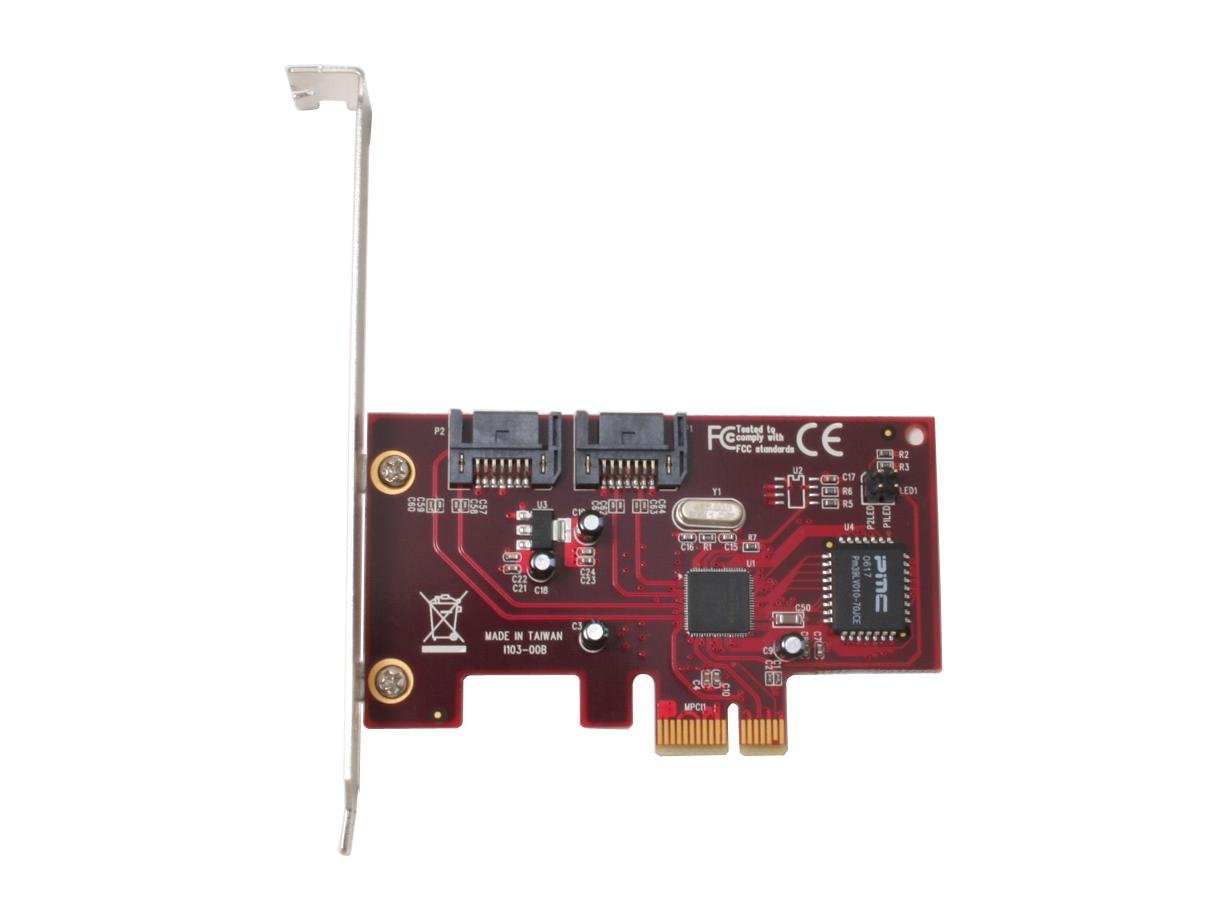
Image: Rosewill RC-211 SATA II PCI Express Host Controller Card. This image shows the physical card with its PCI Express connector and two SATA ports.
5. Setup: Driver Installation
After hardware installation, power on your computer. The operating system may detect new hardware. You will need to install the appropriate drivers for the Rosewill RC-211 card. Drivers are typically provided on a CD included with the product or can be downloaded from the Rosewill official webسایت. دستورالعملهای روی صفحه را برای نصب درایور دنبال کنید.
6. Operating: RAID Configuration
The Rosewill RC-211 supports various RAID levels. Configuration is typically performed through a BIOS-level utility that appears during system boot-up or via a software utility after driver installation. Refer to the specific driver and utility documentation for detailed steps on creating and managing RAID arrays.
Supported RAID Modes:
- RAID 0 (Stripping): Combines multiple drives into a single logical unit, distributing data across them. This significantly increases data transfer performance but offers no data redundancy. If one drive fails, all data is lost.
- RAID 1 (Mirroring): Writes identical data to two drives simultaneously. This provides data protection; if one drive fails, the data is still accessible from the other drive. Performance is generally similar to a single drive.
- RAID 0+1 (Mirrored-Stripping): Combines the performance benefits of RAID 0 with the data redundancy of RAID 1. It requires at least four drives. Data is striped across two drives, and then mirrored to another pair of striped drives.
- RAID 5 (Distributed Parity RAID): Stripes data and parity information across three or more drives. It offers a balance of performance and data redundancy, allowing for the failure of one drive without data loss. Note: RAID 5 requires the use of Port Multiplier capability and a minimum of three drives.
- JBOD (فقط تعدادی دیسک): Combines multiple disk drives into one large virtual disk. It does not offer performance benefits or data redundancy but allows for combining drives of different sizes into a single volume.
7 عیب یابی
- کارت شناسایی نشد: Ensure the card is fully seated in the PCI Express slot. Verify that the PCI Express slot is functional. Check your system's BIOS settings to ensure PCI Express slots are enabled.
- درایوها شناسایی نمیشوند: Confirm that SATA data and power cables are securely connected to both the drives and the controller card. Ensure drivers for the RC-211 card are correctly installed.
- RAID Array Issues: If a RAID array fails or rebuilds unexpectedly, check the health of individual drives. Ensure all drives in the array are compatible and functioning correctly. Refer to the RAID utility documentation for specific error codes or messages.
- SATA Connector Durability: When connecting or disconnecting SATA cables, exercise caution. The plastic connectors on some cards can be fragile. Always ensure proper alignment and avoid excessive force to prevent damage.
- مشکلات عملکرد: Verify that the correct drivers are installed. Ensure your SATA drives are operating at their specified speeds. Check for other system bottlenecks.
8. تعمیر و نگهداری
The Rosewill RC-211 card requires minimal maintenance. Ensure your computer's internal environment is clean and free of dust to prevent overheating. Periodically check for updated drivers on the Rosewill webسایت برای اطمینان از عملکرد و سازگاری بهینه.
9. مشخصات
| ویژگی | مشخصات |
|---|---|
| مدل | RC-211 |
| رابط | PCI Express x1 |
| اتصالات داخلی | 2 x Serial ATA II |
| نرخ انتقال | 3.0 گیگابیت بر ثانیه |
| پشتیبانی RAID | RAID 0, RAID 1, RAID 0+1, RAID 5, JBOD |
| سیستم عامل های پشتیبانی شده | Windows 2000, XP, 2003 Server |
| LBA Support | 48-bit LBA (supports HDDs > 137GB) |
| Hot-plug Capability | بله |
| وزن مورد | 0.3 پوند |
10. گارانتی و پشتیبانی
For information regarding product warranty, technical support, and driver downloads, please visit the official Rosewill webبه سایت مراجعه کنید یا با بخش خدمات مشتریان آنها تماس بگیرید. رسید خرید خود را برای درخواستهای گارانتی نگه دارید.