
مقدمه
The Mackie HD1221 is a 12-inch 2-way compact high-definition powered loudspeaker designed for professional audio applications. It features 1200W of Class-D Fast Recovery amplification, high-definition audio processing, and custom-designed transducers by EAW. This manual provides essential information for the safe and effective use of your HD1221 loudspeaker, including setup, operation, maintenance, and troubleshooting.
اطلاعات ایمنی
Before operating the Mackie HD1221 loudspeaker, please read and understand all safety instructions. Failure to do so may result in electric shock, fire, or other injuries. Keep these instructions for future reference.
- منبع تغذیه: دستگاه را فقط به منبع تغذیهای از نوع ذکر شده در دفترچه راهنما یا مطابق علامت روی دستگاه وصل کنید.
- زمین کردن: Ensure the loudspeaker is properly grounded to prevent electric shock.
- تهویه: هیچ یک از منافذ تهویه را مسدود نکنید. مطابق دستورالعمل سازنده نصب کنید.
- آب و رطوبت: از این دستگاه در نزدیکی آب استفاده نکنید و آن را در معرض چکه کردن یا پاشیدن آب قرار ندهید.
- تمیز کردن: فقط با یک پارچه خشک تمیز کنید.
- سرویس دهی: تمام خدمات را به پرسنل خدمات واجد شرایط ارجاع دهید. هنگامی که دستگاه به هر نحوی آسیب دیده باشد، مانند آسیب به سیم برق یا دوشاخه، ریختن مایعات یا افتادن اشیاء در دستگاه، در معرض باران یا رطوبت بودن دستگاه، به طور عادی کار نمی کند، سرویس مورد نیاز است. ، یا حذف شده است.
- نصب: فقط با گاری، پایه، سه پایه، براکت یا میز مشخص شده توسط سازنده یا فروخته شده با دستگاه استفاده کنید. هنگام استفاده از گاری، هنگام جابجایی ترکیب گاری/دستگاه احتیاط کنید تا در اثر واژگونی آسیب نبینید.
محتویات بسته
Verify that the following items are included in your Mackie HD1221 package:
- Mackie HD1221 Powered Loudspeaker
- کابل برق
- راهنمای شروع سریع (در صورت وجود)
- اطلاعات گارانتی
در صورت مفقود شدن یا آسیب دیدن اقلام، لطفاً فوراً با فروشنده خود تماس بگیرید.
محصول تمام شده استview
The Mackie HD1221 is a versatile loudspeaker designed for various applications, including main PA, stage monitor, and flown installations. It features a robust construction and advanced audio processing.
جلو و کنار Views
شکل 1: جلو و کنار view of the HD1221 loudspeaker, highlighting the durable grille and integrated handles for portability.

شکل ۴: سمت چپ view of the HD1221 loudspeaker.
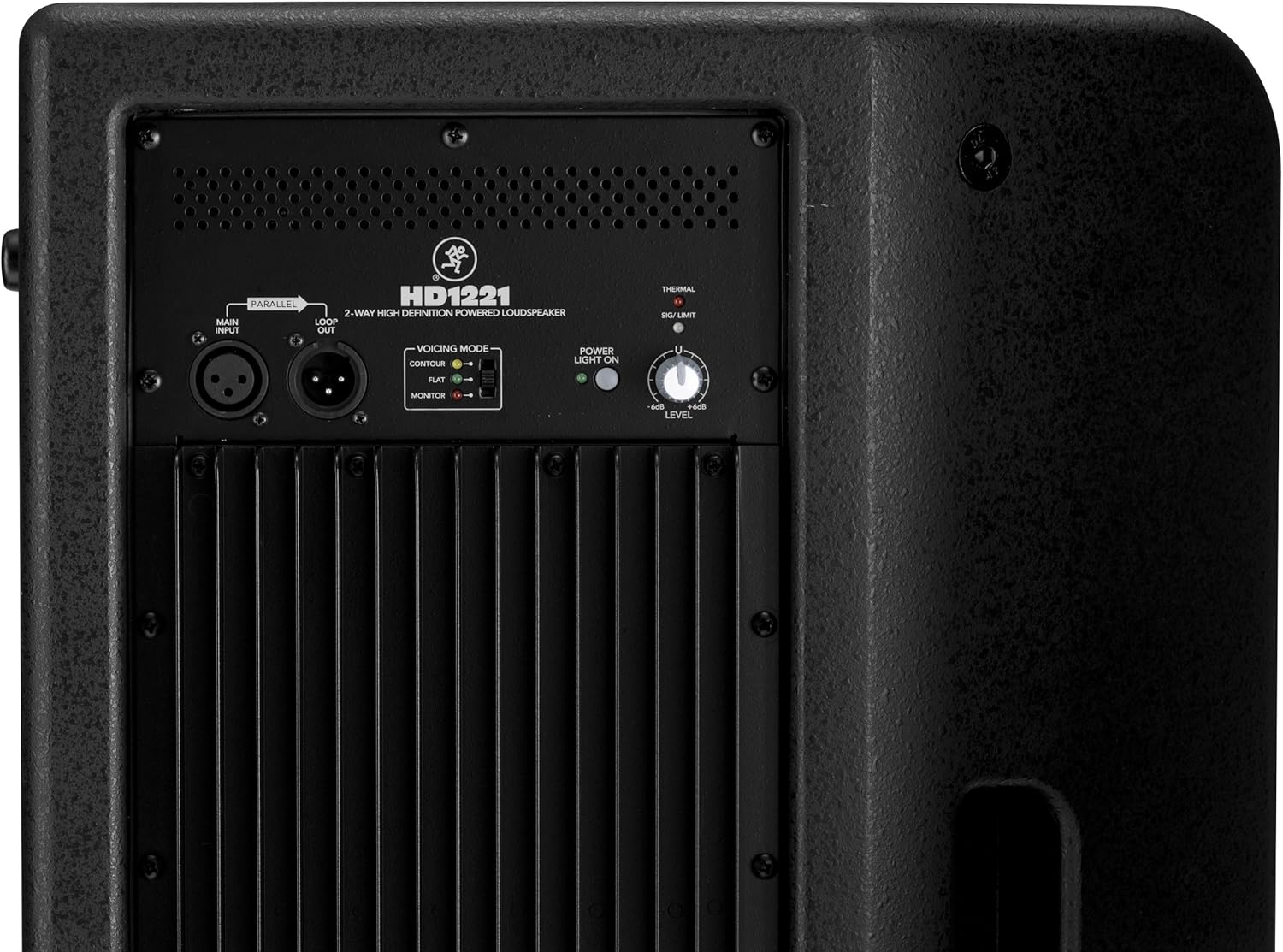
کنترلها و اتصالات پنل پشتی

Figure 3: Rear panel of the HD1221, detailing the input/output section, voicing mode switch, power indicator, and level control knob.
- Main Input (XLR): Connect your audio source here.
- Loop Out (XLR): Provides a parallel output of the main input signal for connecting to additional loudspeakers or other audio equipment.
- Voicing Mode Switch: Selects between Contour, Flat, and Monitor modes to optimize the loudspeaker's frequency response for different applications.
- چراغ روشن: وضعیت برق واحد را نشان می دهد.
- Thermal/Sig/Limit Indicators: Provide visual feedback on the loudspeaker's operational status, including thermal protection, signal presence, and limiting.
- کنترل سطح: میزان صدای خروجی کلی بلندگو را تنظیم میکند.
- برق ورودی AC: کابل برق را به برق شهری متصل میکند.
اجزای داخلی
شکل 4: داخلی view of the HD1221, showcasing the 12-inch neodymium woofer and 1.75-inch titanium compression driver, designed by EAW.
راه اندازی
Proper setup ensures optimal performance and safety. Follow these steps for initial setup:
اتصال برق
- Ensure the Level control on the rear panel is set to its minimum position.
- Connect the supplied AC power cable to the AC Power Input on the rear panel of the HD1221.
- سر دیگر کابل برق را به پریز برق دارای اتصال زمین وصل کنید.
اتصالات صوتی
- Connect your audio source (e.g., mixer, instrument) to the Main Input (XLR) on the rear panel.
- If connecting multiple loudspeakers, use the Loop Out (XLR) to send the signal to the next loudspeaker.
گزینه های نصب
The HD1221 offers several mounting options for flexibility:
نصب قطب

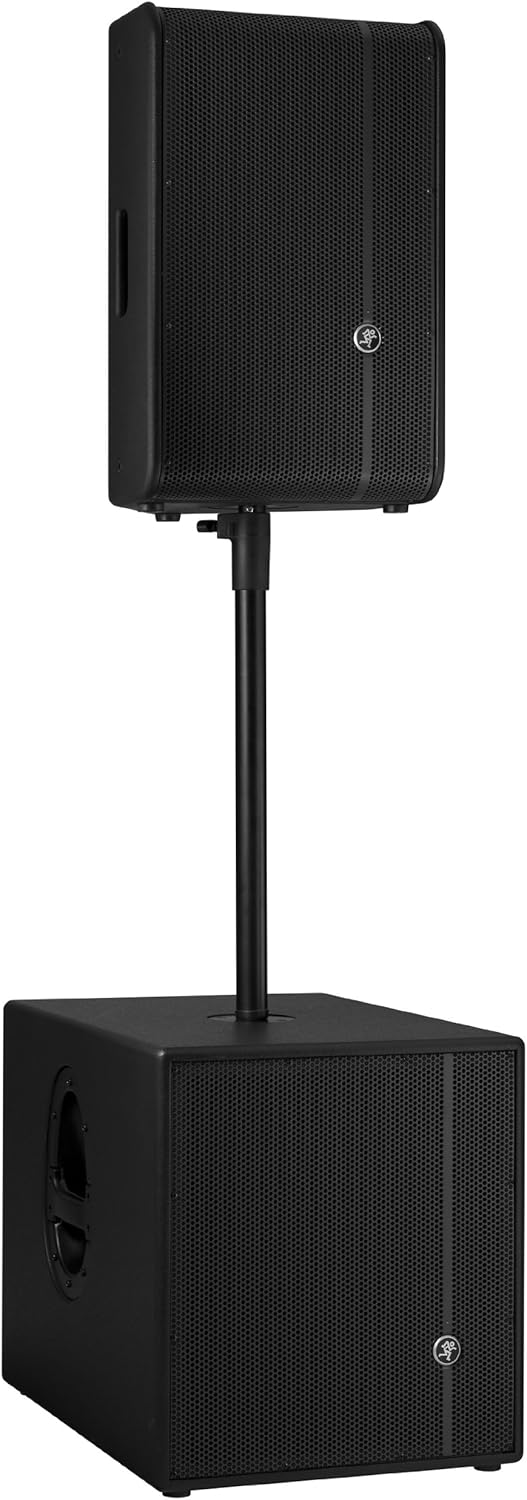
Figure 5: The HD1221 mounted on a pole, typically above a subwoofer like the HD1501 for a full-range PA system.
The HD1221 can be mounted on a standard speaker pole stand. Ensure the stand is stable and rated for the weight of the loudspeaker (approximately 58 lbs).
Stage Monitor Placement
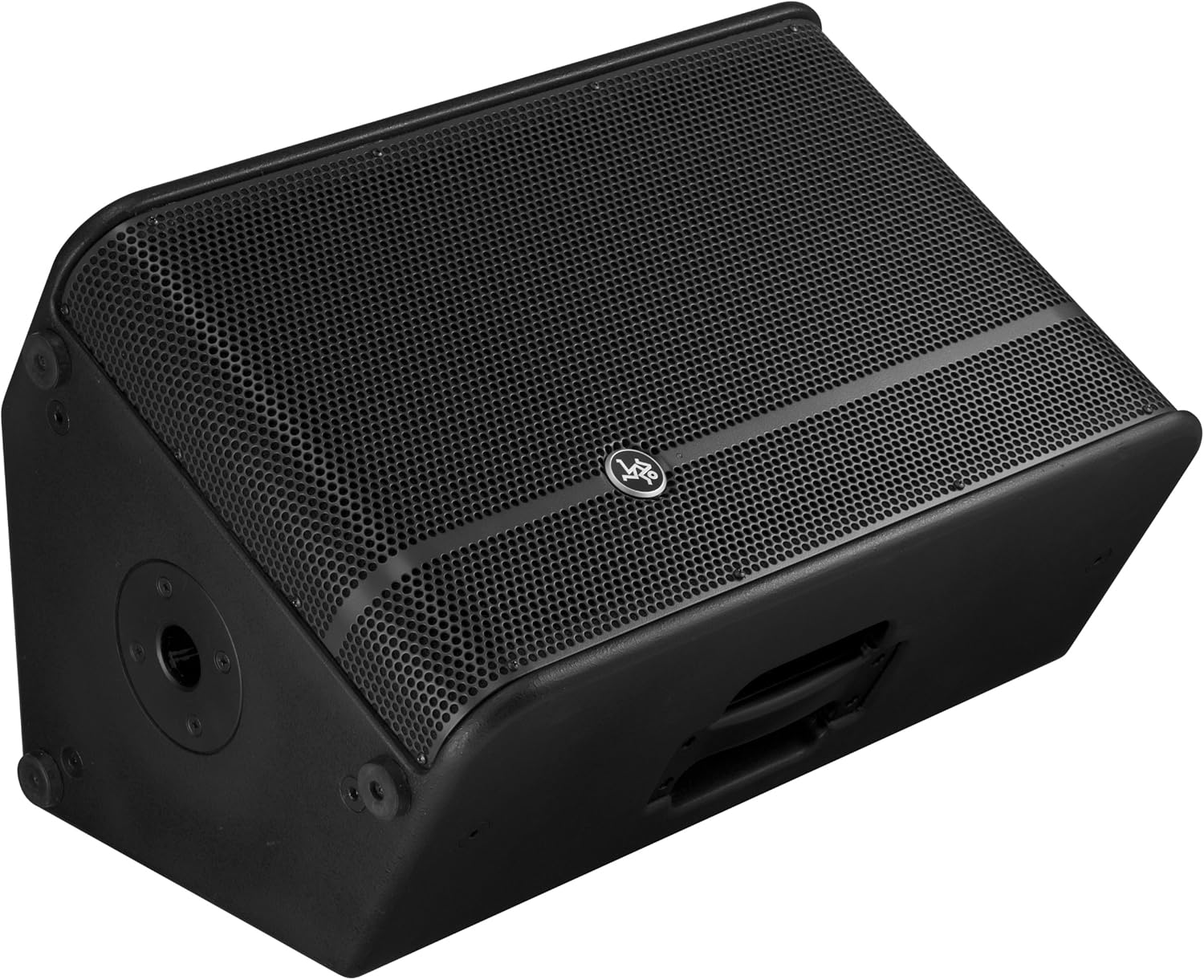
Figure 6: The HD1221 configured as a stage monitor, utilizing its 60-degree angle for optimal sound projection towards the performer.
The cabinet design allows for use as a stage monitor with a 60-degree angle. Place the loudspeaker directly on the stage floor, angled towards the performer.
Flying/Suspension

Figure 7: The HD1221 suspended vertically using appropriate rigging hardware.

Figure 8: The HD1221 suspended horizontally using appropriate rigging hardware.
The HD1221 can be flown both vertically and horizontally. Always use certified rigging hardware and consult with a qualified professional for safe installation. The user-rotatable horn allows for precise sound placement in either orientation.
دستورالعمل های عملیاتی
پس از تنظیم بلندگو، مراحل زیر را برای راهاندازی دنبال کنید:
- روشن کردن: Turn on your audio source (mixer, etc.) first, then turn on the HD1221 loudspeaker. The 'Power Light On' indicator should illuminate.
- Set Voicing Mode: Use the Voicing Mode switch on the rear panel to select the appropriate setting for your application:
- کانتور: Provides a sculpted frequency response, often suitable for music playback.
- تخت: Offers a neutral frequency response, ideal for critical listening or when external EQ is used.
- مانیتور: Optimizes the frequency response for use as a stage monitor, reducing low-end rumble and enhancing clarity.
- تنظیم سطح: Slowly increase the Level control on the rear panel to achieve the desired volume. Monitor the 'Sig/Limit' indicator; if it flashes frequently or stays lit, reduce the input level from your source or the HD1221's level to prevent distortion and potential damage.
- خاموش: When finished, turn off the HD1221 loudspeaker first, then turn off your audio source.
ویدیوی رسمی محصول
ویدیوی ۱.۱: یک پایانview of the Mackie HD1221 12-inch 2-Way High-Definition Powered Loudspeaker, demonstrating its features and applications.
تعمیر و نگهداری
Regular maintenance helps prolong the life and performance of your HD1221 loudspeaker.
- تمیز کردن: Use a dry, lint-free cloth to clean the exterior of the loudspeaker. Do not use liquid cleaners or solvents.
- توری مشبک: Periodically check the steel grille for any damage or debris. Clean gently if necessary.
- اتصالات: مطمئن شوید که همه کابلها به طور ایمن وصل شدهاند و هیچ آسیبی ندیدهاند.
- ذخیره سازی: وقتی از بلندگو استفاده نمیکنید، آن را در محیطی خشک و معتدل، دور از گرد و غبار و دمای شدید نگهداری کنید.
عیب یابی
If you encounter issues with your HD1221, refer to the following common problems and solutions:
| مشکل | علت احتمالی | راه حل |
|---|---|---|
| بدون خروجی صدا | No power; incorrect connections; low level setting; faulty cable. | Check power cable and outlet. Verify audio cable connections. Increase Level control. Test with a different cable. |
| صدای مخدوش | Input level too high; faulty cable; damaged speaker component. | Reduce input level from source or HD1221. Check 'Sig/Limit' indicator. Test with a different cable. If distortion persists, contact support. |
| بدون چراغ برق | No power; power switch off; internal fuse blown. | Ensure power cable is connected and outlet is active. Check power switch. If still no light, contact support. |
| Overheating (Thermal indicator lit) | Insufficient ventilation; prolonged high-volume operation. | Ensure adequate airflow around the unit. Reduce volume. Allow unit to cool down. |
مشخصات
Detailed technical specifications for the Mackie HD1221 powered loudspeaker:
- توان خروجی: 1200 وات پیک
- نوع بلندگو: 2-Way High-Definition Powered Loudspeaker
- ووفر: 12-inch Neodymium Woofer
- درایور فشرده سازی: 1.75-inch Titanium Compression Driver
- شاخ: بوق 90*50 درجه قابل چرخش توسط کاربر
- جنس کابینت: 15mm Birch Plywood
- توری مشبک: Cold-rolled Steel
- زاویه مانیتور: 60 درجه
- Voicing Modes: Contour, Flat, Monitor
- Ampزنده ماندن: Class-D Fast Recovery
- امپدانس: 8 اهم
- وزن مورد: 58 پوند
- پروتکل اتصال: Wi-Fi (Note: This specification might refer to internal processing or future features, as direct Wi-Fi audio input is not typical for this type of speaker.)
- شماره مدل: HD1221
- UPC: 663961030495
گارانتی
The Mackie HD1221 loudspeaker comes with a comprehensive warranty:
- الکترونیک: 3 سال گارانتی
- رانندگان: 2 سال گارانتی
Please retain your proof of purchase for warranty claims. For full terms and conditions, refer to the warranty card included with your product or visit the official Mackie webسایت
پشتیبانی کنید
For additional assistance, technical support, or service inquiries, please contact Mackie Customer Support. You can find contact information and frequently asked questions on the official Mackie webسایت
منابع آنلاین: بازدید کنید Mackie Store on Amazon برای اطلاعات و بهروزرسانیهای محصول.