
VTech 80-109744
VTech Schulstart Laptop E Instruction Manual
مدل: 80-109744
1. مقدمه
This manual provides essential information for the safe and effective use of your VTech Schulstart Laptop E. This learning computer is designed for children aged 6 and up, offering 160 educational games in both German and English. It covers subjects such as letters, words, mathematics, nature, science, and creativity.
لطفاً قبل از استفاده از دستگاه، این دفترچه راهنما را به طور کامل مطالعه کنید و آن را برای مراجعات بعدی نگه دارید.
2. اطلاعات ایمنی
هشدار: Choking hazard due to small parts that can be swallowed. Not suitable for children under 36 months.
هشدار: Strangulation hazard. Keep packaging materials away from children.
- در حین استفاده همیشه بر کودکان نظارت داشته باشید.
- دستگاه را در معرض دمای شدید یا نور مستقیم خورشید قرار ندهید.
- دستگاه را خشک نگه دارید. آن را در آب یا مایعات دیگر فرو نبرید.
- دستگاه را با یک پارچه نرم و خشک تمیز کنید. از پاک کننده های ساینده استفاده نکنید.
- مطمئن شوید که باتریها به درستی و طبق علامتهای قطبیت در جای خود قرار گرفتهاند.
- باتری های تخلیه شده را سریعا خارج کنید.
- باتری های قدیمی و جدید یا انواع مختلف باتری ها را با هم مخلوط نکنید.
- باتری های غیر قابل شارژ نباید دوباره شارژ شوند.
- باتری های قابل شارژ فقط باید تحت نظارت بزرگسالان شارژ شوند.
- قبل از شارژ کردن، باتری های قابل شارژ را از اسباب بازی خارج کنید.
- پایانه های تامین نباید اتصال کوتاه داشته باشند.
3. محتویات بسته
The VTech Schulstart Laptop E package includes:
- 1 x VTech Schulstart Laptop E
- 1 x Cursor Mouse
- 3 x AA Demonstration Batteries (for test purposes only)
Note: A VTech power adapter and VTech laptop bag are sold separately and are not included.
4. راه اندازی
4.1 نصب باتری
The device requires 3 AA batteries. The included demonstration batteries are for testing purposes only and should be replaced with new batteries for regular use.
- محفظه باتری را در قسمت زیرین لپتاپ پیدا کنید.
- با استفاده از یک پیچ گوشتی، درب محفظه باتری را باز کنید.
- Remove the old demonstration batteries (if present).
- دو باتری قلمی جدید را وارد کنید و از قطبیت صحیح (+/-) مطابق آنچه در داخل محفظه نشان داده شده است، اطمینان حاصل کنید.
- درپوش محفظه باتری را تعویض کرده و آن را با پیچ محکم کنید.

Figure 4.1: Battery installation guide. Replace demonstration batteries with new ones for extended play.
4.2 Connecting the Cursor Mouse
The VTech Schulstart Laptop E comes with a wired cursor mouse for interactive play.
- Locate the mouse port on the side of the laptop.
- Carefully insert the mouse connector into the port.
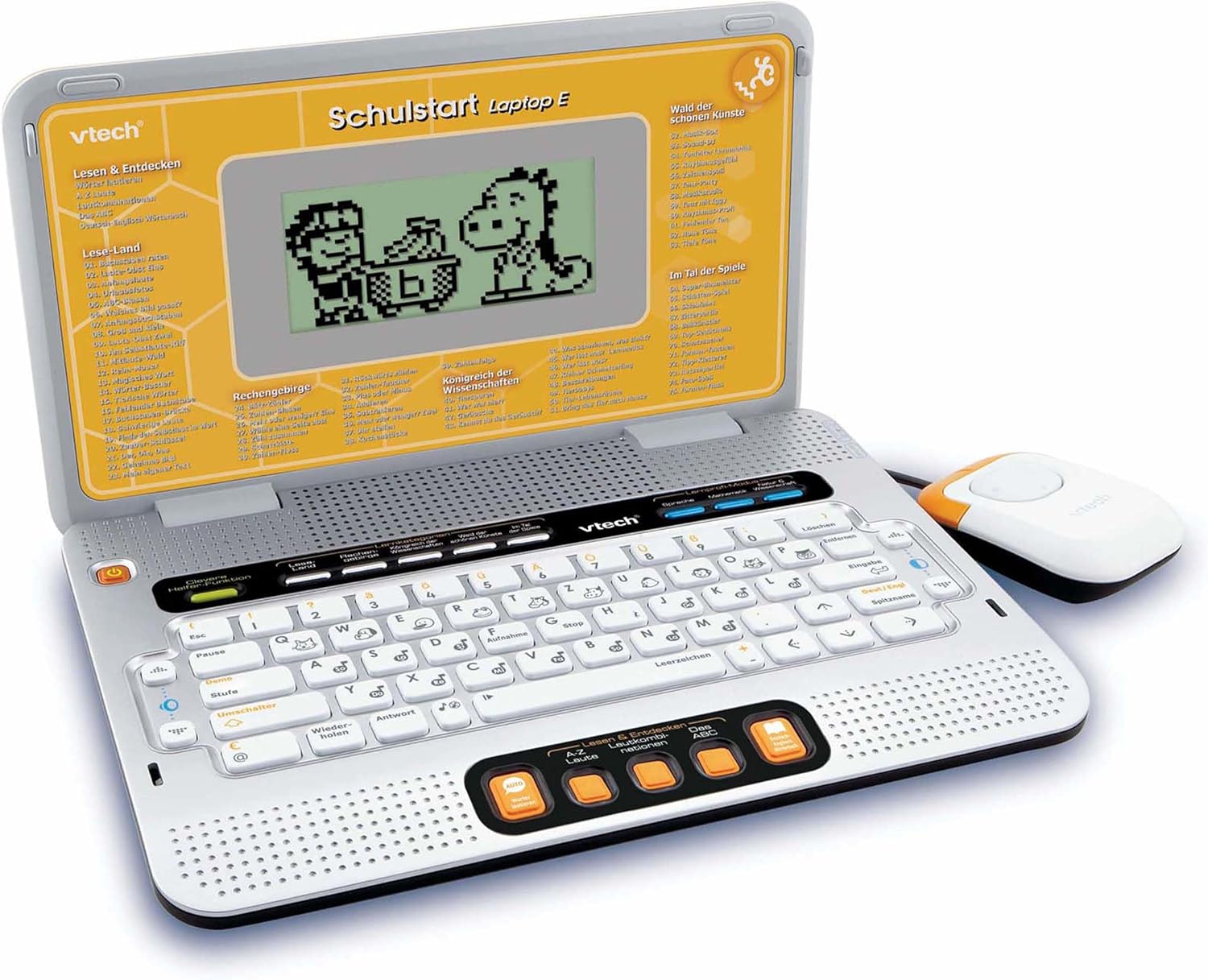
Figure 4.2: VTech Schulstart Laptop E with connected cursor mouse.
5. دستورالعمل های عملیاتی
5.1 روشن/خاموش
برای روشن کردن لپتاپ، دکمه قدرت button, usually located on the top left of the keyboard area. To turn off, press the قدرت button again or the laptop will automatically shut down after a period of inactivity to conserve battery life.
5.2 انتخاب زبان
The VTech Schulstart Laptop E supports both German and English. You can switch between languages using the dedicated language selection button or through the settings menu, if available. Refer to the on-screen prompts for initial setup.
5.3 Game Categories and Selection
The laptop features 160 educational games categorized as follows:
- Language Tools: 5 برنامه
- Letters & Words: 23 برنامه
- ریاضیات: 16 برنامه
- Nature & Science: 12 برنامه
- خلاقیت: 12 برنامه
- منطق و بازیها: 12 برنامه
Use the arrow keys and the Enter button on the keyboard, or the cursor mouse, to navigate through the menu and select a game.

Figure 5.1: Navigating game categories on the VTech Schulstart Laptop E.
5.4 Tutor Function and Learning Modes
The laptop includes a Tutor function and a Learning Pro mode to enhance the learning experience:
- Tutor Function: Features 5 direct-dial keys for language tools (sounds, phonics, sound combinations, ABC with example words, German-English dictionary). These programs assist with letter pronunciation and reading.
- Learning Pro Mode: Offers progressive learning through increasing difficulty levels, adapting to the child's progress.
- Smart Helper Function: Provides additional hints and tips in many educational games upon request.

Figure 5.2: Child using the VTech Schulstart Laptop E's interactive learning features.
6. تعمیر و نگهداری
6.1 تمیز کردن
To clean the VTech Schulstart Laptop E, use a soft, slightly damp از مواد شیمیایی قوی یا پاککنندههای ساینده استفاده نکنید. قبل از تمیز کردن، مطمئن شوید که دستگاه خاموش است و از هرگونه منبع تغذیه جدا شده است.
6.2 ذخیره سازی
Store the laptop in a cool, dry place away from direct sunlight and extreme temperatures. If the device will not be used for an extended period, remove the batteries to prevent leakage.

Figure 6.1: Optional VTech laptop bag for storage and transport (sold separately).
7 عیب یابی
| مشکل | علت احتمالی | راه حل |
|---|---|---|
| دستگاه روشن نمی شود |
|
|
| صفحه نمایش خالی است یا سوسو میزند. |
|
|
| Keys or mouse not responding. |
|
|
| صدا تحریف شده یا وجود ندارد. |
|
|
8. مشخصات
- شماره مدل: 80-109744
- ابعاد (L x W x H): 4 x 28 x 20 سانتیمتر (1.57 x 11.02 x 7.87 اینچ)
- وزن: 1.29 کیلوگرم (2.84 پوند)
- سن توصیه شده: 6 سال به بالا
- باتری ها: ۲ عدد باتری قلمی (برای استفادهی معمولی شامل نمیشود)
- زبان ها: آلمانی، انگلیسی
- تعداد بازی ها: 160
- تاریخ انتشار: 31 جولای 2010
9. گارانتی و پشتیبانی
برای اطلاعات گارانتی و پشتیبانی مشتری، لطفاً به وبسایت رسمی VTech مراجعه کنید. webبه سایت مراجعه کنید یا با توزیعکننده محلی VTech خود تماس بگیرید. رسید خرید خود را به عنوان مدرک خرید نگه دارید.
رسمی VTech Webسایت: www.vtech.com