
مقدمه
ممنون از خریدتونasing the Snakebyte Wireless Bluetooth Premium PS3 Controller. This manual provides detailed instructions for setting up, operating, maintaining, and troubleshooting your new controller. Please read this manual thoroughly before use to ensure optimal performance and longevity of your device.
محتویات بسته
لطفا بررسی کنید که همه اقلام در بسته موجود باشند:
- Snakebyte Wireless Bluetooth Premium PS3 Controller
- USB Charging Cable (approximately 3 meters)
- راهنمای دستورالعمل (این سند)

Image: The Snakebyte Wireless Bluetooth Premium PS3 Controller shown in its retail blister packaging, indicating the product and included cable.
راه اندازی
۳.۱ شارژ کنترلر
Before initial use, fully charge the controller. Connect the supplied USB charging cable to the controller's charging port and the other end to a USB port on your PlayStation 3 console or a compatible USB power adapter. The indicator lights on the controller will show charging status and turn off or change color when fully charged.
۳. اتصال به پلیاستیشن ۳
To connect the controller wirelessly to your PlayStation 3 console:
- Ensure your PlayStation 3 console is powered on.
- Connect the controller to the PS3 console using the supplied USB charging cable. This will register the controller with the console.
- را فشار دهید دکمه PS (located in the center of the controller) once. The controller will power on and attempt to establish a connection.
- Once the controller is registered and connected, the indicator lights will illuminate, typically assigning a player number.
- You can now disconnect the USB cable for wireless gameplay. If the connection is lost, reconnect the USB cable and press the PS button again.

تصویر: جلو view of the Snakebyte Wireless Bluetooth Premium PS3 Controller, showing the button layout including the central PS button.
دستورالعمل های عملیاتی
طرحبندی و توابع کنترلر
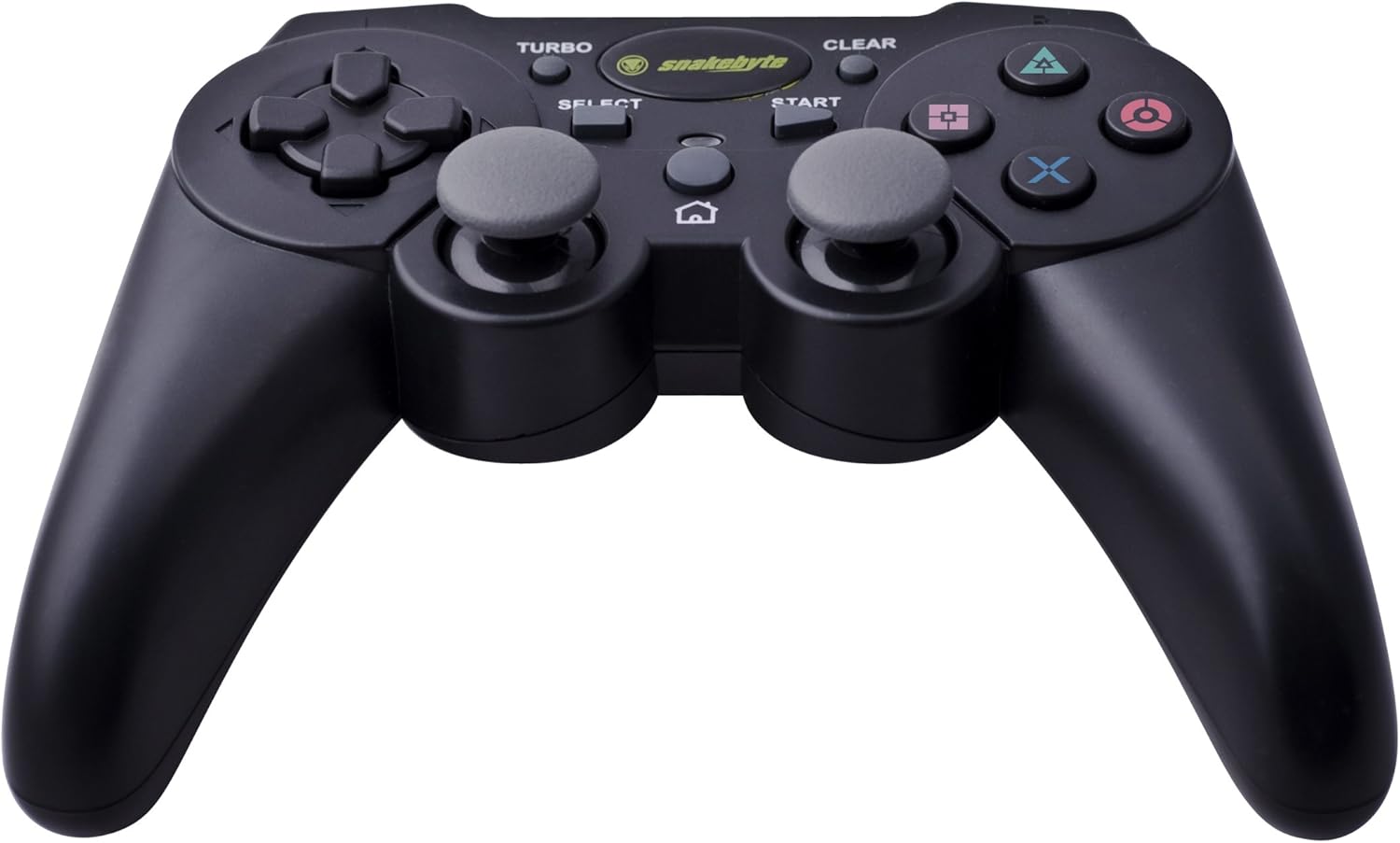
Image: The Snakebyte Wireless Bluetooth Premium PS3 Controller, highlighting the dual analog sticks and various buttons.
- پد جهتدار (D-Pad): For precise directional input in games.
- دسته آنالوگ چپ: کنترل اولیه حرکت.
- آنالوگ سمت راست: کنترل دوربین یا حرکت ثانویه.
- دکمههای عملیاتی (مثلث، دایره، ضربدر، مربع): Game-specific actions.
- دکمه های L1/R1: دکمههای روی شانه برای عملکردهای مختلف درون بازی.
- محرکهای L2/R2: Analog triggers for pressure-sensitive input, often used for acceleration/braking or aiming/firing.
- دکمه شروع: Pauses games or opens menus.
- دکمه انتخاب: Opens in-game maps, inventories, or other menus.
- دکمه PS: Powers on the controller, accesses the PS3 XMB (Cross Media Bar) menu, or turns off the controller/console.
- دکمه TURBO: عملکرد توربو را برای سایر دکمهها فعال میکند.
- دکمه CLEAR: عملکرد توربو را غیرفعال میکند.
عملکرد توربو
The controller features a TURBO function, allowing a selected button to register multiple presses rapidly with a single hold. This can be useful for certain game mechanics.
- To activate TURBO: Press and hold the دکمه TURBO, then press the desired action button (e.g., Cross, Square, Circle, Triangle, L1, R1, L2, R2). Release both buttons. The selected button will now have the TURBO function enabled.
- To deactivate TURBO for a specific button: Press and hold the دکمه CLEAR, then press the button for which TURBO is currently active. Release both buttons.
- To deactivate all TURBO functions: Press the دکمه CLEAR once without holding it down.
Motion Sensing and Vibration Feedback
This controller supports motion sensing capabilities, allowing for intuitive control in compatible games. It also provides vibration feedback to enhance immersion during gameplay, reacting to in-game events such as impacts or explosions.
روشن و خاموش کردن
- برای روشن کردن: دکمه را فشار دهید دکمه PS.
- To power off: The controller will automatically enter sleep mode after a period of inactivity to conserve battery. Alternatively, you can hold the دکمه PS for several seconds to bring up the PS3 menu, where you can choose to turn off the controller.
تعمیر و نگهداری
- تمیز کردن: برای تمیز کردن کنترلر از یک پارچه نرم و خشک استفاده کنید. از پاک کننده ها یا حلال های ساینده استفاده نکنید.
- ذخیره سازی: کنترلر را در جای خشک و خنک و دور از نور مستقیم خورشید و دمای بالا نگهداری کنید.
- مراقبت از باتری: برای افزایش عمر باتری، از خالی شدن کامل شارژ کنترلر به طور مکرر خودداری کنید. آن را به طور منظم شارژ کنید، حتی اگر به طور مداوم از آن استفاده نمیکنید.
- جلوگیری از آسیب: Do not drop the controller or expose it to excessive force or moisture.
عیب یابی
| مشکل | راه حل ممکن |
|---|---|
| Controller does not connect wirelessly. |
|
| دکمهها یا دستههای آنالوگ واکنشی نشان نمیدهند. |
|
| Controller does not charge. |
|
تنظیم مجدد کنترلر
If the controller behaves erratically or becomes unresponsive, you can perform a reset. Locate the small reset button on the back of the controller (often in a small hole). Use a thin, pointed object (like a straightened paperclip) to press and hold the reset button for a few seconds. This will restart the controller's internal electronics.
مشخصات
- برند: Snakebyte
- شماره مدل: SB904714
- پلتفرم سازگار: سونی پلی استیشن 3
- قابلیت اتصال: بی سیم (بلوتوث)
- تعداد دکمه ها: 16
- ابعاد (L x W x H): تقریباً 23.01 × 16.31 × 8.51 سانتی متر (9.06 x 6.42 x 3.35 اینچ)
- وزن: تقریباً 419.99 گرم (0.93 پوند)
- رنگ: مشکی
گارانتی و پشتیبانی
For warranty information and technical support, please refer to the documentation provided with your purchase or contact your retailer. You may also visit the official Snakebyte webبرای کمک بیشتر و اطلاعات محصول به سایت مراجعه کنید.