
Canon SD600
Canon PowerShot SD600 Digital Elph User Manual
Model: SD600 (1079B001) | Brand: Canon
1. مقدمه
This manual provides essential information for the safe and effective use of your Canon PowerShot SD600 Digital Elph camera. Please read it thoroughly before using the camera and keep it in a safe place for future reference.
The Canon PowerShot SD600 is a 6.0-megapixel digital camera equipped with a 3x optical zoom lens, designed for ease of use and high-quality imaging. It features a large 2.5-inch LCD screen for convenient shooting and playback, along with advanced imaging technologies like DIGIC II Image Processor and iSAPS Technology for enhanced performance.
ویژگی های کلیدی:
- 6.0-megapixel CCD sensor for detailed images.
- لنز با زوم اپتیکال ۱۰ برابر.
- 2.5-inch high-resolution LCD display.
- DIGIC II Image Processor for fast performance and vibrant colors.
- ISO 800 and High ISO Auto settings for low-light shooting.
- Widescreen (16:9) stills recording option.
- Fast Frame Rate Movie Mode (QVGA at 60 fps).
- Direct printing via Print/Share button with PictBridge-compatible printers.
2. راه اندازی
2.1. شارژ باتری
Before first use, fully charge the included Lithium-ion battery pack (NB-4L) using the battery charger (CB-2LV). Insert the battery into the charger, ensuring proper orientation. The charging indicator light will show the charging status.
۲. قرار دادن باتری و کارت حافظه
Open the battery/card compartment cover located at the bottom of the camera. Insert the charged battery pack, ensuring it clicks into place. Then, insert the SD memory card (16 MB card included) into its slot until it locks. Close the compartment cover securely.

شکل 2.2.1: پایین view of the camera, illustrating the battery and SD card compartment. Ensure both are inserted correctly before closing the cover.
2.3. اتصال مچ بند
Attach the included wrist strap (WS-600) to the camera's strap lug to prevent accidental drops.
3. کار با دوربین
3.1. روشن/خاموش کردن
را فشار دهید روشن/خاموش دکمهای که در بالای دوربین قرار دارد برای روشن یا خاموش کردن آن. لنز هنگام روشن شدن، باز میشود.

شکل 3.1.1: بالا view of the camera, highlighting the ON/OFF button and the shutter button with zoom control.
۴.۲ تیراندازی مقدماتی
To take a picture, ensure the camera is in shooting mode (indicated by the mode switch on the back). Frame your shot using the LCD screen or optical viewfinder. Press the shutter button halfway to focus, then press it fully to capture the image.

شکل 3.2.1: جلو view of the Canon PowerShot SD600, showing the lens, flash, and viewیاب
۵.۶. استفاده از صفحه نمایش LCD و کنترلها
The 2.5-inch LCD screen displays your composition, captured images, and menu options. Navigate menus and settings using the directional pad and FUNC./SET button on the back of the camera. The mode switch allows you to toggle between shooting, playback, and movie modes.

شکل 3.3.1: عقب view of the camera, showing the LCD screen displaying a sample image and the surrounding control buttons for navigation and settings.
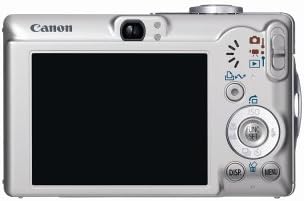
Figure 3.3.2: A diagram illustrating the layout and function of the control buttons on the back of the Canon PowerShot SD600.
3.4. حالت های تیراندازی
The PowerShot SD600 offers various shooting modes to optimize your photos for different scenes:
- خودکار: Camera automatically selects all settings.
- کتابچه راهنمای: Allows control over ISO speed, exposure compensation, and white balance.
- پرتره: Blurs background to emphasize the subject.
- شاخ و برگ: Enhances greens and other natural colors.
- برف: Prevents underexposure in bright snow scenes.
- ساحل: Optimizes for bright, sunny beach environments.
- آتش بازی: Captures brilliant fireworks displays.
- Underwater: For use with optional waterproof case (WP-DC2).
- داخل سالن: Reduces blur and improves color accuracy indoors.
- کودکان و حیوانات خانگی: Reduces focusing time for fast-moving subjects.
- Night Snapshot: Balances flash with ambient light for natural night photos.
- Color Accent: Retains one color while others turn monochrome.
- Color Swap: Replaces a selected color with another.
- Digital Macro: For extreme close-up photography.
- Stitch Assist: Aids in creating panoramic images.
- رنگ های من: Includes Vivid Blue, Vivid Green, Vivid Red, Neutral, Sepia, Black and White, Positive Film, Lighter Skin Tone, Darker Skin Tone, Custom Color.
3.5. ضبط فیلم
The camera supports various movie recording modes, including Fast Frame Rate Movie Mode (QVGA at 60 fps) for smooth video. Select the movie mode using the mode switch and press the shutter button to start/stop recording.
3.6. Connecting to a Computer/Printer
Use the included USB interface cable (IFC-400PCU) to connect the camera to a computer for image transfer. The Print/Share button simplifies direct printing to PictBridge-compatible printers (e.g., Canon CP, SELPHY, PIXMA Photo Printers) or transferring images to a computer.
4. تعمیر و نگهداری
۶.۳ تمیز کردن دوربین
- بدنه دوربین: با یک پارچه نرم و خشک پاک کنید. برای آلودگیهای سرسخت، از پارچهای به آرامی استفاده کنید.ampبا آب رقیق کنید، سپس خشک کنید.
- لنز: Use a lens brush or blower to remove dust. For smudges, use a lens cleaning cloth with a small amount of lens cleaning fluid. Avoid touching the lens surface directly.
- صفحه نمایش LCD: با یک پارچه نرم و خشک به آرامی پاک کنید. از فشار دادن محکم روی صفحه خودداری کنید.
4.2. مراقبت از باتری
- باتری ها را در زمانی که استفاده نمی کنید در جای خشک و خنک نگهداری کنید.
- از قرار دادن باتریها در معرض دمای شدید خودداری کنید.
- اگر قرار است برای مدت طولانی از دوربین استفاده نشود، باتری را خارج کنید.
4.3. ذخیره سازی
When storing the camera for long periods, remove the battery and memory card. Store the camera in a dry, well-ventilated area, away from direct sunlight and extreme temperatures.
5 عیب یابی
If you encounter issues with your Canon PowerShot SD600, refer to the following common problems and solutions:
| مشکل | علت / راه حل احتمالی |
|---|---|
| دوربین روشن نمیشود. | ممکن است باتری خالی شده یا به درستی وارد نشده باشد. مطمئن شوید که باتری شارژ شده و به درستی وارد شده است. |
| تصاویر تار هستند. | Camera shake, subject movement, or incorrect focus. Hold the camera steady, use a faster shutter speed, or ensure proper focus. |
| SD card error / Cannot save images. | SD card may be full, corrupted, or incorrectly inserted. Try reinserting the card, using a different card, or formatting the card (this will erase all data). Ensure the card is not write-protected. |
| LCD screen is blank or damaged. | Check if the display is turned off. If physically damaged (as seen in some product images), repair may be required. |
| Camera feels fragile or parts are loose. | This model has been noted for potential build quality concerns over time. Handle with care. If parts are detached, professional repair may be necessary. |
| SD card difficult to eject. | Ensure the card is pushed in fully to engage the spring mechanism for ejection. Avoid forcing the card. |
If the problem persists after trying these solutions, please contact Canon customer support or a qualified service center.
6. مشخصات
| ویژگی | جزئیات |
|---|---|
| نام مدل | SD600 |
| شماره مدل | 1079B001 |
| وضوح هنوز موثر | 6 مگاپیکسل |
| زوم اپتیکال | 3x |
| بزرگنمایی دیجیتال | 4x |
| فناوری حسگر عکس | CCD |
| اندازه صفحه نمایش | 2.5 اینچ |
| نوع نمایشگر | LCD |
| پشتیبانی می شود File قالب | خام، JPEG |
| نوع حافظه فلش | کارت SD/MMC |
| فناوری اتصال | USB |
| نوع باتری | Lithium Ion (NB-4L) |
| وزن مورد | 5.92 اونس (167.8 گرم) |
| ابعاد (تقریبا) | ۹.۵ اینچ (ارتفاع) |
| وضوح تصویر | 480p (QVGA at 60 FPS) |
| Viewیاب | نوری |
| UPC | 013803062755 |
7. گارانتی و پشتیبانی
The Canon PowerShot SD600 typically comes with a manufacturer's warranty covering defects in materials and workmanship for a specified period (e.g., one year from purchase). Please refer to the warranty card included with your product for specific terms and conditions.
Important Note: This product may be subject to specific sales conditions, such as "No Returns" and "Product is 'as-is'" as per some retailers. Please verify the return policy and condition of sale with your vendor at the time of purchase.
For technical support, service, or to inquire about replacement parts, please visit the official Canon support website or contact their customer service. Keep your purchase receipt and camera's serial number handy when seeking support.
You can find more information and support resources on the official Canon webسایت: www.usa.canon.com/support
Ask a question about this manual
Ask about setup, troubleshooting, compatibility, parts, safety, or missing instructions. Manuals+ will review the question and use this page’s manual context to help answer it.