
مقدمه
This manual provides detailed instructions for the setup, operation, maintenance, and troubleshooting of your Panasonic DMR-E55S Progressive Scan DVD Recorder / Player. This unit allows for recording, editing, and storage on DVD-RAM and DVD-R discs, as well as playback of DVD, CD, CD-R, and MP3-on-CD formats. It features progressive scan video output for enhanced picture quality.
راه اندازی
1. باز کردن بسته بندی و بررسی اجزا
تمام قطعات را با دقت از بستهبندی خارج کنید. مطمئن شوید که موارد زیر وجود دارند:
- Panasonic DMR-E55S DVD Recorder / Player unit
- کنترل از راه دور
- سیم برق
- کابلهای صوتی/تصویری (ممکن است بسته به منطقه متفاوت باشد)
Retain all packaging materials for future transport or service needs.
۲. اتصال به تلویزیون شما
The DMR-E55S offers multiple connection options for video and audio output. Choose the best option supported by your television for optimal quality.

شکل 1: جلو view of the Panasonic DMR-E55S unit. This image shows the disc tray, display panel, and front controls.
- خروجی ویدئوی کامپوننت (Y، Pb، Pr): For the highest quality analog video connection, connect component video cables (green, blue, red) from the DMR-E55S to your TV's component video input.
- خروجی S-Video: Connect an S-video cable for improved video quality over composite video.
- خروجی ویدئو کامپوزیت (RCA زرد): Connect a composite video cable for standard video quality.
- خروجی صدا (RCA قرمز/سفید): Connect red and white RCA cables from the DMR-E55S to your TV's audio input or an audio receiver.
- خروجی صوتی دیجیتال نوری: For digital surround sound, connect an optical cable to a compatible audio receiver.
- RF Coaxial Output: Connect a coaxial cable from the RF OUT jack on the DMR-E55S to your TV's antenna/cable input.

Figure 2: Rear panel of the Panasonic DMR-E55S, illustrating the various audio and video input/output ports for connection to a television or audio system.
3. اتصال برق
Connect the power cord to the AC IN terminal on the rear of the unit, then plug the other end into a standard electrical outlet.
۲.۴. روشن کردن اولیه و تنظیمات اولیه
Press the power button on the unit or remote control. Follow any on-screen prompts for initial setup, such as language selection and automatic channel search if using the RF input.
دستورالعمل های عملیاتی
۱. پخش دیسک
The DMR-E55S supports playback of DVD-Video, DVD-R, DVD-RAM, CD, CD-R/RW, and MP3-on-CD discs.
- دکمه OPEN/CLOSE را فشار دهید تا سینی دیسک باز شود.
- Place a disc on the tray with the label side facing up.
- Press OPEN/CLOSE again to close the tray. Playback will usually begin automatically.
- Use the remote control for playback functions such as Play, Pause, Stop, Fast Forward, and Rewind.

Figure 3: Front panel of the DMR-E55S during operation, showing the illuminated display with disc information.
2. Recording to DVD-RAM and DVD-R
The unit supports recording to both DVD-RAM and DVD-R discs. DVD-RAM discs allow for repeated recording and editing, while DVD-R discs are suitable for permanent recordings.
- یک دیسک قابل ضبط وارد کنید: Place a blank DVD-RAM or DVD-R disc into the disc tray.
- منبع ورودی را انتخاب کنید: Use the INPUT SELECT button on the remote or front panel to choose the desired input source (e.g., Line 1, Line 2, Tuner).
- ضبط تک لمسی: Press the RECORD button to start recording immediately. Press it again to stop.
- حالت های ضبط: The unit offers 4-mode recording (XP/SP/LP/EP) and Flexible Recording (FR) to optimize recording quality and duration based on available disc space.
- ضبط تایمر: Access the timer recording menu to schedule recordings at specific times and channels.
- Finalizing DVD-R Discs: After recording to a DVD-R disc, it must be finalized through the menu system to be playable on other DVD players. DVD-RAM discs do not require finalization.
3. Time Slip Features
The DMR-E55S includes Time Slip functions, primarily for DVD-RAM discs:
- Chasing Playback: Begin watching a program from the beginning while it is still being recorded.
- Playlist Playback: Create custom playlists from recorded content on DVD-RAM discs.
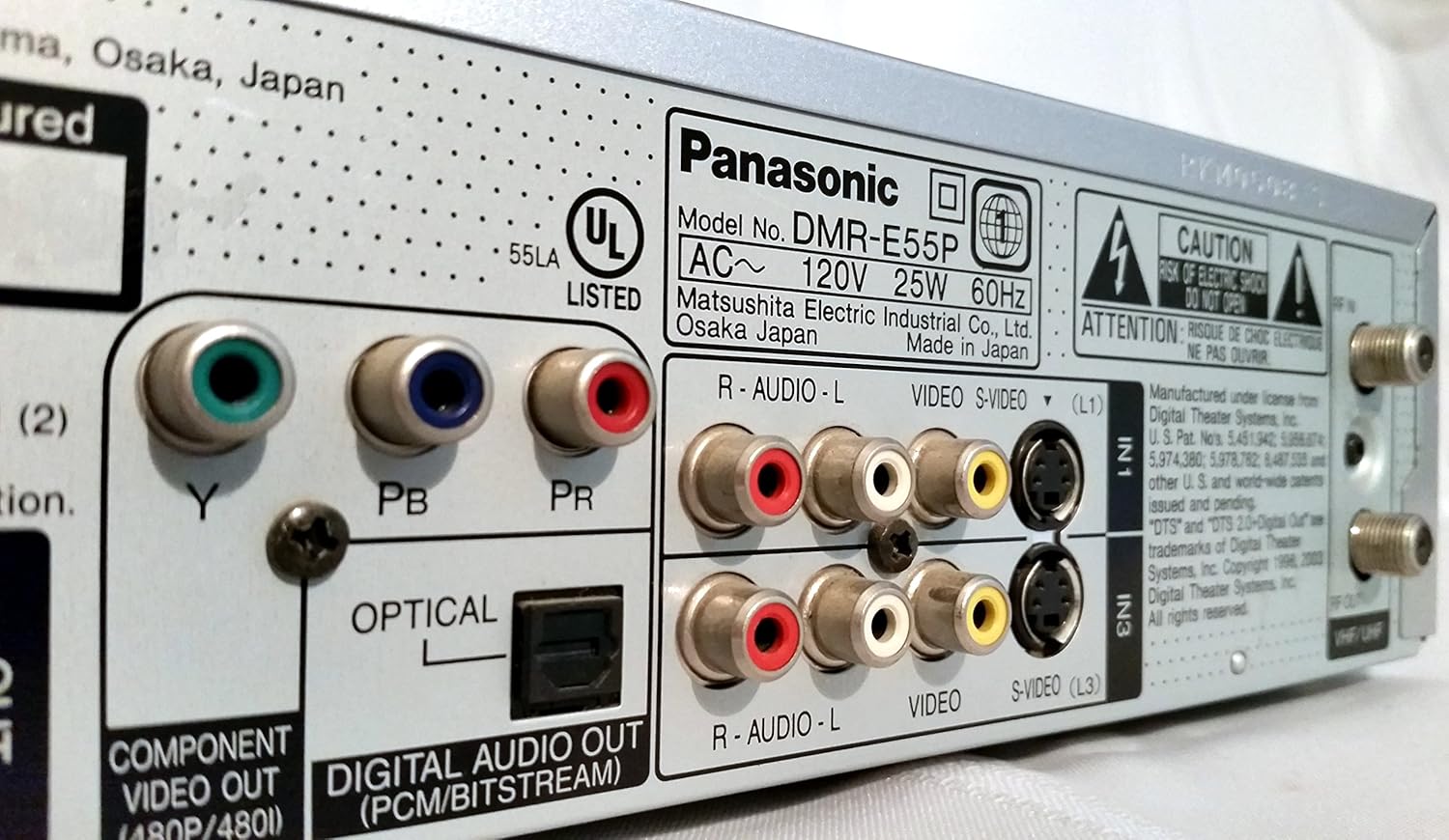
Figure 4: The remote control for the DMR-E55S, showing various buttons for playback, recording, and menu navigation.
تعمیر و نگهداری
۷.۱ تمیز کردن دستگاه
قسمت بیرونی دستگاه را با یک پارچه نرم و خشک پاک کنید. از پاک کننده های مایع یا آئروسل استفاده نکنید، زیرا ممکن است به روکش یا اجزای داخلی آسیب برسانند.
۴.۱ مراقبت از دیسک
Handle discs by their edges to avoid fingerprints and scratches. Store discs in their cases when not in use. Clean dirty discs with a soft, lint-free cloth, wiping from the center outwards.
عیب یابی
If you encounter issues with your DMR-E55S, refer to the following common problems and solutions:
| مشکل | علت / راه حل احتمالی |
|---|---|
| بدون قدرت | Ensure the power cord is securely connected to both the unit and a working electrical outlet. |
| بدون عکس و صدا | Verify all audio and video cables are correctly connected between the DMR-E55S and your TV/audio system. Check that your TV is set to the correct input source. |
| دیسک پخش نمی شود | Check if the disc is inserted correctly (label side up). Ensure the disc type is supported by the unit. Clean the disc if it is dirty or scratched. |
| ضبط نمی شود | Ensure a recordable DVD-RAM or DVD-R disc is inserted. Check if the disc has sufficient free space. Verify the input source is correctly selected. |
| Recorded DVD-R disc won't play on other players | The DVD-R disc may not have been finalized. Finalize the disc through the unit's menu system. |
| کنترل از راه دور کار نمی کند | باتریهای کنترل از راه دور را بررسی کرده و در صورت لزوم آنها را تعویض کنید. مطمئن شوید که هیچ مانعی بین کنترل از راه دور و حسگر IR دستگاه وجود ندارد. |
مشخصات
| ویژگی | توضیحات |
|---|---|
| نام تجاری | پاناسونیک |
| نام مدل | DMR-E55S |
| نوع رسانه | CD, DVD (DVD-RAM, DVD-R, DVD-Video, CD-R/RW, MP3-on-CD) |
| ویژگی خاص | اسکن پیشرونده |
| قطعنامه | 720 x 480 پیکسل |
| وضوح خروجی ویدئو | 480p |
| نوع رابط | RF, A/V (Composite), S-video, Component Video (Y, Pb, Pr), Optical Digital Audio |
| حالت خروجی صدا | Surround (Dolby Digital, DTS compatible via optical output) |
| فرمت صوتی پشتیبانی شده | DVD-Audio (2-channel), DVD-Video with surround play, MP3 |
| رمزگذاری ویدیو | MPEG-2 (Hybrid Variable Bit Rate) |
| Analog Video Format | NTSC |
| حالت های ضبط | XP, SP, LP, EP, FR (Flexible Recording) |
| ابعاد (W x H x D) | ۵.۹ اینچ در ۱۱.۸ اینچ در ۱۴.۶ اینچ |
| وزن مورد | 8.58 پوند |
| لوازم جانبی شامل | کنترل از راه دور |
اطلاعات گارانتی
This Panasonic DMR-E55S unit comes with a one-year warranty covering parts and labor from the date of purchase. Please retain your proof of purchase for warranty claims. For detailed terms and conditions, refer to the warranty card included with your product or contact Panasonic customer support.
پشتیبانی کنید
برای کمک بیشتر، پشتیبانی فنی یا سوالات مربوط به خدمات، لطفاً با پشتیبانی مشتریان پاناسونیک تماس بگیرید. میتوانید اطلاعات تماس را در وبسایت رسمی پاناسونیک پیدا کنید. webسایت یا در مستندات ارائه شده با محصول شما.