
VTech T2451
VTech t2451 2.4 GHz Analog Cordless Phone with Answering System and Caller ID User Manual
مدل: T2451
مقدمه
This manual provides comprehensive instructions for the setup, operation, and maintenance of your VTech t2451 2.4 GHz Analog Cordless Phone with Answering System and Caller ID. Please read this manual thoroughly before using your new phone system to ensure proper functionality and to take full advantage از ویژگی های آن
Key features of your VTech t2451 include:
- 2.4 GHz analog reception for clear communication.
- Digital answering system with 3 mailboxes and 15 minutes of recording time.
- 50 name/number phonebook directory for easy contact management.
- 99 name/number Caller ID history to review تماس های از دست رفته.
- Headset compatibility (2.5 mm jack) for hands-free operation.
- Hold function, page/handset locator, and selectable ring tones.
- Wall-mountable design for flexible placement.
راه اندازی
Follow these steps to set up your VTech t2451 cordless phone system.
- باز کردن بسته بندی: Carefully remove all components from the packaging. Ensure you have the cordless handset, base unit, AC power adapter, telephone line cord, and battery pack.
- نصب باتری: Open the battery compartment on the back of the cordless handset. Connect the battery pack connector to the jack inside the compartment, ensuring correct polarity. Place the battery pack into the compartment and close the cover.
- اتصال واحد پایه:
- Connect one end of the telephone line cord to the TEL LINE jack on the base unit and the other end to a telephone wall jack.
- Connect the small end of the AC power adapter to the DC IN 9V jack on the base unit. Plug the large end of the AC power adapter into a standard electrical outlet.
- شارژ کردن گوشی: Place the cordless handset in the base unit's charging cradle. The charge indicator on the handset should illuminate, indicating that the battery is charging. Allow the handset to charge for at least 12 hours before initial use.
- نصب دیواری (اختیاری): The base unit is designed to be wall-mountable. Refer to the included wall-mount bracket and instructions for secure installation.
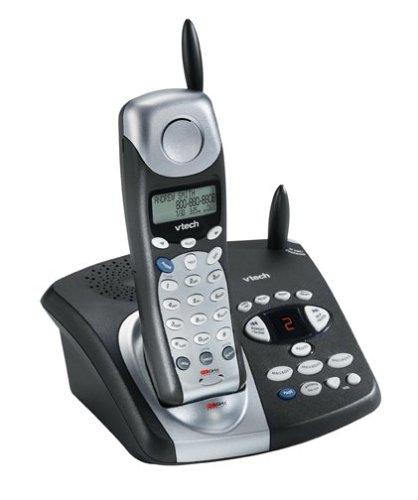
Image: The VTech t2451 cordless phone system, showing the black base unit with the silver and black handset docked in its charging cradle. The base unit features an integrated digital answering system with controls and a display.
دستورالعمل های عملیاتی
برقراری و دریافت تماس
- برای برقراری تماس: را فشار دهید صحبت کنید button, wait for a dial tone, then dial the phone number.
- برای دریافت تماس: وقتی تلفن زنگ میخورد، دکمه صحبت کنید button or any key on the keypad (Any Key Answer).
- برای پایان دادن به تماس: را فشار دهید پایان button or place the handset back in the base unit.
- عملکرد نگه داشتن: در طول تماس ، دکمه را فشار دهید نگه دارید button to place the call on hold. Press صحبت کنید دوباره برای از سرگیری تماس
سیستم پاسخگویی دیجیتال
Your phone system includes a digital answering system with 3 mailboxes and 15 minutes of recording time.
- پخش پیامها: را فشار دهید بازی کنید برای گوش دادن به پیامهای جدید، دکمه روی واحد پایه را فشار دهید.
- ضبط پیام خروجی (OGM): Follow the voice prompts to record a personalized outgoing message.
- Mailbox Management: The system supports up to 3 distinct mailboxes. Refer to the detailed instructions in the full user guide for setting up and accessing individual mailboxes.
شناسه تماس گیرنده و دفترچه تلفن
- شناسه تماس گیرنده: When subscribed to Caller ID service, the handset display will show the caller's name and number. Press the CID دکمه به review the 99-name/number Caller ID history.
- فهرست دفترچه تلفن: Store up to 50 names and numbers in the phonebook. Use the navigation buttons to scroll through entries and the MENU/SELECT button to add or edit entries.
توابع دیگر
- Page/Handset Locator: را فشار دهید PAGE button on the base unit to locate a misplaced handset.
- Ringer Tones: Customize your phone's ringer by selecting from various available tones. Refer to the handset settings menu.
- استفاده از هدست: Connect a 2.5 mm compatible headset to the headset jack on the side of the handset for hands-free communication.
تعمیر و نگهداری
Proper care ensures the longevity of your VTech t2451 phone system.
- تمیز کردن: تلفن و پایه را با یک پارچه نرم و لطیف تمیز کنید.amp پارچه از مواد شیمیایی خشن یا پاک کننده های ساینده استفاده نکنید.
- مراقبت از باتری:
- همیشه وقتی از گوشی استفاده نمیکنید، آن را به پایه برگردانید تا از شارژ ماندن آن مطمئن شوید.
- اگر قرار است برای مدت طولانی از گوشی استفاده نکنید، باتری را از گوشی خارج کنید.
- Replace the battery when its performance significantly degrades. Use only the specified replacement battery pack.
- شرایط محیطی: از قرار دادن گوشی در معرض دمای شدید، نور مستقیم خورشید یا رطوبت خودداری کنید.
عیب یابی
If you experience issues with your VTech t2451, try these common troubleshooting steps.
| مشکل | راه حل |
|---|---|
| بدون شماره گیری |
|
| دریافت ضعیف یا پارازیت. |
|
| گوشی شارژ نمیشود. |
|
| سیستم پاسخگویی پیامها را ضبط نمیکند. |
|
مشخصات
| ویژگی | جزئیات |
|---|---|
| نام تجاری | VTech |
| شماره مدل | T2451 |
| نوع تلفن | بی سیم |
| فرکانس | آنالوگ ۵.۸ گیگاهرتز |
| نوع سیستم پاسخگویی | دیجیتال |
| ظرفیت ضبط | دقیقه 15 |
| Mailboxes | 3 |
| راهنمای دفترچه تلفن | ۲۵ نام/شماره |
| حافظه تماس گیرنده | ۲۵ نام/شماره |
| سازگاری هدست | جک 2.5 میلی متری |
| منبع تغذیه | سیم برقی |
| ابعاد محصول | 7.1 x 8.5 x 5.1 اینچ |
| وزن مورد | 2.19 پوند |
| سازنده | Vtech |
گارانتی و پشتیبانی
For warranty information, please refer to the warranty card included with your product packaging or visit the official VTech website. VTech provides customer support for product inquiries, technical assistance, and service. Contact information can typically be found on the VTech webسایت یا در مستندات اصلی محصول.
سازنده: VTech