
Behringer XENYX X2222USB
Behringer XENYX X2222USB Premium Mixer
Kasutusjuhend
Sissejuhatus
This manual provides comprehensive instructions for the setup, operation, maintenance, and troubleshooting of your Behringer XENYX X2222USB Premium 22-Input 2/2-Bus Mixer. Please read this manual thoroughly before operating the device to ensure proper use and to maximize its performance and longevity.
The Behringer XENYX X2222USB is a high-performance audio mixer designed for professional audio applications. It features an integrated USB computer audio interface, allowing for seamless blending and shaping of multiple audio signals and distribution to various outputs. Key features include eight top-tier XENYX microphone preamps, British-style EQs, eight user-friendly one-knob compressors, and a built-in 24-bit dual engine effects processor.
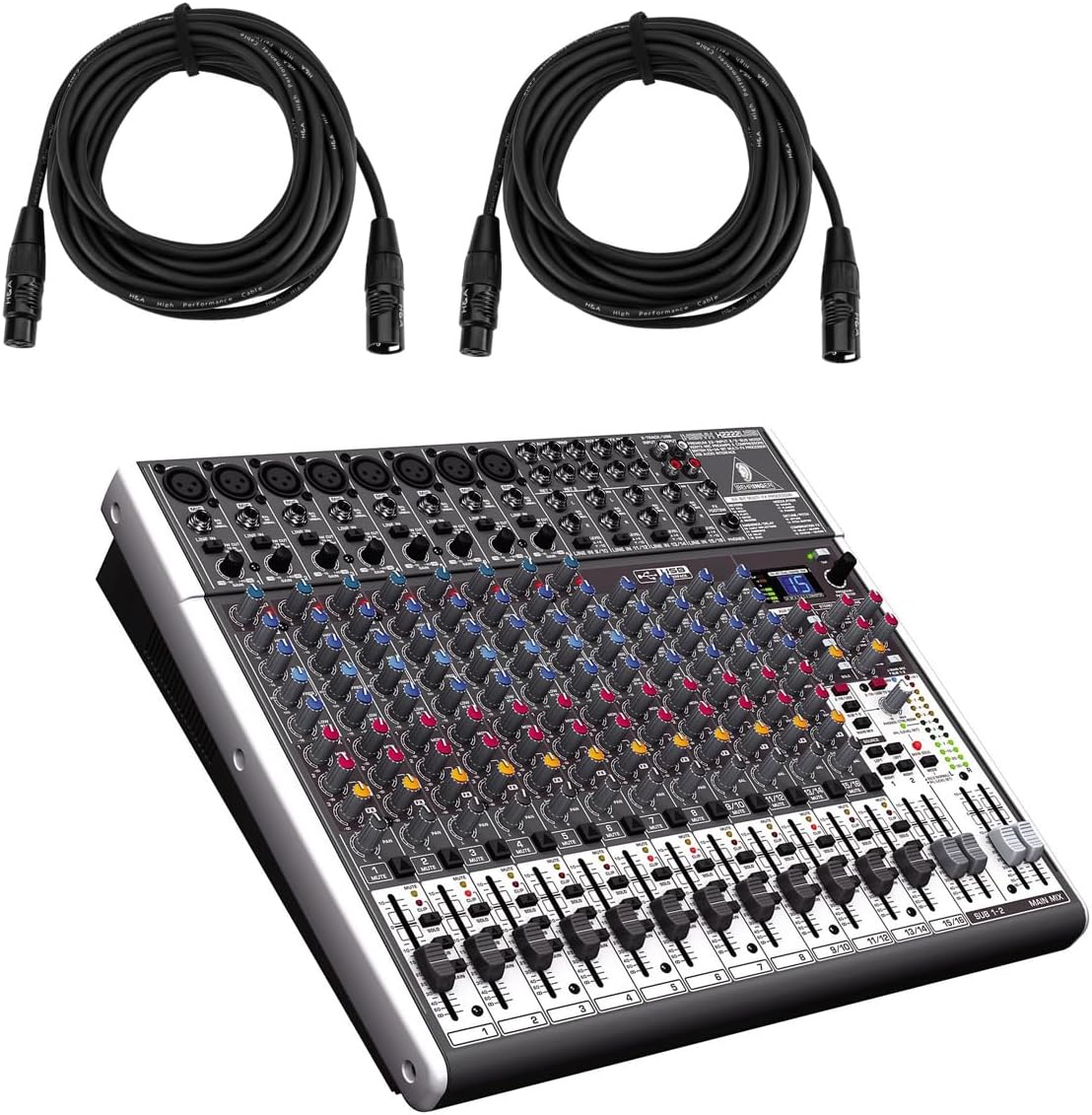
Figure 1: Behringer XENYX X2222USB Mixer with included XLR cables. This image shows the mixer from an angled top-front view, alongside two coiled XLR microphone cables.
Olulised ohutusjuhised
- Lugege neid juhiseid.
- Hoidke need juhised alles.
- Võtke arvesse kõiki hoiatusi.
- Järgige kõiki juhiseid.
- Ärge kasutage seda seadet vee lähedal.
- Puhastage ainult kuiva lapiga.
- Ärge blokeerige ventilatsiooniavasid. Paigaldage vastavalt tootja juhistele.
- Ärge paigaldage soojusallikate, näiteks radiaatorite, küttekehade, ahjude või muude seadmete (sh amptõsteseadmed), mis toodavad soojust.
- Ärge kahjustage polariseeritud või maandatud pistiku ohutust. Polariseeritud pistikul on kaks laba, millest üks on laiem kui teine. Maandustüüpi pistikul on kaks laba ja kolmas maandushark. Lai tera või kolmas haru on teie ohutuse tagamiseks. Kui kaasas olev pistik teie pistikupessa ei sobi, pöörduge vananenud pistikupesa väljavahetamiseks elektriku poole.
- Kaitske toitejuhet selle peale kõndimise või muljumise eest, eriti pistikute, pistikupesade ja nende seadmest väljumise kohas.
- Kasutage ainult tootja poolt määratud lisaseadmeid/tarvikuid.
- Kasutage ainult tootja poolt määratud või koos seadmega müüdava käru, aluse, statiivi, kronsteini või lauaga. Käru kasutamisel olge käru/seadme kombinatsiooni teisaldamisel ettevaatlik, et vältida ümberminekust põhjustatud vigastusi.
- Ühendage seade vooluvõrgust lahti äikesetormide ajal või siis, kui seda pikka aega ei kasutata.
- Andke kõik hooldustööd kvalifitseeritud teeninduspersonalile. Hooldus on vajalik, kui seade on mingil viisil kahjustatud, nt toitejuhe või pistik on kahjustatud, vedelikku või seadmesse on kukkunud esemeid, seade on sattunud vihma või niiskuse kätte, ei tööta normaalselt või on maha kukkunud.
Pakendi sisu
Palun veenduge, et kõik allpool loetletud esemed on teie pakendis olemas:
- Behringer XENYX X2222USB Mixer
- Racki kinnitused
- EnergyXT2.5 Software (download/license information)
- 2 x H&A XLR Cables (15' 8mm)
- Toitejuhe
- Kasutusjuhend (see dokument)
Seadistamine
Follow these steps to set up your Behringer XENYX X2222USB mixer for initial use.
1. Toiteühendus
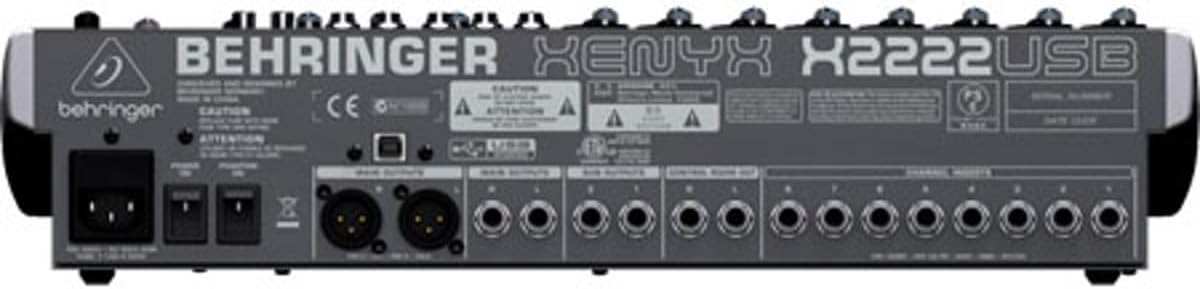
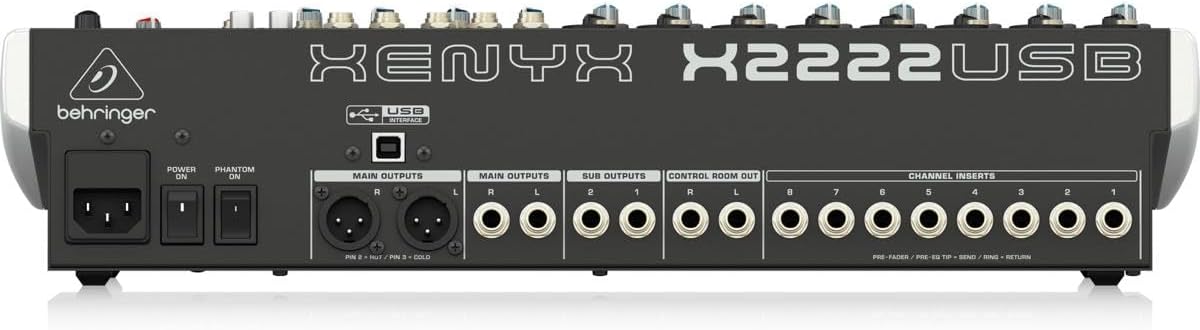
Connect the supplied power cord to the mixer's power input on the rear panel and then to a suitable AC power outlet. Ensure the power switch is in the OFF position before connecting.

Figure 2: Rear panel of the XENYX X2222USB mixer, highlighting power input, main outputs, sub outputs, control room out, and channel inserts.
2. Helisisendi ühendused
The mixer features 8 XLR mic inputs with XENYX preamps and 12 line inputs (8 mono, 4 stereo). Connect your microphones, instruments, and other audio sources to the appropriate input jacks.
- Mikrofonid: Use XLR cables (like the included H&A cables) to connect microphones to the XLR inputs (1-8).
- Liinitaseme seadmed: Use 1/4" TRS or TS cables for line-level instruments or devices to the 1/4" line inputs.
Joonis 3: näitamples of XLR male (left) and female (right) connectors, commonly used for microphone connections.
3. Heliväljundi ühendused
Connect your main speakers, monitors, or recording devices to the mixer's output jacks.
- Peamised väljundid: Use XLR or 1/4" TRS cables for your main stereo speakers.
- Juhtimisruumist väljumine: For connecting studio monitors.
- Alamväljundid: For routing specific groups of channels.
4. USB Connection (for Computer Audio Interface)
Connect the mixer to your computer using a standard USB cable. This enables bi-directional audio transfer for recording and playback.
- Ensure your computer meets the system requirements for the EnergyXT2.5 software.
- Install any necessary drivers (usually automatically detected by modern operating systems, but check Behringer's website if issues arise).
- Install the included EnergyXT2.5 software for advanced recording and production capabilities.
Mikseri kasutamine
See jaotis pakub üleview of the mixer's controls and basic operation.

Joonis 4: esipaneel üleview of the XENYX X2222USB mixer, displaying all channels, faders, knobs, and the effects section.
Channel Strips (Mono Channels 1-8)
- Signaali: Adjusts the input sensitivity for microphones and line-level signals. Set this to achieve a healthy signal level without clipping.
- Kompressor: One-knob compressor for dynamic range control. Turn clockwise to increase compression.
- EQ (ekvalaiser): 3-band British-style EQ with swept mid.
- KÕRGE: Adjusts treble frequencies.
- MID: Adjusts mid-range frequencies. The FREQ knob selects the specific mid-frequency to be adjusted.
- LOW: Adjusts bass frequencies.
- AUX saadab: Three auxiliary sends per channel (FX1, MON1, MON2) for routing signals to external effects processors or stage monitorid.
- PAN: Positions the channel's signal in the stereo field (left to right).
- MUTE: Mutes the channel's output.
- SOLO: Isoleerib kanali jälgimiseks.
- Kanali fader: Juhib üksiku kanali väljundtaset.
Stereo Channels (9/10, 11/12, 13/14, 15/16)
These channels are designed for stereo line-level inputs and feature simplified controls compared to mono channels.
Efektide protsessor
The built-in 24-bit dual engine effects processor offers 16 editable presets including reverb, chorus, flanger, delay, and pitch shifter. Use the PROGRAMM knob to select an effect and the FX SAADA controls to apply it to channels.
USB audio liides
The integrated USB interface allows for bi-directional audio streaming with your computer. This enables direct recording of your mix and playback of audio from your computer through the mixer.
- Salvestus: The main stereo mix can be sent to your computer for recording in a DAW (Digital Audio Workstation) like EnergyXT2.5.
- Taasesitus: Audio from your computer can be routed back into the mixer for monitoring or integration into your live mix.
Peamine segusektsioon
- Põhimiksi faderid: Stereo põhimiksi üldist väljundtaset saab reguleerida.
- Taseme mõõturid: Provide visual indication of the main mix output level. Aim for levels around 0 dB to avoid clipping.
- Fantoomtoide (+48 V): Activates phantom power for condenser microphones connected to XLR inputs. Ensure microphones requiring phantom power are connected before activating.
Hooldus
Nõuetekohane hooldus tagab teie mikseri pikaealisuse ja optimaalse jõudluse.
- Puhastamine: Mikseri välispinna puhastamiseks kasutage pehmet ja kuiva lappi. Vältige abrasiivsete puhastusvahendite, lahustite või vahade kasutamist. Ärge pihustage vedelikke otse mikserile.
- Ventilatsioon: Veenduge, et ventilatsiooniavad poleks blokeeritud. Piisav õhuvool on ülekuumenemise vältimiseks ülioluline.
- Hoiustamine: When not in use for extended periods, store the mixer in a cool, dry place, away from direct sunlight and extreme temperatures. If possible, use the original packaging or a protective case.
- Kaabli haldamine: Regularly check all cables for damage. Replace frayed or damaged cables immediately to prevent signal loss or electrical hazards.
Veaotsing
See jaotis käsitleb levinud probleeme, millega võite kokku puutuda, ja pakub lahendusi.
| Probleem | Võimalik põhjus | Lahendus |
|---|---|---|
| No sound output from main mix. |
|
|
| Moonutatud heli. |
|
|
| USB audio not working. |
|
|
Tehnilised andmed
| Funktsioon | Detail |
|---|---|
| Kaubamärk | Behringer |
| Mudel | XENYX X2222USB |
| Kanalite arv | 22 (8 mono, 4 stereo) |
| Mikrofonamps | 8 x XENYX Mic Preamps |
| Kompressorid | 8 x One-knob Compressors |
| Ekvalaiser | British-style 3-band EQ with swept mid on mono channels |
| Efektide protsessor | 24-bit dual engine with 16 presets |
| Ühenduvustehnoloogia | USB (bi-directional audio interface) |
| Väljundühenduse tüüp | XLR, 1/4" TRS |
| Toiteallikas | Juhtmega elekter |
| Toote mõõtmed | 20.75 x 15.8 x 6 tolli (52.7 x 40.1 x 15.2 cm) |
| Kauba kaal | 15.22 naela (6.9 kg) |
Garantii teave
The Behringer XENYX X2222USB Mixer bundle includes Adorama's 1-year warranty. For specific terms, conditions, and to register your product, please refer to the warranty documentation provided with your purchase or visit the official Behringer or Adorama support websaidid.
Garantiinõuete esitamiseks säilitage ostutõend.
Toetus
For further assistance, technical support, or to download the latest drivers and software, please visit the official Behringer websait:
You may also refer to the Behringer Store on Amazon for product information and related accessories: Behringer Amazon Store
Ask a question about this manual
Ask about setup, troubleshooting, compatibility, parts, safety, or missing instructions. Manuals+ will review the question and use this page’s manual context to help answer it.