
SmallRig RF20C
SmallRig RF20C RGB Portable LED Photo Torch User Manual
Model: RF20C (5335)
Marca: SmallRig
1. Introducción
The SmallRig RF20C RGB Portable LED Photo Torch is a versatile and powerful lighting tool designed for photographers, videographers, and content creators. It features 5-color LED beads, adjustable beam angle, and supports creative lighting effects with included gobos. This manual provides essential information for the safe and effective use of your device.
2. Información de seguridad
- No exponga el dispositivo al agua ni a la humedad excesiva.
- Evite la exposición directa de los ojos a la luz LED.
- No desmonte ni modifique el dispositivo. Las reparaciones solo deben ser realizadas por personal autorizado.
- Mantener fuera del alcance de los niños.
- Ensure proper ventilation during extended use, as the device may become warm.
- Utilice únicamente el cable de carga y el adaptador de corriente especificados.
3. Contenido del paquete
Verifique que todos los artículos estén presentes en su paquete:
- RF20C Portable Focusable LED Video Light x 1
- Gobos x 20
- Silicone Gobo Holder x 1
- Bolsa de almacenamiento x 1
- Manual de usuario x 1 (Este documento)
- Cable de carga x 1
4. Configuración
4.1 Carga inicial
Before first use, fully charge the RF20C. Connect the provided USB-C charging cable to the device's charging port and to a compatible USB power adapter (PD 36W recommended). The device can be used while charging.

Figure 4.1: Internal battery illustration and runtime information.

Figure 4.2: Portable design, mounting options, cooling fan, and charging capability.
4.2 Attaching Gobos
To use the creative pattern gobos, first remove the plano-convex lens from the front of the light. Then, attach the silicone gobo holder and insert the desired gobo. This ensures optimal projection effects.

Figure 4.3: Gobo projection examples and installation tip.
5. Instrucciones de funcionamiento
5.1 Encendido/apagado y controles básicos
The RF20C features a single multi-function button for control. To prevent accidental activation during transport, the device requires a specific action to turn on.
- Encendido: Rotate the control button to turn on the device.
- Apagado: Mantenga presionado el botón de control durante 3 segundos.
- Cambiar el color: Short press the control button to cycle through the available colors (Red, 5600K White, Purple, Orange, Cyan).
- Ajustar el brillo: Rotate the control button to increase or decrease the light brightness.
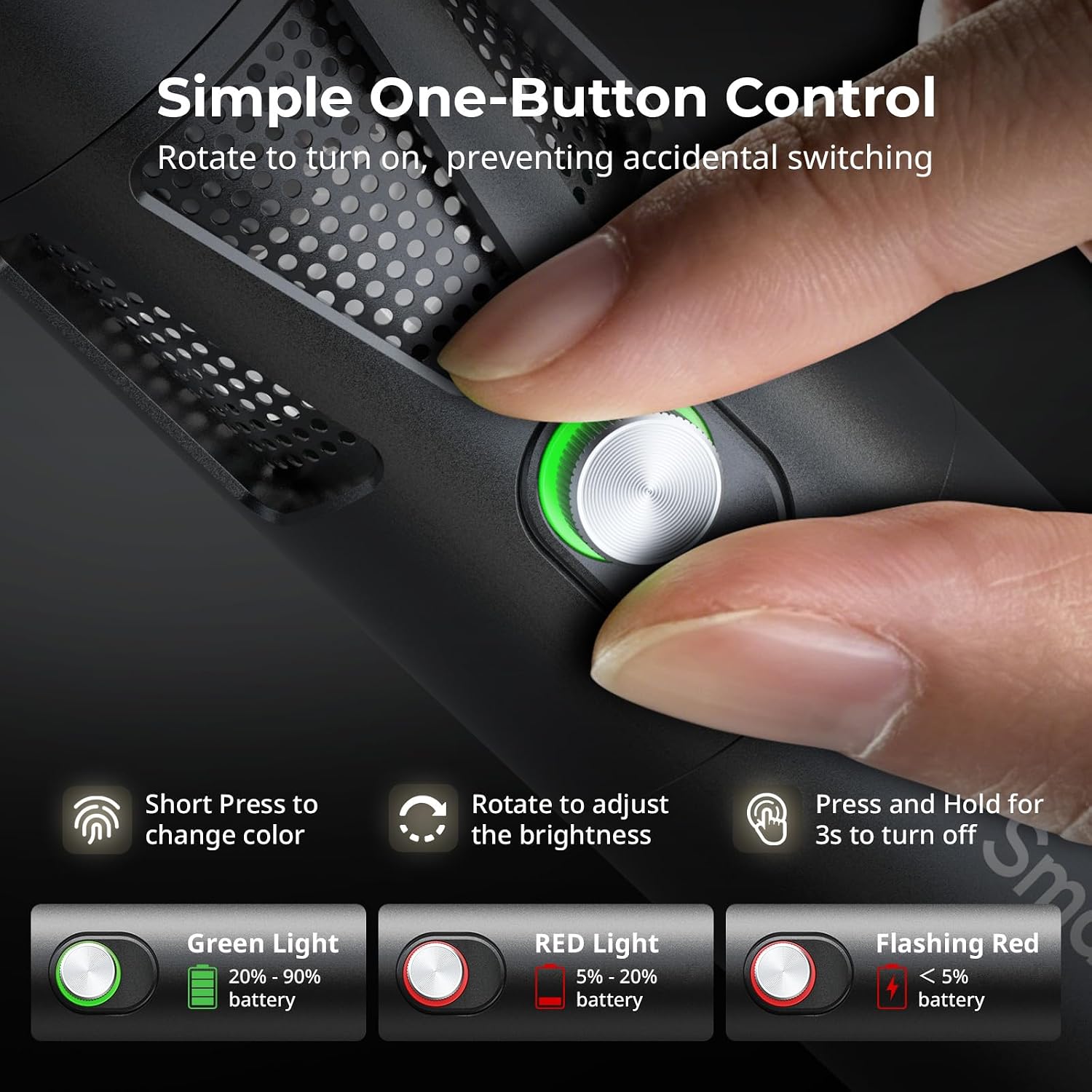
Figure 5.1: One-button control and battery indicator.

Figure 5.2: Available LED colors.
5.2 Ajuste del ángulo del haz
The front plano-convex lens allows for adjustment of the beam angle. Push or pull the lens to change the focus of the light from a narrow 24° beam to a wider 60° diffusion.
- Extend the lens: Narrows the beam (e.g., 24°).
- Retract the lens: Diffuses the beam (e.g., 60°).

Figure 5.3: Beam angle adjustment mechanism.
5.3 Indicador de batería
The control button's LED indicates the battery status:
- Luz verde: 20% - 90% de batería restante.
- Luz roja: 5% - 20% de batería restante.
- Luz roja intermitente: Queda menos del 5% de batería.

Figure 5.4: Brightness comparison of RF20C.
6. Mantenimiento
- Clean the device regularly with a soft, dry cloth. Do not use harsh chemicals or abrasive materials.
- Guarde el dispositivo en un lugar fresco y seco, alejado de la luz solar directa y de temperaturas extremas.
- When not in use for extended periods, charge the battery to approximately 50% every three months to prolong battery life.
- Keep the lens and LED surface free from dust and fingerprints for optimal light output.
7. Solución de problemas
| Problema | Posible causa | Solución |
|---|---|---|
| El dispositivo no se enciende. | Batería baja; procedimiento de encendido incorrecto. | Charge the device. Ensure you rotate the control button to power on. |
| La salida de luz es tenue. | Low battery; brightness set too low; dirty lens. | Charge the device. Rotate the control button to increase brightness. Clean the lens. |
| Gobo projection is blurry. | Plano-convex lens not removed; gobo not seated correctly. | Remove the plano-convex lens before attaching the silicone gobo holder. Ensure gobo is properly inserted. |
| Device becomes warm during use. | Normal operation, especially at high power; fan obstruction. | This is normal. Ensure the fan vents are not obstructed for proper heat dissipation. If excessively hot, reduce brightness or allow to cool. |
| El ruido del ventilador es perceptible. | Funcionamiento normal para refrigeración. | The device uses a high-speed fan for efficient heat dissipation. This noise is part of normal operation. Consider distance from audio recording equipment. |
8. Especificaciones
| Característica | Detalle |
|---|---|
| Modelo | RF20C (5335) |
| Fuerza | 20 W |
| Aporte | 20 V / 1.8 A (max. 36 W) |
| Colores de LED | Red, 5600K White, Purple, Orange, Cyan |
| Índice de reproducción cromática (IRC) | ≥ 97 |
| Índice de consistencia de iluminación de televisión (TLCI) | ≥ 99 (at 5600 K) |
| Luminancia | 5400 Lux @ 1m / 5600K |
| Capacidad de la batería | 10000mAh (2 x 5000mAh / 7.4V / 37Wh) |
| Tiempo de ejecución (máxima potencia) | Hasta 1.5 horas |
| Cargando | USB-C PD 36W Fast Charging, supports charging while operating |
| Ajuste del ángulo de haz | 24° a 60° |
| Material | Aleación de aluminio, ABS |
| Dimensiones del producto | φ49.0 x 200.0 mm / φ1.9 x 7.9 inches |
| Peso del producto | 520.0 ± 20.0 g / 18.3 ± 0.7 onzas |
| Tecnología de conectividad | USB |
| País natal | Porcelana |
9. Garantía y soporte
SmallRig products are designed and manufactured to the highest quality standards. This product is covered by a limited warranty from the date of purchase. For detailed warranty terms, technical support, or service inquiries, please refer to the official SmallRig websitio o póngase en contacto con su distribuidor local.
Conserve su comprobante de compra para reclamos de garantía.
10. Escenarios de uso
The SmallRig RF20C is suitable for various applications, including:
- Fotografía
- Grabación de vídeo
- Transmisión en vivo
- Creative Accent Lighting
- Macro Work and Close-ups

Figura 10.1: Examples of RF20C usage scenarios.
Ask a question about this manual
Ask about setup, troubleshooting, compatibility, parts, safety, or missing instructions. Manuals+ will review the question and use this page’s manual context to help answer it.