
1. Producto terminadoview
The NovaStar TB20 Plus is a high-performance, cost-effective asynchronous LED controller designed for managing full-color LED displays. It offers smart features such as Wi-Fi connectivity, remote management, and mobile app control, making it suitable for various applications including storefront signs, retail displays, and promotional screens.
Las características principales incluyen:
- High Pixel Load Capacity: Supports up to 650,000 pixels with resolutions up to approximately 1920x1080, compatible with various LED module scan configurations.
- Conectividad de red dual: Built-in 2.4GHz Wi-Fi and 10/100M Ethernet for remote content updates and device monitoring.
- Gestión de aplicaciones móviles: Free iOS and Android app for managing multiple devices, scheduling playlists, and performing OTA firmware updates.
- Rich Multimedia Support: Plays MP4, AVI, MOV (H.264), JPG, PNG, BMP formats, scrolling text, live clock, and real-time weather. Supports multi-zone layouts.
- Instalación Plug and Play: Compact design, powered by standard DC 5V/2A, with content loading via USB drive.
- Almacenamiento expandible: 8GB internal storage with microSD/TF card expansion capability.
- Amplio rango operativo: Funciona de forma fiable a temperaturas de -20 °C a +60 °C.
2. Qué incluye
Por favor verifique que todos los artículos estén presentes en el paquete:
- NovaStar TB20 Plus Playback Controller ×1
- DC 5V / 2A Power Adapter ×1
- Quick Start Guide ×1 (includes English instructions)

Image: The NovaStar TB20 Plus controller with its Wi-Fi antenna connected, showing the various ports and indicator lights.
3. Guía de configuración
Follow these steps for initial setup of your NovaStar TB20 Plus controller:
- Conectar a la pantalla LED: Connect the TB20 Plus to your LED display using an Ethernet cable from the controller's Ethernet output port to the receiving card of the LED display.
- Conecte la electricidad: Plug the DC 5V / 2A power adapter into the controller's power input port and then into a power outlet. The PWR indicator light should illuminate.
- Conexión de red:
- Wifi: Attach the provided Wi-Fi antenna to the designated port. You can configure Wi-Fi settings later via the mobile app or web interfaz.
- Ethernet: For a wired connection, connect an Ethernet cable from your network router or switch to the controller's Ethernet input port.
- Initial Content Loading (Optional): To load content directly, insert a USB drive containing your media files into the USB port. The controller can automatically play content from the USB drive after setup.
- Instalación de la aplicación móvil: Download the official NovaStar mobile application from the iOS App Store or Google Play Store on your smartphone or tablet.
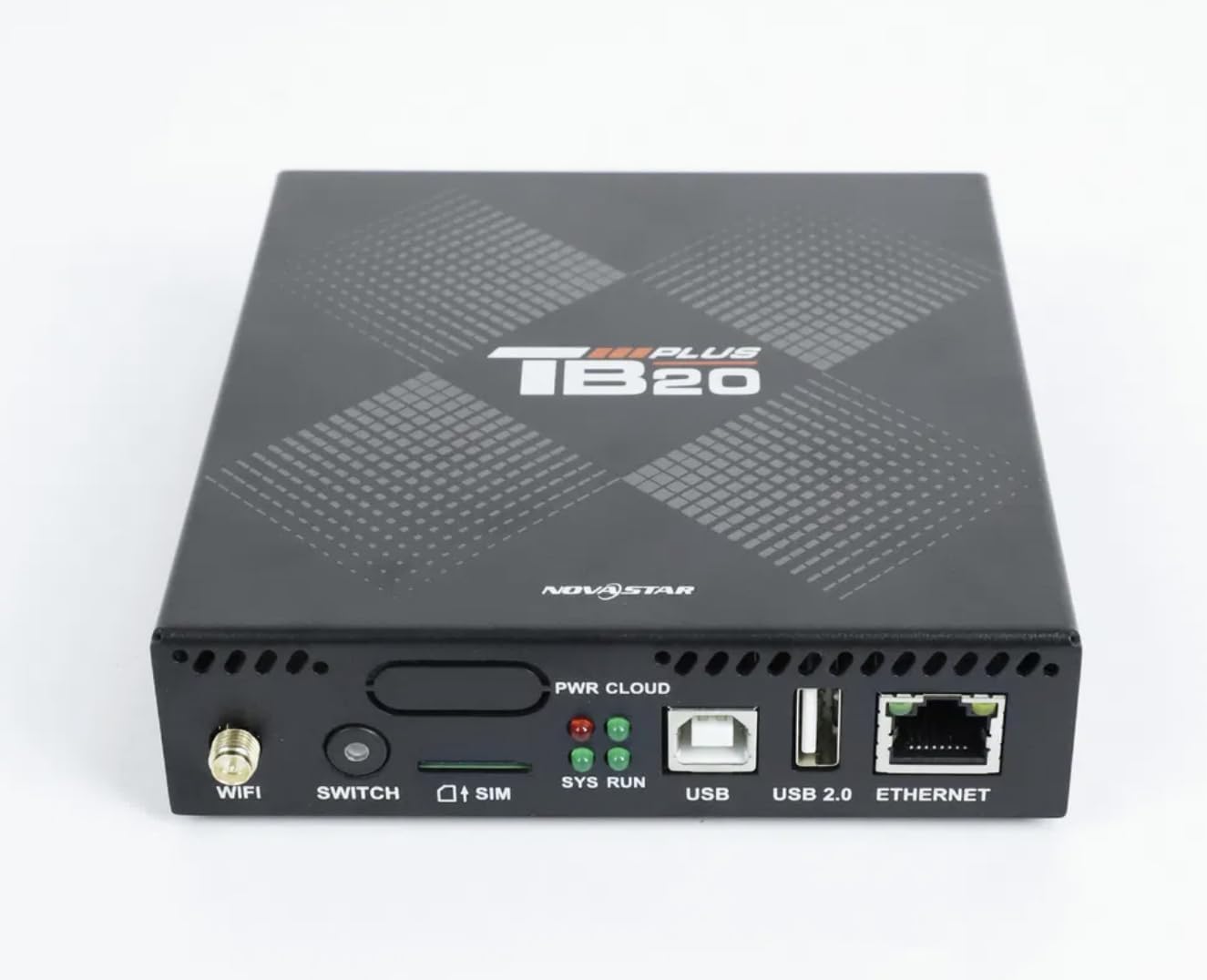
Imagen: Un primer plano frontal view of the NovaStar TB20 Plus, highlighting the Wi-Fi antenna port, SIM card slot, USB ports, and Ethernet port.
4. Instrucciones de funcionamiento
The NovaStar TB20 Plus offers flexible content management and control options:
4.1. Control de aplicaciones móviles
Use the dedicated mobile app for comprehensive control:
- Emparejamiento de dispositivos: Open the app and follow the on-screen instructions to discover and pair with your TB20 Plus controller via Wi-Fi or Ethernet.
- Carga de contenido: Subir medios files (videos, images, text) from your mobile device or cloud storage to the controller.
- Gestión de listas de reproducción: Create and manage playlists, schedule playback times, and set display effects.
- Monitoreo remoto: Monitor the status of your LED display and controller, receive fault alerts, and adjust settings remotely.
- Actualizaciones de firmware OTA: Perform over-the-air firmware updates to ensure your device has the latest features and improvements.
4.2. USB Content Playback
For quick content updates without a network connection:
- Guarda tus medios files (MP4, JPG, etc.) to a USB drive.
- Insert the USB drive into the USB port on the TB20 Plus.
- The controller will detect the new content and can be configured to automatically play it or add it to the device's internal storage.
4.3. Multimedia Support
The TB20 Plus supports a wide range of media types and display features:
- Formatos de vídeo: MP4, AVI, MOV (H.264).
- Formatos de imagen: JPG, PNG, BMP.
- Contenido dinámico: Scrolling text, live clock, real-time weather.
- Diseños: Multi-zone layouts for professional visual effects, allowing different content to be displayed simultaneously in various areas of the screen.
5. Mantenimiento
Proper maintenance ensures the longevity and optimal performance of your NovaStar TB20 Plus:
- Limpieza: Mantenga el dispositivo limpio y sin polvo. Utilice un paño suave y seco para limpiarlo. Evite los limpiadores líquidos.
- Ventilación: Ensure adequate airflow around the device to prevent overheating. Do not block ventilation holes.
- Actualizaciones de firmware: Regularly check for and apply firmware updates via the mobile app or web interface. Updates often include performance improvements and bug fixes.
- Almacenamiento: Si va a almacenar el dispositivo durante un período prolongado, desconéctelo de la alimentación y guárdelo en un lugar fresco y seco.
6. Solución de problemas
Consulte los siguientes problemas y soluciones comunes:
| Asunto | Posible causa | Solución |
|---|---|---|
| No hay visualización en la pantalla LED | Power issue, incorrect cable connection, display settings. | Check power adapter connection. Verify Ethernet cable connection to LED display. Ensure display is powered on and configured correctly. |
| Cannot connect via Wi-Fi/Ethernet | Incorrect network settings, weak signal, network interference. | Ensure Wi-Fi antenna is attached. Verify network cable is securely connected. Check Wi-Fi password. Restart the controller and router. |
| El contenido no se reproduce | Sin soporte file format, empty playlist, USB drive issue. | Check if media files are in supported formats (MP4, JPG, etc.). Verify playlist configuration in the app. Ensure USB drive is formatted correctly and contains valid files. |
| El dispositivo no responde | Fallo de software, fluctuación de energía. | Perform a power cycle: disconnect power, wait 10 seconds, then reconnect. If issue persists, contact support. |
7. Especificaciones técnicas
| Característica | Especificación |
|---|---|
| Nombre del modelo | TB20 Plus |
| Capacidad de carga máxima | ~650,000 pixels (up to 1920x1080 resolution) |
| Almacenamiento interno | 8GB (expandable via microSD/TF card) |
| Conectividad de red | Wi-Fi 2.4GHz, 10/100M Ethernet |
| Entrada de potencia | DC 5V / 2A |
| Temperatura de funcionamiento | -20°C a +60°C |
| Plataformas compatibles | iOS, Android, Windows |
| Dimensiones del producto | 8"L x 5"W x 2"H (approximately 20.3 x 12.7 x 5.1 cm) |
| Tipo de conector | HDMI (output for display, not for input) |
| Soporte de resolución | 1080p |
8. Información de garantía
Warranty details for the NovaStar TB20 Plus LED Playback Controller are typically provided at the time of purchase or can be found on the manufacturer's official webSitio web. Conserve su comprobante de compra para reclamaciones de garantía. La garantía generalmente cubre defectos de fabricación en condiciones normales de uso.
9. Atención al cliente
For further assistance with installation, configuration, technical guidance, or any other inquiries regarding your NovaStar TB20 Plus, please contact the professional support team of your vendor or the manufacturer. Refer to the contact information provided with your purchase or on the official NovaStar websitio.