
1. Producto terminadoview
The PowMr 5000W Hybrid Solar Inverter is a pure sine wave inverter designed to convert 48VDC to 110V/120VAC. It features a built-in 80A MPPT charge controller and advanced digital voltage/current double closed-loop control with SPWM technology, ensuring high charging efficiency and reliable performance. This inverter supports solar, utility, and generator triple-input charging, offering versatile power solutions for homes and offices. It is compatible with both 48V lead-acid (Sealed, AGM, Gel, Flooded) and lithium batteries.
Características principales:
- Salida de onda sinusoidal pura de 5000 W: Provides stable and clean AC power for sensitive electronics.
- 80A MPPT Charge Controller: Maximizes solar power harvesting with up to 99.9% charging efficiency.
- Triple-Input Charging: Supports charging from solar, utility grid, and generators.
- Amplio rango de entrada fotovoltaica: Accommodates 120-500Vdc PV input with a maximum power of 5500W.
- Pantalla LCD e indicadores LED: Offers real-time system data, status monitoring, and fault code display for easy troubleshooting.
- Múltiples modos de carga y salida: Four optional battery charging modes (Only Solar, Utility Priority, Solar Priority, Utility + Solar Hybrid) and three configurable output modes (PV Priority, Utility Priority, Inverter Mode).
- Compatibilidad de la batería: Works with 48V lead-acid (Sealed, AGM, Gel, Flooded) and lithium batteries.
- Protección integral: Includes current limiting, anti-reverse charge, over-voltage, bajo voltage, short circuit, overload, radiator overtemperature, and bypass overcurrent protection.
- Refrigeración inteligente: Features an intelligent variable speed fan that adjusts based on ambient temperature and environmental conditions.
¿Qué hay en la caja?
- PowMr 5000W Hybrid Solar Inverter (POW-LVM5K-48V) x 1
- Manual de usuario x 1
- Tarjeta de garantía x 1
- Screw Accessories (for mounting and connections)
- Terminals (for battery connections)
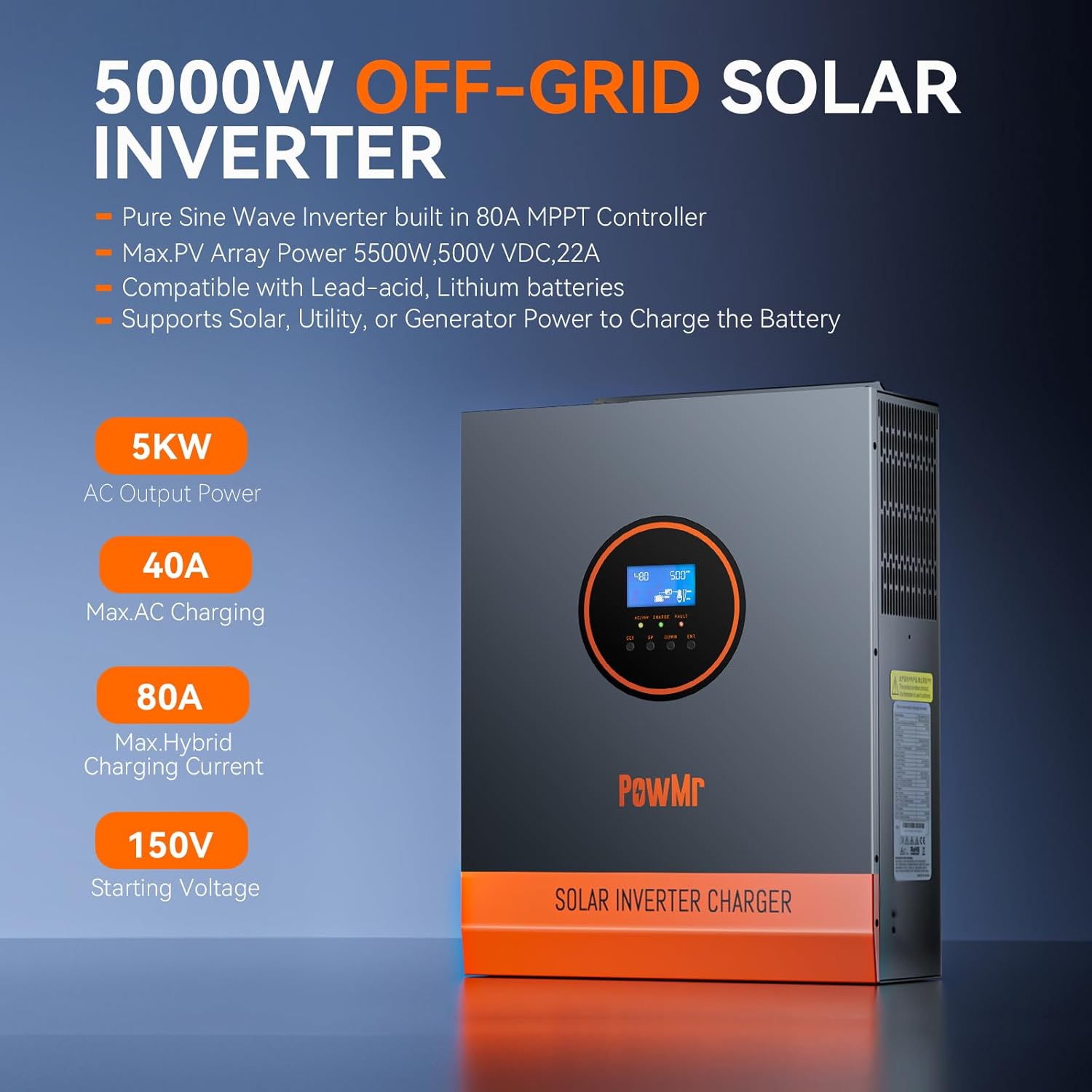
Figure 1.1: PowMr 5000W Hybrid Solar Inverter with key features highlighted.

Figure 1.2: Inverter's LCD HD Display Screen for real-time monitoring of photovoltaic system operating data.

Figura 1.3: Sobreview of the inverter's Power Smart Protection features, including short circuit, overvoltage, sobrecarga y protección de conexión inversa.

Figure 1.4: The inverter features an intelligent variable speed fan that adjusts its rotation speed based on ambient temperature and environmental conditions for optimal cooling.

Figure 1.5: Diagram illustrating the four safe charging modes (solar charging, utility charge, solar priority, solar+utility charging) and three output modes (PV priority, utility priority, inverter priority) of the PowMr 5000W Hybrid Solar Inverter.

Figure 1.6: The inverter supports expandable capacity up to 51.2V 400Ah, 20480Wh energy, with various combinations for solar modules, MPPT solar controllers, LiFePO4 battery systems, and inverters.
2. Información de seguridad
Please read and understand all safety instructions before installing, operating, or maintaining the inverter. Failure to follow these instructions may result in electrical shock, fire, serious injury, or death. Keep this manual for future reference.
- La instalación debe ser realizada por personal calificado.
- Ensure all power sources are disconnected before any wiring or maintenance.
- No exponga el inversor a la lluvia, nieve o líquidos.
- No desmonte el inversor. No contiene piezas que puedan ser reparadas por el usuario.
- Asegure una conexión a tierra adecuada de la unidad.
- Use appropriate overcurrent protection devices for all circuits.
- Verify battery polarity before connecting to the inverter.
- This product is for indoor use only. It is forbidden to use it outdoors.
3. Especificaciones
| Característica | Especificación |
|---|---|
| Nombre del modelo | POW-LVM5K-48V |
| Quétage | 5000 vatios |
| Potencia máxima | 10000 VA |
| Fuente de poder | Alimentado por energía solar y baterías |
| Potencia máxima de entrada fotovoltaica | 5500 W |
| Volumen de PVtage Rango | 120–500 VCC |
| Corriente de entrada máxima de PV | 22A |
| Corriente de carga máxima | 80A |
| Vol de entrada de CAtage | 90–140 V |
| Vol de salidatage | 100/105/110Vac (±5%) |
| Volumen de inicio PVtage | > 150Vdc |
| Dimensiones del producto | 12 x 4 x 16 pulgadas |
| Peso del artículo | 26 libras |
4. Configuración e instalación
Follow these steps for safe and proper installation of your PowMr Hybrid Solar Inverter.
4.1 Instalación física
- Montaje: Secure the inverter to a wall or suitable vertical surface using appropriate screws. Ensure the mounting location is well-ventilated and protected from direct sunlight, moisture, and extreme temperatures.
- Terminal Cover Removal: Unscrew and remove the terminal cover located at the bottom of the inverter to access the wiring connections.
Video 4.1: POW-LVM5K-48V-N Unboxing and First Look Review. This video provides a visual guide to unboxing the inverter and its components.
Video 4.2: POW-LVM5K-48V-N Quick Install & Wiring Video. This video demonstrates the physical installation and wiring process for the inverter.
4.2 conexiones de cableado
Before making any electrical connections, ensure all power sources (solar, utility, battery) are disconnected and turned off. Improper wiring can cause damage to the inverter and connected devices, and poses a risk of electric shock.
- Conexión de la batería: Connect the 48V battery bank to the BAT+ and BAT- terminals on the inverter. Ensure correct polarity. Use the provided terminals and appropriate gauge wiring.
- Solar Array Connection: Connect the solar panel array to the PV+ and PV- terminals. Ensure the PV input voltage and current are within the inverter's specified limits (120-500Vdc, Max 5500W, 22A).
- Conexión de salida de CA: Connect your AC loads (e.g., household appliances) to the AC OUT terminals.
- Conexión de entrada de CA (servicio público/generador): Connect the utility grid or generator power to the AC IN terminals.
- Toma de tierra: Connect the inverter to a reliable earth ground using the designated grounding lug.
- Reattach Terminal Cover: Once all connections are secure, reattach the terminal cover.

Figure 4.1: Detailed wiring diagram for the PowMr 5000W Hybrid Solar Inverter, showing connections for solar panels, battery, AC input (utility/generator), and AC output.

Figure 4.2: Labeled diagram of the inverter's components, including LCD buttons, mounting holes, LCD screen, LED indicators, AC input breaker, dry contact port, RS485 communication ports, USB debugging port, AC output terminal, cooling fans, PV input terminal, main On/Off power switch, battery input terminal, and grounding lug.
5. Instrucciones de funcionamiento
Once the inverter is installed and wired correctly, you can proceed with operation.
5.1 Encendido
- Ensure all circuit breakers for the battery, solar array, and AC input/output are in the 'OFF' position.
- Turn on the battery circuit breaker first.
- Turn on the solar array circuit breaker.
- Turn on the AC input (utility/generator) circuit breaker.
- Finally, turn on the main ON/OFF power switch on the inverter. The LCD screen will light up, and the inverter will begin its startup sequence.
5.2 Pantalla LCD y configuraciones
The intuitive LCD screen and LED indicators provide real-time system data and status. Use the 'SET', 'UP', 'DOWN', and 'ENT' buttons to navigate menus and configure settings.
- Escucha: View volumen fotovoltaicotage, corriente, potencia, volumen de la bateríatage, current, state of charge (SOC), load active power, AC input/output voltage, frecuencia y más.
- Configurable Modes:
- Modos de carga de la batería: Select from Only Solar, Utility Priority, Solar Priority, and Utility + Solar Hybrid to optimize battery charging based on your energy needs.
- Modos de salida: Choose between PV Priority, Utility Priority, and Inverter Mode to determine the primary power source for your loads.
- Selección del tipo de batería: Configure the inverter for your specific 48V battery type (e.g., Sealed, AGM, Gel, Flooded lead-acid, or Lithium).
- Otros parámetros: Adjust various parameters such as maximum charge current, AC input voltage range, and alarm settings.
Video 5.1: POW-LVM5K-48V-N Host Computer Communication Guide. This video demonstrates how to connect the inverter to a computer and use the PC software for monitoring and configuration.
6. Mantenimiento
El mantenimiento regular garantiza la longevidad y el rendimiento óptimo de su inversor solar híbrido PowMr.
- Limpieza: Periodically clean the inverter's exterior and ventilation openings to prevent dust accumulation, which can hinder cooling. Use a dry, soft cloth. Do not use liquids or abrasive cleaners.
- Comprobación de conexiones: Annually inspect all electrical connections (battery, PV, AC input/output, grounding) for tightness and corrosion. Tighten any loose connections and clean any corrosion.
- Ventilación: Ensure that the inverter's ventilation areas are not blocked. Maintain adequate clearance around the unit for proper airflow.
- Condiciones ambientales: Supervise el entorno operativo para garantizar que permanezca dentro de los rangos de temperatura y humedad especificados.
- Actualizaciones de firmware: Consulta el sitio oficial de PowMr websitio para obtener actualizaciones de firmware disponibles para garantizar que su inversor tenga las últimas funciones y correcciones de errores.
7. Solución de problemas
The inverter's LCD display will show fault codes to assist in troubleshooting. Refer to the detailed user manual for a complete list of fault codes and their corresponding solutions. Below are some common issues and general troubleshooting steps:
- Sin energía/pantalla apagada:
- Compruebe si el interruptor principal de encendido y apagado está en la posición “ON”.
- Verify battery connections and ensure the battery bank has sufficient charge.
- Check all circuit breakers (battery, PV, AC input) to ensure they are not tripped.
- Sin salida de CA:
- Verifique el disyuntor de salida de CA.
- Ensure the inverter is not in a fault state (check LCD for fault codes).
- Verify that the selected output mode is appropriate for your power source.
- Low PV Charging:
- Revise las conexiones de los paneles solares y asegúrese de que estén limpias y sin sombras.
- Verificar el volumen de entrada fotovoltaicatage y corriente en la pantalla LCD.
- Ensure the MPPT controller is operating correctly.
- Problemas de comunicación con el software de PC:
- Double-check the USB A-to-B device configuration cable connection between the inverter and the computer.
- Ensure the correct COM port is selected in the iPower application. If unsure, unplug and reconnect the cable while observing the COM port options in the software.
- Try restarting the iPower application or your computer.
- Ensure the USB driver is correctly installed (refer to Video 5.1).
8. Garantía y soporte
Your PowMr Hybrid Solar Inverter comes with a warranty. Please refer to the included Warranty Card for details regarding coverage, terms, and conditions. For technical assistance, troubleshooting, or any other inquiries, please contact our technical support team.
For additional support, please refer to the comprehensive PowMr user manual (included in the package) or contact our technical team via the contact information provided on the PowMr official websitio.
Correo electrónico: soporte@powmr.com
También puedes visitar el Tienda PowMr en Amazon Para obtener más información sobre el producto y recursos.