
1. Primeros pasos
1.1 Desempaquetado del dispositivo
Carefully unpack your realme 16 Pro+ 5G Smartphone and check for the following items:
- Teléfono inteligente realme 16 Pro+ 5G
- Cable USB
- Funda de teléfono
- Guía de inicio rápido
- Expulsor de bandeja SIM
1.2 Cargo inicial
Before first use, it is recommended to fully charge your device. Connect the USB cable to the smartphone's USB Type-C port and the other end to the 80W SuperVOOC charger. The device supports 80W fast charging, allowing for rapid power replenishment.
1.3 Instalación de la tarjeta SIM
Para instalar su tarjeta SIM:
- Localice la bandeja de la tarjeta SIM en el costado del teléfono.
- Inserte la herramienta de expulsión de la bandeja SIM en el pequeño orificio al lado de la bandeja y presione suavemente hasta que la bandeja salga.
- Coloque la(s) tarjeta(s) Nano-SIM en la bandeja con los contactos dorados hacia abajo. Asegúrese de que estén bien orientadas.
- Empuje con cuidado la bandeja nuevamente dentro de la ranura hasta que encaje en su lugar.
2. Configuración
2.1 Encendido y apagado
To power on, press and hold the Power button until the realme logo appears. To power off, press and hold the Power button, then select 'Power off' from the options on the screen.
2.2 Configuración inicial del dispositivo
Al encenderlo por primera vez, el dispositivo lo guiará a través del proceso de configuración inicial:
- Selección de idioma: Elija su idioma preferido.
- Conexión Wi-Fi: Conéctese a una red Wi-Fi para acceder a Internet.
- Cuenta Google: Inicia sesión con tu cuenta de Google o crea una nueva. Esto es esencial para acceder a los servicios de Google y a Play Store.
- Transferencia de datos: Option to transfer data from an old device.
2.3 Seguridad biométrica
The realme 16 Pro+ 5G supports Face Recognition for secure unlocking. During setup, you will have the option to configure this feature. Follow the on-screen instructions to register your face for quick and secure access.
3. Operar su dispositivo
3.1 Pantalla
The device features a 144Hz AMOLED display, providing smooth visuals and vibrant colors. Navigate the interface using touch gestures. The high refresh rate enhances the experience for scrolling, gaming, and video playback.
3.2 Cámara
The realme 16 Pro+ 5G is equipped with a 200MP rear main camera and a 50MP front camera. Open the Camera application to access various modes including Photo, Video, Portrait, and more. Utilize the high-resolution sensors for detailed images and videos.
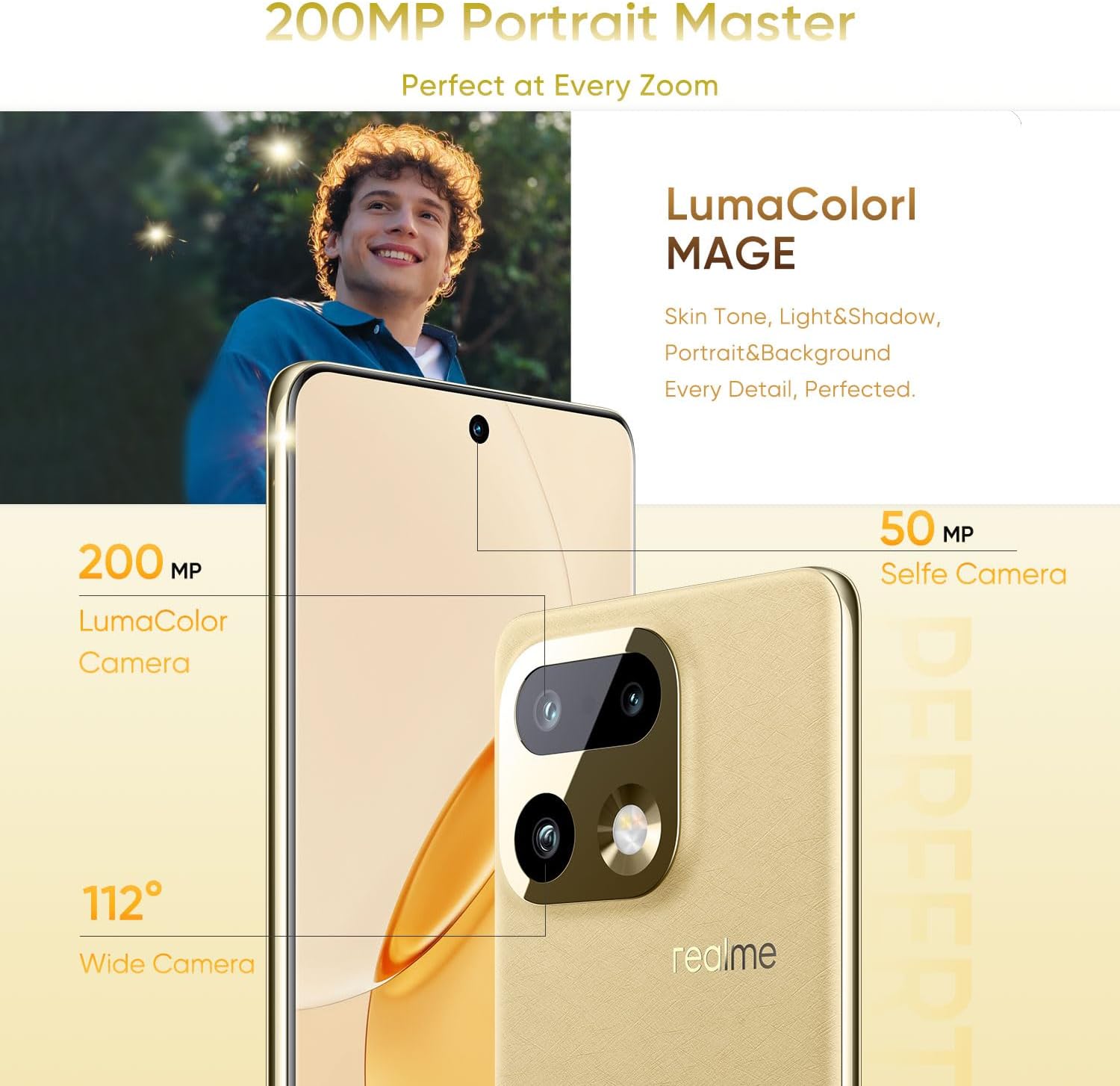
Imagen: Más alláview of the realme 16 Pro+ 5G camera system, showing the 200MP main camera and 50MP selfie camera with LumaColorl MAGE technology.

Image: The AI Instant Clip feature for one-tap video creation and AI Framing for smart framing and auto-zoom.

Image: The 50MP selfie camera and 200MP HI-RES mode for detailed group portraits, enhanced by AI Perfect Shot and AI Ultra Clarity.
3.3 Batería y carga
The device is powered by a 7000mAh battery. For optimal charging, use the provided 80W SuperVOOC charger. This technology allows for rapid charging, reaching 48% in approximately 10 minutes and a full charge in about 35 minutes. The battery also supports reverse charging and bypass charging.

Image: Details of the 7000mAh Titan Battery, highlighting 80W Ultra Charge, Reverse Charge, Bypass Charge, and 6 Years Battery Health.
3.4 Rendimiento
The realme 16 Pro+ 5G integrates the Qualcomm Snapdragon 7 Gen 4 chipset and Rocket LPDDR5X memory, ensuring smooth multitasking, efficient gaming, and fast data processing. This configuration provides a responsive user experience for demanding applications and daily tasks.

Image: Visual representation of 12GB Dynamic RAM and 512GB ROM for enhanced multitasking capabilities.
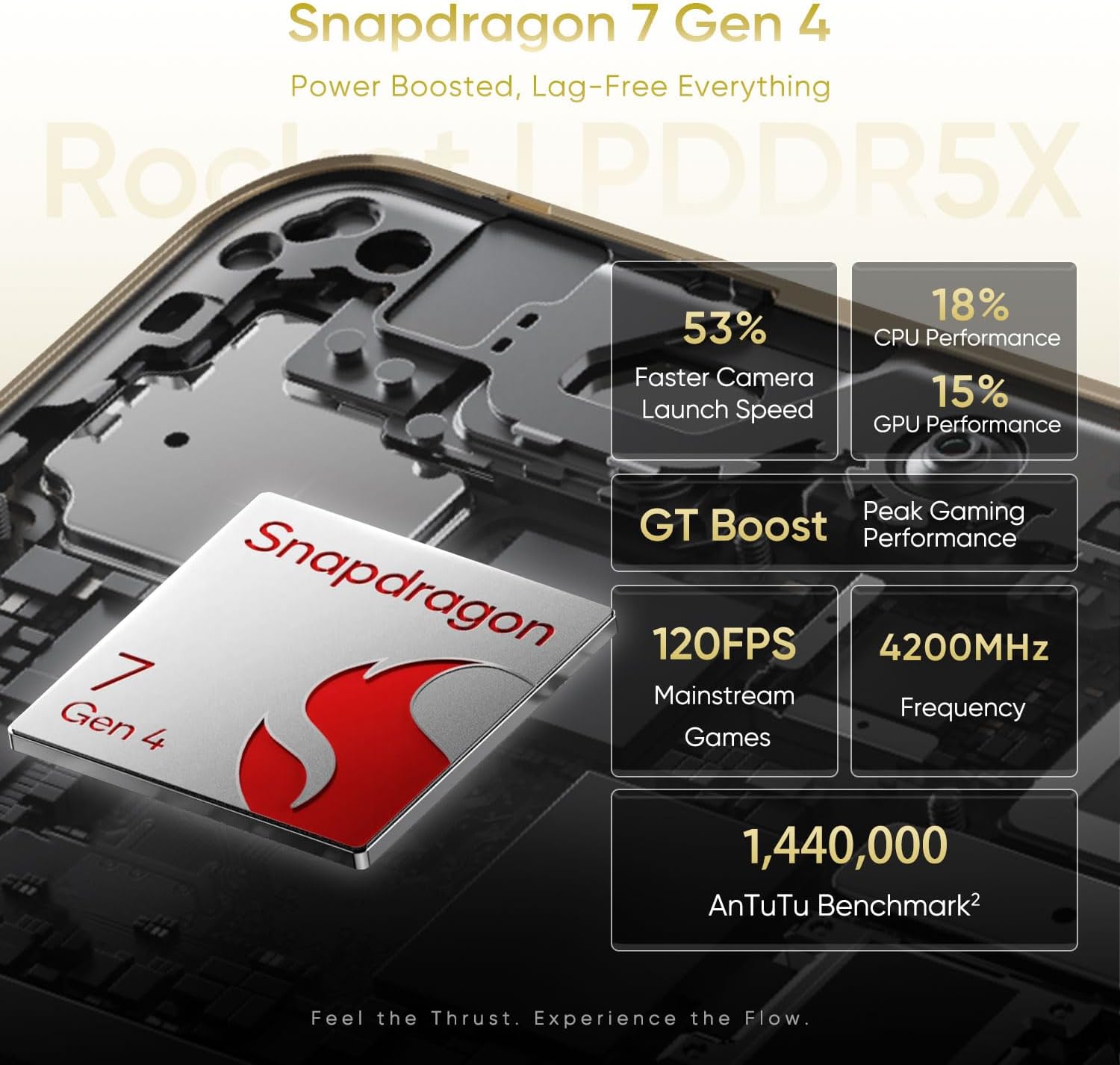
Image: Performance metrics for the Snapdragon 7 Gen 4, including faster camera launch speed, CPU/GPU performance, and gaming benchmarks.
3.5 Resistencia al agua y al polvo
The device features an IP69 rating for water and dust resistance. This means it is protected against high-pressure water jets and dust ingress, offering durability in various environments. While resistant, avoid intentional submersion or exposure to extreme conditions.
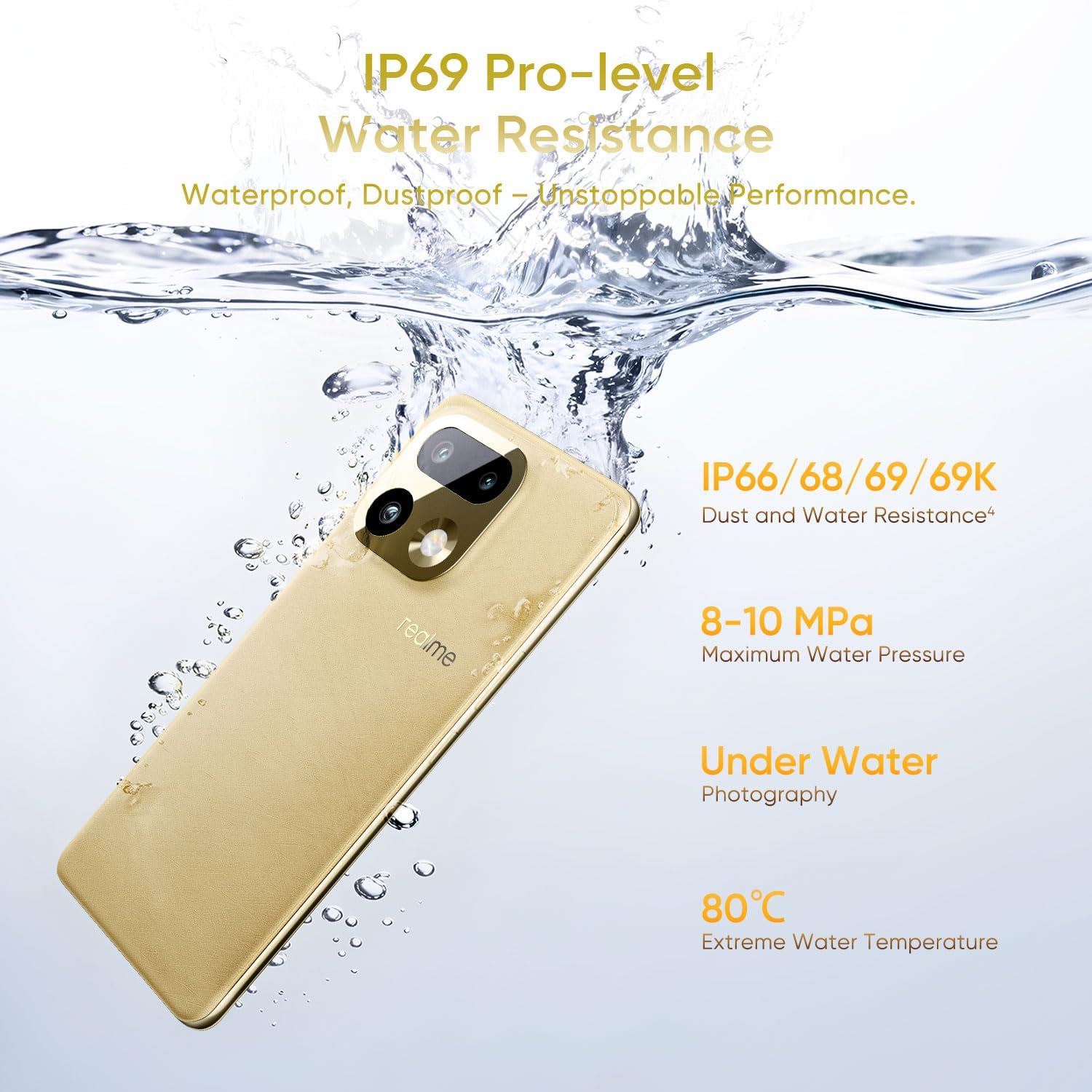
Image: The realme 16 Pro+ 5G submerged in water, illustrating its IP69 Pro-level Water Resistance, capable of withstanding high water pressure and extreme temperatures.
3.6 Conectividad
The realme 16 Pro+ 5G supports 5G cellular technology for high-speed mobile data. It also includes Bluetooth, USB Type-C, and Wi-Fi for various connectivity needs.
4. Mantenimiento
4.1 Actualizaciones de software
Verifique e instale periódicamente las actualizaciones de software para garantizar un rendimiento óptimo, seguridad y acceso a nuevas funciones. Vaya a Ajustes > Acerca del teléfono > Actualización de software para comprobar si hay actualizaciones disponibles.
4.2 Limpieza
To clean your device, use a soft, lint-free cloth. Avoid using harsh chemicals or abrasive materials, which can damage the screen or finish. For stubborn smudges, slightly dampen el paño con agua.
4.3 Cuidado de la batería
Para prolongar la vida útil de la batería:
- Evite temperaturas extremas.
- No deje el dispositivo completamente cargado o completamente descargado durante períodos prolongados.
- Utilice el cargador y cable originales.
5. Solución de problemas
Esta sección aborda problemas comunes que podrías encontrar.
5.1 El dispositivo no se enciende
- Asegúrese de que la batería esté cargada. Conecte el dispositivo al cargador durante al menos 15 minutos.
- Mantenga presionado el botón de encendido durante 10 a 15 segundos para forzar el reinicio.
5.2 Problemas de carga
- Verifique que el cargador y el cable USB estén conectados de forma segura.
- Intente utilizar una toma de corriente diferente.
- Inspeccione el puerto de carga para detectar residuos o daños.
5.3 Problemas de conectividad de red
- Compruebe si el modo avión está desactivado.
- Reinicie el dispositivo.
- Asegúrese de que su tarjeta SIM esté correctamente insertada y activa.
- Restablecer la configuración de red (Configuración > Sistema > Opciones de restablecimiento > Restablecer Wi-Fi, móvil y Bluetooth).
6. Especificaciones
| Marca | Realme |
| Nombre del modelo | realme 16 Pro+ |
| Sistema operativo | Androide 16 |
| Modelo de CPU | Qualcomm Snapdragon 7 Gen 4 |
| Velocidad de la CPU | 2.8 GHz |
| Tamaño de la memoria RAM instalada | 12 GB |
| Capacidad de almacenamiento de memoria | 512 GB |
| Tipo de pantalla | AMOLED |
| Frecuencia de actualización | 144 Hz |
| Resolución máxima de pantalla | 1280*2800 píxeles por pulgada |
| Front Photo Sensor Resolution | 50 MP |
| Rear Facing Camera Photo Sensor Resolution | 200 MP |
| Capacidad de la batería | 7000 miliamp Horas |
| Tecnología de carga | SuperVOOC de 80 W |
| Nivel de resistencia al agua | Resistente al agua IP69 |
| Tecnología celular | 5G |
| Tecnología de conectividad | Bluetooth, USB tipo C, Wi-Fi |
| Función de seguridad biométrica | Reconocimiento facial |
| Peso del artículo | 120 gramos |
7. Garantía y soporte
7.1 Información de garantía
The realme 16 Pro+ 5G Smartphone comes with a 1 año de garantía del fabricante. This warranty covers defects in materials and workmanship under normal use. For specific terms and conditions, please refer to the warranty card included in your product packaging or visit the official realme websitio.
7.2 Atención al cliente
For technical assistance, troubleshooting, or warranty claims, please contact realme customer support through their official website or the contact information provided in your Quick Start Guide. Ensure you have your device's model number and purchase details ready when contacting support.