
1. Introducción
This manual provides essential information for the safe and efficient use of your HP 17.3 Inch FHD Business Laptop. Please read this guide thoroughly before operating your device to ensure optimal performance and longevity. This laptop is designed for business and everyday computing tasks, offering a large display, robust performance, and portability.
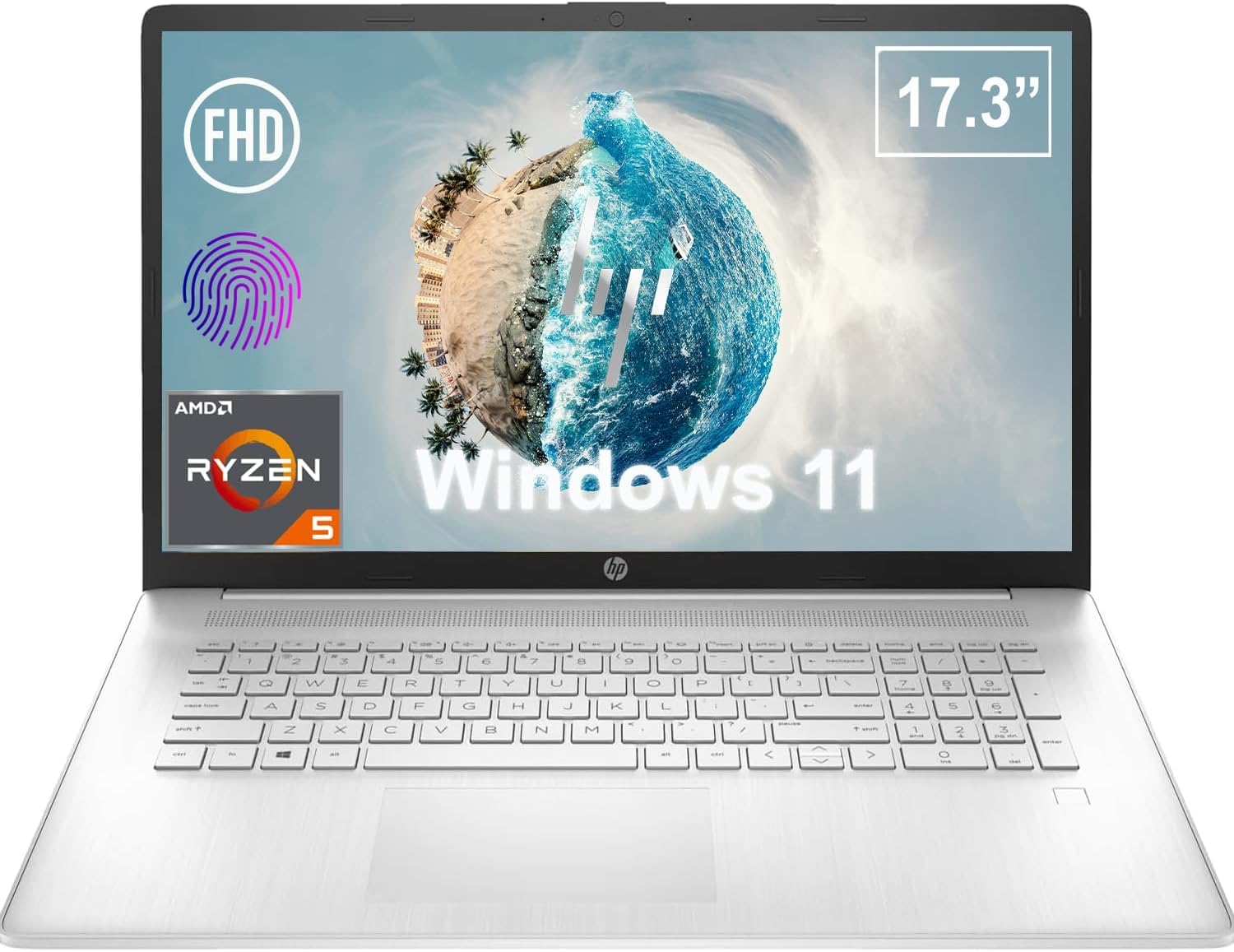
Figura 1.1: Frente view of the HP 17.3 Inch FHD Business Laptop, showcasing the large display and keyboard.
2. Configuración
2.1 Desembalaje e inspección inicial
Retire con cuidado todos los componentes del embalaje. Compruebe que estén presentes los siguientes elementos:
- HP 17.3 Inch FHD Business Laptop
- Power Adapter (45 W Smart AC Power Adapter)
- Documentación (este manual, información de garantía)
Inspect the laptop and accessories for any signs of damage. If any items are missing or damaged, contact your retailer or HP support immediately.
2.2 Conexión del adaptador de corriente
Before first use, ensure the laptop is fully charged. Connect the power adapter to the AC smart pin port on the side of the laptop and then plug the adapter into a power outlet.
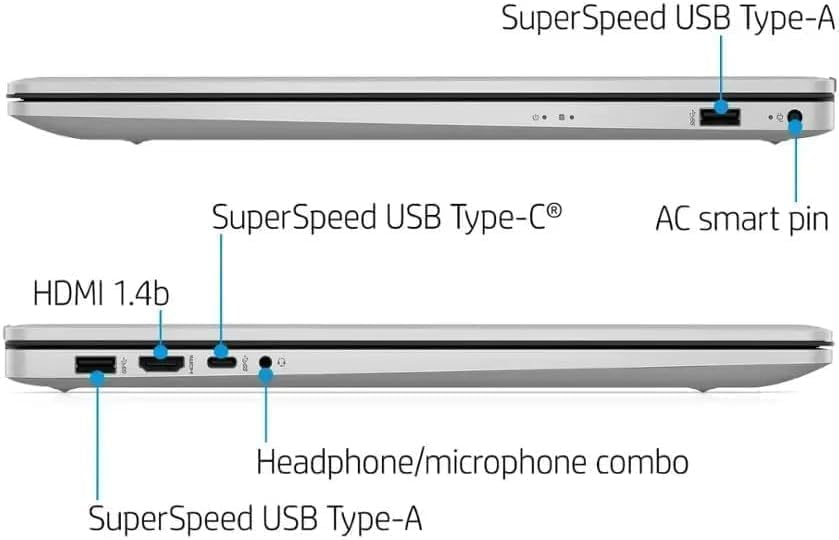
Figura 2.1: Lado view illustrating the location of the AC smart pin and other ports.
2.3 Encendido inicial y configuración de Windows
Press the power button to turn on the laptop. Follow the on-screen instructions to complete the Windows 11 Home setup process. This includes setting up your user account, network connection, and initial preferences.
3. Operación de la computadora portátil
3.1 Teclado y panel táctil
The laptop features a full-size QWERTY keyboard with a 10-key number pad for efficient data entry. The integrated touchpad provides precise cursor control. Refer to the operating system's settings for customizing touchpad gestures and keyboard shortcuts.
3.2 Lector de huellas dactilares
For enhanced security and convenient login, utilize the integrated fingerprint reader. Set up your fingerprints through Windows Hello in the Windows 11 settings.
3.3 Webcámara y micrófonos
The HP True Vision 720p HD Camera and integrated dual array digital microphones are located at the top of the display. These are suitable for video conferencing and online communication.
3.4 Conectividad
- Wifi: The laptop supports 802.11a/b/g/n/ac Wi-Fi for wireless internet access. Connect to available networks via the Windows network settings.
- Bluetooth: Bluetooth 5 allows for wireless connection to compatible devices such as headphones, mice, and keyboards. Enable and manage Bluetooth devices through Windows settings.
3.5 Puertos y dispositivos externos
El portátil está equipado con varios puertos para conectar dispositivos externos:
- 1 x USB Type-C (5Gbps, Data Only): For connecting USB-C compatible devices and data transfer.
- 2 x USB Type-A (5Gbps): For connecting standard USB devices like external drives, mice, or keyboards.
- 1 x HDMI 1.4b: For connecting to external displays or projectors.
- 1 x Headphone/Microphone Combo: For connecting a headset with a single 3.5mm jack.
- 1 x AC Smart Pin: For connecting the power adapter.

Figure 3.1: Open view of the laptop, highlighting the keyboard and touchpad area.
3.6 Gestión de la batería
The laptop is powered by a 3-Cell, 41 Wh Li-ion battery, offering up to 8 hours and 30 minutes of video playback. Use the provided 45 W Smart AC Power Adapter for charging. HP Fast Charge technology allows for quicker charging times.
4. Mantenimiento
4.1 Limpieza de la computadora portátil
To maintain the laptop's appearance and functionality:
- Utilice un paño suave y sin pelusaampLimpiar con agua o con un limpiador de pantalla especializado para la pantalla.
- Para el teclado y el chasis, utilice un paño suave y seco. Evite productos químicos agresivos o materiales abrasivos.
- Asegúrese de que la computadora portátil esté apagada y desenchufada antes de limpiarla.
4.2 Actualizaciones de software
Actualice periódicamente su sistema operativo Windows y sus controladores para garantizar un rendimiento, una seguridad y una compatibilidad óptimos. Puede acceder a Windows Update a través del menú Configuración.
4.3 Security Software
The laptop comes preloaded with McAfee LiveSafe for security. Ensure this software is active and updated to protect against viruses and other threats.
5. Solución de problemas
Esta sección aborda problemas comunes que puede encontrar con su computadora portátil HP.
5.1 Problemas de energía
- La computadora portátil no enciende: Ensure the power adapter is securely connected to both the laptop and a working power outlet. Verify the battery is charged.
- La batería no se carga: Check the power adapter and cable for damage. Try a different power outlet.
5.2 Problemas de visualización
- No hay imagen en la pantalla: Conecte un monitor externo para comprobar si el problema está en la pantalla de la laptop. Reiníciela.
- Imagen parpadeante o distorsionada: Actualiza los controladores gráficos. Ajusta la resolución de pantalla y la frecuencia de actualización en la configuración de Windows.
5.3 Problemas de conectividad
- Wi-Fi no se conecta: Ensure Wi-Fi is enabled. Restart your router and the laptop. Check network settings for correct password and configuration.
- El dispositivo Bluetooth no se empareja: Asegúrate de que el Bluetooth esté activado en ambos dispositivos. Asegúrate de que el dispositivo esté en modo de emparejamiento y dentro del alcance.
Para problemas más complejos, consulte el soporte de HP. websitio o póngase en contacto con el servicio de atención al cliente.
6. Especificaciones
| Característica | Detalle |
|---|---|
| Marca | HP |
| Nombre del modelo | HP17 |
| Número de modelo | i5-1135G7 |
| Tamaño de pantalla | 17.3 pulgadas |
| Tipo de pantalla | IPS, Anti-Glare, LED |
| Resolución | 1920 x 1080 (Full HD) |
| Frecuencia de actualización | 60 Hz |
| Procesador | AMD Ryzen 5 5500U (6 Cores, 12 Threads, up to 4.0 GHz Max Boost Clock) |
| Gráficos | Gráficos AMD Radeon integrados |
| Memoria RAM | 32 GB DDR4-3200 MHz (Max 64 GB) |
| Almacenamiento | SSD PCIe NVMe M.2 de 1 TB |
| Sistema operativo | Windows 11 Home, 64-bit, English |
| Conectividad inalámbrica | Wi-Fi 802.11a/b/g/n/ac, Bluetooth 5 |
| Puertos | 1x USB Type-C (5Gbps), 2x USB Type-A (5Gbps), 1x HDMI 1.4b, 1x Headphone/Microphone Combo, 1x AC Smart Pin |
| Webleva | HP True Vision 720p HD Camera |
| Audio | Dual Speakers, Integrated Dual Array Digital Microphones |
| Batería | 3-Cell, 41 Wh Li-ion (Up to 8.5 hours video playback) |
| Adaptador de corriente | 45 W Smart AC Power Adapter |
| Dimensiones (An x Pr x Al) | 40.07 x 25.78 x 2.06 cm (14.14" de largo x 9.31" de ancho x 0.78" de grosor) |
| Peso | A partir de 2.07 kg |
| Características especiales | Fingerprint Reader, Lightweight Design, HP Fast Charge |
7. Garantía y soporte
7.1 Información de garantía
This HP laptop comes with a 1-year manufacturer's limited warranty. For detailed terms and conditions, please refer to the warranty documentation included with your product or visit the official HP support websitio.
7.2 Atención al cliente
Si encuentra problemas que no se pueden resolver con los pasos de solución de problemas de este manual, póngase en contacto con el servicio de atención al cliente de HP. Puede encontrar información de contacto y recursos adicionales en el sitio web oficial de HP. websitio:
- Soporte HP Websitio: soporte.hp.com
- Tienda HP: Tienda HP en Amazon