
1. Introducción y másview
The ZEALOT MP1 is a powerful and versatile portable Bluetooth speaker designed for both indoor and outdoor use. Featuring 60W RMS output, HiFi stereo sound, and an 8000mAh battery, it delivers clear audio with deep bass. Its IPX6 waterproof rating ensures durability against splashes and rain, making it suitable for various environments. The speaker also includes dynamic LED lighting and supports multiple playback modes for an enhanced audio experience.
2. Contenido del paquete
Por favor, marque la casilla correspondiente a los siguientes artículos:
- ZEALOT MP1 Portable Bluetooth Speaker
- Guía de inicio rápido
- Cable de carga (USB-C)
- Cable auxiliar
- Bandolera
3. Características del producto
3.1. Powerful Dual Speakers with Deep Bass
Equipped with 66mm dual speakers and advanced audio decoding technology, the MP1 delivers 60W RMS of clear, powerful sound with enhanced low-frequency response and volume. Dual passive bass diaphragms ensure a rich and immersive audio experience.

Imagen: interna view of the ZEALOT MP1 speaker, showcasing its dual 66mm drivers for powerful bass.
3.2. Multiple Device Connectivity (TWS)
Connect multiple MP1 speakers wirelessly to create a wider sound field and cinematic surround sound experience. Easily pair one device to your mobile phone, then connect additional speakers for a synchronized audio setup.

Image: Illustration of multiple ZEALOT MP1 speakers connected wirelessly to a single source for an expanded sound experience.
3.3. Diseño resistente al agua IPX6
The speaker features a fully sealed chamber design with rubber plug seals, providing IPX6 waterproof protection. It can withstand water splashes and rain, making it ideal for outdoor use, beach trips, or even in the bathroom.
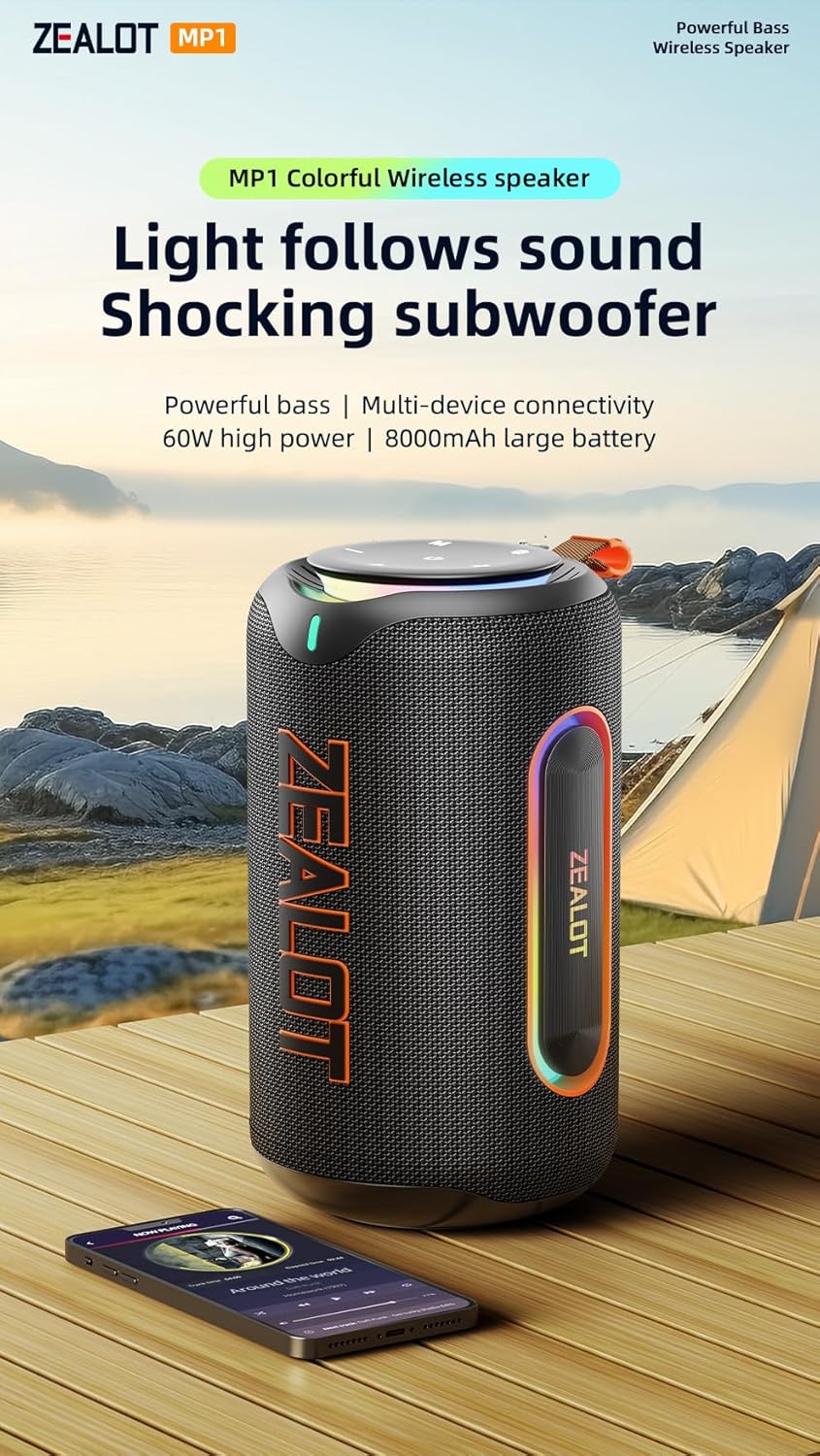
Image: The ZEALOT MP1 speaker enduring water splashes, showcasing su capacidad de resistencia al agua IPX6.
3.4. Dynamic RGB LED Lighting
Enjoy colorful RGB lighting effects that synchronize with the rhythm of your music. The dazzling array of colors and shadows creates a glamorous party atmosphere, enhancing your listening experience visually.

Image: The ZEALOT MP1 speaker displaying its colorful RGB lighting effects, synchronized with music.
3.5. Versatile Playback Modes
The MP1 supports multiple playback options including wireless Bluetooth connection, AUX mode, TF card mode, and USB flash drive mode, offering flexibility for your audio sources.

Image: Close-up of the ZEALOT MP1 speaker's port panel, illustrating its support for USB, TF card, and AUX input.
3.6. Batería de larga duración
Equipped with an 8000mAh battery, the speaker provides extended playtime, ensuring your music lasts through long gatherings or outdoor adventures.
4. Controles e indicadores
The control panel is conveniently located on the top of the speaker for easy access to all functions.

Image: The control interface of the ZEALOT MP1 speaker, showing power, mode, EQ, play/pause, volume, and light controls.
- Botón de encendido (⏻): Mantenga pulsado para encender/apagar. Pulse brevemente para comprobar el estado de la batería.
- Botón de modo (M): Short press to switch between Bluetooth, AUX, TF Card, and USB modes.
- Botón EQ (EQ): Short press to cycle through different equalizer presets (e.g., Bass, Vocal, Normal).
- Botón TWS (⎘): Press to initiate or disconnect True Wireless Stereo pairing.
- Botón Reproducir/Pausar (▶):Presione brevemente para reproducir o pausar el audio.
- Bajar volumen (-): Pulsación corta para bajar el volumen. Pulsación larga para ir a la pista anterior.
- Subir volumen (+)Pulsación corta para subir el volumen. Pulsación larga para pasar a la siguiente pista.
- Botón de luz (✱): Short press to change LED light modes. Press and hold to turn lights on/off.
4.1. Port Panel
The port panel is located on the rear of the speaker, protected by a waterproof cover.
- Puerto de carga USB-C:Para cargar el altavoz.
- Puerto USB-A: For USB flash drive playback or as a power bank to charge other devices.
- Ranura para tarjetas TF:Para reproducción de tarjeta TF (MicroSD).
- Puerto de entrada auxiliar:Para conectar dispositivos de audio externos mediante un cable de audio de 3.5 mm.
5. Configuración
5.1. Carga del altavoz
- Abra la cubierta impermeable en la parte posterior del altavoz.
- Connect the provided USB-C charging cable to the speaker's USB-C port and to a compatible USB power adapter (not included).
- The LED indicators on the control panel will show charging progress. All LEDs lit indicate a full charge.
- Close the waterproof cover securely after charging.
5.2. Emparejamiento Bluetooth
- Power on the speaker by pressing and holding the Power button. The speaker will enter Bluetooth pairing mode automatically, indicated by a flashing Bluetooth indicator.
- On your mobile device, enable Bluetooth and search for "ZEALOT MP1" in the list of available devices.
- Select "ZEALOT MP1" to connect. Once connected, the Bluetooth indicator will stop flashing and remain solid.
- Ahora puedes reproducir audio desde tu dispositivo a través del altavoz.
6. Instrucciones de funcionamiento
6.1. Cambio de modos de reproducción
Short press the Mode (M) button to cycle through Bluetooth, AUX, TF Card, and USB modes.
6.2. Adjusting Volume and Tracks
- Control de volumen: Presione brevemente los botones Subir volumen (+) o Bajar volumen (-).
- Pista anterior / siguiente: Long press the Volume Down (-) button for the previous track, and long press the Volume Up (+) button for the next track.
6.3. Using the EQ Function
Short press the EQ button to switch between different sound profiles (e.g., enhanced bass, clear vocals, balanced normal mode) to suit your audio preference.
6.4. Emparejamiento estéreo inalámbrico verdadero (TWS)
- Ensure both ZEALOT MP1 speakers are powered on and not connected to any Bluetooth device.
- On one speaker, short press the TWS button. It will emit a tone and search for another MP1 speaker.
- Once connected, both speakers will indicate successful pairing.
- Conecta tu dispositivo móvil a uno de los altavoces emparejados por Bluetooth. El audio se reproducirá en estéreo en ambos altavoces.
7. Mantenimiento
- Mantenga el altavoz alejado de temperaturas extremas, luz solar directa y líquidos corrosivos.
- Limpie el altavoz con un paño suave y seco.amp paño. No utilice productos químicos agresivos ni materiales abrasivos.
- Ensure the waterproof cover for the ports is securely closed when not in use, especially in wet environments.
- Guarde el altavoz en un lugar fresco y seco cuando no lo utilice durante períodos prolongados.
8. Solución de problemas
- Sin poder: Ensure the speaker is charged. Connect to a power source and try again.
- Sin sonido: Check the volume level on both the speaker and your connected device. Ensure the correct playback mode is selected.
- Desconexión de Bluetooth: Ensure the speaker is within the 100ft Bluetooth range. Disconnect and re-pair the device.
- Fallo de emparejamiento de TWS: Ensure both speakers are not connected to any other Bluetooth device before initiating TWS pairing.
- Sonido distorsionado: Reduce the volume on both the speaker and your device. Check the audio source for quality issues.
9. Especificaciones
| Nombre del modelo | MP1 Bluetooth Speaker |
| Marca | FANÁTICO |
| Tipo de altavoz | Altavoz portátil |
| Tecnología de conectividad | Bluetooth |
| Tecnología de comunicación inalámbrica | Bluetooth |
| Potencia máxima de salida del altavoz | 80 vatios (pico) / 60 W RMS |
| Modo de salida de audio | Estéreo |
| Respuesta de frecuencia | 20 kHz |
| Capacidad de la batería | 8000mAH (2 x 9V batteries included) |
| Nivel de resistencia al agua | IPX6 (resistente al agua) |
| Dimensiones del producto | 5.12" de profundidad x 5.12" de ancho x 9.06" de alto |
| Peso del artículo | 16.09 libras |
| Componentes incluidos | Guía de inicio rápido |
10. Información de seguridad
- No desmonte, repare ni modifique el producto.
- No exponga el producto al fuego ni a altas temperaturas.
- Evite dejar caer o someter el producto a fuertes impactos.
- Mantener fuera del alcance de los niños.
- Deshazte de las baterías de acuerdo a las regulaciones locales.
11. Garantía y soporte
This product is sold by ZEALOT-Direct. For support or warranty inquiries, please refer to the seller's return policy or contact ZEALOT customer service. Standard return policy allows for refund/replacement within 30 days of purchase.