
Sellrich 8 Core 6G+128G Car Radio Stereo
Sellrich 9-inch Android Car Radio Stereo User Manual
Model: 8 Core 6G+128G Car Radio Stereo Upgrade for Ford Fiesta (2009-2016)
1. Introducción
This manual provides comprehensive instructions for the installation, operation, and maintenance of your new Sellrich 9-inch Android Car Radio Stereo. This unit is specifically designed as an upgrade for Ford Fiesta models manufactured between 2009 and 2016, provided they have the "PASS AIRBAG OFF" button. Please read this manual thoroughly before installation and use to ensure proper function and safety.
2. Información de seguridad
- Asegúrese siempre de que el encendido del vehículo esté apagado y la batería esté desconectada antes de realizar cualquier instalación o cableado.
- Una instalación incorrecta puede provocar cortocircuitos, daños en el sistema eléctrico del vehículo o lesiones personales. Si tiene dudas sobre algún paso, busque ayuda profesional.
- No utilice el dispositivo de forma que le distraiga de la conducción. Priorice siempre la seguridad vial.
- Mantenga el dispositivo alejado del agua, la humedad y las temperaturas extremas.
- Utilice únicamente accesorios y piezas especificados.
3. Contenido del paquete
Verifique que todos los artículos enumerados a continuación estén incluidos en su paquete:
- Car Stereo (with Frame)
- Cámara de respaldo
- Decodificador Canbus
- Micrófono externo
- Antena GPS
- Cable RCA
- Cable de alimentación
- Antena de radio
- Kit de herramientas de instalación
- Cables USB (4 pines y 6 pines)
- Cable de entrada de cámara trasera
- Cable adaptador
- Antena adaptadora
- Manual de usuario (este documento)

Image: Visual representation of the car stereo unit and all included accessories.
4. Configuración e instalación
4.1. Comprobación de compatibilidad
This car radio is compatible with Ford Fiesta models from 2009 to 2016. Crucially, your vehicle's dashboard must have a "PASS AIRBAG OFF" button for proper fitment and function. Please refer to the images below to confirm compatibility with your vehicle's dashboard.

Image: Comparison of the Ford Fiesta dashboard before and after the installation of the Sellrich car radio.

Image: Visual guide for Ford Fiesta dashboard compatibility, highlighting the "PASS AIRBAG OFF" button requirement.
4.2. Pasos generales de instalación
The unit is designed for plug-and-play installation. However, basic automotive electrical knowledge is recommended. Always disconnect the car battery before starting the installation.
- Retire con cuidado la radio original del automóvil y la moldura del tablero.
- Connect the provided power cable and CANbus decoder to the vehicle's wiring harness.
- Conecte la antena GPS y la antena de radio a los puertos correspondientes de la nueva unidad principal. Coloque la antena GPS en un lugar despejado. view del cielo.
- If installing the backup camera, follow the specific wiring instructions below.
- Connect any additional accessories (e.g., external microphone, USB cables).
- Carefully mount the new car stereo into the dashboard opening.
- Vuelva a conectar la batería del automóvil y pruebe todas las funciones antes de volver a ensamblar el tablero.
4.3. Conexión de la cámara de respaldo
The included AHD backup camera enhances reversing safety. Follow these steps to connect it:

Image: Detailed wiring diagram for connecting the backup camera to the car stereo and vehicle's reverse lights.
- Connect the Reversing Camera Input Cable: Even if you are not using the backup camera immediately, ensure the white plug of the reversing camera input cable is connected to the radio. This connection is crucial for Bluetooth and Wi-Fi signals.
- Power Connection (Backup Camera):
- Connect the red wire (positive) of the backup camera's power cable to the positive terminal of your vehicle's reverse light.
- Connect the black wire (negative) of the backup camera's power cable to the negative terminal of your vehicle's reverse light.
- Video Signal Connection: Connect the yellow RCA video cable from the backup camera to the "CAM IN" or "REVERSE IN" RCA input on the car stereo.
- Gatillo inverso: The stereo controls the reversing trigger automatically. There is no need to connect a separate reverse trigger wire (often labeled "BACK" or "REVERSE") from the camera harness to the stereo.
5. Instrucciones de funcionamiento
Your Sellrich car stereo runs on an Android 15 operating system with an 8-core CPU, 6GB RAM, and 128GB ROM, ensuring smooth and responsive performance.
5.1. Carplay inalámbrico y Android Auto/Mirror Link
Connect your smartphone for seamless integration and access to navigation, calls, messages, and music.
- Carplay inalámbrico y Android Auto: Supports both wired and wireless connections. Once connected, you can use voice commands (Siri or Google Assistant) for navigation, making calls, sending messages, and playing music, keeping your hands free for driving.
- Enlace espejo: Supports wireless and wired Mirror Link, allowing you to project your phone's screen directly onto the car radio display for enhanced entertainment.
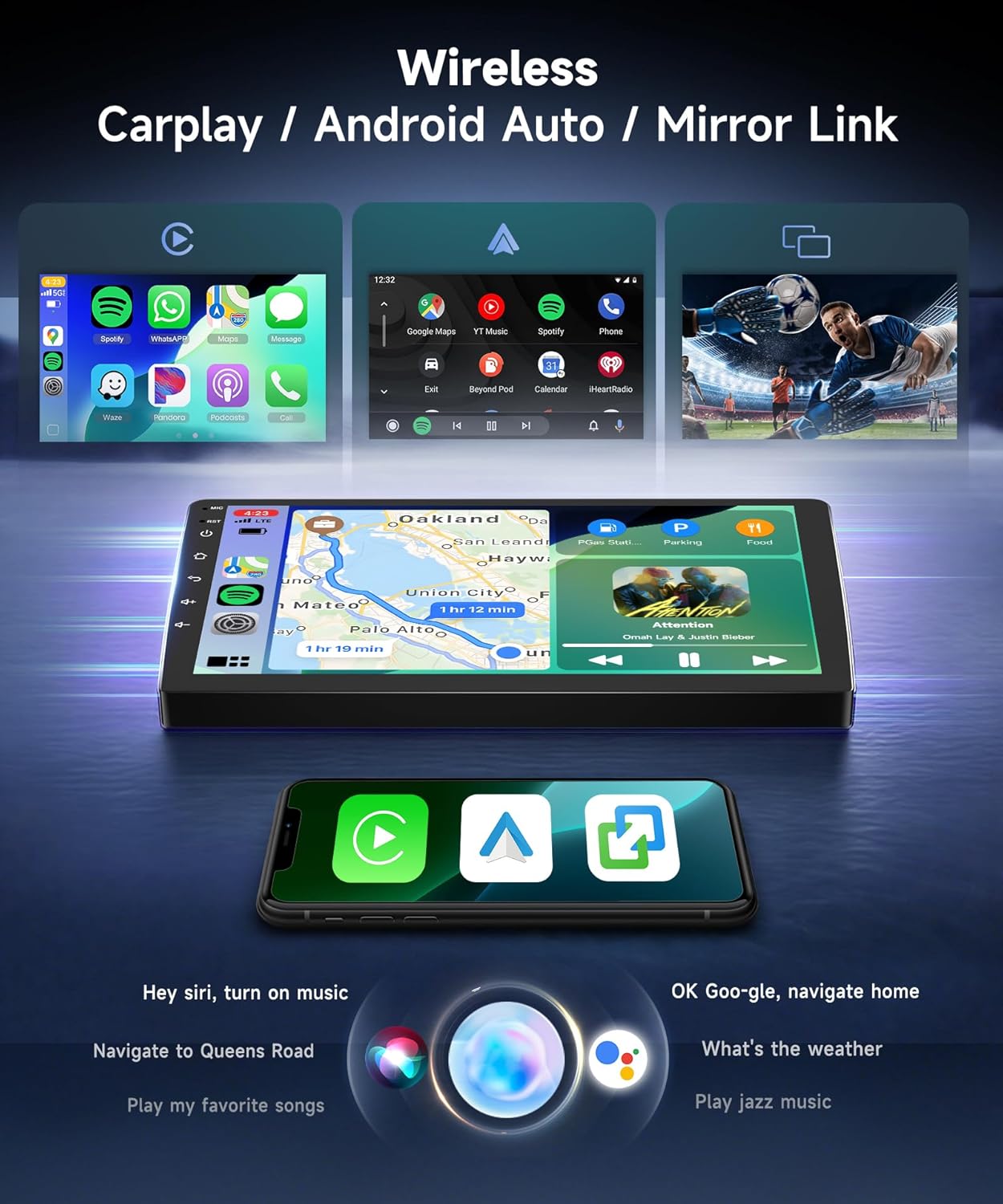
Imagen: La pantalla del estéreo del automóvil muestra examples of Wireless Carplay, Android Auto, and Mirror Link functionality.
5.2. Navegación GPS
The unit features built-in GPS for reliable navigation.
- Mapas en línea: Connect to Wi-Fi (via 5G Wi-Fi hotspot) to use online navigation apps like Google Maps or Waze.
- Mapas sin conexión: Descargue mapas sin conexión para navegar sin conexión a Internet.
- The system allows you to download various navigation and other applications from the app store.

Image: The car stereo displaying GPS navigation, with an external GPS antenna shown.
5.3. Bluetooth 5.0 & Audio Features
Experience enhanced connectivity and audio quality.
- Bluetooth 5.0: Provides faster, more stable, and smoother connections for hands-free calls and music streaming. Supports phonebook synchronization.
- Radio FM/RDS: Access 18 preset radio stations to stay updated with real-time traffic, news, and music broadcasts.
- Audio con ecualizador DSP 32: The Digital Sound Processor (DSP) with 32-band Equalizer allows for precise audio tuning and customization of your music style.

Image: The car stereo displaying Bluetooth 5.0 features, including hands-free calling and music playback.
5.4. Pantalla e interfaz de usuario
The 9-inch 1280*720 IPS high-resolution touchscreen offers a clear and responsive visual experience.
- Pantalla IPS: Proporciona amplia viewÁngulos brillantes y colores vibrantes.
- 2.5D Tempered Glass: Enhances durability and touch sensitivity.
- Temas de interfaz de usuario: Customize your experience with 63 different desktop themes. Long-press on a blank space on the homepage to change themes.

Image: The 9-inch HD IPS touchscreen with 1280x720 resolution, highlighting its clarity and responsiveness.
5.5. Cámara de marcha atrás AHD y control del volante
- AHD Night Vision Reversing Camera: The included camera provides clear video input for safer and easier reversing, even in low-light conditions.
- Control del volante (SWC): The unit supports your vehicle's existing steering wheel controls, allowing you to manage audio and other functions without taking your hands off the wheel.
- Accesorios opcionales: The system supports additional accessories like 360° Panoramic View cameras, OBD (On-Board Diagnostics), DVR (Dash Cam), and DAB+ (Digital Audio Broadcasting), which are not included in the standard package.

Image: The HD backup camera display on the car stereo, along with illustrations of optional accessories like 360° camera, OBD, DVR, and DAB.
6. Mantenimiento
- Limpieza de la pantalla: Utilice un paño suave y sin pelusa para limpiar suavemente la pantalla táctil. Para manchas difíciles, limpie ligeramenteampEnjuague el paño con agua o un limpiador de pantallas. Evite productos químicos agresivos o materiales abrasivos.
- Actualizaciones de software: Verifique periódicamente si hay actualizaciones de software a través de la configuración del sistema para garantizar un rendimiento óptimo y acceso a nuevas funciones.
- Cuidado general: Avoid exposing the unit to direct sunlight for extended periods when parked, as extreme heat can affect electronics. Ensure proper ventilation around the unit.
7. Solución de problemas
| Problema | Posible causa | Solución |
|---|---|---|
| La unidad no se enciende. | Conexión de alimentación suelta, fusible quemado, problema con la batería del vehículo. | Revise todas las conexiones de los cables de alimentación. Inspeccione los fusibles del vehículo. Asegúrese de que la batería del coche esté cargada. |
| No hay sonido. | Volumen demasiado bajo, silencio activado, problema de cableado del altavoz, configuración de salida de audio incorrecta. | Increase volume. Check if mute is active. Verify speaker connections. Check audio settings. |
| La señal GPS es débil o inexacta. | Antena GPS mal colocada, antena defectuosa, interferencia ambiental. | Asegúrese de que la antena GPS tenga una vista clara. view of the sky. Check antenna connection. Try moving the antenna. |
| Problemas de conexión Bluetooth. | Dispositivo no detectable, emparejamiento incorrecto, interferencia. | Asegúrate de que el Bluetooth esté activado en ambos dispositivos. Elimina los emparejamientos anteriores y vuelve a emparejarlos. Acerca los dispositivos. |
| La cámara de respaldo no se muestra. | Camera power issue, video cable loose, incorrect input selected. | Check camera power and video cable connections. Ensure the white plug of the reversing camera input cable is connected to the radio. |
| La pantalla táctil no responde. | Fallo de software, daño en la pantalla. | Restart the unit (press and hold the power button). If issue persists, contact support. |
If you encounter problems not listed here or if the suggested solutions do not resolve the issue, please contact Sellrich customer support.
8. Especificaciones
| Marca | Sellrich |
| Tamaño de pantalla | 9 pulgadas |
| Tipo de pantalla | LCD, pantalla táctil capacitiva |
| Resolución | 1280 * 720 IPS |
| Sistema operativo | Androide 15 |
| UPC | 8 núcleos |
| RAM | 6 GB |
| Capacidad de almacenamiento de memoria | 128 GB |
| Tecnología de conectividad | Bluetooth 5.0, Wi-Fi (5G) |
| Modo de salida de audio | Bluetooth, FM/RDS |
| Características especiales | Wireless Carplay, Android Auto, DSP/32 EQ, Support 360° Panoramic View camera (optional), OBD (optional), DVR (optional), DAB+ (optional) |
| Sistema de navegación por satélite compatible | GPS (Mapas en línea/fuera de línea) |
| Peso del artículo | 3902 gramos |
9. Garantía y soporte
Garantía: This Sellrich car stereo comes with a 2 año de garantía A partir de la fecha de compra, cubre defectos de fabricación. Conserve el comprobante de compra para reclamaciones de garantía.
Atención al cliente: For technical assistance, troubleshooting, or warranty inquiries, please contact Sellrich customer support through the retailer where you purchased the product or visit the official Sellrich websitio para información de contacto.
Ask a question about this manual
Ask about setup, troubleshooting, compatibility, parts, safety, or missing instructions. Manuals+ will review the question and use this page’s manual context to help answer it.