
Introducción
Thank you for choosing the Rimoody 1 Din Autoradio. This device integrates advanced features such as Wireless CarPlay, Android Auto, a 6.9-inch IPS touchscreen, Bluetooth 5.2, FM radio, and various multimedia options to enhance your driving experience. This manual provides essential information for proper installation, operation, maintenance, and troubleshooting to ensure optimal performance and longevity of your device.
Información de seguridad
- Lea atentamente todas las instrucciones antes de la instalación y el uso.
- La instalación debe ser realizada por un profesional calificado para evitar daños al vehículo o al dispositivo.
- No utilice el dispositivo de forma que le distraiga de la conducción. Priorice siempre la seguridad vial.
- Evite exponer el dispositivo a temperaturas extremas, luz solar directa durante períodos prolongados o humedad.
- Utilice únicamente accesorios y piezas especificados por el fabricante.
- Desconecte la batería del vehículo antes de la instalación para evitar cortocircuitos eléctricos.
Contenido del paquete
Verifique que todos los artículos estén presentes en el paquete:
- 1 Car MP5 Player (Autoradio)
- 1 Cable de alimentación
- 1 Horn Cable
- 1 control remoto
- 1 Manual de usuario
- 1 Camera (Optional, if included in your purchase)

Imagen: Más alláview of the Rimoody 1 Din Autoradio package contents, including the main unit, various cables, remote control, user manual, and an optional reverse camera.
Producto terminadoview
The Rimoody 1 Din Autoradio (Model 6286W) is designed to fit standard 1 DIN dashboard openings (178x50 mm). It features a 6.9-inch IPS touchscreen with a resolution of 1280x480, offering vibrant colors and wide viewing angles. Key functionalities include:
- CarPlay y Android Auto inalámbricos y con cable
- Bluetooth 5.2 para llamadas manos libres y transmisión de audio
- FM Radio with automatic search and preset stations
- Mirror Link for screen mirroring from smartphones
- Función de aprendizaje del control del volante
- Customizable EQ sound effects
- Multi-function USB and Type-C ports for media playback and charging
- Support for optional reverse camera and DVR functions
- Colorful backlight settings
Configuración e instalación
This autoradio is compatible with vehicles equipped with standard 1 DIN dashboard kits (178x50 mm). Professional installation is recommended.
Diagrama de cableado
Refer to the detailed wiring diagram provided in the image below and in your physical user manual for correct connections. Ensure all connections are secure to prevent malfunctions.
Image: Detailed wiring diagram for the Rimoody 1 Din Autoradio, illustrating connections for power, speakers, audio outputs, camera input, and USB ports.
- Conexión de energía: Connect the power cable (red and yellow wires) to the vehicle's power supply. The black wire is for ground.
- Conexión de altavoz: Connect the horn cable to your vehicle's speakers. Ensure correct polarity.
- Reverse Camera (Optional): Connect the reverse camera input (CVBS) to the designated port. The unit will automatically display the camera feed when reverse gear is engaged.
- Antena: Conecte la antena de radio a la unidad.
- USB/Tipo C: Connect external devices or charging cables to the USB and Type-C ports.
Instrucciones de funcionamiento
1. CarPlay y Android Auto inalámbricos
Enjoy seamless smartphone integration. Connect your Apple or Android phone wirelessly via Bluetooth/Wi-Fi or wired via USB to access maps, music, calls, and apps. Activate voice control (Siri/Google Assistant) for navigation, messages, or calls, keeping your focus on the road.
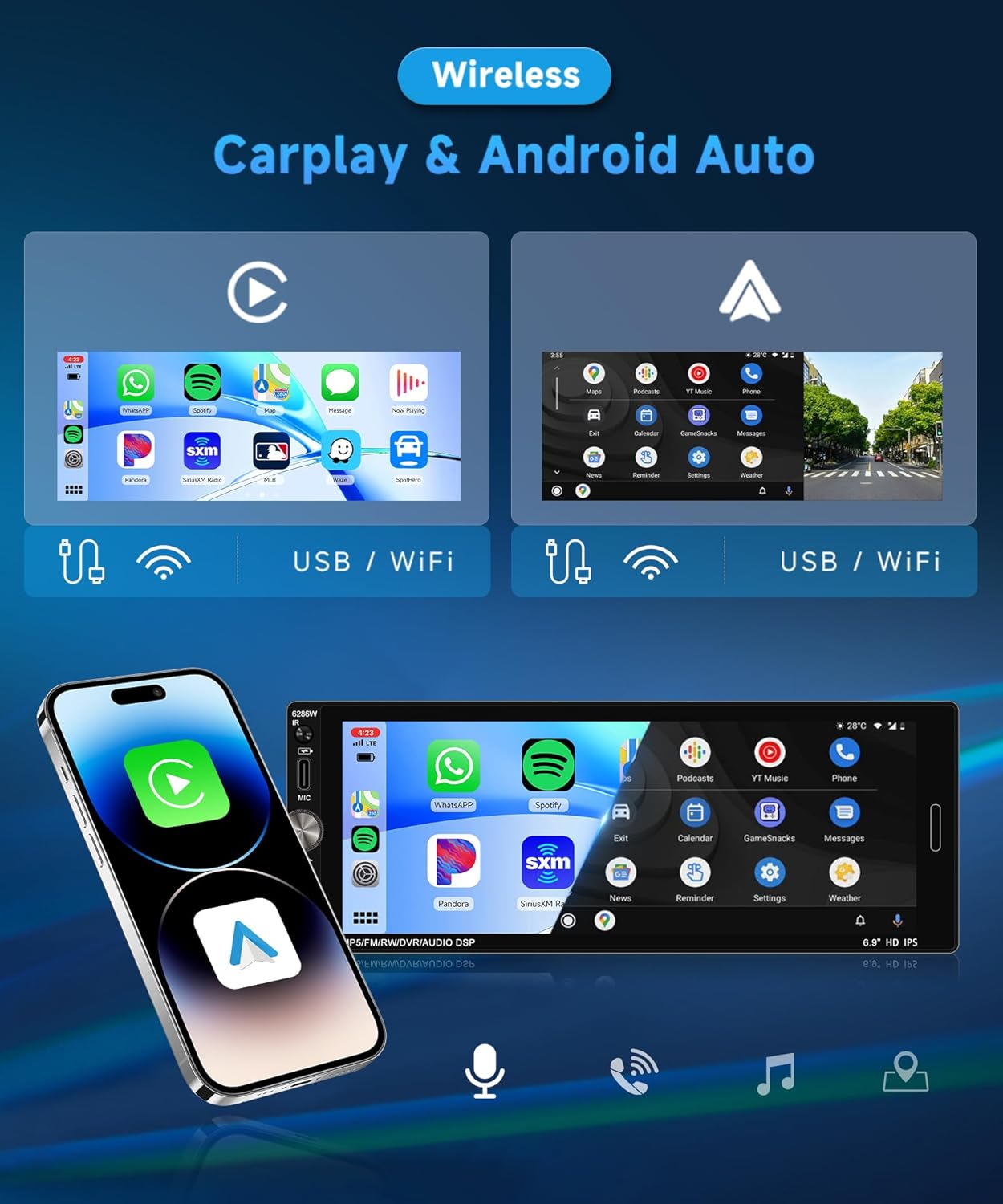
Image: Display of Wireless CarPlay and Android Auto interfaces on the 6.9-inch IPS touchscreen, demonstrating app access and connectivity options.
2. Bluetooth 5.2
Benefit from stable Bluetooth 5.2 connectivity for wireless music streaming, hands-free calls, and contact synchronization. Noise reduction technology ensures clear audio even in noisy environments. To pair, enable Bluetooth on your phone, search for the device (e.g., "Rimoody 6286W"), and connect.
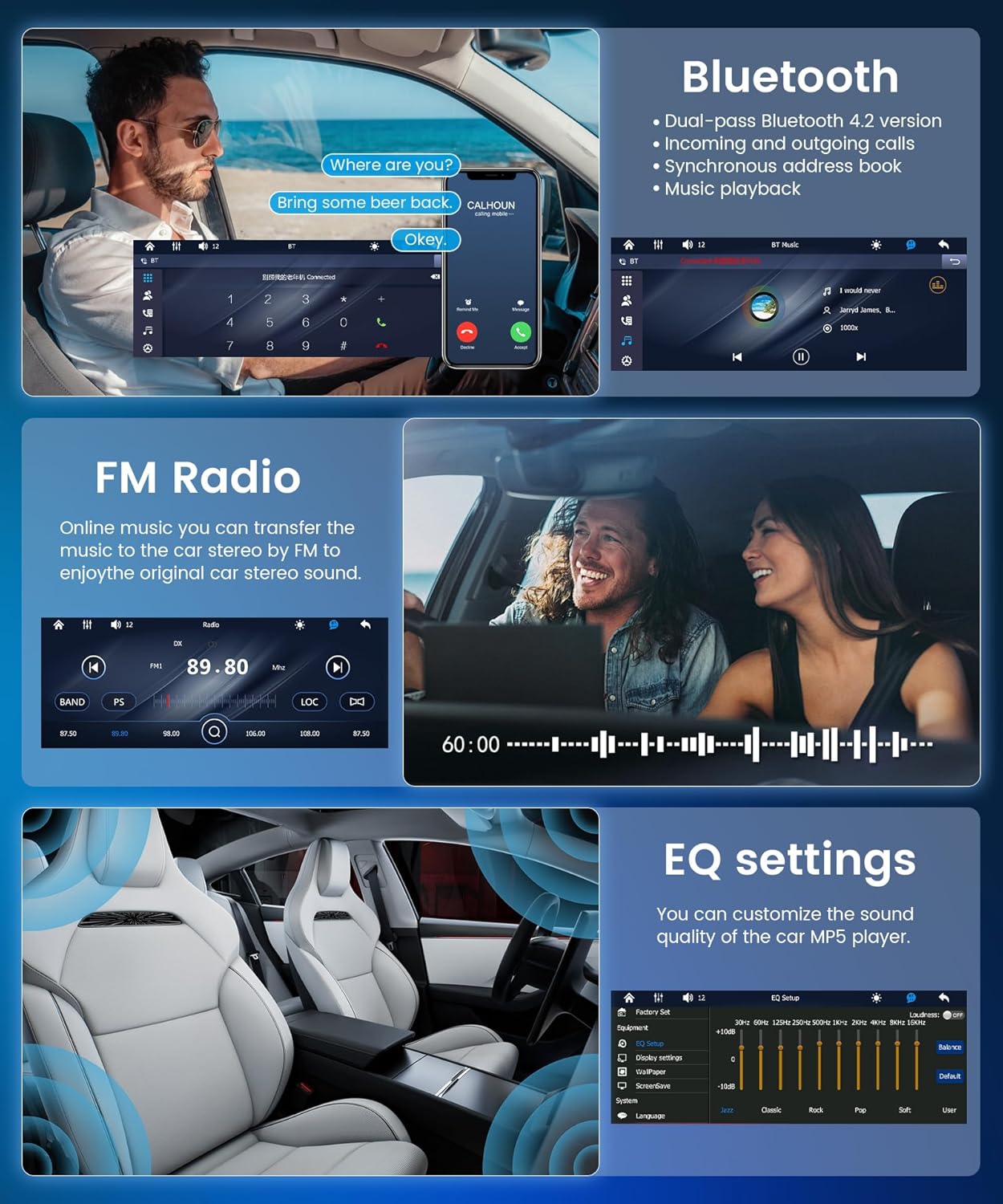
Image: The Bluetooth interface showing an active call, alongside the FM radio tuner and equalizer settings.
3. Radio FM
The integrated FM radio automatically searches and saves up to 18 preset stations. Listen to music, news, and traffic information. Use the auto-search, semi-automatic, or precise tuning functions to find your preferred stations.
4. Enlace espejo
Mirror Link duplicates your smartphone screen onto the car's display, providing seamless access to your apps and media. Connect wirelessly via Bluetooth/Wi-Fi or via USB to display maps, videos, or applications on the large touchscreen.

Image: A smartphone screen being mirrored onto the Rimoody Autoradio display, illustrating the Mirror Link feature via USB or WiFi connection.
5. Control del volante
The unit supports a steering wheel button learning function, allowing you to control essential functions directly from your steering wheel for added convenience and safety. Follow the on-screen instructions in the settings menu to program your steering wheel controls.

Image: The steering wheel control setup menu on the autoradio, next to a visual representation of a car's reverse camera view.
6. Configuración de EQ
Customize your audio experience with the 10-band equalizer. Adjust bass, treble, and other sound parameters to achieve optimal sound quality. The unit also features a bass filter for an immersive in-car audio experience.
7. Reverse Camera (Optional)
If a reverse camera is connected, the autoradio will automatically display the rear view when the vehicle is put into reverse. This feature enhances safety by providing a clear view of obstacles, aiding in parking and maneuvering.
8. Multimedia Input (USB & Type-C)
Connect your devices to the multi-function USB and Type-C ports to enjoy your favorite music, videos, and photos. These ports also support fast charging for your devices while driving. Compatible formats include MP3/WMA/WAV/APE/FLAC for audio and RM/RMVB/AVI/MP4/MKV/3GP for video.

Image: Visual representation of multimedia input options including TF card, USB, AUX IN, and fast charging, along with the customizable colorful backlight settings.
9. Configuración de retroiluminación colorida
Customize the unit's button backlighting with various color options to match your vehicle's interior or your personal preference.
Mantenimiento
- Limpieza de la pantalla: Utilice un paño suave y sin pelusa para limpiar suavemente la pantalla táctil. No utilice limpiadores abrasivos ni disolventes.
- Limpieza general: Mantenga la unidad libre de polvo y residuos. Utilice un paño seco para limpiar el exterior.
- Actualizaciones de software: Verifique el fabricante webRevise periódicamente el sitio para ver si hay actualizaciones de software disponibles para garantizar un rendimiento óptimo y nuevas funciones.
- Evite los líquidos: Evite que entren líquidos en la unidad, ya que esto puede causar daños graves.
Solución de problemas
| Problema | Posible causa | Solución |
|---|---|---|
| Sin poder | Cableado incorrecto; fusible quemado; problema con la batería del vehículo. | Check power cable connections; Inspect and replace fuses if necessary; Verify vehicle battery voltage. |
| Sin sonido | Cables del altavoz desconectados; Volumen demasiado bajo; Función de silencio activa; Fuente de audio incorrecta. | Verifique las conexiones de los altavoces; Aumente el volumen; Desactive el silencio; Seleccione la fuente de audio correcta. |
| La conexión Bluetooth falla | Bluetooth not enabled on phone/unit; Device out of range; Interference. | Ensure Bluetooth is active on both devices; Move devices closer; Restart both devices. |
| CarPlay/Android Auto no se conecta | Incorrect USB cable; Phone software outdated; App not installed/updated. | Use original or certified USB cable; Update phone OS and CarPlay/Android Auto app; Restart phone and unit. |
| Mala recepción de radio FM | Antena no conectada; Área de señal débil; Interferencia. | Ensure antenna is properly connected; Try tuning manually; Move to an area with better signal. |
Presupuesto
- Modelo: 6286 W
- Material de la pantalla: IPS
- Volumentage: 12 V CC
- Procesador: F133
- Tamaño de pantalla: 6.9 pulgadas
- Resolución: 1280 x 480
- Enlace espejo: Compatible
- Banda de radio FM
- Chip de radio: QN8035
- Potencia de salida: 45W (per channel), 180W total
- Temperatura de funcionamiento: -10 ~ 60 °C
- Versión de Bluetooth: 5.2
- Luz de fondo colorida: Compatible
- Entrada inversa: CVBS
- Fuerza AmpChip elevador: TDA7388
- Frecuencia de radio: 87.5-108 MHz
- Formatos de audio: MP3 / WMA / WAV / APE / FLAC
- Formatos de vídeo: RM/RMVB/AVI/MP4/MKV/3GP
- Formatos de imagen: JPG, BMP, PNG
- Idiomas admitidos: Inglés, chino, español, portugués, ruso, italiano, alemán, francés, turco, checo, árabe, polaco, hebreo
- Tecnología de conectividad: AUX, USB, Type C
- Tipo de controlador: Manual Control, Remote Control
- Dispositivos compatibles: Smartphone, Tablet, Personal Computer, Game Console, Car Display
- Modo de salida de audio: Estéreo
- Configuración del canal de sonido envolvente: 4.0
Garantía y soporte
This Rimoody Autoradio comes with a Garantía del fabricante por 2 añoConserve su comprobante de compra para reclamaciones de garantía.
For technical support, troubleshooting assistance, or warranty inquiries, please contact Rimoody customer service through the retailer where you purchased the product or visit the official Rimoody websitio para información de contacto.
When contacting support, please have your product model (6286W) and purchase details ready.