
1. Introducción
This manual provides detailed instructions for the safe and efficient use of your Surfans F20 Pro Android Hi-Res Music Player. Please read this manual thoroughly before operating the device and retain it for future reference.
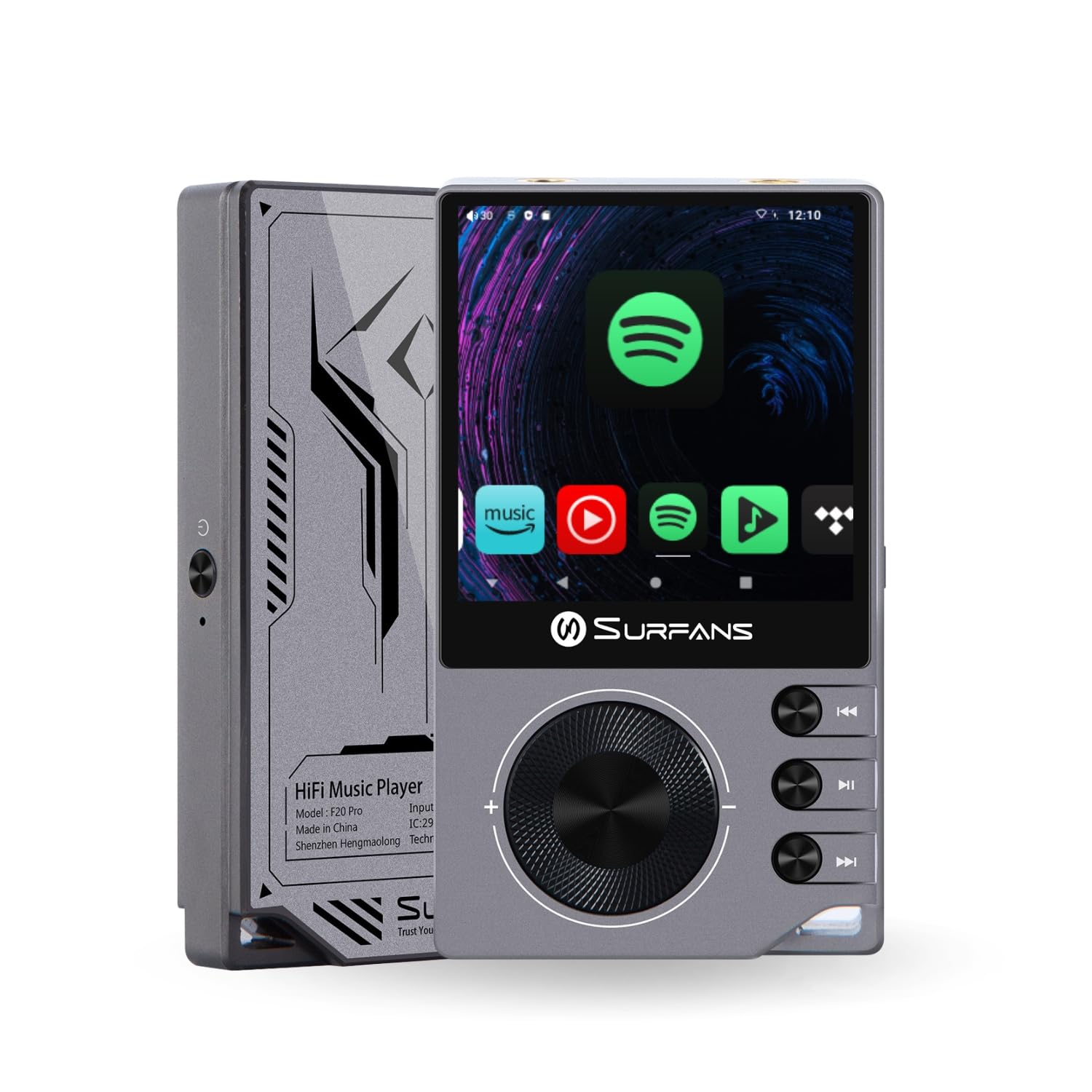
The Surfans F20 Pro Hi-Res Music Player, showcasing its compact design and touchscreen interface.
2. Contenido del paquete
Verifique que todos los artículos estén presentes en el paquete:
- Surfans F20 Pro Hi-Res Music Player
- Cable USB tipo C
- 32 GB MicroSD Memory Card (pre-installed or separate)
- Estuche protector
- Manual de usuario (este documento)
3. Dispositivo terminadoview
Familiarize yourself with the physical components and ports of your F20 Pro player.

Delante y detrás view of the Surfans F20 Pro, highlighting its robust CNC metal chassis and button layout.
3.1. Características principales
- Dual ESS9018Q2M DACs: For high-fidelity audio processing.
- Octa-Core Android 12 System: Enables streaming app compatibility and smooth operation.
- 3.5mm Single-Ended & 4.4mm Balanced Outputs: Versatile headphone connectivity.
- Bluetooth 5.0 con LDAC: High-quality wireless audio transmission.
- Wi-Fi de doble banda (2.4 GHz y 5 GHz): For stable internet connectivity.
- Almacenamiento expandible: Supports up to 1TB via MicroSD card.
- Pantalla táctil de 2.7 pulgadas: Interfaz de usuario intuitiva.
4. Configuración
4.1. Carga del dispositivo
Before first use, fully charge the F20 Pro. Connect the included USB Type-C cable to the device's charging port and a compatible USB power adapter (not included) or computer USB port. The charging indicator will show the charging status.
4.2. Inserción de una tarjeta MicroSD
The F20 Pro supports MicroSD cards up to 1TB for expanded storage. Locate the MicroSD card slot on the side of the device. Gently insert the card until it clicks into place. To remove, push the card in again until it springs out.
4.3. Encendido inicial
Mantenga presionado el botón de encendido hasta que la pantalla se ilumine. Siga las instrucciones en pantalla para completar la configuración inicial, incluyendo la selección del idioma y la conexión Wi-Fi.
4.4. Conexión a Wi-Fi
Navegar a Configuración > Red e Internet > Wi-Fi. Select your desired network and enter the password if prompted. The F20 Pro supports both 2.4GHz and 5GHz Wi-Fi bands.

The Surfans F20 Pro demonstrating its dual-band Wi-Fi capability for fast and stable connections.
4.5. Emparejamiento Bluetooth
Para conectar auriculares o altavoces Bluetooth:
- Asegúrese de que su dispositivo Bluetooth esté en modo de emparejamiento.
- On the F20 Pro, go to Ajustes > Dispositivos conectados > Emparejar nuevo dispositivo.
- Seleccione su dispositivo de la lista y confirme el emparejamiento.

An illustration of the Bluetooth 5.0 chip, indicating support for high-resolution wireless audio codecs like LDAC.
5. Operación del dispositivo
5.1. Navegación básica
The F20 Pro features a 2.7-inch touchscreen for navigation. Swipe to scroll, tap to select, and use the physical buttons for quick controls:
- Botón de encendido: Power on/off, screen on/off.
- Rueda de volumen: Ajusta el volumen de salida de audio.
- Botones de control de reproducción: Reproducir/Pausa, Pista siguiente, Pista anterior.
5.2. Reproducción de música
The F20 Pro supports various audio formats including DSD512, 192kHz/24bit, FLAC, WAV, WMA, M4A, MP3, MP2, and AAC.
5.2.1. Local Files
Transferir música files to the device's internal storage or MicroSD card via USB connection to a computer. Use the pre-installed music player application to browse and play your library.
5.2.2. Aplicaciones de streaming
The Android 12 operating system allows installation of streaming apps like Spotify, Apple Music, Tidal, or YouTube. Connect to Wi-Fi and download apps from the Google Play Store or other compatible sources.

The Surfans F20 Pro's screen showing various streaming application icons, demonstrating its Android capabilities.
5.3. Conexiones de auriculares
The device offers both single-ended and balanced audio outputs.
- Salida de un solo extremo de 3.5 mm: Standard headphone jack (125mW/32Ω).
- Salida balanceada de 4.4 mm: For enhanced audio performance with compatible headphones (500mW/32Ω).

De cerca view of the 3.5mm single-ended and 4.4mm balanced audio output ports on the Surfans F20 Pro.
6. Mantenimiento
6.1. Limpieza
Use a soft, dry, lint-free cloth to clean the device. Avoid using abrasive cleaners or solvents, which may damage the surface.
6.2. Actualizaciones de software
Periodically check for software updates to ensure optimal performance and access to new features. Updates can typically be found in Configuración > Sistema > Actualización del sistema.
6.3. Cuidado de la batería
Para prolongar la vida útil de la batería, evite descargar el dispositivo por completo con frecuencia. Guárdelo en un lugar fresco y seco cuando no lo use durante períodos prolongados.

Un interno view of battery cells, representing the long-lasting battery capacity of the F20 Pro.
7. Solución de problemas
If you encounter issues with your F20 Pro, refer to the following common problems and solutions:
| Problema | Posible causa | Solución |
|---|---|---|
| El dispositivo no enciende | Batería baja; Fallo del sistema | Cargue el dispositivo; mantenga presionado el botón de encendido durante 10 a 15 segundos para forzar el reinicio. |
| No hay salida de sonido | Volume too low; Incorrect output selected; Faulty headphones | Increase volume; Check headphone connection; Test with different headphones. |
| No se puede conectar al wifi | Contraseña incorrecta; Fuera de rango; Problema con el enrutador | Verify password; Move closer to router; Restart router. |
| Rendimiento lento/bloqueos de la aplicación | Demasiadas aplicaciones ejecutándose; Poco almacenamiento; Software obsoleto | Close background apps; Free up storage; Check for system updates. |
8. Especificaciones
Detailed technical specifications for the Surfans F20 Pro:
| Característica | Detalle |
|---|---|
| Marca | Surfanes |
| Nombre del modelo | F20 PRO |
| Chips DAC | Dual ESS9018Q2M |
| op-Amps | Dual OPA1612 |
| Sistema operativo | Androide 12 |
| RAM | 3 GB |
| Almacenamiento interno | 32 GB |
| Almacenamiento expandible | Hasta 1 TB mediante tarjeta MicroSD |
| Tamaño de pantalla | 2.73 pulgadas |
| Conectividad | Aux, Bluetooth 5.0 (LDAC), USB Type-C, Wi-Fi (2.4GHz & 5GHz) |
| Salidas de audio | 3.5mm Single-Ended (125mW/32Ω), 4.4mm Balanced (500mW/32Ω) |
| Formatos de audio compatibles | DSD512, 192kHz/24bit, FLAC, WAV, WMA, M4A, MP3, MP2, AAC |
| Color | Gris |

An illustration of the dual ESS9018K2M DAC chips, central to the F20 Pro's high-resolution audio capabilities.
9. Información de garantía
The Surfans F20 Pro comes with a Garantía de 1 años A partir de la fecha de compra. Esta garantía cubre defectos de fabricación y mano de obra en condiciones normales de uso. No cubre daños causados por mal uso, accidentes, modificaciones no autorizadas ni desgaste normal. Conserve su comprobante de compra para reclamaciones de garantía.
10. Atención al cliente
For further assistance, technical support, or warranty inquiries, please contact Surfans customer service through the official website or your retailer. You may also find additional resources and FAQs online.