
FreedConn R3PRO
FreedConn R3Pro Motorcycle Intercom with 2K Camera
Manual de usuario
Introducción
Thank you for choosing the FreedConn R3Pro Motorcycle Intercom with 2K Camera. This device is designed to enhance your riding experience by providing seamless communication, high-definition video recording, and entertainment features. This manual provides detailed instructions on how to set up, operate, and maintain your R3Pro unit. Please read it carefully before use to ensure optimal performance and safety.
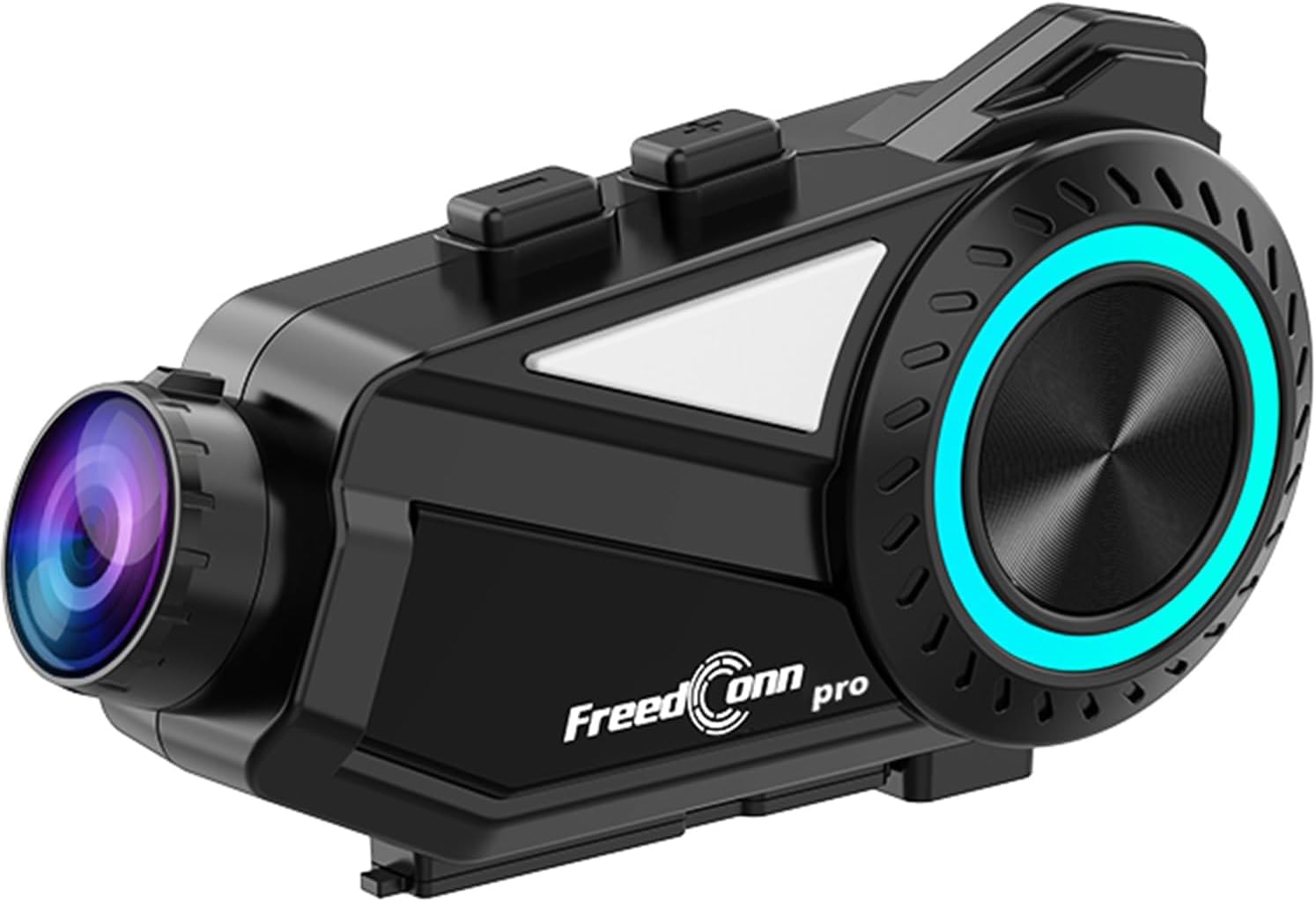
A sleek, black FreedConn R3Pro motorcycle intercom unit, featuring a camera lens on one end and a control dial with blue LED illumination on the side. It is designed to attach to a motorcycle helmet.
Producto terminadoview
Características principales
- Conectividad Bluetooth 5.1: High-speed chip for stable connections, supporting HFP/HSP/A2DP protocols.
- Intercomunicador de grupo: Supports up to 6 riders simultaneously with a communication range of 1.2km.
- 2K Camera & Loop Recording: Captures clear 1440p video, with adjustable lens and 360-degree unit rotation. Supports up to 512GB memory cards.
- Cancelación de ruido avanzada: CVC and DSP/C technologies reduce wind and engine noise for clear audio up to 120km/h.
- Batería de larga duración: 2000mAh battery provides up to 45 hours of talk time and 7 hours of continuous recording.
- Aplicación móvil dedicada: "RoadCam" app for real-time video viewing and downloading via Wi-Fi.
- Radio FM: Built-in FM radio function for entertainment and information.
- Soporte de asistente de voz: One-touch activation for hands-free control.
- IP65 a prueba de agua y polvo: Diseñado para soportar diversas condiciones climáticas.
- Emparejamiento universal: Compatible with other intercom brands (FODSPORTS, SENA) and various Bluetooth devices.
Contenido del paquete

This image displays the contents of the FreedConn R3Pro package, including the Bluetooth kit, 2-in-1 soft & hard microphones, hook clip, velcro clip, headphone velcro, USB cable, and manual. Below, a seven-step visual guide illustrates how to install the intercom unit onto a motorcycle helmet.
The FreedConn R3Pro package typically includes:
- FreedConn R3Pro Intercom Unit
- 2-in-1 Soft & Hard Microphones
- Helmet Mounting Kit (Hook Clip, Velcro Clip)
- Almohadillas de velcro para auriculares
- Cable de carga USB
- Manual de usuario
Diagrama de componentes

A detailed diagram of the FreedConn R3Pro unit, highlighting its various buttons and ports. Labels indicate the camera, WiFi button, recorder power ON/OFF, record/pause button, multi-function button, Bluetooth ON/OFF/intercom button, LED indicator, volume/next track, volume/previous track, microphone, earphone jack, reset button, TF card slot, and charging/USB port.
Familiarize yourself with the buttons and ports on your R3Pro unit:
- Cámara: Integrated 2K camera lens.
- Botón Wi-Fi: Activa Wi-Fi para la conexión de la aplicación.
- Recorder Power ON/OFF / Record/Pause Button: Controls camera recording.
- Botón multifunción: Used for various controls including pairing and voice assistant.
- Bluetooth ON/OFF / Intercom Button: Manages Bluetooth and intercom functions.
- Indicador LED: Muestra el estado del dispositivo.
- Volume / Next Track: Adjusts volume and skips tracks.
- Volume / Previous Track: Adjusts volume and goes to previous tracks.
- Puerto de micrófono: Connects the external microphone.
- Enchufe de audífonos: Connects the helmet speakers.
- Botón de reinicio: Para restablecer el dispositivo.
- Ranura para tarjetas TF: For inserting a microSD card for recording.
- Charging / USB Port: Para carga y transferencia de datos.
Configuración
1. Instalación del casco
Follow these steps to securely install the R3Pro unit on your motorcycle helmet:
- Attach the hook clip or velcro clip to the side of your helmet.
- Mount the R3Pro unit onto the attached clip.
- Insert the microphone into the helmet's interior, positioning it near your mouth.
- Attach the speakers inside the helmet using the provided velcro pads, ensuring they are aligned with your ears.
- Connect the microphone and speaker cables to the corresponding ports on the R3Pro unit.
2. Emparejamiento inicial (Bluetooth)

An illustration showing the internal Bluetooth 5.1 chip of the FreedConn R3Pro, emphasizing high-speed communication, energy saving, low latency, and ultra-stability. An inset image demonstrates the multi-function button used for automatic pairing after the initial setup.
The R3Pro features automatic pairing after the first successful connection:
- Ensure your R3Pro unit is charged.
- Turn on the R3Pro unit.
- Activa el Bluetooth en tu teléfono inteligente u otro dispositivo.
- Buscar "FreedConn R3Pro" in your device's Bluetooth settings and select it to pair.
- Once paired, the unit will automatically connect to your device when powered on.
3. App Connection (RoadCam)

This image illustrates the loop recording capability of the R3Pro and its integration with the "RoadCam" smartphone application. A motorcycle rider is shown, with the app interface on a phone displaying real-time video footage, indicating that recorded videos can be viewed and downloaded via Wi-Fi.
To connect to the dedicated "RoadCam" app:
- Download the "RoadCam" app from your smartphone's app store.
- Turn on the R3Pro unit and activate its Wi-Fi function (refer to the component diagram for the Wi-Fi button).
- Connect your smartphone to the R3Pro's Wi-Fi network (SSID and password usually found in the manual or on the device).
- Abra la aplicación "RoadCam" para view real-time video, manage recordings, and download files.
Instrucciones de funcionamiento
Encendido/apagado
- Encendido: Press and hold the Power button (refer to component diagram) until the LED indicator lights up.
- Apagado: Mantenga presionado el botón de encendido hasta que el indicador LED se apague.
Comunicación por intercomunicador

An image depicting multiple motorcycle riders on a road, connected wirelessly by the FreedConn R3Pro intercoms. It highlights the automatic communication reconnection feature, allowing riders to rejoin the conversation seamlessly even if they temporarily separate up to 1.2km.
- Iniciar intercomunicador: Press the Intercom button to start a conversation with paired units.
- Intercomunicador de grupo: The R3Pro supports up to 6 riders for simultaneous communication. Follow the specific pairing instructions in the full manual for multi-unit connections.
- Reconexión automática: If riders separate and exceed the 1.2km range, the units will automatically reconnect once they are back within range.
Operación de la cámara

This image demonstrates the adjustable camera features of the FreedConn R3Pro. It shows the camera lens can be adjusted by 30 degrees and the main unit can rotate 360 degrees, allowing riders to capture various angles.
- Iniciar/Detener grabación: Press the Record/Pause button (refer to component diagram) to start or stop video recording.
- Grabación en bucle: La cámara admite grabación en bucle, sobrescribiendo automáticamente las grabaciones más antiguas. files cuando la tarjeta de memoria está llena.
- Ajuste de la cámara: The camera lens can be adjusted by 30 degrees, and the entire unit can rotate 360 degrees for optimal viewángulos de ing.
- Tarjeta de memoria: Insert a microSD card (up to 512GB) into the TF card slot before recording.
Reproducción y uso compartido de música

This image illustrates the R3Pro's universal pairing with various Bluetooth devices like smartphones, action cameras, and other Bluetooth earphones. It also shows two riders sharing music, emphasizing the ability to enjoy favorite tunes with a partner.
- Reproducir/Pausa: Use the multi-function button for music control.
- Pista siguiente / anterior: Use the Volume/Next Track and Volume/Previous Track buttons.
- Compartir música: Share audio with a paired intercom unit up to 50 meters away.
Radio FM

A motorcycle rider is shown with the R3Pro, indicating the built-in FM radio feature. The image displays a frequency range from 76-108MHz, suggesting support for Japanese frequencies, and mentions support for sports broadcasts and news.
- Activar radio FM: Press the designated FM radio button (refer to the full manual for specific button assignment).
- Escanear canales: La unidad escaneará y guardará automáticamente las estaciones de FM disponibles.
- Cambiar canales: Use the Volume/Next Track and Volume/Previous Track buttons to switch between stations.
Llamadas telefónicas

An image showing a motorcycle rider receiving a call, with a graphic indicating automatic answering after 15 seconds of no operation. It also states that hands-free calls are possible while riding, and music playback resumes after the call ends.
- Responder llamada: The R3Pro supports automatic answering after 15 seconds of no operation. You can also tap the multi-function button to answer.
- Finalizar llamada: Tap the multi-function button to end a call.
- Rechazar llamada: Mantenga presionado el botón multifunción para rechazar una llamada entrante.
- Conexión telefónica dual: The unit can connect to two smartphones simultaneously, allowing real-time switching between call, music, and navigation functions.
Asistente de voz

An illustration showing how to activate the voice assistant by long-pressing the multi-function button for 2 seconds. Examples of voice commands are displayed, such as "Buscar gas station," "Call Mr. Matsumoto," "What day is today?", and "How's the weather tomorrow?".
To activate your smartphone's voice assistant (e.g., Siri, Google Assistant):
- Activar: Mantenga pulsado el botón multifunción durante 2 segundos.
- Once activated, you can issue commands for navigation, calls, weather checks, and more.
Cancelación de ruido

A diagram illustrating the effect of noise cancellation, showing sound waves before and after processing, with a significant reduction in noise. It also displays the internal components of the speaker, highlighting Hi-Res audio quality and an omnidirectional microphone for clear conversations up to 120km/h.
The R3Pro features advanced CVC and DSP/C noise cancellation technology, which automatically reduces ambient noise such as wind and engine sounds. This ensures clear voice communication and high-quality music playback even at speeds up to 120km/h.
Mantenimiento
Cargando la batería

Una imagen muestraasing the 2000mAh battery of the R3Pro, indicating approximately 2.5 hours for a full charge. It highlights extended usage times: 42 hours for music, 33 hours for talk, and 7-8 hours for recording, with support for up to 512GB memory cards for loop recording.
- Connect the R3Pro to a power source using the provided USB charging cable via the Charging/USB Port.
- Una carga completa suele tardar aproximadamente 2.5 horas.
- El indicador LED mostrará el estado de carga (por ejemplo, rojo para carga, azul para carga completa).
Limpieza y cuidado

An image showing the FreedConn R3Pro unit being splashed with water, illustrating its IP65 waterproof and dustproof rating. This indicates stable communication and recording are possible even in sudden rain or bad weather conditions.
- Limpie la unidad con un paño suave yamp paño. No utilice productos químicos agresivos ni limpiadores abrasivos.
- Asegúrese de que todos los puertos estén secos antes de cargar o conectar accesorios.
- The IP65 rating protects against water jets and dust, but avoid submerging the unit in water.
Solución de problemas
Problemas comunes y soluciones
| Asunto | Posible causa | Solución |
|---|---|---|
| La unidad no enciende | Batería baja; botón de encendido defectuoso | Cargue la unidad completamente; comuníquese con el soporte técnico si el problema persiste. |
| No se puede emparejar con el teléfono inteligente | Bluetooth not enabled; Unit not in pairing mode; Interference | Ensure Bluetooth is on; Put R3Pro in pairing mode; Move away from other devices; Reset unit. |
| El intercomunicador no se conecta | Units out of range; Incorrect pairing sequence; Low battery | Ensure units are within 1.2km; Re-pair units; Charge batteries. |
| Mala calidad de audio/ruido | Microphone/speaker placement; High wind noise; Interference | Adjust microphone/speaker; Ensure CVC/DSP is active; Check for obstructions. |
| La cámara no graba | No microSD card; Full microSD card; Card error | Insert/replace microSD card; Format card; Check card compatibility. |
| Problemas de conexión de la aplicación | Wi-Fi not enabled on R3Pro; Incorrect Wi-Fi password; App not updated | Enable R3Pro Wi-Fi; Re-enter password; Update RoadCam app. |
If you encounter issues not listed here or if the suggested solutions do not resolve the problem, please refer to the comprehensive troubleshooting section in the full user manual or contact customer support.
Presupuesto
| Característica | Detalle |
|---|---|
| Marca | FreedConn |
| Nombre del modelo | R3PRO |
| Tecnología de conectividad | Bluetooth 5.1, Wi-Fi |
| Rango de intercomunicación | Up to 1.2 km (multi-person) |
| Intercomunicador de grupo | Hasta 6 pasajeros simultáneamente |
| Resolución de captura de video | 1440p (2K) |
| Características de la cámara | 30-degree lens adjustment, 360-degree unit rotation, Loop Recording |
| Soporte para tarjetas de memoria | MicroSD de hasta 512 GB |
| Cancelación de ruido | CVC, DSP/C |
| Capacidad de la batería | Iones de litio 2000mAh |
| Tiempo de conversación continuo | Hasta 45 horas |
| Tiempo de grabación continua | Aproximadamente 7 horas |
| Tiempo de carga | Aproximadamente 2.5 horas |
| Clasificación de impermeabilidad | IP65 |
| Dimensiones | 14.8 x 11.5 x 6.4 cm |
| Peso | 450 gramos |
Garantía y soporte
The FreedConn R3Pro comes with a 1 año de garantía A partir de la fecha de compra, cubre defectos de fabricación. Conserve el comprobante de compra para reclamaciones de garantía.
For technical support, troubleshooting assistance, or warranty inquiries, please contact FreedConn customer service through the retailer where you purchased the product or visit the official FreedConn websitio para información de contacto.
Documentos relacionados - R3PRO
 |
Manual del usuario del intercomunicador y grabador Bluetooth FreedConn R1 Plus Manual de usuario completo para FreedConn R1 Plus, que detalla sus características, funciones, instalación, funcionamiento y solución de problemas para el intercomunicador Bluetooth y la grabación de video de la motocicleta. |
 |
Sistema de intercomunicación Bluetooth para casco BM2: Manual de usuario y características Manual de usuario completo del sistema de intercomunicación Bluetooth para casco BM2. Conozca sus características, emparejamiento, intercomunicador grupal, funciones, especificaciones técnicas y mantenimiento. |
 |
FreedConn FG Bluetooth Motorcycle Helmet Intercom Kit: Features, Installation, and Controls Comprehensive guide to the FreedConn FG Bluetooth Motorcycle Helmet Intercom Kit, detailing its features, parts list, step-by-step installation, and control panel functions for riders. |
 |
Manual de usuario del casco de motocicleta Bluetooth FreedConn BM2-S Manual de usuario completo para el casco de motocicleta Bluetooth FreedConn BM2-S, que detalla características como intercomunicador, llamadas telefónicas, reproducción de música, integración de GPS, mantenimiento, información de la batería y garantía. |
 |
Guía de inicio rápido del intercomunicador Bluetooth Freedconn T-COM VB/SC Guía completa para instalar, emparejar y operar su sistema de intercomunicación para motocicletas Bluetooth Freedconn T-COM VB y T-COM SC, incluido el manejo de llamadas, el control de música y las funciones de intercomunicador. |
 |
Manual de instrucciones de la grabadora Bluetooth WIFI FreedConn R3 Manual de instrucciones completo para la grabadora Bluetooth WIFI FreedConn R3, que detalla la configuración, el funcionamiento, las características y la resolución de problemas de este sistema de intercomunicación para casco de motocicleta. |