
1. Producto terminadoview
The Baseus Nomos 245W Charging Station is a versatile 6-in-1 desktop power solution designed to efficiently charge multiple devices simultaneously. It features dual retractable USB-C cables, multiple USB-C and USB-A ports, and a Qi2 certified magnetic wireless charger. Powered by advanced GaN technology and BPS3.0 smart power allocation, this station provides high-speed charging while maintaining a compact form factor and ensuring device safety.

Image 1.1: The Baseus Nomos 245W Charging Station showcasing its various ports and the integrated wireless charging pad.
2. ¿Qué hay en la caja?
- 1 x Baseus Nomos Charging Station 245W
- 1 x 245W Power Adapter with 5ft Power Cord
- 1 x Manual de usuario
3. Características del producto
- Potencia de salida total 245W: Delivers a combined 245W across all ports for simultaneous charging of up to 6 devices.
- Dual Retractable USB-C Cables: Two built-in 80 cm (31.5 inches) braided USB-C cables with 100W max output each, designed for neat cable management and durability.
- Qi2 Certified 15W Magnetic Wireless Charger: Provides 15W fast wireless charging for compatible devices, ensuring precise alignment.
- Múltiples puertos: Includes 4 USB-C ports (two retractable, two fixed) and 1 USB-A port for broad device compatibility.
- BPS3.0 Smart Power Allocation: Intelligently distributes power to connected devices for optimal charging speed and safety.
- GaN Chip Technology: Utilizes advanced Gallium Nitride (GaN) technology for a compact and efficient design.
- Visualized LCD Display: A 3-inch LCD screen shows real-time charging data, including total output, individual port power, and overall performance.
- Protecciones de seguridad: Features protection against short circuits, over-voltage, and overheating, with a modular internal design for enhanced heat dissipation.

Image 3.1: Illustration of the BPS3.0 Smart Power Allocation system distributing power to various devices.
4. Instrucciones de configuración
- Desempaque el dispositivo: Carefully remove the charging station, power adapter, and power cord from the packaging.
- Conecte la electricidad: Insert the 245W power adapter into the designated power input port on the charging station. Connect the power cord to the adapter and then plug it into a standard wall outlet.
- Colocación: Place the charging station on a stable, flat surface, ensuring adequate ventilation around the unit. The hollow base design aids in passive cooling.
- Encendido inicial: The LCD display will automatically activate when powered on, showing real-time charging data.
Video 4.1: An official product video demonstrating the Baseus Nomos 245W Charging Station in use, highlighting its features and clean desk setup.
5. Instrucciones de funcionamiento
5.1 Carga por cable
- Using Retractable USB-C Cables: Gently pull the braided USB-C cables from their slots to extend them. Connect the USB-C end to your device. To retract, press the button next to the cable and guide it back into the station. Avoid forcing the cables.
- Using Fixed USB-C/USB-A Ports: Connect your device's charging cable to the appropriate USB-C (C3/C4) or USB-A port on the charging station.
- La entrega de energía: The USB-C3/C4 ports can deliver up to 140W individually. The station's BPS3.0 system will automatically adjust power output based on the number and type of connected devices.
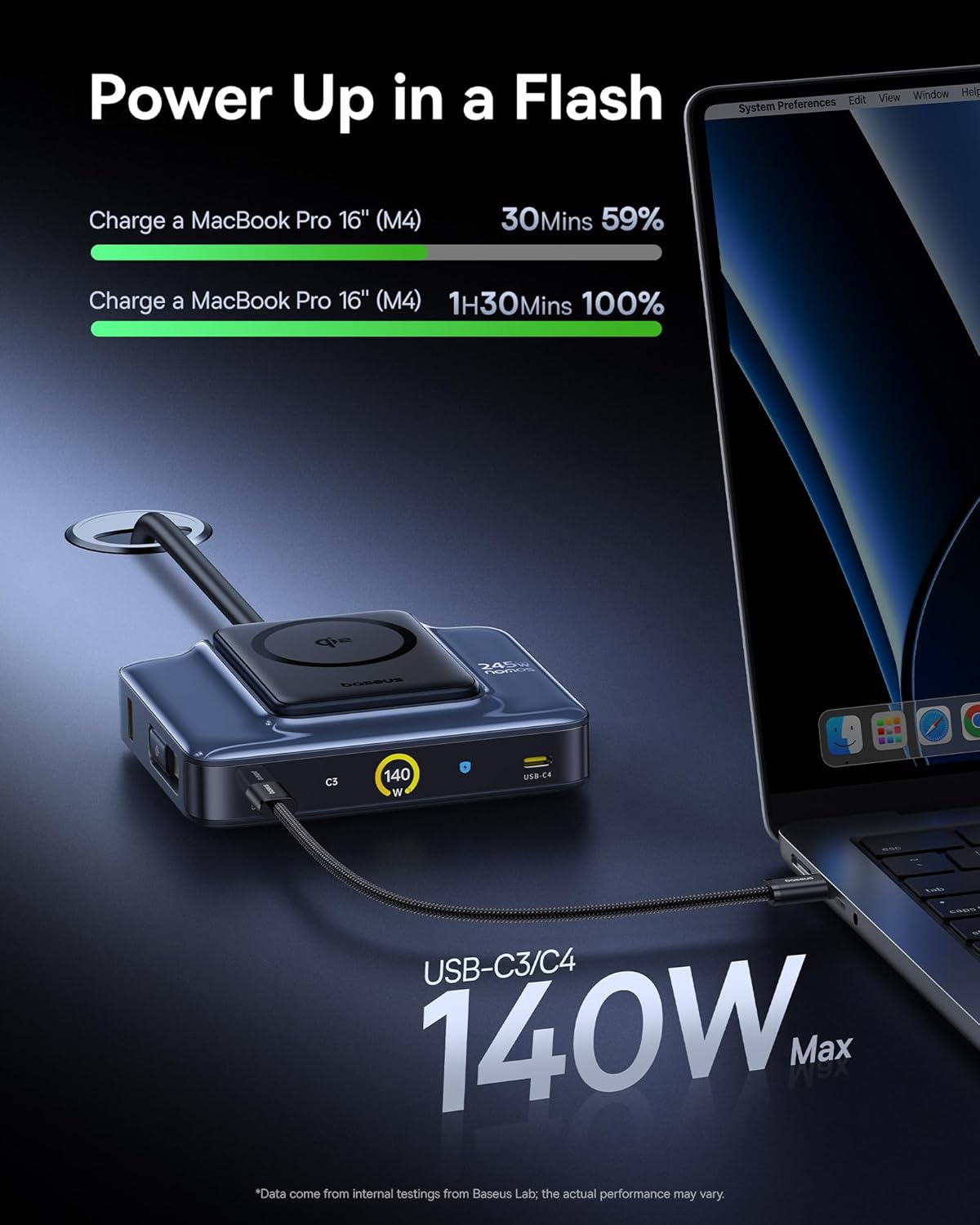
Image 5.1: The charging station providing 140W fast charging to a MacBook Pro 16 inch via a USB-C port.
5.2 Wireless Charging (Qi2)
- Posicionamiento: Place your Qi2-compatible device (e.g., iPhone 12-17 series) onto the magnetic wireless charging pad. The magnets will ensure proper alignment.
- Estado de carga: The LCD display will show the wireless charging status and power output (up to 15W).
- Compatibilidad de casos: The wireless charger supports charging through cases up to 3mm thick.

Image 5.2: An iPhone 17 Pro being wirelessly charged on the Qi2 magnetic pad of the Baseus Nomos station.
Pantalla LCD 5.3
The 3-inch LCD digital display provides real-time charging information. Press the button on the station to toggle between different display modes:
- Salida total: Muestra el agua combinadatage being delivered by the station.
- Individual Port Power: Muestra el aguatage para cada puerto activo.
- Rendimiento general: May indicate charging modes (e.g., Balanced, High Performance, Smart Cooling).
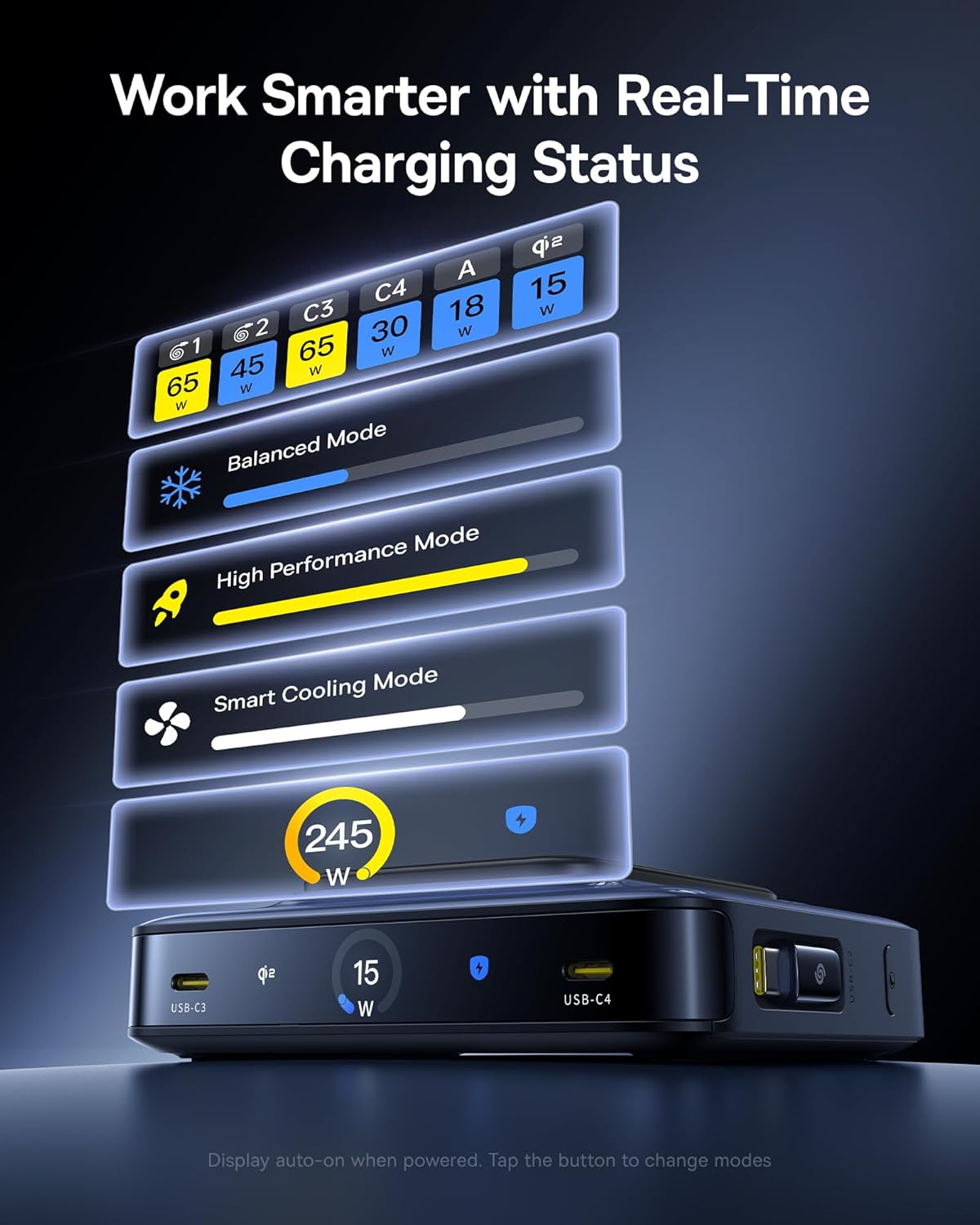
Image 5.3: The LCD display on the charging station showing real-time power output for each port and various operational modes.
6. Especificaciones
| Característica | Detalle |
|---|---|
| Marca | Baseus |
| Modelo | Nomos 245W |
| Potencia de salida total | 245W Max |
| Vol de entradatage | 240 voltios |
| Corriente de salida | 13 Amps |
| Vol de salidatage | 120 voltios |
| Puertos USB-C | 4 (2 retractable, 2 fixed) |
| Puertos USB-A | 1 |
| Longitud del cable retráctil | 80 cm (31.5 pulgadas) |
| Carga inalámbrica | Qi2 Certified, 15W Max |
| Características especiales | GaN Technology, BPS3.0 Smart Power Allocation, LCD Display |
| Color | Negro |
| Dispositivos compatibles | iPhone 12-17 series, Galaxy S20-24, OnePlus 8 Pro, Google Pixel 6-8, Sony Xperia 5, iPad, Air Pods 2-3, MacBook Pro 2023, Lenovo ThinkPad T14, Dell XPS 13, and more. |
7. Solución de problemas
7.1 El dispositivo no se carga
- Verifique la conexión de energía: Ensure the charging station is securely plugged into a working wall outlet.
- Conexión de cable: Verify that the charging cables are firmly connected to both the charging station and your device.
- Integridad del cable: Inspect cables for any visible damage. Try a different cable if available.
- Wireless Charging Alignment: For wireless charging, ensure your device is correctly centered on the magnetic pad. Remove thick cases if necessary.
- Compatibilidad del dispositivo: Confirm your device is compatible with the charging station's output specifications (USB-C PD, Qi2, etc.).
7.2 Carga lenta
- Calidad del cable: Use high-quality, certified charging cables that support fast charging protocols.
- Asignación de energía: When multiple devices are connected, the BPS3.0 system distributes power. Charging speeds may vary depending on the total load. Refer to the LCD display for individual port output.
- Device Input Limits: Ensure your device supports the higher wattage output from the charging station. Some devices have maximum input limits.
- Aplicaciones en segundo plano: Close power-intensive applications on your device during charging.
7.3 Sobrecalentamiento
- Ventilación: Ensure the charging station is placed in a well-ventilated area and its vents are not obstructed.
- Temperatura ambiental: Avoid using the charger in excessively hot environments.
- Reducir la carga: If the station feels excessively hot, temporarily disconnect some devices to reduce the load. The smart cooling mode will activate to manage temperature.
8. Información de seguridad
- No exponga el dispositivo al agua, la humedad o temperaturas extremas.
- Evite dejar caer, desmontar o intentar reparar el dispositivo usted mismo.
- Mantener fuera del alcance de los niños.
- Use only the provided power adapter and cord.
- Asegúrese de que haya una ventilación adecuada para evitar el sobrecalentamiento.
- Desconecte la alimentación cuando no vaya a utilizarlo durante períodos prolongados.
9. Mantenimiento
- Clean the charging station with a soft, dry cloth. Do not use liquid cleaners or aerosols.
- Regularly check cables for wear and tear. Replace damaged cables immediately.
- Mantenga los puertos libres de polvo y residuos.
10. Garantía y soporte
The Baseus Nomos 245W Charging Station comes with a 2 año de garantía from the date of purchase, covering manufacturing defects. For warranty claims, technical support, or further assistance, please contact Baseus customer service through their official websitio o el minorista donde se compró el producto.
For more information, visit the official Baseus websitio: Tienda oficial de Baseus