
1. Introducción
This user manual provides comprehensive instructions for the NICGIGA 10-Port 10Gbps Unmanaged Ethernet Switch, Model S25-0802T. It covers product features, installation, operation, and troubleshooting to ensure optimal performance and longevity of your device. Please read this manual thoroughly before using the switch.
2. Producto terminadoview
The NICGIGA S25-0802T is an unmanaged Ethernet switch designed to expand your network capabilities with high-speed connectivity. It features a durable metal casing and a fanless design for quiet operation.
- Configuración del puerto: 8 x 2.5Gb Base-T RJ45 ports and 2 x 10Gb RJ45 uplink ports.
- Compatibilidad de velocidad: Ports 1-8 support 2.5G/1G/100Mbps. Ports 9-10 support 10G/5G/2.5G/1G/100Mbps.
- MDI/MDIX automático: Automatically detects and adjusts for straight-through or crossover cables.
- Conectar y usar: No software configuration required for operation.
- Alta capacidad de conmutación: Hasta 60 Gbps.
- Thermal Design: Fanless for silent operation, with double-sided cooling holes and a metal case for efficient heat dissipation.
- Opciones de montaje: Supports desktop placement and wall mounting.

3. Contenido del paquete
Verifique que todos los artículos estén presentes en el paquete:
- NICGIGA 10-Port Unmanaged Ethernet Switch (Model: S25-0802T)
- Adaptador de corriente (CC 12 V 1.5 A)
- Manual de usuario (este documento)
4. Instrucciones de configuración
The NICGIGA S25-0802T switch is designed for simple plug-and-play operation. No software installation or complex configuration is required.
- Conexión de energía: Connect the included DC 12V 1.5A power adapter to the switch's power input port and then to a power outlet. The Power LED on the switch will illuminate.
- Conexión del dispositivo de red: Connect your network devices (e.g., computers, NAS, routers, access points) to any of the RJ45 ports (1-10) on the switch using standard Ethernet cables.
- Verificar conexión: Once connected, the corresponding Link/Act LEDs for each port will illuminate, indicating an active connection.

5. Instrucciones de funcionamiento
The switch operates automatically once powered on and devices are connected. It supports auto-negotiation for speed and duplex mode, and auto MDI/MDIX for cable type detection.
- Detección automática de velocidad: The switch ports automatically detect the speed of the connected device (100Mbps, 1Gbps, 2.5Gbps, 5Gbps, or 10Gbps) and adjust accordingly.
- Operación dúplex completo: All ports support full-duplex mode for maximum data throughput.
- Arquitectura sin bloqueo: The switch provides full wire-speed forwarding on all ports, ensuring efficient data transfer without bottlenecks.

6. Instalación
The NICGIGA S25-0802T switch offers flexible installation options:
- Colocación de escritorio: Coloque el interruptor sobre una superficie plana y estable. Asegúrese de que haya suficiente ventilación alrededor del dispositivo.
- Montaje en pared: The switch can be mounted on a wall using appropriate screws (not included) and the mounting slots on the underside of the device. Ensure the mounting surface is sturdy enough to support the switch's weight.


7. Indicadores LED
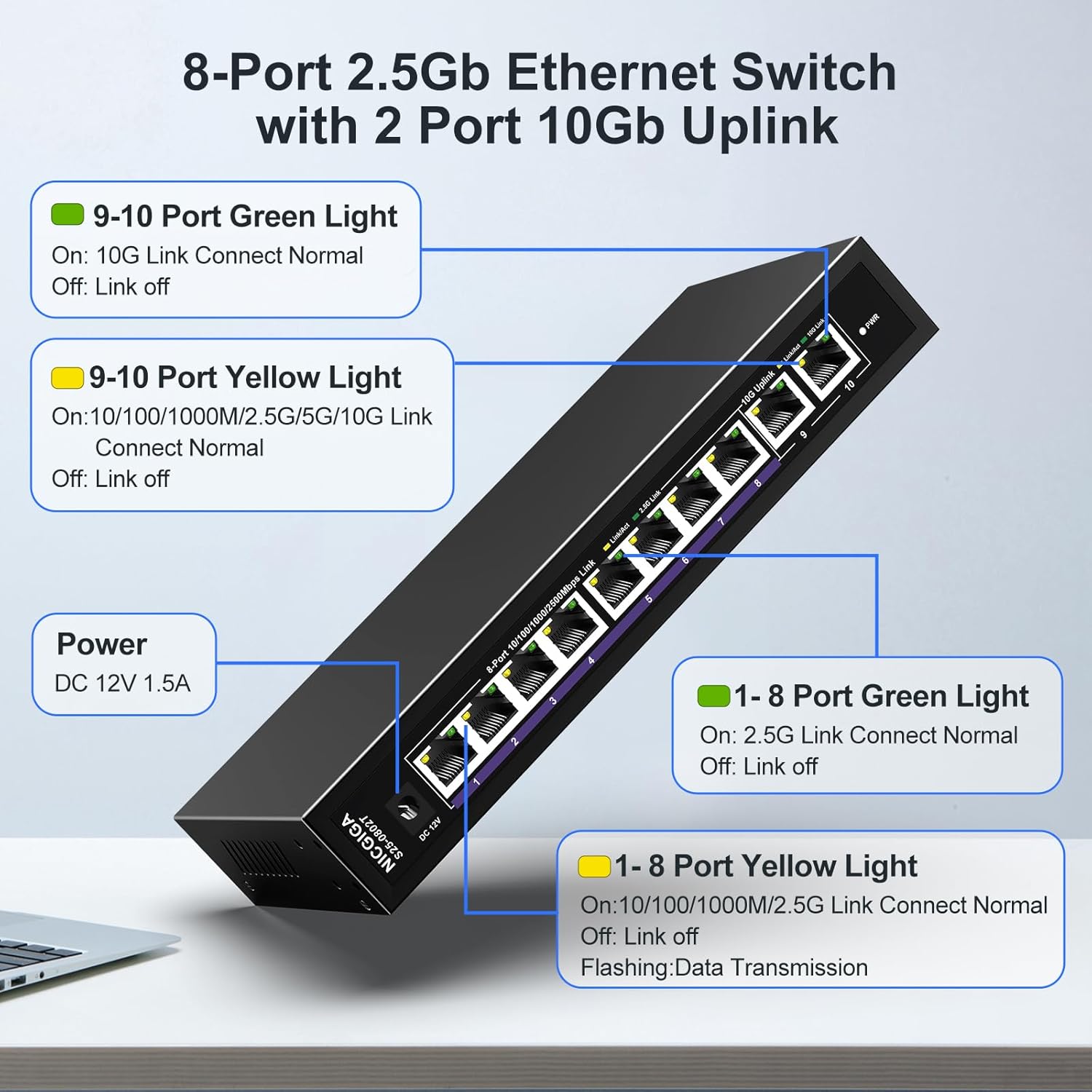
The switch features LED indicators to provide real-time status information for each port and the device itself.
| Indicador | Estado | Descripción |
|---|---|---|
| Fuerza | On | El interruptor está encendido. |
| Ports 1-8 Green Light | On | 2.5G Link Connect Normal. |
| Apagado | Link off. | |
| Ports 1-8 Yellow Light | On | 10/100/1000M/2.5G Link Connect Normal. |
| Brillante | Data Transmission. | |
| Apagado | Link off. | |
| Ports 9-10 Green Light | On | 10G Link Connect Normal. |
| Apagado | Link off. | |
| Ports 9-10 Yellow Light | On | 10/100/1000M/2.5G/5G/10G Link Connect Normal. |
| Brillante | Data Transmission. | |
| Apagado | Link off. |
8. Network Cable Compatibility
Using appropriate Ethernet cables is crucial for achieving optimal network speeds.
- For 2.5Gbps Ports (1-8):
- CAT5e Cable (≤100m)
- CAT6/6a Cable (≤100m)
- CAT7 Cable (≤100m)
- For 10Gbps Ports (9-10):
- CAT6 Cable (≤55m)
- CAT6a Cable (≤100m)
- CAT7 Cable (≤100m)


9. Especificaciones
| Característica | Detalle |
|---|---|
| Número de modelo | S25-0802T |
| Número de puertos | 10 (8 x 2.5Gb RJ45, 2 x 10Gb RJ45) |
| Tipo de interfaz | RJ45 |
| Velocidad de transferencia de datos | 60 Gigabits por segundo (capacidad de conmutación) |
| Clasificación de temperatura superior | 50 grados centígrados |
| Peso del artículo | 1.76 libras |
| Dimensiones del paquete | 9.8 x 9.61 x 2.99 pulgadas |
| Color | Negro |
| Dispositivos compatibles | Computadora de escritorio, consola de juegos, computadora portátil, impresora, enrutador |
| Fabricante | NICGIGA |
10. Solución de problemas
If you encounter issues with your NICGIGA switch, refer to the following common troubleshooting steps:
- Sin energía:
- Asegúrese de que el adaptador de corriente esté conectado de forma segura al interruptor y a una toma de corriente que funcione.
- Verifique que la toma de corriente funcione.
- Sin luz de enlace:
- Compruebe si el cable Ethernet está conectado de forma segura tanto al puerto del conmutador como al dispositivo de red.
- Pruebe con un cable Ethernet diferente.
- Asegúrese de que el dispositivo conectado esté encendido y su adaptador de red esté habilitado.
- Verify the cable type is appropriate for the desired speed (refer to Section 8).
- Velocidad de red lenta:
- Ensure your network cables are rated for the desired speed (e.g., CAT6a or CAT7 for 10Gbps).
- Check the network adapter settings on your connected devices to ensure they are configured for auto-negotiation or the correct speed.
- Confirm that the connected devices themselves support the higher speeds (2.5Gbps or 10Gbps).
- Conexión intermitente:
- Inspeccione los cables Ethernet para detectar daños.
- Ensure the switch is placed in a well-ventilated area to prevent overheating, although its fanless design is optimized for heat dissipation.
- Avoid placing the switch near strong electromagnetic interference sources.
11. Mantenimiento
To ensure the longevity and optimal performance of your switch, follow these maintenance guidelines:
- Limpieza: Utilice un paño suave y seco para limpiar el exterior del interruptor. No utilice limpiadores líquidos ni en aerosol.
- Ventilación: Ensure that the ventilation holes on the sides of the switch are not obstructed to allow for proper heat dissipation.
- Ambiente: Operate the switch within its specified temperature range (-10~50°C) and humidity levels.
- Ciclo de energía: Si el interruptor no responde, desconecte el adaptador de corriente, espere 10 segundos y vuelva a conectarlo.

12. Garantía y soporte
NICGIGA provides the following support for this product:
- Garantía: Se proporciona una garantía de un año a partir de la fecha de compra.
- Apoyo técnico: Está disponible soporte técnico de por vida para el producto.
For warranty claims or technical assistance, please contact NICGIGA customer support through the retailer where the product was purchased or visit the official NICGIGA websitio.