
1. Introducción
Thank you for choosing the CLEANmaxx 2-in-1 Cordless Handheld Vacuum with Blower Function, Model 16535. This versatile device is designed for quick and effective cleaning of various surfaces, offering both powerful suction and a convenient blower function. Its compact, lightweight design and cordless operation provide maximum flexibility for use in your home, car, or workshop. Please read this manual carefully before first use to ensure proper operation and maintenance.
2. Instrucciones de seguridad
Para garantizar un funcionamiento seguro y evitar daños, observe las siguientes pautas de seguridad:
- Mantenga el dispositivo alejado del agua y la humedad. No lo utilice con las manos mojadas.
- Do not vacuum liquids, glowing ashes, sharp objects, or flammable/explosive substances.
- Ensure the HEPA filter is correctly installed before use.
- No bloquee las entradas o salidas de aire durante el funcionamiento.
- Este aparato no está diseñado para ser utilizado por personas (incluidos niños) con capacidades físicas, sensoriales o mentales reducidas, o con falta de experiencia y conocimientos, a menos que hayan recibido supervisión o instrucciones sobre el uso del aparato por parte de una persona responsable de su seguridad.
- Only use the provided USB-C charging cable and a suitable power adapter (not included) for charging.
- Do not attempt to open or repair the device yourself. Contact qualified service personnel for repairs.
- Guarde el dispositivo en un lugar seco, fuera del alcance de los niños.
3. Contenido del paquete
Carefully unpack your CLEANmaxx 2-in-1 Cordless Handheld Vacuum and check that all items are present and undamaged:
- 1x Motor Unit with integrated battery
- 1x Dirt Bin
- 1 filtro HEPA
- 1x Cushion Nozzle
- 1x Herramienta para grietas
- 1x Small Blower Nozzle
- 1x Large Blower Nozzle
- 1x Flat Brush Attachment (for crevice tool)
- 1x Round Brush Attachment (for blower nozzle)
- 1x Vacuum Nozzle (for vacuum storage bags)
- 1x cable de carga USB-C

Image 3.1: All components included with the CLEANmaxx 2-in-1 Cordless Handheld Vacuum.
4. Producto terminadoview
Familiarize yourself with the main parts of your CLEANmaxx handheld vacuum:

Image 4.1: Main unit and various attachments.
- Unidad principal: Contiene el motor, la batería y el botón de control.
- Contenedor de polvo: Contenedor transparente para la suciedad recogida.
- Filtro HEPA: Located inside the dust bin, filters fine particles.
- Puerto de succión: Front opening for vacuuming.
- Puerto del soplador: Rear opening for the blower function.
- Botón de encendido: Para encender/apagar el dispositivo.
- Puerto de carga USB-C: Para conectar el cable de carga.
5. Configuración
5.1. Carga inicial
Before first use, fully charge the device. Connect the USB-C charging cable to the charging port on the main unit and plug the other end into a suitable USB power source (e.g., computer, USB wall adapter). The charging indicator light will show the charging status.

Image 5.1: Charging the CLEANmaxx handheld vacuum via USB-C.
5.2. Colocación de accesorios
Select the appropriate nozzle or brush for your cleaning task. Attach it firmly to either the suction port (for vacuuming) or the blower port (for blowing) until it clicks into place.
6. Instrucciones de funcionamiento
6.1. Función de aspiración
Press the power button to turn on the vacuum. Direct the suction port with the chosen attachment towards the area to be cleaned. The powerful 4 kPa suction will collect dirt into the dust bin. The device offers up to 20 minutes of runtime on a full charge.

Image 6.1: Using the vacuum function with a floor brush attachment.

Image 6.2: Vacuuming crumbs with a brush attachment.
6.2. Función del soplador
To use the blower function, attach the desired blower nozzle to the rear port. Press the power button to activate. This function is ideal for dislodging dust from keyboards, tight crevices, or for inflating small items (with appropriate adapter, not included).
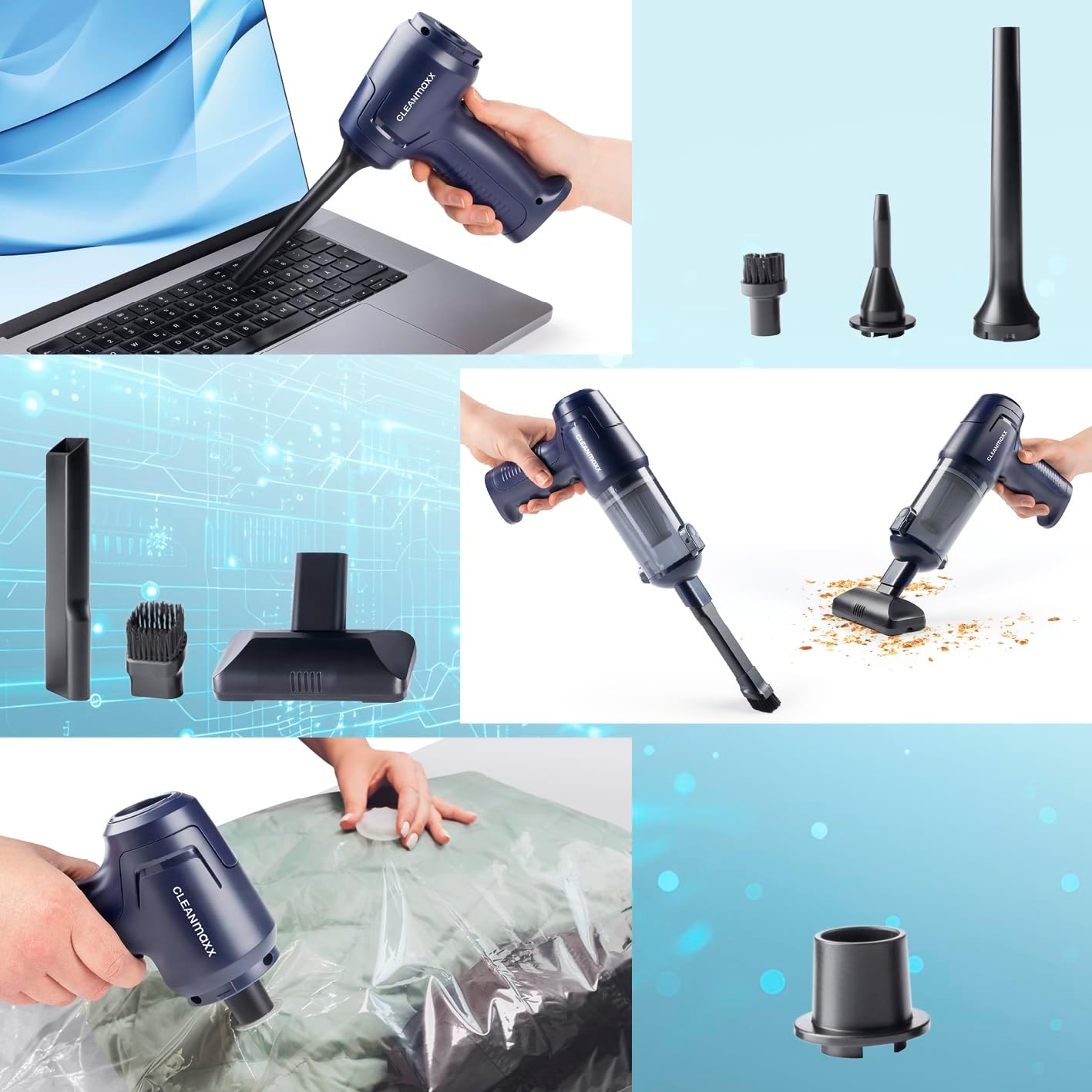
Image 6.3: Using the blower function to clean a laptop keyboard.
6.3. Vacuum Storage Bag Function
Attach the dedicated vacuum nozzle to the suction port. This nozzle can be used with compatible vacuum storage bags (not included) to remove air and compress items.

Image 6.4: Using the vacuum nozzle to compress a storage bag.
7. Mantenimiento
El mantenimiento regular garantiza un rendimiento óptimo y prolonga la vida útil de su dispositivo.
7.1. Vaciado del depósito de polvo
When the dust bin is full or suction power decreases, it's time to empty it. The Easy-Release function allows for quick and hygienic emptying:
- Asegúrese de que el dispositivo esté apagado.
- Press the Easy-Release button to detach the dust bin from the main unit.
- Vacíe cuidadosamente el contenido en un cubo de basura.

Image 7.1: Emptying the dust bin using the Easy-Release mechanism.
7.2. Limpieza del filtro HEPA
The HEPA filter should be cleaned regularly to maintain suction efficiency and air quality. It is washable:
- Retire el filtro HEPA del contenedor de polvo.
- Rinse the filter under running water until clean. Do not use detergents.
- Allow the filter to air dry completely before reinserting it into the dust bin. Ensure it is completely dry to prevent mold growth and damage to the device.
Image 7.2: Washing the HEPA filter under running water.
7.3. Limpieza del exterior
Limpie el exterior del dispositivo con un paño suave yamp Paño. No utilice limpiadores abrasivos ni disolventes.
8. Solución de problemas
If you encounter issues with your CLEANmaxx handheld vacuum, refer to the following table:
| Problema | Posible causa | Solución |
|---|---|---|
| El dispositivo no enciende | La batería está descargada | Cargue el dispositivo por completo. |
| Baja potencia de succión | El depósito de polvo está lleno | Vacíe el depósito de polvo. |
| Baja potencia de succión | El filtro HEPA está obstruido. | Limpie o reemplace el filtro HEPA. |
| Baja potencia de succión | Nozzle or suction port is blocked | Retire cualquier obstrucción de la boquilla o del puerto de succión. |
| Blower function is weak | Blower port or nozzle is blocked | Remove any obstructions from the blower port or nozzle. |
| El dispositivo se detiene durante el funcionamiento | La batería está descargada | Recarga el dispositivo. |
Si el problema persiste después de intentar estas soluciones, comuníquese con el servicio de atención al cliente.
9. Especificaciones
- Número de modelo: 16535
- Marca: CLEANmaxx
- Dimensiones (Producto): 18.5 de largo x 23.5 de ancho x 5.5 de alto cm
- Peso (Artículo): 640 gramos
- Material: ABS, Polypropylene (PP)
- Fuente de energía: Funciona con pilas
- Batería: Batería de iones de litio de 1800 mAh
- Poder de succión: Hasta 4 kPa
- Duración: Hasta 20 minutos
- Capacidad del depósito de polvo: Aprox. 100 ml
- Tipo de filtro: Filtro HEPA lavable
- Cargando: USB-C
- Color: Azul oscuro
10. Garantía y soporte
For warranty information, please refer to the terms and conditions provided by your retailer at the time of purchase. Information regarding spare parts availability is currently unavailable. For technical support or further assistance, please contact the retailer or manufacturer directly.