
Introducción
This manual provides essential information for setting up, operating, maintaining, and troubleshooting your Samsung Galaxy A07 4G smartphone (Model SM-A075/DS). Please read this manual thoroughly to ensure proper use and to maximize the device's features.
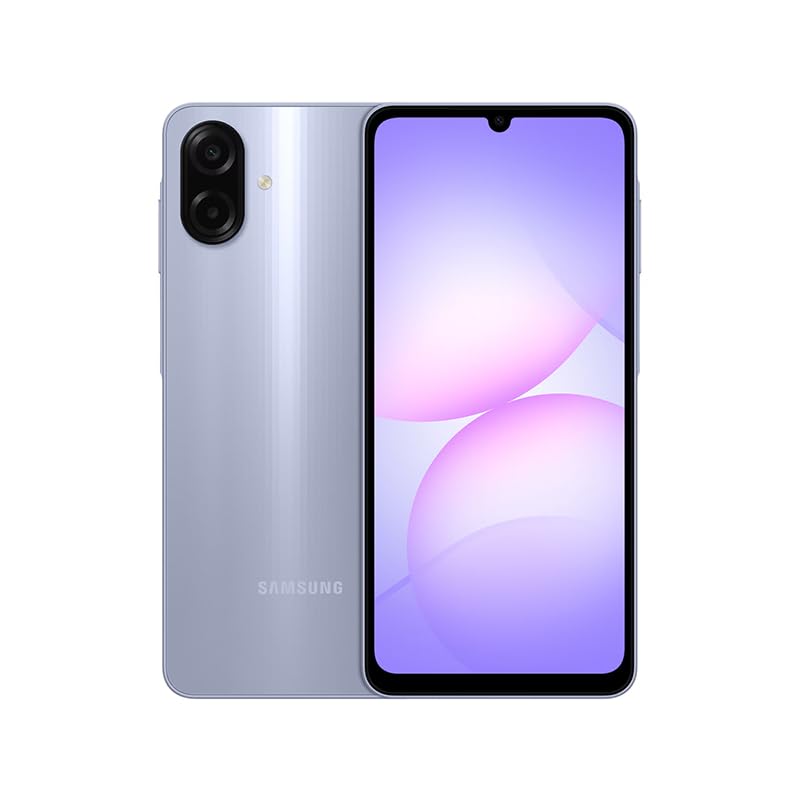
Figure 1: Samsung Galaxy A07 4G Front View
1. Configuración
1.1 Desembalaje e inspección inicial
Carefully remove all items from the packaging. Verify that all components are present. The box should contain the Samsung Galaxy A07 4G smartphone and a USB Cable. A charger is not included.

Figure 2: Device in packaging
1.2 Inserción de tarjetas SIM y tarjetas MicroSD
- Localice la bandeja SIM en el lateral del dispositivo.
- Use the provided SIM ejector tool (if included, otherwise a small paperclip) to open the SIM tray.
- Carefully place your SIM card(s) and/or MicroSD card into the designated slots on the tray. This device supports Dual SIM and MicroSD up to 1TB.
- Empuje suavemente la bandeja SIM dentro del dispositivo hasta que quede al ras.

Figura 3: Lado view con ubicación de la bandeja SIM
1.3 Encendido inicial y configuración
- Mantenga presionado el botón de encendido (ubicado en el costado) hasta que aparezca el logotipo de Samsung.
- Siga las instrucciones en pantalla para completar la configuración inicial, incluida la selección de idioma, la conexión Wi-Fi, la configuración de la cuenta Google y la configuración de seguridad.
2. Instrucciones de funcionamiento
2.1 Pantalla y navegación
The Samsung Galaxy A07 features a 6.7-inch PLS LCD display with a 90 Hz refresh rate for smooth visuals.
- Gestos táctiles: Toque para seleccionar, deslice para desplazarse, pellizque para hacer zoom.
- Pantalla de inicio: Personaliza con widgets y accesos directos a aplicaciones.
- Panel de notificaciones: Deslice el dedo hacia abajo desde la parte superior de la pantalla para acceder a la configuración rápida y las notificaciones.
2.2 Uso de la cámara
The device is equipped with a 50 MP Pro-Grade main camera and an 8 MP front camera.
- Abra la aplicación Cámara desde la pantalla de inicio o el cajón de aplicaciones.
- Seleccione el modo deseado (Foto, Vídeo, Retrato, etc.).
- Toque el botón del obturador para capturar una imagen o iniciar/detener la grabación de un video.
- Utilice los controles de zoom en la pantalla para ajustar la ampliación.
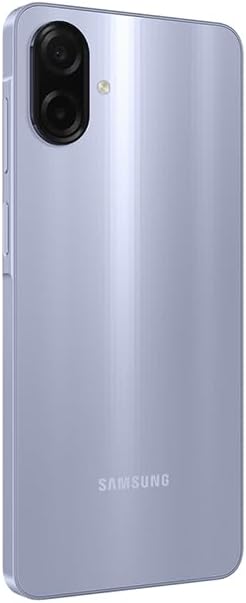
Figura 4: Sistema de cámara trasera
2.3 Conectividad
- Wifi: Connect to wireless networks via Settings > Connections > Wi-Fi. Supports 802.11a/b/g/n/ac 2.4GHz+5GHz.
- Bluetooth: Empareje con otros dispositivos Bluetooth a través de Configuración > Conexiones > Bluetooth.
- Datos móviles: Ensure your SIM card is active for 4G LTE connectivity. Compatible with T-Mobile, Mint, Tello, and Global GSM networks.
- GPS: Location services are supported via GPS, Glonass, Beidou, Galileo, QZSS.
3. Mantenimiento
3.1 Actualizaciones de software
Regularly check for and install software updates to ensure optimal performance, security, and access to new features. Your device is designed to receive 6 major OS upgrades and 6 years of security updates.
- Vaya a Configuración > Actualización de software > Descargar e instalar.
3.2 Limpieza del dispositivo
To clean your device, use a soft, lint-free cloth. Avoid abrasive materials or harsh chemicals. The device has an IP54 rating, providing protection against dust and water splashes.
- Wipe the screen and back panel gently.
- No sumerja el dispositivo en agua.
3.3 Cuidado de la batería
El dispositivo está equipado con una batería de 5000 mAh. Para prolongar su duración:
- Evite temperaturas extremas.
- Utilice el cable USB proporcionado para cargar.
- No deje que la batería se descargue por completo con frecuencia.
4. Solución de problemas
4.1 El dispositivo no se enciende
- Asegúrese de que la batería esté cargada. Conecte el dispositivo a un cargador durante al menos 10 minutos.
- Mantenga presionado el botón de encendido durante 10 a 15 segundos para realizar un reinicio forzado.
4.2 Problemas de conectividad de red
- Compruebe si su tarjeta SIM está insertada correctamente.
- Verify that mobile data is enabled in Settings > Connections > Data usage.
- Reinicie el dispositivo.
- Ensure your device is compatible with your carrier's network (T-Mobile, Mint, Tello, Global GSM).
4.3 Las aplicaciones se bloquean o se congelan
- Cierre y vuelva a abrir la aplicación.
- Borrar el caché de la aplicación (Configuración > Aplicaciones > [Nombre de la aplicación] > Almacenamiento > Borrar caché).
- Asegúrese de que el software de su dispositivo esté actualizado.
5. Especificaciones
| Característica | Detalle |
|---|---|
| Nombre del modelo | Samsung Galaxy A07 4G (SM-A075/DS) |
| Mostrar | 6.7 inches PLS LCD, 720 x 1600 (HD+), 90 Hz Refresh Rate |
| Procesador | Octa-core (2x2.2 GHz Cortex-A76 y 6x2.0 GHz Cortex-A55) |
| RAM | 4 GB |
| Almacenamiento | 64 GB (ampliable mediante MicroSD hasta 1 TB) |
| Cámara trasera | 50 MP (wide, PDAF), 2 MP (depth) |
| Cámara frontal | 8 MP (gran angular) |
| Batería | 5000 mAh |
| Sistema operativo | Androide |
| Conectividad | 4G LTE, Wi-Fi 802.11a/b/g/n/ac (2.4GHz+5GHz), Bluetooth, GPS, Glonass, Beidou, Galileo, QZSS |
| Puertos | USB Type-C, 3.5mm Stereo Earjack |
| Dimensiones | Approx. 2 x 2 x 2 inches (Product Dimensions), 7.6 mm thickness |
| Peso | 9.2 onzas |
| Durabilidad | Protección IP54 contra el polvo y el agua |
| Incluido en la caja | USB Cable (Charger NOT Included) |
6. Garantía y soporte
6.1 Información de garantía
This Samsung Galaxy A07 4G (Model SM-A075/DS) is a Latin American Version and comes with a Garantía de 1 años valid in South, Central, Latin America, and the Caribbean. Please ensure your device model is SM-A075/DS for local warranty coverage in Latin America.
For warranty claims or service, please contact Samsung customer support in your region. Proof of purchase may be required.
6.2 Atención al cliente
Para obtener más ayuda, soporte técnico o encontrar centros de servicio, visite el soporte oficial de Samsung. website for your region or refer to the contact information provided in your product packaging.