
1. Introducción
This manual provides essential information for the safe and efficient operation of your TCL 65P8K 65-inch 4K QLED Smart Google TV. Please read it thoroughly before using the product and retain it for future reference.
2. Información de seguridad
Siga siempre las precauciones básicas de seguridad para reducir el riesgo de incendio, descarga eléctrica y lesiones. No exponga el televisor a la lluvia ni a la humedad. No abra el televisor.asing; refer all servicing to qualified personnel. Ensure proper ventilation and avoid placing the TV near heat sources. Use only the power cord and accessories supplied by the manufacturer.
3. ¿Qué hay en la caja?
Verifique que todos los componentes estén presentes en el embalaje:
- TCL 65P8K 65-inch 4K QLED Smart Google TV
- Mando a distancia (con pilas)
- Cable de alimentación
- Soporte de TV (si corresponde)
- Tornillos para soporte de TV
- Tarjeta de garantía
- Manual de usuario (este documento)
4. Configuración
4.1 Instalación física
Before installation, ensure the TV is placed on a stable, level surface or securely mounted to a wall using a compatible VESA mount (sold separately). When installing the stand, align the stand with the mounting holes on the TV and secure with the provided screws.
Frente view of the TCL 65P8K 65-inch 4K QLED Smart Google TV. This image shows the slim bezel design and the overall aesthetic of the television.
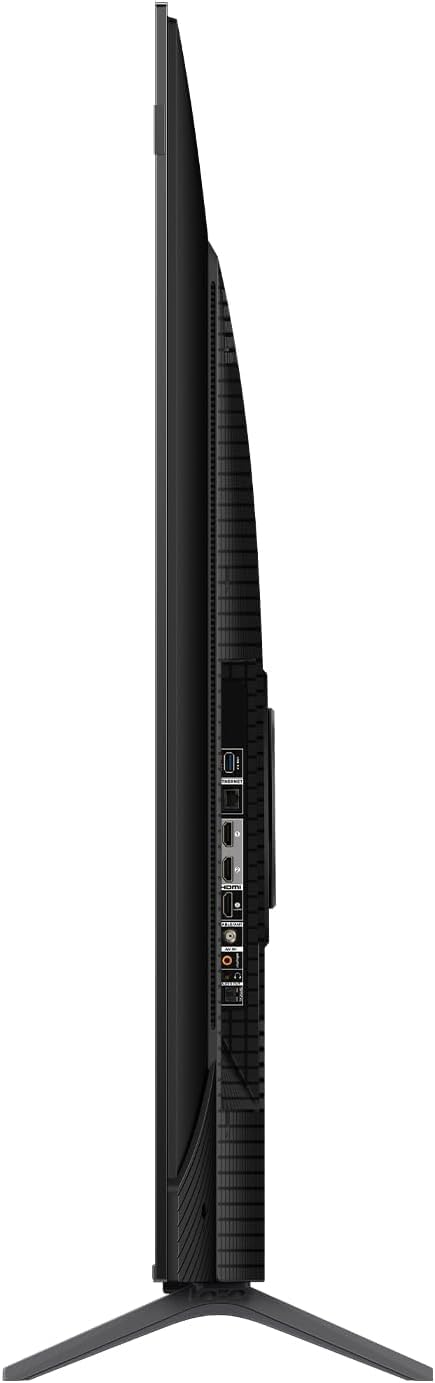
Lado view of the TCL 65P8K TV, highlighting the various input ports available on the side panel for easy access.
Trasero view of the TCL 65P8K TV, showing the textured back panel and additional connection points.
4.2 Encendido inicial
- Conecte el cable de alimentación al televisor y luego a una toma de corriente.
- Presione el botón de encendido del televisor o el control remoto para encender el televisor.
- Siga las instrucciones en pantalla para completar la configuración inicial, incluida la selección de idioma, la conexión de red y la configuración de la cuenta de Google TV.
4.3 Conexión de red
Your TV supports both Wi-Fi (5G compatible) and wired LAN connections.
- Wifi: Navegar a Configuración> Red e Internet, seleccione su red Wi-Fi e ingrese la contraseña.
- LAN: Connect an Ethernet cable from your router to the LAN port on the TV. The TV will automatically detect the connection.
4.4 Conexiones de entrada
Connect external devices such as gaming consoles, Blu-ray players, or sound systems to the TV using the appropriate ports.
- HDMI (2.1): 4 ports available, supporting eARC/ARC for enhanced audio return.
- USB (3.0): 1 port for media playback (video, photos, music).
- Entrada RF: 1 digital input for antenna/cable connection.
- Salida de audio óptica: 1 port for digital audio to external sound systems.
5. Operación del televisor
5.1 control remoto sobreview
The remote control allows you to navigate the Google TV interface, adjust settings, and access various features. Familiarize yourself with the buttons for power, volume, channel, input selection, and smart assistant activation.
5.2 Interfaz de Google TV
Your TCL 65P8K operates on the Google TV platform, providing a personalized experience with access to a wide range of apps and content. Use the remote to browse recommendations, search for titles, and manage your installed applications from the Google Play Store.
5.3 Configuración de imagen
Optimiza tu viewing experience by adjusting picture settings. Access these through the TV's settings menu.
- Modos de imagen: Standard, Sports, Movie, Game.
- Temperatura de color: Normal, Cool, Warm.
- Soporte HDR: Dolby Vision, HDR10+, HDR10, HLG for enhanced contrast and color.
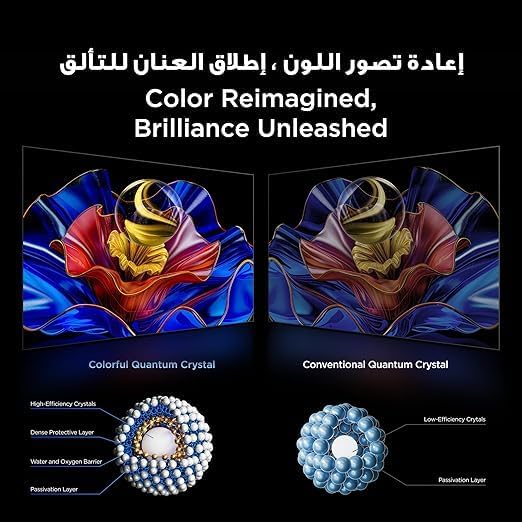
- Tecnología QLED: Delivers 93% DCI-P3 color gamut for vibrant and accurate colors.

This image demonstrates the 'Color Reimagined, Brilliance Unleashed' feature, showcasing the superior color reproduction of Colorful Quantum Crystals compared to conventional ones.
5.4 Configuración de sonido
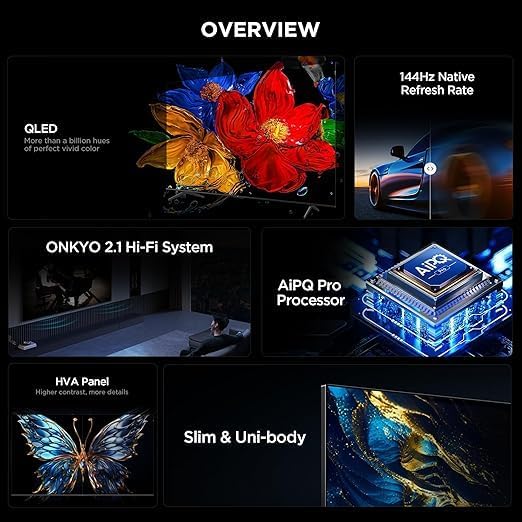
The TV features an Onkyo 2.1 Hi-Fi Sound System for rich audio. Adjust sound settings to your preference.
- Potencia de salida de audio: 10W x 2 speakers + 15W Onkyo subwoofer.
- Modos de sonido: Dynamic, Standard, Sports, Movies, Music.
- Tecnologías de audio: Dolby Atmos, Dolby Digital, DTS Studio Sound, DTS Virtual: X for immersive surround sound.

An image depicting the Onkyo 2.1 Sound System, illustrating its role in defining the standard for home theater audio with immersive sound waves.
5.5 Características de juego
The TCL 65P8K is optimized for gaming with advanced features:
- Frecuencia de actualización nativa de 144 Hz: Provides ultra-smooth motion for fast-paced gaming and action scenes.
- Game Master Features: Includes FreeSync, VRR (Variable Refresh Rate), and ALLM (Auto Low Latency Mode) for a responsive gaming experience.

A visual comparison demonstrating the 'Smoother and clearer' motion provided by a 144Hz refresh rate versus a 60Hz refresh rate, ideal for gaming and fast-action content.
5.6 Funciones inteligentes
Leverage the smart capabilities of your Google TV:
- Asistente de Google: Utilice comandos de voz para buscar, controlar dispositivos domésticos inteligentes y más.
- Chromecast integrado: Transmite contenido desde tu teléfono inteligente o tableta directamente al televisor.
- Juego de aire 2: Transmite contenido desde dispositivos Apple.
- Aplicaciones preinstaladas: Netflix, YouTube, Prime Video, Disney+, and access to the Google Play Store for more applications.
- Procesador AiPQ Pro: AI-powered image processing enhances picture quality, ensuring realistic images with optimal contrast and color accuracy.

Una imagen muestraasing the AiPQ Pro Processor, highlighting its advanced capabilities in perceiving, thinking, and producing optimized visual content.

This image illustrates the smart way to control your TCL devices, showing the TV as a central hub for managing various smart home appliances.
6. Mantenimiento
6.1 Limpieza
Para limpiar la pantalla, límpiela suavemente con un paño suave que no deje pelusa. Para el televisor casing, use a soft, dry cloth. Avoid using abrasive cleaners, waxes, or solvents as they can damage the finish. Always unplug the TV before cleaning.
6.2 Actualizaciones de software
Your TV may receive software updates periodically to improve performance and add new features. Ensure your TV is connected to the internet to receive these updates. You can check for updates manually in Configuración > Sistema > Acerca de > Actualización del sistema.
7. Solución de problemas
Si tiene problemas con su televisor, consulte las siguientes soluciones comunes:
- Sin energía: Check if the power cord is securely connected and the power outlet is working.
- Sin imagen/sonido: Verifique que la fuente de entrada seleccionada sea correcta. Revise las conexiones de los cables a los dispositivos externos.
- Mala calidad de imagen: Ajuste la configuración de la imagen. Asegúrese de que la fuente de entrada proporcione una señal de alta calidad.
- El control remoto no funciona: Reemplace las pilas. Asegúrese de que no haya obstrucciones entre el control remoto y el sensor infrarrojo del televisor.
- Problemas de conexión de red: Restart your router and TV. Re-enter Wi-Fi password or check LAN cable.
Para problemas más complejos, consulte al soporte de TCL. websitio o póngase en contacto con el servicio de atención al cliente.
8. Especificaciones
| Característica | Especificación |
|---|---|
| Marca | TCL |
| Número de modelo | 65P8K |
| Tamaño de pantalla | 65 pulgadas |
| Tecnología de visualización | LED Q |
| Resolución | 3840 x 2160 (4K Ultra HD) |
| Frecuencia de actualización | Nativo 144Hz |
| Relación de aspecto | 16:9 |
| Viewángulo de ing | 178 grados |
| Memoria interna | 32 GB |
| Sistema operativo | Google TV |
| Procesador | Procesador AiPQ Pro |
| Compatibilidad con HDR | Dolby Vision, HDR10+, HDR10, HLG |
| Sistema de audio | Onkyo 2.1 Hi-Fi Sound System (10W x 2 + 15W Subwoofer) |
| Tecnologías de audio | Dolby Atmos, Dolby Digital, DTS Studio Sound, DTS Virtual: X |
| Puertos HDMI | 4 (HDMI 2.1, eARC/ARC compatible) |
| Puertos USB | 1 (USB 3.0) |
| Conectividad | Wi-Fi (5G), Bluetooth v5.4, LAN, RF Input, Optical Audio Output |
| Consumo de energía | 180 vatios (en funcionamiento), <0.5 vatios (en espera) |
| Dimensiones (An x Al x Pr) sin soporte | 1444 x 831 x 69.5 mm |
| Dimensiones (An x Al x Pr) con soporte | 1444 x 893 x 295 mm |
| Peso neto | 17.4 kilogramos |
| País natal | Egipto |
9. Garantía y soporte
Your TCL 65P8K TV comes with a full 2-year warranty from the date of purchase. Please retain your proof of purchase and the warranty card included in the box. For technical support, service requests, or warranty claims, please contact TCL customer service or visit the official TCL support website. Do not attempt to repair the product yourself, as this may void your warranty.