
Introducción
The ShiftCam SnapGrip Essential transforms your smartphone into a versatile camera, offering enhanced grip, a wireless shutter button, and a convenient tabletop dock. Designed for seamless integration with MagSafe-enabled devices, it provides a stable and ergonomic solution for capturing photos and videos. This manual provides detailed instructions for setup, operation, and maintenance of your SnapGrip Essential.
¿Qué hay en la caja?
- ShiftCam SnapGrip Essential
- (Charging cable may not be included; use a standard USB-C cable)
Configuración
1. Attaching the SnapGrip
The SnapGrip Essential features a magnetic snap-to-attach mount. Align the SnapGrip with the back of your MagSafe-enabled iPhone or MagSafe-compatible case. The magnets will securely attach the grip to your phone.
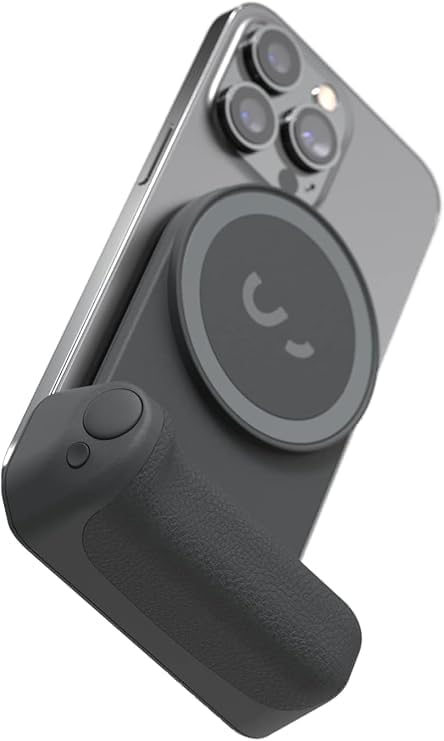
Image: The SnapGrip Essential securely attached to a smartphone via its magnetic mount.
Note: Non-MagSafe cases may reduce magnetic performance. For optimal security, use with MagSafe-enabled phones or certified MagSafe cases.
2. Pairing the Wireless Shutter Button (Bluetooth)
- Ensure your SnapGrip Essential is charged.
- Press and hold the small button on the side of the grip until the Bluetooth indicator light flashes.
- On your smartphone, go to Bluetooth settings and select "SnapGrip" from the available devices to pair.
- Once paired, the indicator light will turn solid, and you can use the large shutter button to control your phone's camera.
3. Charging the SnapGrip Essential
Connect a standard USB-C charging cable to the port on the SnapGrip Essential. The battery indicator lights on the side will show the charging status. A full charge is indicated when all lights are solid.
Instrucciones de funcionamiento
1. Tomar fotos y videos
With the SnapGrip paired via Bluetooth, open your phone's camera application. Press the large shutter button on the grip to capture photos or start/stop video recording, similar to a traditional camera.

Image: A user holding their phone with the SnapGrip, demonstrating the ergonomic grip for photography.
2. Using the Rotational Mount
The SnapGrip allows for easy switching between portrait and landscape orientations. Simply twist your phone while it's attached to the magnetic mount to rotate it 180 degrees. This feature is useful for adapting to different content formats.

Image: The SnapGrip's pivotal system allows for quick rotation between portrait and landscape modes.
3. Tabletop Dock Functionality
The SnapGrip features a built-in tabletop dock. Fold out the grip to create a stable stand for your phone. This is ideal for hands-free viewing, video calls, or live streaming in both portrait and landscape orientations.

Image: The SnapGrip Essential functioning as a tabletop stand for a smartphone.
4. Carga inalámbrica del teléfono
The SnapGrip Essential includes a built-in power bank. To wirelessly charge your phone, ensure the SnapGrip is powered on and attached to your phone. Press the small button on the side of the grip to activate wireless charging. The battery indicator lights will show the charging status.
Características másview
- Compact Ergonomic Design: Transforms your smartphone into a traditional-style camera grip, fitting comfortably in hand for extended use.
- Wireless Shutter Button: Integrated Bluetooth shutter button for convenient photo and video capture.
- Magnetic Snap-to-Attach Mount: Compatible with MagSafe-enabled phones and cases for instant attachment.
- Tabletop Dock with Rotational Mount: Allows for hands-free use and easy switching between portrait and landscape orientations.
- Banco de energía incorporado: Provides additional battery life to your smartphone during use.
- Ecosistema ampliable: Compatible with other ShiftCam Snap accessories like SnapLight and SnapPod (sold separately) for enhanced creative setups.

Image: The SnapGrip Essential integrated with SnapLight and SnapPod accessories, demonstrating the expandable ecosystem.
Integración de medios
Imágenes del producto

Frente view of the SnapGrip Essential.

Angular view highlighting the ergonomic grip and magnetic attachment area.

The compact design allows for easy portability in a pocket.
Vídeos oficiales de productos
No official product videos from the seller "ShiftCam" were available for embedding based on the provided data.
Solución de problemas
- Conexión magnética débil: Ensure your phone is MagSafe-enabled or uses a certified MagSafe-compatible case. Third-party magnetic cases may weaken the connection.
- Inconsistent Shutter Button Response: Verify that the SnapGrip is properly paired via Bluetooth to your smartphone. Recharge the SnapGrip if the battery is low.
- El teléfono no se carga de forma inalámbrica:
- Ensure the SnapGrip Essential is sufficiently charged and powered on.
- Press the small button on the side of the grip to activate wireless charging.
- Confirme que su teléfono admite la carga inalámbrica.
- Some phone models, such as certain Pixel series phones (e.g., Pixel 10 Pro), may use newer Qi2 charging standards which might not be fully compatible with the SnapGrip's Qi1 charger element, potentially leading to reduced charging efficiency or heat generation.
- Phone Overheating During Charging: If your phone becomes excessively hot during wireless charging, discontinue use and consult your phone's manufacturer. This can sometimes occur due to compatibility differences in wireless charging standards.
- Unintended Phone Actions: If your phone exhibits unusual behavior (e.g., gestures as if buttons are pressed) when the SnapGrip is attached but not in camera mode, ensure the SnapGrip's Bluetooth connection is stable or temporarily disconnect it if not actively using the shutter.
Presupuesto
| Marca | ShiftCam |
| Modelo | SnapGrip Essential |
| Color | Medianoche |
| Característica especial | Diseño ergonómico |
| Tipo de agarre | Agarre del mango |
| Dimensiones del artículo (largo x ancho x alto) | 13.43 x 3.22 x 4.47 pulgadas |
| Tipo de montaje | Soporte MagSafe |
| Código Postal | 799793507529 |
| Fabricante | ShiftCam |
Garantía y soporte
The ShiftCam SnapGrip Essential comes with a 2 año de garantía. For technical support, warranty claims, or further assistance, please visit the official ShiftCam webSitio web o contacte con el departamento de atención al cliente. Conserve su comprobante de compra para validar la garantía.
Official ShiftCam Store: ShiftCam Amazon Store