
1. Introducción
This manual provides detailed instructions for the installation, configuration, and operation of your NEWFAST AC1200 Dual Band WiFi Repeater, model NF-RE523. This device is designed to extend the range of your existing wireless network, eliminate Wi-Fi dead zones, and provide stable, high-speed internet access throughout your home or office. Please read this manual carefully before using the product and retain it for future reference.
2. Contenido del paquete
Verifique que todos los artículos estén presentes en su paquete:
- 1 x NEWFAST AC1200 WiFi Repeater (Model NF-RE523)
- 1 cable Ethernet RJ-45.
- 1 x Manual de usuario
3. Producto terminadoview
The NEWFAST AC1200 WiFi Repeater features a compact design with adjustable antennas and an informative LCD display. Familiarize yourself with the device's components:
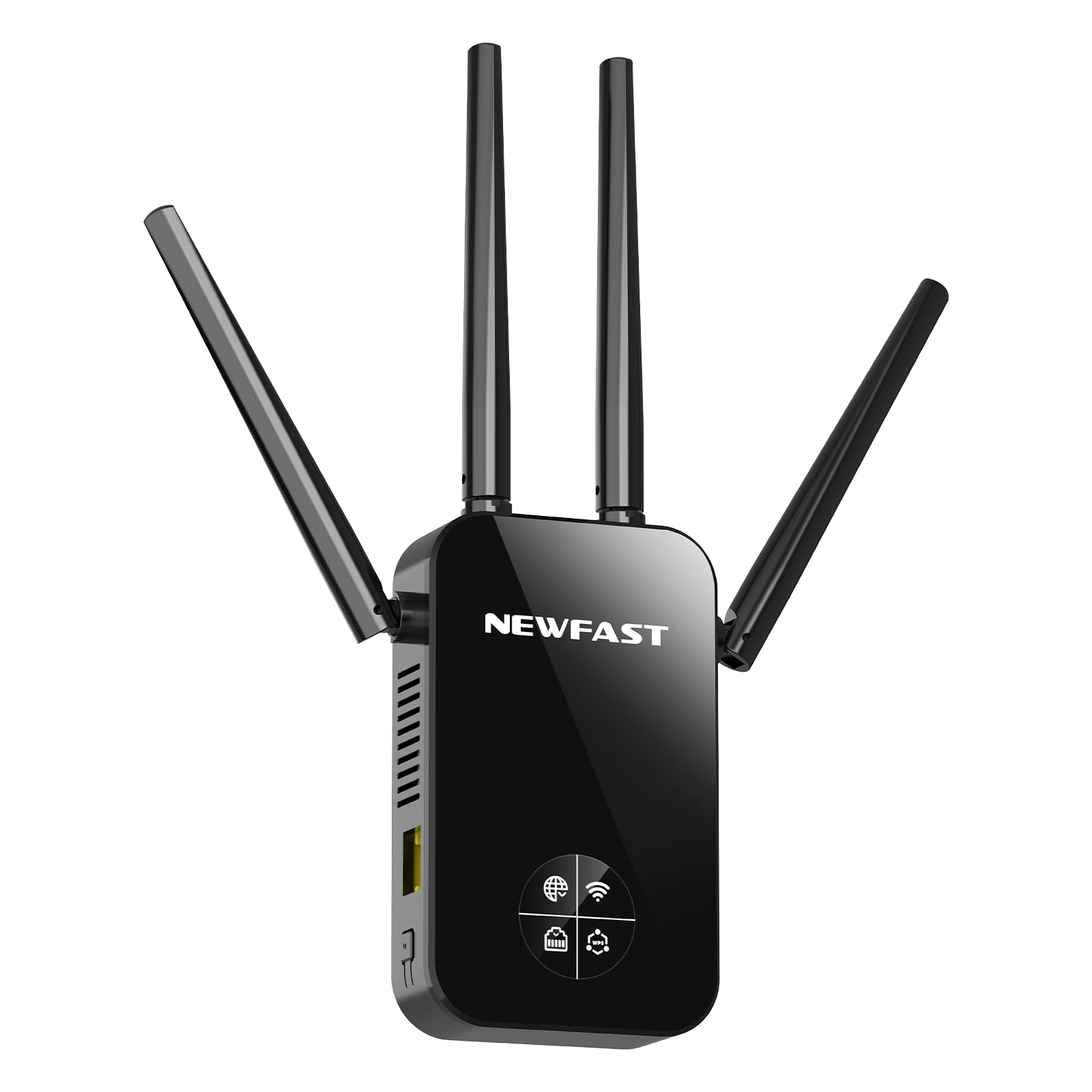
Imagen 1: Frente view of the NEWFAST AC1200 WiFi Repeater NF-RE523. The device is black, featuring four adjustable external antennas, two on each side, and a central LCD screen. Below the screen, there are indicator lights and a WPS button. An RJ45 port is located at the bottom.
Componentes clave:
- Adjustable Antennas (x4): Two dedicated to 2.4 GHz and two to 5 GHz, designed to maximize signal coverage and reduce interference.
- Pantalla LCD: Provides real-time information on signal strength, connection status, and WPS status.
- Botón WPS: For quick and secure connection to your router without manual password entry.
- Puerto RJ45: Functions as an Ethernet port for wired connections in Repeater/AP mode or as a WAN port in Router mode.
- Enchufe de alimentación: Integrated EU plug for direct wall outlet connection.
4. Configuración
The NEWFAST NF-RE523 offers two primary methods for setup: WPS (Wi-Fi Protected Setup) for quick configuration, and Web Interfaz de usuario para configuraciones más detalladas.
4.1. WPS Setup (Recommended for Repeater Mode)
- Encendido: Plug the NEWFAST Repeater into an electrical outlet near your main router. Wait for the device to power on and the LCD display to activate.
- Activar WPS en el enrutador: Press the WPS button on your main Wi-Fi router. The WPS indicator on your router should start blinking.
- Activar WPS en el repetidor: Within two minutes, press the WPS button on the NEWFAST Repeater. The WPS indicator on the repeater's LCD display will flash.
- Esperar la conexión: The repeater will automatically connect to your router. This process may take a few moments. Once connected, the LCD display will show a stable signal strength indicator.
- Reubicar (opcional): Unplug the repeater and move it to a location between your router and the Wi-Fi dead zone. Ensure the LCD display shows a good signal strength from your router.
Note: If WPS setup fails, try the Web Método de configuración de la interfaz de usuario.
4.2. Web UI Setup (For all modes and advanced configuration)
- Encendido: Plug the NEWFAST Repeater into an electrical outlet near your main router.
- Conectarse al Wi-Fi del repetidor: On your computer or mobile device, connect to the Wi-Fi network broadcast by the repeater (e.g., "NEWFAST_Repeater" or similar, check the label on the device). No password is required for the initial connection.
- Acceso Web Interfaz: Abrir una web navegador e ingrese la dirección IP predeterminada (normalmente
192.168.1.1or192.168.0.1, or a specific domain likerepeater.net). Refer to the device label or the included quick start guide for the exact address. - Acceso: Introduzca el nombre de usuario y la contraseña predeterminados (comúnmente
adminpara ambos). - Seleccione el modo de funcionamiento: Follow the on-screen wizard to select your desired operating mode (Repeater, Router, or Access Point).
- Configurar ajustes:
- Modo repetidor: Select your main Wi-Fi network from the list, enter its password, and choose a name for the extended network (or keep the default).
- Modo de enrutador: Configure WAN settings (e.g., PPPoE, Dynamic IP, Static IP) and set up your new Wi-Fi network name and password.
- Modo de punto de acceso: Connect the repeater to your main router via an Ethernet cable (RJ45 port). Configure the new Wi-Fi network name and password.
- Guardar y reiniciar: Save your settings. The repeater will reboot to apply the changes.
- Verificar conexión: Once rebooted, connect your devices to the new or extended Wi-Fi network.
5. Modos de funcionamiento
El NEWFAST NF-RE523 admite tres modos de funcionamiento distintos para adaptarse a diversas necesidades de red:
- Modo repetidor (extensor de alcance):
This is the most common mode. The device wirelessly connects to your existing router and extends its Wi-Fi signal to areas with weak or no coverage. It uses the same network name (SSID) or a new one, providing seamless roaming.
- Modo de enrutador:
In this mode, the device acts as a primary router. Connect your internet modem to the repeater's RJ45 port, and it will create a new wireless network for your devices. This is ideal for setting up a new network, especially with fiber optic connections.
- Modo de punto de acceso (AP):
The device converts a wired internet connection into a wireless one. Connect the repeater to your existing router or network switch via an Ethernet cable (RJ45 port). It then broadcasts a new Wi-Fi network, providing wireless access to the wired network.
6. Información de la pantalla LCD
The integrated LCD display provides crucial real-time status updates:
- Indicador de intensidad de la señal: Shows the strength of the Wi-Fi signal received from your main router. Aim for a strong signal for optimal performance when placing the repeater.
- Estado de la conexión a Internet: Indicates whether the repeater has a stable internet connection.
- RJ45 Port Status: Shows if a device is connected to the Ethernet port and if data is being transmitted.
- Indicador WPS: Flashes during WPS pairing and remains steady when WPS is successfully connected.
7. Solución de problemas
If you encounter issues with your NEWFAST AC1200 WiFi Repeater, refer to the following common problems and solutions:
- Cannot connect to the repeater's Wi-Fi network during setup:
Ensure the repeater is powered on. Try unplugging and replugging the device. If using a mobile device, temporarily disable mobile data to ensure it connects to the repeater's Wi-Fi.
- WPS setup fails or does not connect:
Ensure your main router supports WPS and that its WPS function is enabled. Press the WPS buttons on both the router and repeater within two minutes of each other. If it still fails, try the Web Método de configuración de la interfaz de usuario.
- Sin acceso a Internet después de la configuración:
Check the internet connection status on the repeater's LCD display. Ensure your main router has an active internet connection. Verify that you entered the correct Wi-Fi password for your main router during setup. If in Repeater mode, try relocating the repeater closer to your main router to ensure a strong signal.
- Slow internet speed or frequent disconnections:
The repeater might be too far from your main router, resulting in a weak signal. Relocate the repeater to a position where the LCD display shows a strong signal strength (at least 2-3 bars). Avoid placing the repeater near large metal objects, microwaves, or other devices that may cause interference. Ensure your main router's firmware is up to date.
- Forgot the repeater's login password or Wi-Fi password:
You can perform a factory reset. Locate the reset button (usually a small pinhole) on the device. With the repeater powered on, use a paperclip to press and hold the reset button for about 5-10 seconds until the lights flash or the device reboots. This will restore all settings to factory defaults, and you will need to set up the repeater again.
8. Especificaciones
| Característica | Detalle |
|---|---|
| Modelo | NF-RE523 |
| Marca | NOVEDADRÁPIDO |
| Estándar inalámbrico | IEEE 802.11a / b / g / n / ac |
| Velocidad de transferencia de datos | Up to 1200 Mbps (300 Mbps 2.4 GHz + 867 Mbps 5 GHz) |
| Bandas de frecuencia | 2.4 GHz y 5 GHz (doble banda) |
| Antenas | 4 antenas externas ajustables |
| Puerto Ethernet | 1 RJ45 (10/100 Mbps) |
| Protocolos de seguridad | WPS/WPA2-PSK/AES |
| Modos de funcionamiento | Repeater, Router, Access Point |
| Características especiales | LCD Display, WPS Button, Beamforming Technology, MU-MIMO |
| Dimensiones (L x An x Al) | 86P x 45l x 197H mm |
| Enchufe | Enchufe UE |
| Dispositivos compatibles | Internet Box, Computers, Access Points, Routers |
9. Información de seguridad
- No exponga el dispositivo al agua, al fuego, a altas temperaturas o a ambientes húmedos.
- No intente desmontar, reparar ni modificar el dispositivo.
- Utilice únicamente la fuente de alimentación proporcionada o especificada por el fabricante.
- Mantenga el dispositivo alejado de dispositivos médicos y marcapasos.
- Asegúrese de que haya una ventilación adecuada alrededor del dispositivo para evitar el sobrecalentamiento.
- Este dispositivo es solo para uso en interiores.
10. Garantía y soporte
NEWFAST products are covered by a limited warranty. For detailed warranty terms and conditions, please refer to the warranty card included with your product or visit the official NEWFAST website. For technical support, troubleshooting assistance, or to inquire about replacement parts, please contact NEWFAST customer service through the contact information provided on the official websitio o su plataforma de compra.


