
1. Introducción
Thank you for choosing the Proscenic P11 Ultra Cordless Vacuum Cleaner. This manual provides essential information for the safe and efficient use, maintenance, and troubleshooting of your new appliance. Please read it thoroughly before first use and retain it for future reference.
The Proscenic P11 Ultra is designed for versatile cleaning across various surfaces, offering powerful suction and convenient features for a cleaner home environment.
2. Instrucciones de seguridad importantes
Siga siempre las precauciones básicas de seguridad al utilizar aparatos eléctricos para reducir el riesgo de incendio, descarga eléctrica o lesiones.
- Lea todas las instrucciones antes de utilizar el aparato.
- No utilizar en exteriores ni sobre superficies mojadas.
- No permita que se utilice como juguete. Se requiere especial atención cuando lo utilicen niños o cerca de ellos.
- Úselo únicamente como se describe en este manual. Utilice únicamente los accesorios recomendados por el fabricante.
- No lo utilice si el cable o el enchufe están dañados. Si el aparato no funciona como debería, se ha caído, se ha dañado, se ha dejado al aire libre o se ha sumergido en agua, devuélvalo a un centro de servicio.
- No tire del cable ni lo transporte, no lo use como manija, no cierre una puerta sobre el cable ni lo tire por bordes o esquinas filosos. No pase el aparato por encima del cable. Mantenga el cable alejado de superficies calientes.
- No desenchufe el aparato tirando del cable. Para desenchufarlo, sujete el enchufe, no el cable.
- No manipule el enchufe ni el aparato con las manos mojadas.
- No introduzca ningún objeto en las aberturas. No utilice el aparato si alguna de las aberturas está bloqueada; manténgalo libre de polvo, pelusa, pelos y cualquier cosa que pueda reducir el flujo de aire.
- Mantenga el cabello, la ropa suelta, los dedos y todas las partes del cuerpo lejos de las aberturas y piezas móviles.
- No recoja nada que esté ardiendo o humeando, como cigarrillos, fósforos o cenizas calientes.
- Tenga especial cuidado al limpiar escaleras.
- No lo utilice para recoger líquidos inflamables o combustibles, como gasolina, ni lo utilice en áreas donde pueda haberlos.
- No recoja materiales tóxicos (por ejemplo, blanqueador con cloro, limpiador de amoníaco, limpiador de desagües).
- No lo use en un espacio cerrado donde haya vapores de pintura a base de aceite, disolvente de pintura, algunas sustancias antipolillas, polvo inflamable u otros vapores explosivos o tóxicos.
- Do not vacuum hard or sharp objects such as glass, nails, screws, or coins.
- Apague siempre este aparato antes de conectar o desconectar la boquilla motorizada.
- Guarde el aparato en un lugar cerrado. Guárdelo después de usarlo para evitar accidentes.
- Utilice únicamente el cargador suministrado por el fabricante para recargar.
- No incinere el aparato aunque esté muy dañado. Las baterías pueden explotar en caso de incendio.
- The battery should be fully charged and stored separately if the device is not used for a long time.
3. Contenido del paquete
Carefully unpack your Proscenic P11 Ultra and check that all items are present and in good condition. If any items are missing or damaged, please contact customer support.
- Unidad de vacío principal
- Varilla telescópica ajustable
- Motorized Floor Brush (Anti-Tangle with Green Light)
- Batería extraíble
- Kit de accesorios (incluye herramienta para rincones y cepillo para polvo)
- Adaptador (cargador)
- Charging Dock / Wall Mount
- Manual de usuario (este documento)
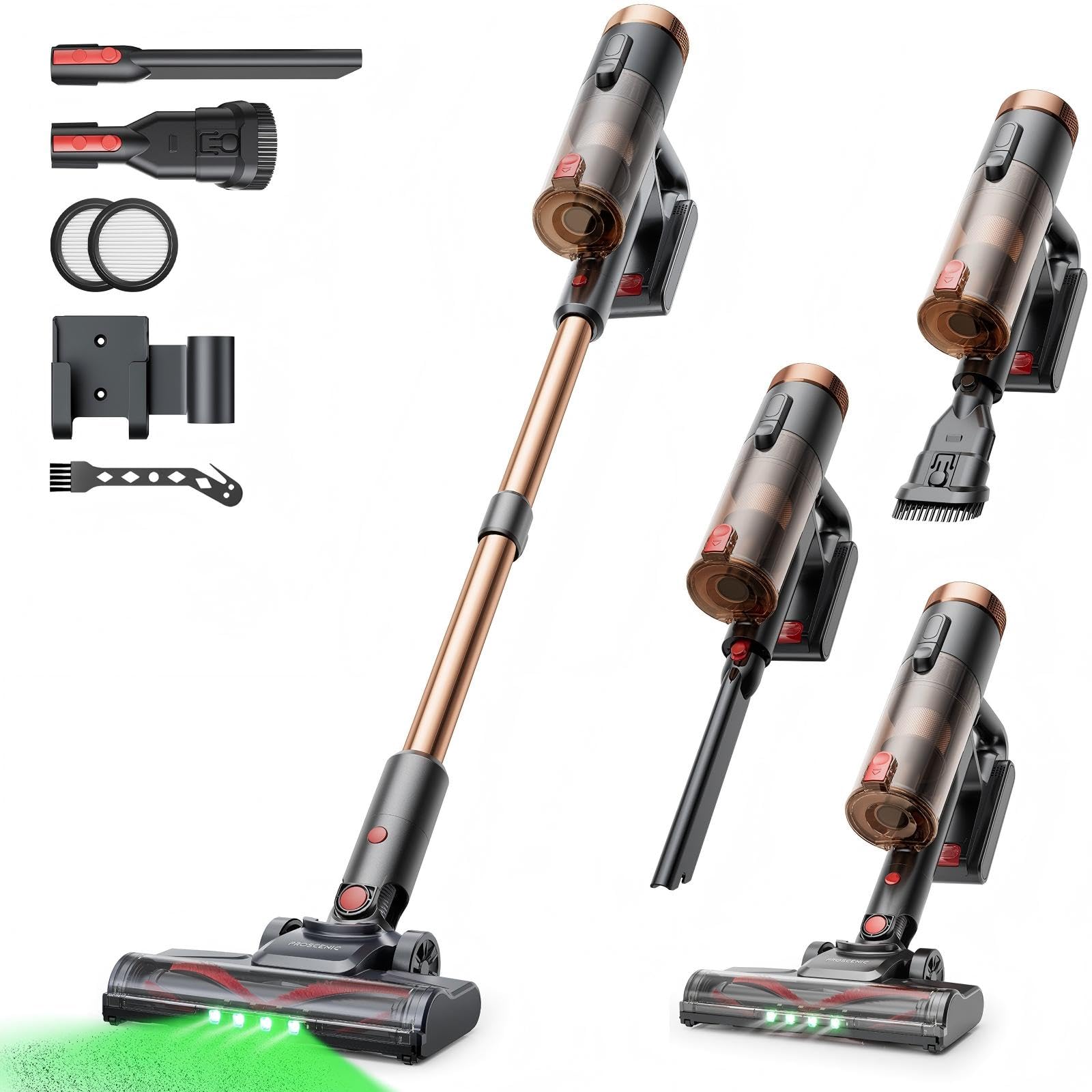
Image 1: Proscenic P11 Ultra main unit and included accessories. This image displays the vacuum cleaner's primary components, including the handheld unit, extension wand, floor brush, and various attachments.
4. Producto terminadoview
Familiarize yourself with the key components and features of your Proscenic P11 Ultra.
Características principales:
- Diseño independiente: Allows the vacuum to stand upright independently for convenient storage and breaks during cleaning.
- 180° Rotating Floor Brush: Enhances maneuverability, allowing easy access to tight corners and under furniture.
- Varilla telescópica ajustable: Customize the height for comfortable use by various users.
- Anti-Tangle Brush with Green Detection Light: Prevents hair tangles and illuminates hidden dust particles for thorough cleaning.
- 50 kPa Super Strong Suction Power: Provides powerful cleaning performance for stubborn dirt and debris.
- Intelligent Touchscreen: Displays real-time information on battery life, maintenance status, and suction modes.
- Two Suction Power Modes: Offers versatile cleaning options for different floor types and cleaning needs.
- Batería extraíble: Allows for extended cleaning time with an optional spare battery and convenient charging.
Image 2: Close-up of the Proscenic P11 Ultra's intelligent touchscreen. The screen provides visual feedback on the vacuum's status.
5. Configuración y montaje
Follow these steps to assemble your Proscenic P11 Ultra and prepare it for first use.
5.1 Montaje de la unidad principal
- Insert the adjustable telescopic rod into the main handheld vacuum unit until it clicks securely into place.
- Attach the motorized floor brush to the bottom end of the telescopic rod, ensuring it locks firmly.
- Insert the removable battery into the designated slot on the main unit until it clicks.
Image 3: Illustration of assembling the main vacuum unit, showing the connection points for the telescopic rod and floor brush.
5.2 Carga de la batería
Antes del primer uso, cargue completamente la batería. Puede cargarla conectada a la unidad principal o por separado.
- Connect the adapter to the charging port on the battery or the charging dock.
- Conecte el adaptador a una toma de corriente.
- The touchscreen display will indicate charging status. A full charge typically takes approximately 4-5 hours.
Image 4: The vacuum cleaner connected to its charger, illustrating the charging process. The battery can be charged while installed or removed.
5.3 Colocación de accesorios
To use the crevice tool or dusting brush, detach the telescopic rod and floor brush from the main unit. Insert the desired accessory directly into the main unit's nozzle until it clicks.
6. Operación
Learn how to effectively use your Proscenic P11 Ultra for various cleaning tasks.
6.1 Encendido/Apagado y Modos de Succión
- Press the power button on the main unit to turn the vacuum cleaner on. It will start in the default suction mode.
- Use the mode selection button on the touchscreen to switch between the two available suction power modes: Standard and Max.
- Presione nuevamente el botón de encendido para apagar la aspiradora.
6.2 Limpieza de superficies
- Pisos duros y alfombras: Use the motorized floor brush for general cleaning. The green detection light will help identify fine dust.
- Espacios estrechos y esquinas: Utilize the crevice tool for narrow gaps, edges, and hard-to-reach areas.
- Tapicería y superficies delicadas: Attach the dusting brush for cleaning sofas, curtains, and other sensitive items.
- Pelo de mascota: The anti-tangle brush is specifically designed to effectively pick up pet hair without tangling.
Image 5: The Proscenic P11 Ultra in use, demonstrating its maneuverability on a hard floor surface. The green light on the brush head is visible.
6.3 Freestanding Function
The P11 Ultra features a freestanding design. When you need to pause cleaning or store the vacuum temporarily, simply ensure it is balanced and stands upright on its own. This allows for convenient breaks without needing to lean the vacuum against a wall or lay it down.
7. Mantenimiento
El mantenimiento regular garantiza un rendimiento óptimo y prolonga la vida útil de su aspiradora.
7.1 Vaciado del cubo de basura
Vacíe el depósito de basura después de cada uso o cuando alcance la línea de llenado MÁXIMO.
- Asegúrese de que el vacío esté apagado.
- Localice el botón de liberación del depósito de basura, generalmente cerca del mango.
- Press the button to open the dustbin flap and empty contents into a waste bin.
- Cierre la tapa del depósito de basura de forma segura hasta que haga clic.
Image 6: A user demonstrating how to empty the transparent dustbin of the Proscenic P11 Ultra into a trash receptacle.
7.2 Limpieza del filtro HEPA
Clean the HEPA filter regularly (e.g., monthly, depending on usage) to maintain suction power.
- Retire el depósito de basura de la unidad principal.
- Twist and pull out the HEPA filter assembly.
- Golpee suavemente el filtro sobre un cubo de basura para eliminar el polvo suelto.
- If necessary, rinse the filter under cold running water. Ensure it is completely dry (for at least 24 hours) before reinserting. Do not use detergents.
- Vuelva a montar el filtro y el depósito de polvo.
7.3 Limpieza del rodillo del cepillo
Revise periódicamente el cepillo giratorio para ver si hay pelos enredados o residuos.
- Apague la aspiradora y separe el cepillo motorizado para piso.
- Locate the brush roll release mechanism (refer to the floor brush diagram).
- Retire el cepillo giratorio. Use tijeras o una herramienta de limpieza para cortar y retirar cualquier pelo o fibra enredada.
- Vuelva a insertar el cepillo giratorio y asegure el mecanismo de liberación.
8. Solución de problemas
If you encounter issues with your Proscenic P11 Ultra, refer to the following common problems and solutions.
| Problema | Posible causa | Solución |
|---|---|---|
| La aspiradora no se enciende | La batería no está cargada o no está instalada correctamente. | Asegúrese de que la batería esté completamente cargada y bien insertada. |
| Baja potencia de succión | Dustbin is full; Filter is clogged; Brush roll is blocked. | Empty dustbin. Clean or replace HEPA filter. Remove blockages from brush roll. |
| El rodillo del cepillo no gira | Brush roll is tangled with hair/debris; Floor brush is not properly attached. | Clean brush roll. Reattach floor brush securely. |
| Duración corta de la batería | Battery not fully charged; Using Max suction mode frequently; Battery degradation. | Ensure full charge. Use Standard mode for longer runtime. Consider replacing battery if significantly degraded. |
| Ruido inusual | Blockage in nozzle or hose; Damaged brush roll. | Check for and remove any blockages. Inspect brush roll for damage. |
If the problem persists after attempting these solutions, please contact Proscenic customer support.
9. Especificaciones
Technical specifications for the Proscenic P11 Ultra Cordless Vacuum Cleaner.
- Modelo: P11 Ultra
- Fuente de energía: Funciona con pilas
- Volumentage: 22.5 voltios
- Poder de succión: Hasta 50 kPa
- Peso del artículo: 2.68 kilogramos
- Capacidad del cubo de basura: Approximately 1.0 Liter (1000 Microliters as per data, interpreted as 1.0L)
- Tipo de filtro: Filtro HEPA
- Factor de forma: Upright (Stick Vacuum)
- Sin cable: Sí
- Superficies recomendadas: Carpet, Solid Wood, Upholstery
- Características especiales: Freestanding Design, Touchscreen, Green Detection Light, Anti-Tangle Brush, Adjustable Telescopic Rod, Removable Battery
10. Garantía y atención al cliente
Proscenic ofrece una 2 año de garantía for the P11 Ultra Cordless Vacuum Cleaner, covering manufacturing defects from the date of purchase.
Para cualquier pregunta, asistencia técnica o reclamación de garantía, póngase en contacto con nuestro equipo de atención al cliente. Ofrecemos Atención al cliente las 24 horas del día, los 7 días de la semana para ayudarle.
Correo electrónico: servicio-de@proscenic.com
Please have your model number (P11 Ultra) and purchase information ready when contacting support.