
EKIY EC17
EKIY EC17 Wireless CarPlay & Android Auto Adapter User Manual
Modelo: EC17
1. Introducción
The EKIY EC17 is a 2-in-1 wireless adapter designed to convert your car's wired Apple CarPlay or Android Auto system into a wireless one. This device features 6GHz WiFi and Bluetooth 5.4 for stable connectivity, a Cortex A9 processor for smooth performance, and an aluminum alloy casing with 4-way heat dissipation for optimal operation. Its compact design and tempered glass finish integrate seamlessly into your vehicle's interior, providing convenient access to navigation, music, and communication apps without the need for cables.
2. Contenido del paquete
Por favor verifique que todos los artículos estén presentes en su paquete:
- 1 x EKIY EC17 Wireless CarPlay & Android Auto Adapter
3. Guía de configuración
3.1 Prerrequisitos
- Your vehicle must have a factory-installed wired Apple CarPlay or Android Auto system. Third-party installations are not supported.
- For Wireless CarPlay: iPhone running iOS 10 or above.
- For Wireless Android Auto: Android phone running Android 11.0 or above.
3.2 métodos de conexión
The EC17 adapter supports two primary connection types:
- Conexión USB-A: If your car has a standard USB-A port, plug the adapter directly into the port.
- Conexión USB-C: If your car has a USB-C port, use a USB-A to USB-C adapter (not included) to connect the EC17 adapter.

Figure 3.2: Connection methods for the EKIY EC17 adapter.
3.3 Proceso de emparejamiento
Follow these steps to establish a wireless connection:
- Asegúrese de que el motor de su vehículo esté en funcionamiento y que el sistema de información y entretenimiento esté activo.
- Plug the EKIY EC17 adapter into the car's USB port that supports wired CarPlay or Android Auto.
- On your car's infotainment screen, the adapter interface should appear.
- En su teléfono inteligente, habilite Bluetooth y Wi-Fi.
- Buscar the adapter's Bluetooth name (usually displayed on the car screen or adapter itself) and pair your phone.
- Once paired via Bluetooth, your phone will automatically connect to the adapter's Wi-Fi for data transfer, enabling Wireless CarPlay or Android Auto.
- Confirm the connection on your car's screen.
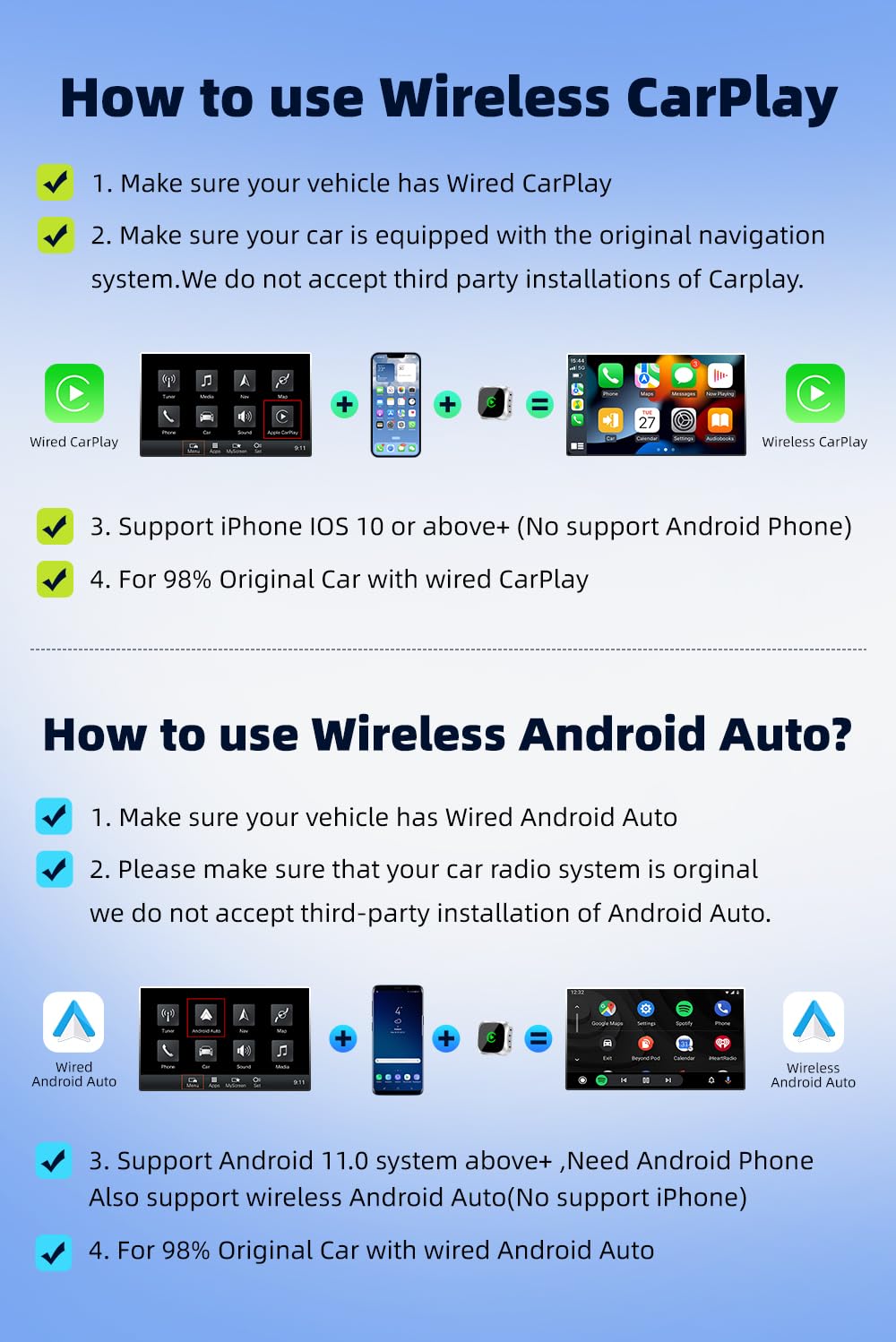
Figure 3.3: Step-by-step guide for Wireless CarPlay and Android Auto setup.
3.4 Compatibilidad
The EKIY EC17 adapter is designed to be compatible with approximately 98% of car models that come with original wired CarPlay or Android Auto functionality. This includes a wide range of manufacturers such as Audi, Toyota, Hyundai, Porsche, Ford, Honda, Mazda, Mitsubishi, Nissan, Suzuki, KIA, Volkswagen, Skoda, Lexus, Benz, Chevrolet, Jeep, Citroen, and Peugeot.

Figure 3.4: Car model compatibility overview.
4. Instrucciones de funcionamiento
4.1 Uso de CarPlay inalámbrico/Android Auto
Once successfully connected, your car's infotainment screen will display the Wireless CarPlay or Android Auto interface, mirroring your smartphone's compatible applications. You can access various apps including navigation (Google Maps, Apple Maps), music streaming (Spotify, Apple Music), messaging, and more.
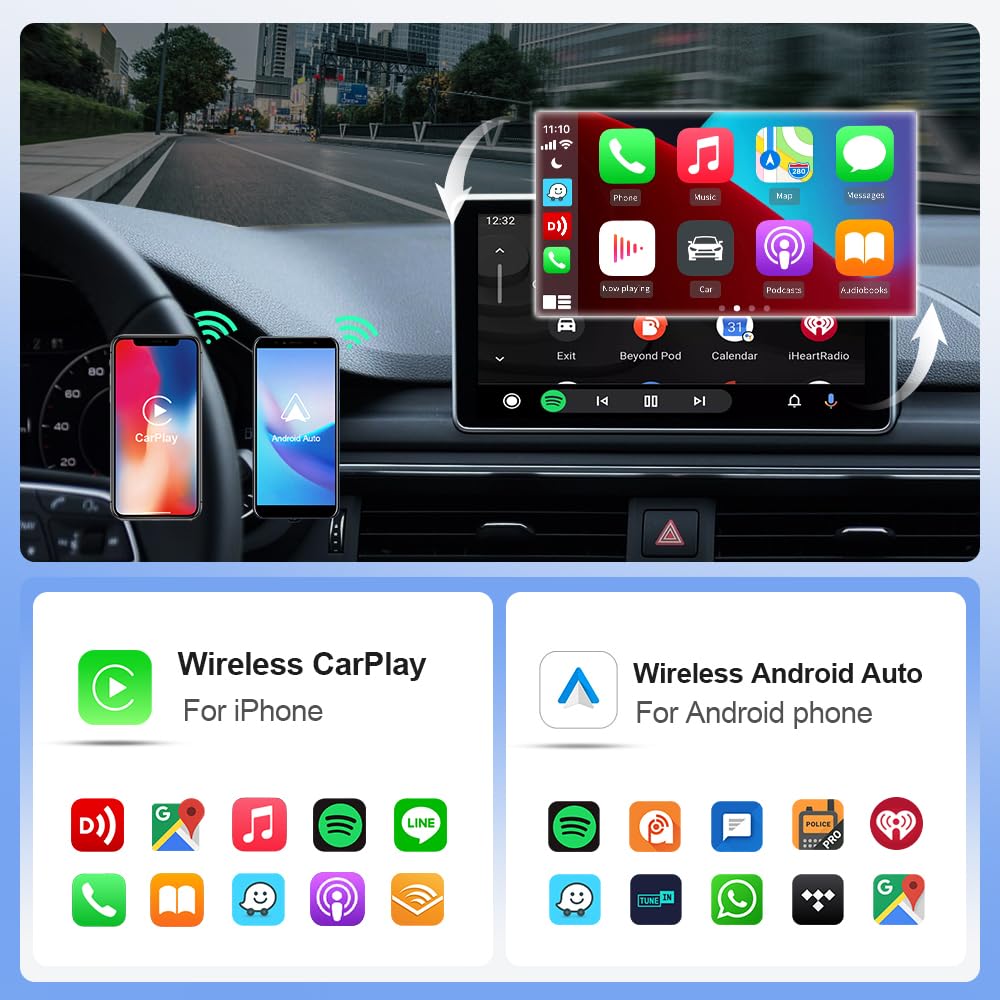
Figure 4.1: Wireless CarPlay and Android Auto interfaces with app exampLes.
Métodos de control 4.2
The EKIY EC17 adapter maintains compatibility with your car's original control mechanisms, allowing for a familiar user experience:
- Control del volante: Use your car's steering wheel buttons to navigate menus, adjust volume, and manage calls.
- Control de perilla: Utilize the car's central control knob for precise menu selection and navigation.
- Control de voz: Activate voice assistants (Siri for CarPlay, Google Assistant for Android Auto) using your car's voice command button for hands-free operation.
- Control de pantalla táctil: Interact directly with the infotainment screen for app selection and input, if your car supports touch functionality.

Figure 4.2: Supported control methods for the adapter.
5. Mantenimiento
To ensure the longevity and optimal performance of your EKIY EC17 adapter, follow these simple maintenance guidelines:
- Limpieza: Gently wipe the adapter's surface with a soft, dry cloth. Avoid using liquid cleaners or abrasive materials.
- Almacenamiento: Cuando no utilice el adaptador durante períodos prolongados, guárdelo en un lugar fresco y seco, alejado de la luz solar directa y de temperaturas extremas.
- Disipación de calor: El adaptador cuenta con una aleación de aluminio casing with ventilation openings for heat dissipation. Ensure these openings are not obstructed to prevent overheating.

Figure 5.1: EKIY EC17 adapter with heat dissipation features.
6. Solución de problemas
If you encounter issues with your EKIY EC17 adapter, please refer to the following common solutions:
- No Connection / Frequent Disconnections:
- Ensure your car's wired CarPlay/Android Auto system is functioning correctly.
- Verifique que Bluetooth y Wi-Fi estén habilitados en su teléfono inteligente.
- Intente desconectar el adaptador y volver a conectarlo.
- Reinicie el sistema de información y entretenimiento de su automóvil y su teléfono inteligente.
- Check for any firmware updates for the adapter (refer to support section for details).
- Respuesta retrasada o retardada:
- Ensure your smartphone has a strong Wi-Fi signal from the adapter.
- Cierra las aplicaciones innecesarias en tu teléfono inteligente para liberar recursos.
- Compruebe si hay posibles interferencias de otros dispositivos inalámbricos.
- Sobrecalentamiento del adaptador:
- Ensure the ventilation openings on the adapter are not blocked.
- Avoid placing the adapter in direct sunlight or enclosed spaces.
- If overheating persists, disconnect the adapter and allow it to cool down before re-connecting.
- Audio Issues (e.g., unclear calls):
- Check your phone's audio settings and ensure the correct output is selected.
- Verify your car's microphone is functioning properly.
- Ensure there are no other Bluetooth devices interfering with the connection.
Si estos pasos no resuelven el problema, comuníquese con el servicio de atención al cliente.
7. Especificaciones
| Característica | Detalle |
|---|---|
| Marca | EKIY |
| Modelo | EC17 |
| Dimensiones del producto | 2.3 x 0.5 x 2.3 cm |
| Peso del artículo | 50 gramos |
| Conectividad | Wi-Fi de 6 GHz, Bluetooth 5.4 |
| Procesador | Corteza A9 |
| Material | Aluminium, Tempered Glass |
| Dispositivos compatibles | Teléfonos inteligentes (iPhone iOS 10+, Android 11.0+) |
| Usos específicos | Car Infotainment System (Wireless CarPlay & Android Auto) |
| Tipo de conector | USB Type A, USB Type C (with adapter) |
| País natal | Porcelana |
8. Información de garantía
Consulte el embalaje del producto o el manual del vendedor. website for specific warranty terms and conditions. Generally, electronic products come with a limited manufacturer's warranty covering defects in materials and workmanship under normal use. Keep your proof of purchase for warranty claims.
9. Atención al cliente
Para asistencia técnica, resolución de problemas o cualquier consulta relacionada con el producto, comuníquese con nuestro equipo de atención al cliente:
- Teléfono: 06282844320
- Fabricante: EKIY

Figure 9.1: EKIY Support Center contact information.
Ask a question about this manual
Ask about setup, troubleshooting, compatibility, parts, safety, or missing instructions. Manuals+ will review the question and use this page’s manual context to help answer it.