
1. Producto terminadoview
The Kaiser KSB-4008 is a versatile portable Bluetooth speaker designed for powerful audio output and dynamic lighting effects. It features an 8-inch woofer, 2.5-inch tweeter, and mid-range drivers, delivering 40W RMS of balanced sound. Integrated RGB LED lighting enhances the atmosphere for various events. With KSR-Link technology, you can wirelessly connect another compatible speaker for an expanded sound experience. The speaker includes a rechargeable battery, Bluetooth connectivity, and supports USB and Micro SD inputs for diverse music playback options. Its robust and portable design makes it suitable for both indoor and outdoor use.
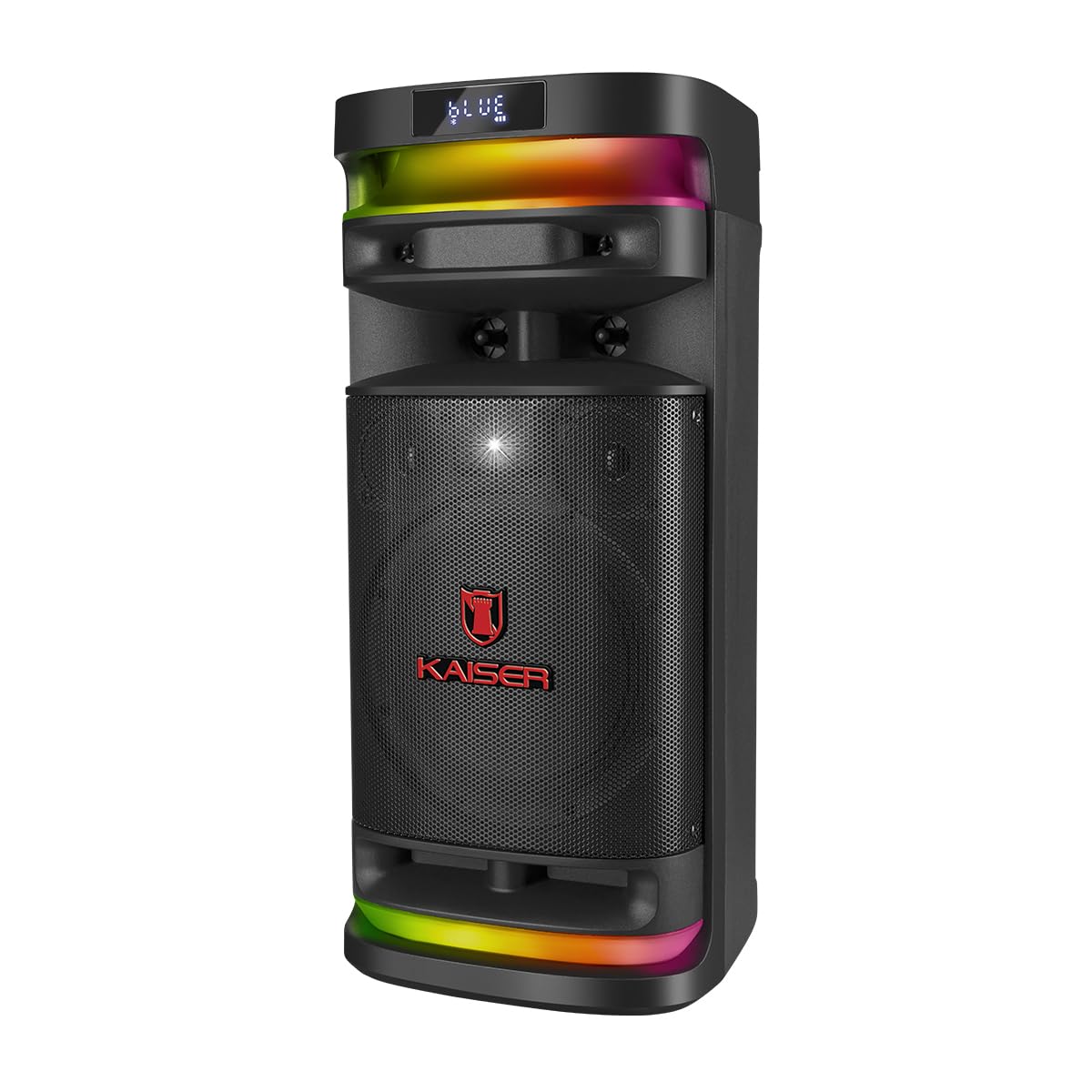
Figura 1.1: Frente view of the Kaiser KSB-4008 Portable Bluetooth Speaker, showcasing its speaker grille and RGB LED light strips.
Características principales:
- Potencia RMS de 40 W: Provides powerful and balanced audio output.
- Full Speaker Configuration: Includes an 8-inch woofer, 2.5-inch tweeter, and mid-range for comprehensive sound reproduction.
- RGB LED Light Effect: Multi-color lighting creates a vibrant atmosphere.
- KSR-Link Technology: Allows wireless connection to another compatible speaker for ampsonido lificado.
- Conectividad versátil: Supports Bluetooth, USB, and Micro SD for various audio sources.
- Batería recargable: Enables extended use without constant power connection.
- Portable and Sturdy Design: Easy to transport for indoor or outdoor events.
2. Contenido del paquete
Por favor, marque la casilla correspondiente a los siguientes artículos:
- Kaiser KSB-4008 Portable Bluetooth Speaker
- Micrófono inalámbrico
- Charging Cable (for microphone)
- Manual de usuario (este documento)

Figura 2.1: Included wireless microphone and its USB charging cable.
3. Instrucciones de seguridad
Para garantizar un funcionamiento seguro y evitar daños, lea y siga estas pautas de seguridad:
- No exponga el altavoz al agua, la humedad o temperaturas extremas.
- Evite colocar el altavoz cerca de fuentes de calor o bajo la luz solar directa durante períodos prolongados.
- Asegúrese de que haya una ventilación adecuada; no bloquee ninguna abertura de ventilación.
- Utilice únicamente los cables de carga y adaptadores de corriente especificados.
- Do not attempt to open, modify, or repair the speaker yourself. Refer all servicing to qualified personnel.
- Mantenga el altavoz alejado de niños y mascotas.
- Operate the speaker within its specified voltage y límites de corriente.
- Evite escuchar a volúmenes excesivamente altos durante períodos prolongados para evitar daños auditivos.
4. Componentes y controles del producto
Familiarize yourself with the various parts and controls of your KSB-4008 speaker.
Figura 4.1: Top Control Panel Layout.
Funciones del panel de control:
- Interruptor de alimentación: Enciende y apaga el altavoz.
- CARGA (Charge) Indicator: Se ilumina durante la carga.
- Entrada auxiliar: Conector de 3.5 mm para dispositivos de audio externos.
- Puerto USB: Para unidades flash USB.
- Ranura Micro SD: Para tarjetas Micro SD.
- Entrada de micrófono: 6.35mm jack for wired microphone (if used).
- GUIT Input: 6.35mm jack for guitar (if used).
- VOL MIC (Microphone Volume): Ajusta el volumen del micrófono.
- VOLUMEN (Master Volume): Ajusta el volumen general del altavoz.
- Botón LED: Controls the RGB LED light effects.
- GRAB Button: For recording audio (functionality may vary).
- MIC PRIO (Microphone Priority): Prioriza el audio del micrófono sobre la música.
- REPETIR (Repeat) Button: Repite la pista o lista de reproducción actual.
- Botón de pista anterior/rebobinado: Skips to previous track or rewinds.
- Botón de reproducción/pausa: Reproduce o pausa la reproducción de audio.
- Botón Pista siguiente/Avance rápido: Skips to next track or fast forwards.
- MODO BT (Mode/Bluetooth) Button: Switches between input modes (Bluetooth, USB, Micro SD, AUX) and initiates Bluetooth pairing.
5. Configuración y uso inicial
5.1 Carga del altavoz
- Connect the speaker to a power outlet using a compatible charging cable (not explicitly listed but implied).
- The 'CARGA' indicator light on the control panel will illuminate during charging.
- Once fully charged, the indicator light may change color or turn off. Disconnect the speaker from the power source.
5.2 Encendido / Apagado
- To turn ON the speaker, toggle the FUERZA Cambie a la posición 'ON'.
- To turn OFF the speaker, toggle the FUERZA cambie a la posición 'OFF'.
5.3 Configuración del micrófono inalámbrico
- Ensure the wireless microphone is charged. Use the provided USB charging cable if necessary.
- Turn on the microphone using its power button.
- The microphone should automatically pair with the speaker. If not, refer to the microphone's specific instructions for pairing.
- Ajuste el volumen del micrófono con el VOL MIC knob on the speaker's control panel.
6. Instrucciones de funcionamiento
6.1 Conexión Bluetooth
- Encienda el altavoz.
- Presione el MODO BT button repeatedly until 'BLUE' or 'BT' appears on the display, indicating Bluetooth mode. The speaker will enter pairing mode.
- En su dispositivo móvil, habilite Bluetooth y busque dispositivos disponibles.
- Select 'Kaiser KSB-4008' (or similar name) from the list.
- Once connected, the speaker will confirm with an audible prompt, and the display will show a stable Bluetooth icon.
6.2 Reproducción USB/Micro SD
- Insert a USB flash drive or Micro SD card into the respective port/slot.
- The speaker should automatically switch to USB or Micro SD mode and begin playing audio files. Si no, presione el MODO BT Botón para seleccionar el modo de entrada correcto.
- Utilice los botones Reproducir/Pausa, Pista anterior y Pista siguiente para controlar la reproducción.
6.3 entrada auxiliar
- Conecte un dispositivo de audio externo (por ejemplo, un teléfono inteligente o un reproductor MP3) al Auxiliar Entrada mediante un cable de audio de 3.5 mm.
- Presione el MODO BT Botón para seleccionar el modo de entrada AUX.
- Controle la reproducción desde su dispositivo conectado.
6.4 KSR-Link Technology (True Wireless Stereo)
KSR-Link allows you to connect two KSB-4008 speakers wirelessly for a stereo sound experience.
- Ensure both KSB-4008 speakers are powered on and in Bluetooth mode, but not connected to any device.
- En uno de los altavoces (este será el altavoz principal), mantenga presionado el botón MODO BT button for a few seconds until you hear a confirmation tone, indicating KSR-Link pairing mode.
- Los dos altavoces se conectarán automáticamente. Una vez conectados, oirá otro tono de confirmación.
- Ahora, conecte su dispositivo móvil al altavoz principal a través de Bluetooth como se describe en la sección 6.1.
- El audio ahora se reproducirá en estéreo a través de ambos altavoces.
Control de luz LED RGB 6.5
- Presione el CONDUJO button on the control panel to cycle through different light modes or to turn the lights off.
6.6 Ajuste del volumen
- Adjust the overall speaker volume using the VOLUMEN perilla.
- Adjust the wireless microphone volume using the VOL MIC perilla.
7. Mantenimiento
7.1 Limpieza
- Always turn off the speaker and disconnect it from power before cleaning.
- Utilice un paño suave y seco para limpiar las superficies exteriores.
- No utilice limpiadores abrasivos, ceras o disolventes ya que pueden dañar el acabado.
- Evite que entre humedad en las aberturas.
7.2 Almacenamiento
- Guarde el altavoz en un lugar fresco y seco, alejado de la luz solar directa y de temperaturas extremas.
- Si lo almacenará durante un período prolongado, cargue la batería aproximadamente al 50 % cada pocos meses para mantener su salud.
8. Solución de problemas
If you encounter issues with your KSB-4008 speaker, refer to the following common problems and solutions:
| Problema | Posible causa | Solución |
|---|---|---|
| El altavoz no se enciende. | La batería está agotada. El interruptor de encendido está apagado. | Cargue el altavoz. Asegúrese de que el interruptor de encendido esté en la posición "ON". |
| No hay salida de sonido. | El volumen está demasiado bajo. Modo de entrada incorrecto. El dispositivo no está conectado correctamente. | Aumentar la VOLUMEN knob. Press MODO BT to select the correct input. Reconnect your audio source. |
| El dispositivo Bluetooth no se puede emparejar. | El altavoz no está en modo de emparejamiento. El dispositivo está demasiado lejos. Hay interferencias. | Ensure speaker is in Bluetooth pairing mode (display shows 'BLUE' or 'BT'). Move device closer to speaker. Turn off other Bluetooth devices. |
| El micrófono inalámbrico no funciona. | Microphone battery low. Microphone not turned on. VOL MIC is low. | Charge the microphone. Turn on the microphone. Increase the VOL MIC perilla. |
| KSR-Link connection fails. | Speakers already connected to a device. Incorrect pairing procedure. | Ensure both speakers are not connected to any Bluetooth device. Follow KSR-Link pairing steps carefully. |
9. Especificaciones
Technical specifications for the Kaiser KSB-4008 Portable Bluetooth Speaker:

Figura 9.1: Kaiser KSB-4008 Speaker Dimensions.
| Característica | Especificación |
|---|---|
| Marca | Emperador |
| Modelo | KSB-4008 |
| Tipo de altavoz | Atmosférico |
| Peak Power Handling (RMS) | 40 vatios |
| Tamaño del woofer | 8 pulgadas |
| Tamaño del tweeter | 2.5 pulgadas |
| Conectividad | Bluetooth, USB, Micro SD, AUX |
| Características especiales | RGB LED Light, KSR-Link Technology, Rechargeable Battery |
| Dimensiones del producto (LxAnxAl) | 37.4 x 36.2 x 80 cm (Note: Image shows 56.7 x 26.5 x 25 cm, please verify actual dimensions) |
| Peso del artículo | 500 gramos |
| Componentes incluidos | Micrófono inalámbrico |
Note: Product dimensions from specifications (37.4 x 36.2 x 80 cm) differ from the provided image (56.7 x 26.5 x 25 cm). Please refer to the product packaging for the most accurate dimensions.
10. Garantía y soporte
Para obtener información sobre la garantía y soporte técnico, consulte la tarjeta de garantía incluida con su producto o visite el sitio web oficial de Kaiser. webSitio. Conserve su recibo de compra como comprobante de compra para cualquier reclamación de garantía.