
1. Introducción
Thank you for choosing the WLIVE Modern TV Stand (Model ADSG084BL). This entertainment center is designed to accommodate TVs up to 75 inches, featuring two tiers, integrated LED lighting, and ample storage with cabinets and open shelves. This manual provides detailed instructions for assembly, operation, maintenance, and troubleshooting to ensure safe and optimal use of your new TV stand.
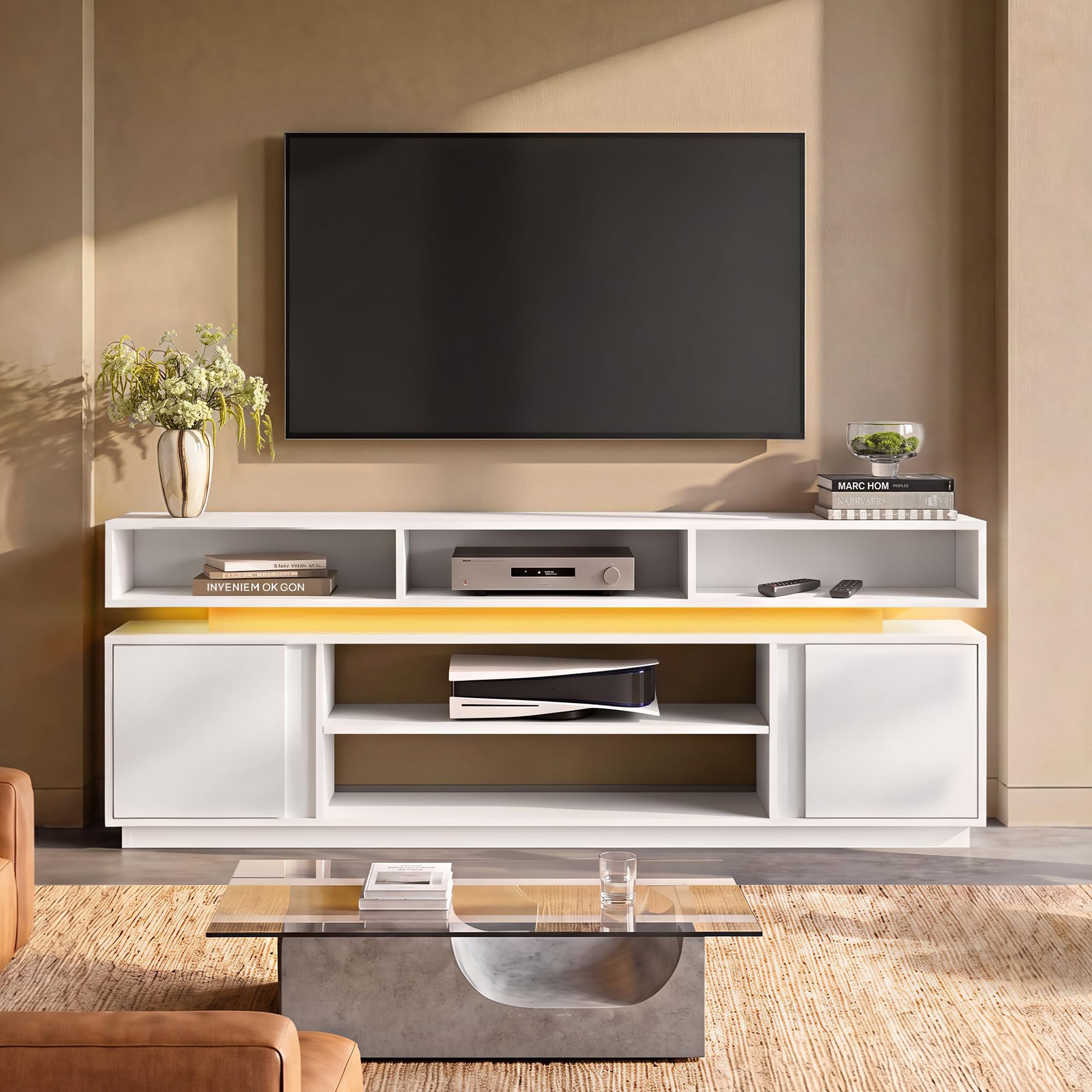
Image 1.1: The WLIVE Modern TV Stand (Model ADSG084BL) in a typical setup.
2. Información de seguridad
Lea y comprenda todas las advertencias e instrucciones de seguridad antes de ensamblar y usar el producto. El incumplimiento de estas instrucciones podría causar lesiones o daños al producto.
- Capacidad de peso: Do not exceed the maximum weight capacity of 110 pounds (50 kg) for the top surface. Ensure your television and other equipment do not exceed this limit.
- Seguridad antivuelco: This TV stand includes an anti-tip base for enhanced stability. Always use the provided anti-tip hardware to secure the stand to a wall, especially in households with children or pets.
- Asamblea: Assembly should ideally be performed by two adults. Follow all steps carefully.
- Colocación: Coloque el soporte del televisor sobre una superficie plana, nivelada y estable. Evite colocarlo cerca de fuentes de calor, luz solar directa o en zonas con mucha humedad.
- Seguridad eléctrica: Ensure all electrical connections for the LED lights are properly secured and follow local electrical codes. Do not overload electrical outlets.
- Seguridad de los niños: Keep small parts and packaging materials away from children. Do not allow children to climb on or play with the TV stand.
3. Contenido del paquete
Before beginning assembly, verify that all parts and hardware are present and undamaged. Refer to the included assembly manual for a complete list of components. If any parts are missing or damaged, contact customer support immediately.

Imagen 3.1: Example of labeled parts and assembly instructions.
El contenido típico del paquete incluye:
- Wood panels (various sizes for top, sides, shelves, and doors)
- Hardware kit (screws, dowels, cam locks, hinges, anti-tip kit)
- Tira de luz LED y adaptador de corriente
- Remote control or app instructions for LED lights
- Manual de instrucciones de montaje
4. Instrucciones de montaje
Assembly typically takes approximately 1 hour with two people. Follow the step-by-step instructions provided in the included manual. Ensure you have a clear, spacious area for assembly.
4.1. Guía de ensamblaje visual
Video 4.1: Official WLIVE TV Stand Installation Guide. This video provides a visual walkthrough of the assembly process for the TV stand.
4.2. Key Assembly Tips
- Identificar piezas: Lay out all parts and match them with the labels in the instruction manual.
- Hardware: Utilice los herrajes correctos para cada paso. No apriete demasiado los tornillos.
- Estantes ajustables: The central divider features 3 adjustable/removable positions. Plan your shelf height before fully securing.
- Kit antivuelco: Install the anti-tip kit as the final step to secure the stand to the wall.

Imagen 4.2: Dimensiones del producto y compatibilidad de tamaño de TV.

Image 4.3: Adjustable shelf options for customized storage.
5. Instrucciones de funcionamiento (luces LED)
The WLIVE Modern TV Stand features integrated RGB LED lighting. Follow these steps to operate the lights:
- Conecte la electricidad: Conecte el adaptador de corriente de la tira de luz LED a una toma de corriente eléctrica estándar.
- Control a través de la aplicación: Download the designated control app (refer to the LED light instruction sheet for app name and QR code). Pair your smartphone with the LED lights via Bluetooth.
- Funciones: A través de la aplicación podrás:
- Select from 20 single colors (e.g., warm white, cool blue).
- Choose from 4 color flashing modes (e.g., gradient, blinking).
- Ajuste el brillo con 5 niveles.
- Control remoto (si está incluido): Some models may include a physical remote control for basic functions. Refer to its specific instructions.

Image 5.1: Features of the RGB LED lighting system.

Image 5.2: Controlling LED lights via smartphone app.
6. Mantenimiento
Proper care will extend the life and appearance of your WLIVE TV Stand.
- Limpieza: Limpie las superficies con adamp cloth. Avoid harsh chemicals or abrasive cleaners, which can damage the finish. The surface is scratch-resistant and waterproof, making cleaning easy.
- Derrames: Promptly wipe up any spills to prevent water damage, although the material is designed to be waterproof.
- Hardware: Revise periódicamente todos los tornillos y conexiones para asegurarse de que estén bien apretados. Vuelva a apretarlos si es necesario.
- Luces LED: If the LED lights malfunction, check the power connection. If issues persist, contact customer support.

Image 6.1: Waterproof and easy-to-clean surface.
7. Solución de problemas
If you encounter any issues with your WLIVE TV Stand, refer to the following common problems and solutions:
| Problema | Posible causa | Solución |
|---|---|---|
| El soporte se tambalea después del montaje. | Conexiones sueltas; suelo irregular. | Ensure all screws and cam locks are tightened. Place the stand on a level surface. Install the anti-tip kit. |
| Las luces LED no se encienden. | Power adapter not connected; loose LED strip connection; app not paired. | Check if the power adapter is securely plugged into the outlet and the LED strip. Ensure the app is correctly paired via Bluetooth. |
| Las puertas no se alinean correctamente. | Bisagras no ajustadas correctamente. | Ajuste los tornillos de las bisagras para alinear las puertas. Consulte el manual de montaje para obtener más información sobre el ajuste de las bisagras. |
| Piezas faltantes o componentes dañados. | Defecto de fabricación o daño durante el envío. | Do not proceed with assembly. Contact WLIVE customer support immediately for replacement parts. |
8. Especificaciones
| Característica | Detalle |
|---|---|
| Número de modelo | ADSG084BL |
| Marca | EN VIVO |
| Color | Blanco |
| Dimensiones (L x An x Al) | 67.72'' x 13'' x 25.28'' (172 cm x 33 cm x 64.2 cm) |
| Peso del artículo | 82.2 libras (37.3 kg) |
| Tipo de material | Madera de ingeniería |
| Tamaño máximo de TV admitido | Hasta 75 pulgadas |
| Capacidad de peso | 110 libras (50 kg) |
| Número de estantes | 7 (5 abiertas, 2 detrás de puertas) |
| Características adicionales | RGB LED lights, 3 adjustable/removable shelves, Waterproof surface, Thickened base, Pinch-free & silent hinges |
| Requiere ensamblaje | Sí |
9. Garantía y soporte
WLIVE is committed to providing quality products and customer satisfaction. If you have any questions, concerns, or require assistance with your TV stand, please do not hesitate to contact our customer support team.
- Servicio al cliente: Para obtener ayuda, visite el sitio Tienda WLIVE en Amazon o contacte directamente al vendedor.
- Devoluciones: This product is eligible for a 30-day refund/replacement return policy from the date of purchase. Please refer to the retailer's return policy for full details.
- Comentario: Your feedback is valuable. If you are satisfied with your product, please consider leaving a review.