
1. Introducción
Thank you for choosing the MusicMan BT-X63 True Wireless Bluetooth In-Ear Headphones. This manual provides essential information for the safe and efficient use of your device. Please read it carefully before use and retain it for future reference.
2. Instrucciones de seguridad
- No exponga el dispositivo a temperaturas extremas, luz solar directa o humedad alta.
- Evite dejar caer o someter el dispositivo a impactos fuertes.
- No intente desmontar, reparar ni modificar el dispositivo usted mismo. Deje todas las reparaciones a personal cualificado.
- Mantenga el dispositivo alejado del agua y otros líquidos.
- Utilice únicamente el cable de carga USB-C proporcionado o un equivalente certificado.
- Deseche las baterías y los componentes electrónicos de forma responsable de acuerdo con las regulaciones locales.
- Evite escuchar a niveles de volumen altos durante períodos prolongados para evitar daños auditivos.
3. Contenido del paquete
Por favor revise el paquete para ver los siguientes artículos:
- MusicMan BT-X63 True Wireless In-Ear Headphones (Left and Right)
- portátil
- Cable de carga USB-C
- Silicone Ear Tips (2 different sizes)
- Manual de usuario (este documento)
4. Producto terminadoview
Familiarize yourself with the components of your MusicMan BT-X63 headphones and charging box.

Image: The MusicMan BT-X63 True Wireless Earbuds are shown removed from their open charging case. The white earbuds feature a stem design, and the white charging case has the 'MusicMan Germany' logo on its lid.
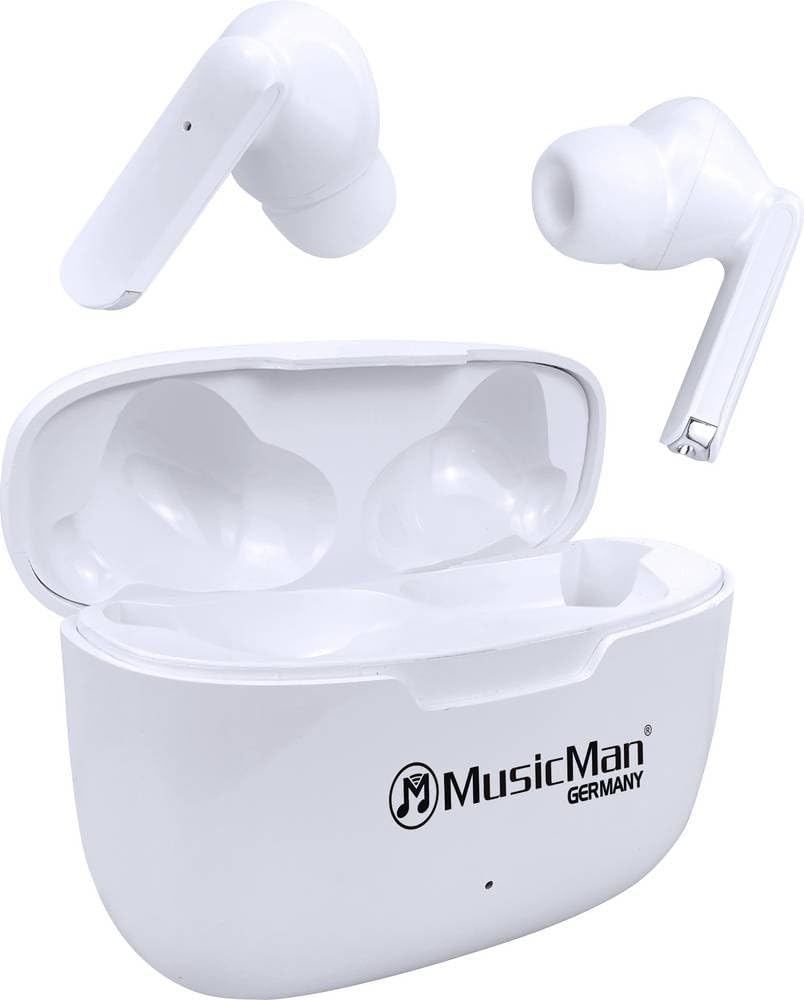
Image: The MusicMan BT-X63 True Wireless Earbuds are placed inside their open charging case. The white earbuds fit snugly into their respective slots, and the 'MusicMan Germany' logo is visible on the case lid.

Image: The MusicMan BT-X63 charging case is shown closed, displaying its compact, white design. The 'MusicMan Germany' logo is prominently featured on the top surface of the case.
5. Configuración
5.1 Carga del dispositivo
- Carga de la caja de carga: Connect the provided USB Type-C cable to the charging port on the charging box and the other end to a USB power adapter (not included) or a computer's USB port. The indicator light on the charging box will show charging status. A full charge takes approximately 2 hours.
- Carga de los auriculares: Place the earbuds into their respective slots in the charging box. Ensure they are correctly seated. The earbuds will automatically begin charging. The charging box can provide up to 4 full charges for the earbuds.
5.2 Encendido y apagado
- Encendido: The earbuds will automatically power on when removed from the charging box.
- Apagado: The earbuds will automatically power off and begin charging when placed back into the charging box and the lid is closed.
5.3 Emparejamiento Bluetooth
- Asegúrese de que los auriculares estén cargados.
- Remove both earbuds from the charging box. They will automatically enter pairing mode, indicated by a flashing LED on one of the earbuds.
- En su teléfono inteligente, tableta o computadora portátil, habilite Bluetooth y busque los dispositivos disponibles.
- Seleccionar "Man de música BT-X63" de la lista de dispositivos.
- Once connected, a voice prompt will confirm successful pairing, and the LED indicator on the earbuds will turn off or flash slowly.
- The earbuds will automatically reconnect to the last paired device when removed from the charging box, if Bluetooth is enabled on the device.
6. Instrucciones de funcionamiento
The MusicMan BT-X63 features intuitive touch controls on both earbuds.
6.1 Reproducción de música
- Reproducir/Pausa: Un solo toque en cualquiera de los auriculares.
- Pista siguiente: Toque dos veces el auricular derecho.
- Pista anterior: Toque dos veces el auricular izquierdo.
- Sube el volumen: Toque tres veces el auricular derecho.
- Bajar volumen: Toque tres veces el auricular izquierdo.
6.2 Llamadas telefónicas
- Responder llamada: Un solo toque en cualquiera de los auriculares.
- Finalizar llamada: Un solo toque en cualquiera de los auriculares durante una llamada.
- Rechazar llamada: Mantenga presionado cualquiera de los auriculares durante 2 segundos.
6.3 Asistente de voz
- Activar asistente de voz: Mantenga presionado cualquiera de los auriculares durante 3 segundos (cuando no esté en una llamada).
7. Mantenimiento
7.1 Limpieza
- Wipe the earbuds and charging box with a soft, dry, lint-free cloth.
- No utilice limpiadores abrasivos, alcohol ni disolventes químicos.
- Asegúrese de que los contactos de carga estén limpios y libres de residuos.
7.2 Almacenamiento
- Guarde el dispositivo en un lugar fresco y seco, alejado de la luz solar directa y de temperaturas extremas.
- If storing for an extended period, charge the device periodically to maintain battery health.
8. Solución de problemas
If you encounter issues with your MusicMan BT-X63 headphones, refer to the following common solutions:
| Problema | Posible solución |
|---|---|
| Los auriculares no se emparejan |
|
| Sin sonido de un auricular |
|
| Problemas de carga |
|
| Los controles táctiles no responden |
|
9. Especificaciones
| Característica | Especificación |
|---|---|
| Marca | Hombre de musica |
| Nombre del modelo | BT-X63 |
| Número de modelo del artículo | 5098 |
| Tecnología de conectividad | Inalámbrico (Bluetooth 5.3) |
| Composición de las celdas de la batería | Polímero de litio |
| Tiempo de carga (caja de carga) | Aproximadamente 2 horas |
| Operating Time (Earbuds per charge) | Aproximadamente 4 horas |
| Total Runtime (with Charging Box) | Hasta 16 horas |
| Tiempo de espera | Hasta 300 horas |
| Peso (por auricular) | Aprox. 7 g |
| Product Dimensions (Charging Box) | 6.12 x 4.62 x 2.41 cm |
| Material | Plástico |
| Micrófono | Sí |
| Control táctil | Sí |
10. Garantía y soporte
MusicMan products are designed for reliability and performance. For warranty information, please refer to the warranty card included with your purchase or visit the official MusicMan website. For technical support or further assistance, please contact MusicMan customer service through their official channels.