
1. Introducción
Thank you for choosing the Healthkeep Smart Body Fat Scale. This manual provides essential information for the safe and effective use of your new scale. Please read it thoroughly before use and retain it for future reference. This device is designed to help you monitor various body composition metrics and track your health progress over time.
2. Información de seguridad
- This scale is intended for general health monitoring and is not a substitute for professional medical advice. Consult a healthcare professional for any health concerns.
- No utilice este dispositivo si tiene un marcapasos u otro dispositivo médico interno.
- Keep the scale dry. Avoid placing it in wet environments or submerging it in water.
- Place the scale on a hard, flat, and stable surface for accurate measurements. Uneven surfaces can affect accuracy.
- The maximum weight capacity of this scale is 180 kg (400 lb). Do not exceed this limit.
- No saltes sobre la báscula. Sube y baja con cuidado.
- Mantener fuera del alcance de los niños.
3. Contenido del paquete
- Healthkeep Smart Body Fat Scale (Model: FI2019LB-I)
- Manual de usuario
- Pilas AAA (4x)
4. Producto terminadoview
The Healthkeep Smart Body Fat Scale features advanced technology to provide comprehensive insights into your body composition.
Características principales:
- Revolutionary Dual VA Displays: One screen displays weight, while the other shows vital health metrics.
- 16 Comprehensive Health Measurements: Includes Heart Rate, Cardiac Index, Weight, BMI, Body Fat, Muscle Rate, Fat-free Body Weight, Subcutaneous Fat, Visceral Fat, Body Water, Skeletal Muscle, Muscle Mass, Bone Mass, Protein, BMR, and Body Age.
- Monitoreo del ritmo cardíaco: Provides a holistic view of cardiovascular health.
- Advanced ITO Technology: Ensures precise measurements, enhanced durability, and easy cleaning.
- Gestión multiusuario: Supports up to 24 user profiles via the Fitdays app.
- Alta precisión: Measures with an accuracy of 0.05 kg (0.1 lb) up to 180 kg (400 lb).
- Operación fácil de usar: Features auto-calibration, auto on/off, and auto-zero.
- Large & Stable Platform: Dimensions of 28 x 28 x 2.7 cm for enhanced stability and safety.
Componentes:
The scale consists of a tempered glass surface with ITO coating, dual VA display screens, and anti-slip padding on the bottom.

Imagen: Más alláview of the Healthkeep Smart Body Fat Scale, displaying weight and other metrics, alongside a smartphone and smartwatch showing synchronized data.
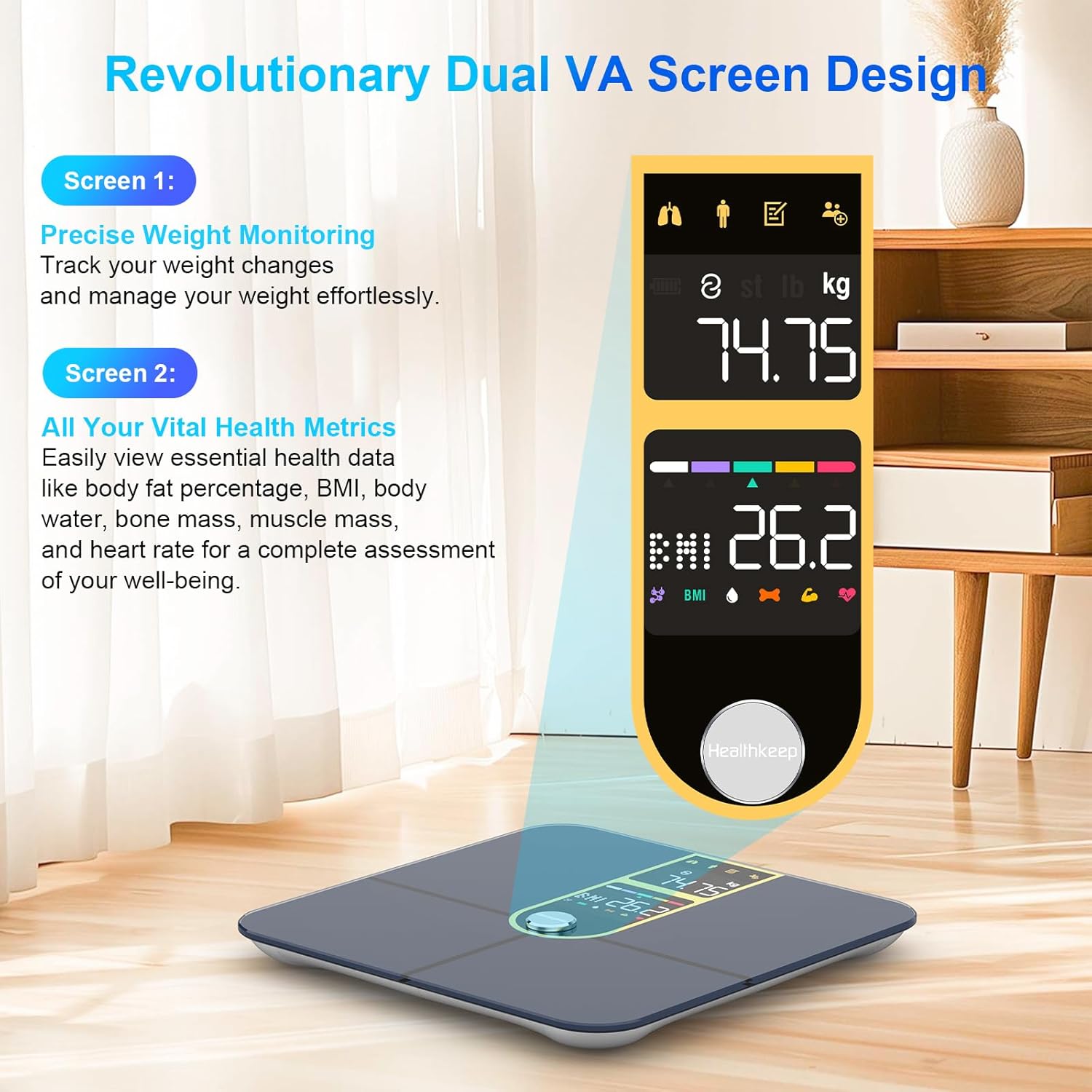
Imagen: Detallada view of the scale's dual VA screens. Screen 1 shows precise weight monitoring, and Screen 2 displays vital health metrics like body fat, BMI, body water, bone mass, muscle mass, and heart rate.
5. Configuración
5.1 Instalación de la batería
- Abra el compartimento de la batería en la parte inferior de la báscula.
- Inserte las cuatro pilas AAA, asegurándose de la polaridad correcta (+/-).
- Cierre bien el compartimento de la batería.
5.2 Colocación inicial
Place the scale on a hard, flat, and stable surface. Avoid carpets or soft flooring, as this can affect measurement accuracy.
5.3 Descarga y emparejamiento de la aplicación
- Descargar el "Fitdays" aplicación desde la App Store (iOS) o Google Play (Android).
- Crea una cuenta y configura tu perfil profesional personalfile (género, altura, edad, etc.).
- Habilite Bluetooth en su teléfono inteligente.
- Step onto the scale to activate it. The scale will automatically attempt to pair with the app.
- Confirm the pairing within the Fitdays app.

Image: Illustration of the Fitdays app and its compatibility with various fitness applications such as Apple Health, Fitbit, Samsung Health, and Google Fit, along with an Apple Watch displaying health data.
6. Instrucciones de funcionamiento
6.1 Realización de una medición
- Asegúrese de que sus pies estén limpios y secos.
- Step onto the scale barefoot, placing your feet on the ITO-coated surface. Ensure your feet make good contact with the electrodes.
- Stand still on the scale. The dual VA displays will show your weight first, followed by other body composition metrics.
- The measurements will automatically synchronize with the Fitdays app on your paired smartphone.

Image: A person standing barefoot on the scale, demonstrating how to take a measurement. The image highlights the 16 comprehensive health measurements displayed, including Heart Rate, BMI, Body Fat, and Bone Mass.
6.2 Understanding the Dual Displays
- Pantalla 1: Primarily displays your current weight.
- Pantalla 2: Cycles through various body composition metrics such as Body Fat percentage, BMI, Body Water, Bone Mass, Muscle Mass, and Heart Rate.
6.3 Funcionalidad multiusuario
The Fitdays app supports up to 24 user profiles. To add or switch users:
- Abra la aplicación Fitdays.
- Navigate to the user management section.
- Add a new user profile o seleccione uno existente.
- Asegúrese de que el usuario pro correctofile is selected in the app before taking a measurement to ensure data is recorded accurately for that individual.

Image: A family demonstrating the multi-user management feature, with a smartphone displaying the Fitdays app showing different user profiles and their respective body fat and BMI readings.
7. App Integration (Fitdays App)
The Fitdays app is your central hub for tracking and analyzing your health data. It provides comprehensive insights into your progress over daily, weekly, monthly, and yearly periods.
- Seguimiento de datos: Monitor trends for weight, BMI, body fat percentage, muscle mass, bone mass, heart rate, and all other 16 metrics.
- Establecer metas: Set and track personal fitness and health goals.
- Third-Party App Sync: Seamlessly sync your data with popular health platforms such as Samsung Health, Apple Health, Fitbit, and Google Fit.

Image: A woman tracking her fitness journey using the Fitdays app, which displays detailed graphs and insights into her progress over time.
8. Mantenimiento y cuidado
- Limpieza: Limpie la superficie de la báscula con un paño suave.amp cloth. Do not use abrasive cleaners or chemical detergents. A small amount of alcohol can be used if necessary.
- Almacenamiento: Guarde la báscula en un lugar fresco y seco, alejado de la luz solar directa y de temperaturas extremas.
- Reemplazo de batería: If the display becomes dim or shows a low battery indicator, replace all four AAA batteries simultaneously.
- Evite el impacto: Do not drop the scale or subject it to heavy impact, as this may damage the sensors or glass surface.
9. Solución de problemas
| Problema | Posible causa | Solución |
|---|---|---|
| La báscula no enciende | Baterías bajas o agotadas; Instalación incorrecta de la batería | Reemplace las baterías; asegúrese de que la polaridad sea correcta |
| Lecturas inexactas | Scale on uneven surface; Not standing still; Dirty ITO surface; Calibration needed | Place on hard, flat surface; Stand still; Clean surface; Step on and off to re-calibrate |
| La aplicación no se conecta a través de Bluetooth | Bluetooth off; App not open; Scale not active; Interference | Ensure Bluetooth is on; Open Fitdays app; Step on scale to activate; Move closer to scale |
| Datos de composición corporal no mostrados | Not standing barefoot; Poor contact with ITO surface | Step on barefoot; Ensure feet cover the ITO electrodes |
10. Especificaciones

Image: Technical diagram illustrating the dimensions of the Healthkeep Smart Body Fat Scale, measuring 28 cm in length and width, and 2.7 cm in height.
| Característica | Detalle |
|---|---|
| Dimensiones del producto | 11.02 x 11.02 x 1.06 pulgadas (28 x 28 x 2.7 cm) |
| Número de modelo del artículo | FI2019LB-I |
| Peso | 3.31 libras |
| Fabricante | mantenimiento de la salud |
| Marca | mantenimiento de la salud |
| Color | Dorado |
| Usos recomendados | Adultos |
| Características especiales | Bone Mass, Heart Rate, Large Display, Muscle Mass, Smart |
| Tipo de pantalla | LCD (Dual VA Displays) |
| Capacidad máxima | 180 kg (400 libras) |
| Precisión de medición | 0.05 kg (0.1 libras) |
| Conectividad | Bluetooth (Compatible with iOS & Android) |
11. Garantía y soporte
Healthkeep products are manufactured to high-quality standards. For information regarding warranty coverage, technical support, or customer service, please refer to the contact details provided with your purchase or visit the official Healthkeep webSitio web. Conserve su comprobante de compra para reclamaciones de garantía.