
Introducción
This manual provides instructions for the RENPHO MorphoScan Base Smart Body Composition Scale. This advanced scale utilizes eight-electrode dual-frequency and segmental Bioelectrical Impedance Analysis (BIA) technology to deliver comprehensive body composition data. It measures various metrics including body weight, body fat percentage, BMI, muscle mass, water ratio, and more, with high precision. The scale features a clear LED display and connects to the user-friendly RENPHO Health App for detailed health reports and progress tracking.
Vídeo: Un overview of the RENPHO MorphoScan Base Smart Body Fat Scale, highlighting its features and benefits for body composition analysis.
¿Qué hay en la caja?
- RENPHO MorphoScan Base Smart Body Composition Scale
- Manual de usuario
- 4 pilas AAA
Configuración
1. Instale las baterías
Open the battery compartment on the underside of the scale. Insert the 4 AAA batteries, ensuring correct polarity. Close the compartment.
2. Download and Install the RENPHO Health App
Buscar "RENPHO Health" in your device's app store (Apple App Store or Google Play Store) and install the application.
Video: Step-by-step guide on how to download and install the Renpho Health App, register an account, and connect the scale via Bluetooth.
3. Register and Log In
Open the RENPHO Health App. Register for a new account or log in if you already have one.
4. Connect the Scale via Bluetooth
Ensure Bluetooth is enabled on your smartphone. In the RENPHO Health App, follow the prompts to add a new device and connect to your MorphoScan Base scale.
Instrucciones de funcionamiento
1 Colocación
Coloque la báscula sobre una superficie dura y plana. Evite alfombras o suelos irregulares para obtener lecturas precisas.
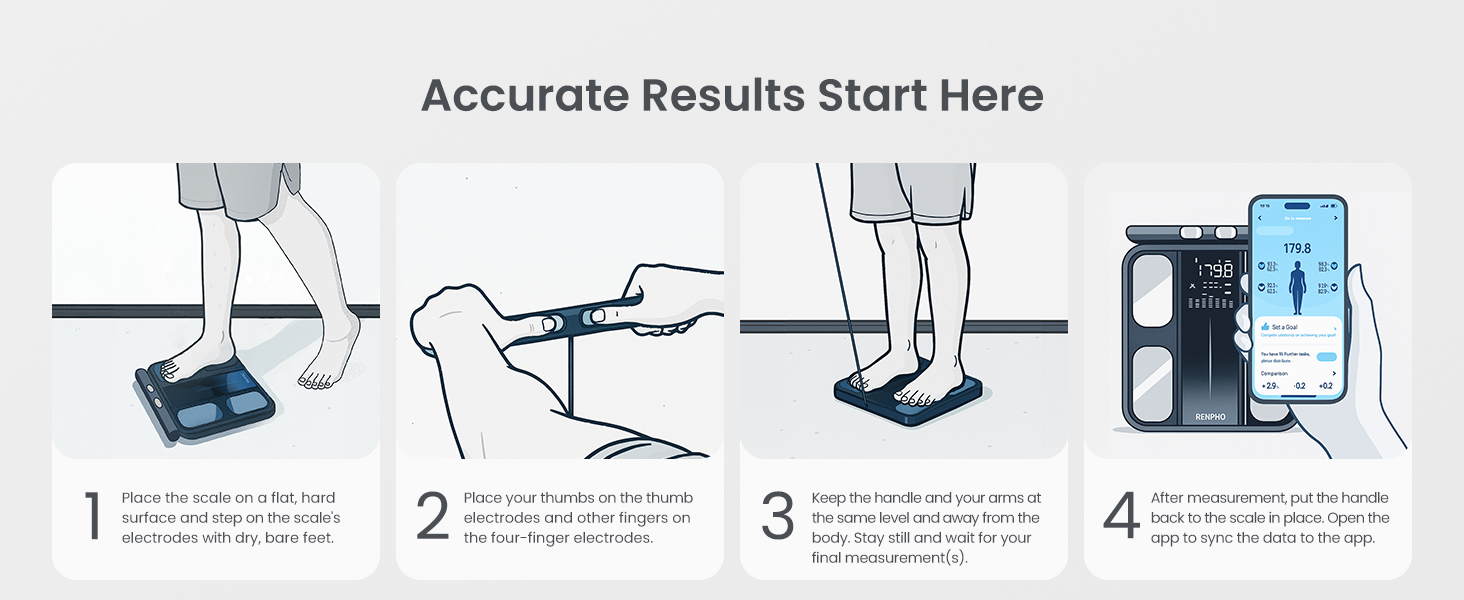
Image: A person placing the RENPHO scale on a flat, hard surface, emphasizing proper placement for accurate measurements.
2. Tomando una medida
Step onto the scale with bare, dry feet, ensuring your feet are positioned on the electrode pads.
Grasp the handle and pull it up, keeping your arms straight and held at a 30-45 degree angle away from your body. Ensure continuous contact with all eight electrode pads (four on the scale platform, four on the handle).

Image: A person standing on the RENPHO scale, holding the retractable handle with both hands, demonstrating the correct body position for a full body composition analysis.
Hold this position until the measurement is complete and the report is generated in the app.
After measurement, return the handle to its resting position and step off the scale.

Image: A visual guide illustrating the four steps for accurate measurement: placing the scale, placing thumbs on electrodes, keeping arms straight, and viewing results on the app.
Entendiendo sus datos
The RENPHO Health App provides a detailed body composition analysis report. This report includes metrics such as:
- Peso
- IMC (Índice de masa corporal)
- Porcentaje de grasa corporaltage
- Porcentaje de músculo esqueléticotage
- Índice de grasa visceral
- Porcentaje de agua corporaltage
- La masa ósea
- Porcentaje de proteínatage
- BMR (tasa metabólica basal)
- Edad metabólica
- Segmental Fat Analysis (Left Arm, Right Arm, Trunk, Left Leg, Right Leg)
- Muscle Balance
The app also displays a seven-day weight trend and allows for tracking progress over time. You can generate and print comprehensive health reports for personal use or to share with fitness professionals.

Image: A smartphone screen showing the RENPHO Health App interface with detailed body composition analysis, including segmental fat and muscle data, and a comprehensive health report.

Image: An infographic listing over 15 body metrics measured by the RENPHO scale, such as Weight, BMI, Body Fat, and Muscle Mass, indicating the depth of analysis available through the app.
Mantenimiento
Limpieza
Para limpiar la báscula, utilice un paño suave y húmedo.amp cloth. Avoid abrasive cleaners or harsh chemicals. Ensure the scale is dry before storage or next use.
Video: A user demonstrating how to clean the scale by spraying it and wiping it down with a cloth.
Reemplazo de batería
The scale operates on 4 AAA batteries. When the battery indicator appears on the display, replace all four batteries with new ones.
Presupuesto
| Característica | Detalle |
|---|---|
| Marca | RENFO |
| Modelo | MorphoScan Base |
| Límite de peso | 180 Kilograms / 400 lbs |
| Tipo de pantalla | CONDUJO |
| Electrodos | 8 (Dual-frequency BIA) |
| Fuente de poder | 4 pilas AAA (incluidas) |
| Duración de la batería | Hasta 130 días |
| Conectividad | Bluetooth |
| Compatibilidad de aplicaciones | RENPHO Health App, Apple Health, MyFitnessPal, Samsung Health |
Solución de problemas
Lecturas inexactas
- Asegúrese de que la báscula esté colocada sobre una superficie dura y plana.
- Make sure your feet are bare and dry, and in full contact with all electrode pads.
- Hold the handle correctly, ensuring continuous contact with all handle electrodes.
- Avoid taking measurements immediately after intense exercise, showering, or consuming large amounts of food/drink, as these can affect hydration levels and readings.
- Verifique los niveles de la batería y reemplácela si es necesario.
Problemas de conectividad de la aplicación
- Asegúrese de que Bluetooth esté habilitado en su teléfono inteligente.
- Restart the RENPHO Health App.
- Try re-pairing the scale with the app.
- Asegúrese de que el sistema operativo de su teléfono inteligente esté actualizado.
La báscula no se enciende
- Compruebe si las baterías están correctamente instaladas.
- Reemplace las baterías por otras nuevas.
Garantía y soporte
Para obtener información sobre la garantía y la atención al cliente, consulte el sitio web oficial de RENPHO. webSitio web o contacte directamente con el servicio de atención al cliente. Conserve su recibo de compra como comprobante.
Nota: The data results from this device are intended solely for athletic fitness and health monitoring purposes and are not a substitute for medical equipment. For any decisions regarding diagnosis and treatment, please consult a qualified medical professional.