
1. Introducción
This manual provides essential information for setting up, operating, maintaining, and troubleshooting your Lenovo Laptop Computer 2026 Edition, Model IdeaPad Slim 3. Please read this manual thoroughly before using your device to ensure proper function and longevity.
2. Contenido del paquete
Verifique que todos los artículos estén presentes en su paquete:
- Lenovo Laptop Computer 2026 Edition (IdeaPad Slim 3)
- Adaptador de corriente
- Lector de tarjetas SD
- Guía de inicio rápido (si está incluida)
- Warranty Information Card (if included)
3. Producto terminadoview
Familiarize yourself with the components and features of your Lenovo IdeaPad Slim 3 laptop.
3.1 Características principales

This image displays the Lenovo IdeaPad Slim 3 laptop and highlights its primary features. It includes an Intel Core i7-13620H processor, a 15.3-inch WUXGA IPS display (1920x1200 resolution), and an HD camera with a privacy shutter. The laptop is 0.70 inches thin and weighs 3.51 lbs. It comes with 24GB DDR5 RAM, upgradable to 40GB, and a 512GB SSD, upgradable to 4TB. Audio is provided by dual 2W speakers. The device supports Rapid Charge Boost and features a Metal A Cover for durability, meeting Military Grade standards.
3.2 Pantalla y teclado

This image focuses on the laptop's display and keyboard. The 15.3-inch WUXGA IPS display offers a 1920x1200 resolution, 300 nits brightness, anti-glare properties, and a 16:10 aspect ratio. It boasts up to a 90% active area ratio and is an Eyesafe Display, TÜV Rheinland Certified for low blue light. The keyboard is non-backlit and includes a numeric keypad.
3.3 Power and Audio
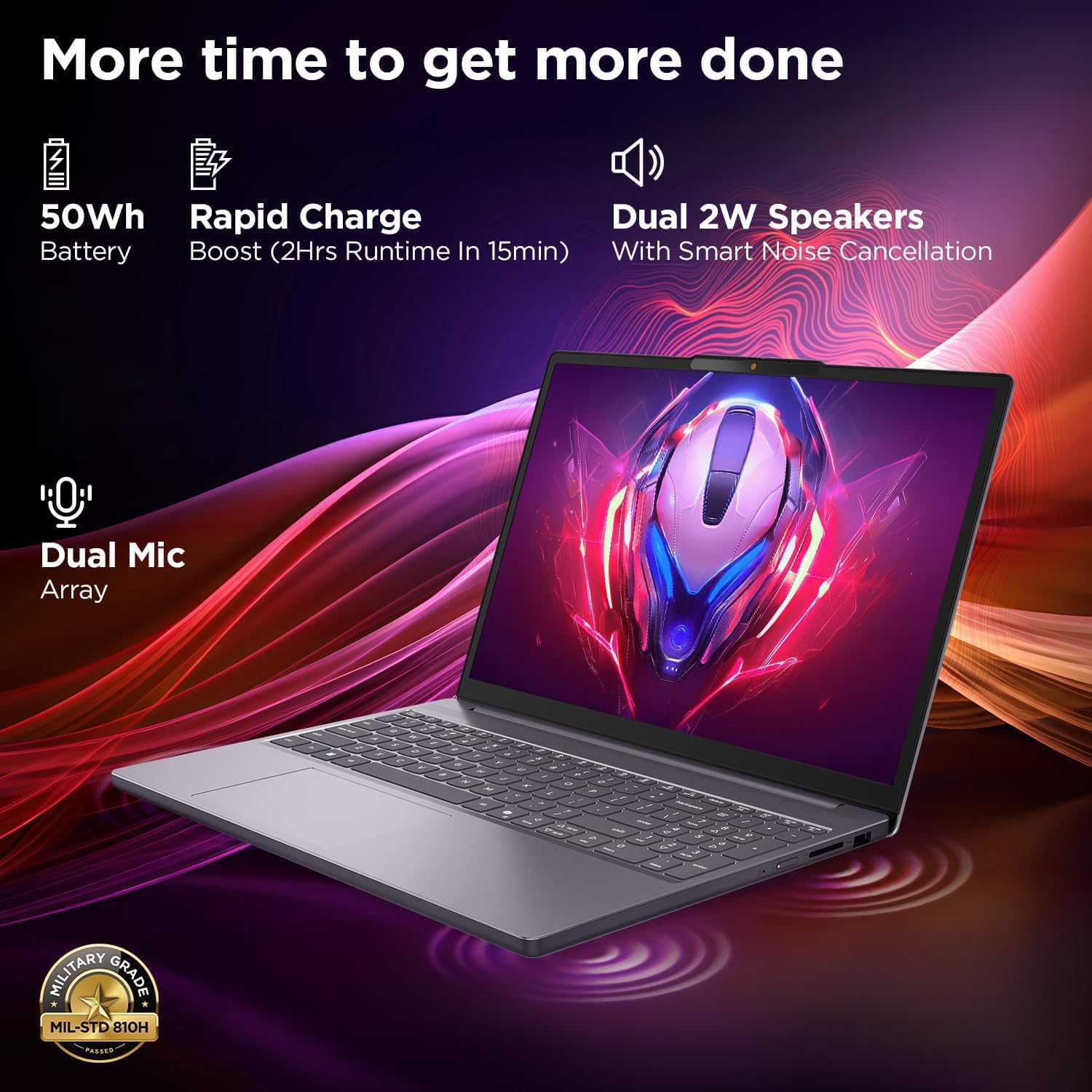
This image highlights the laptop's power and audio capabilities. It features a 50Wh battery with Rapid Charge Boost, providing 2 hours of runtime from a 15-minute charge. Dual 2W speakers with Smart Noise Cancellation and a Dual Mic Array enhance audio quality. The laptop also meets Military Grade MIL-STD 810H durability standards.
3.4 Puertos y conectividad

This image illustrates the various ports available on the Lenovo IdeaPad Slim 3. These include a power button, an SD card reader, a power connector, two USB-A ports (5Gbps), an HDMI port, and a USB-C port (5Gbps) with USB Power Delivery 3.0 and DisplayPort 1.2 support for data transfer and external displays. A headphone/microphone combo jack (3.5mm) is also present.
3.5 Keyboard and Touchpad Layout
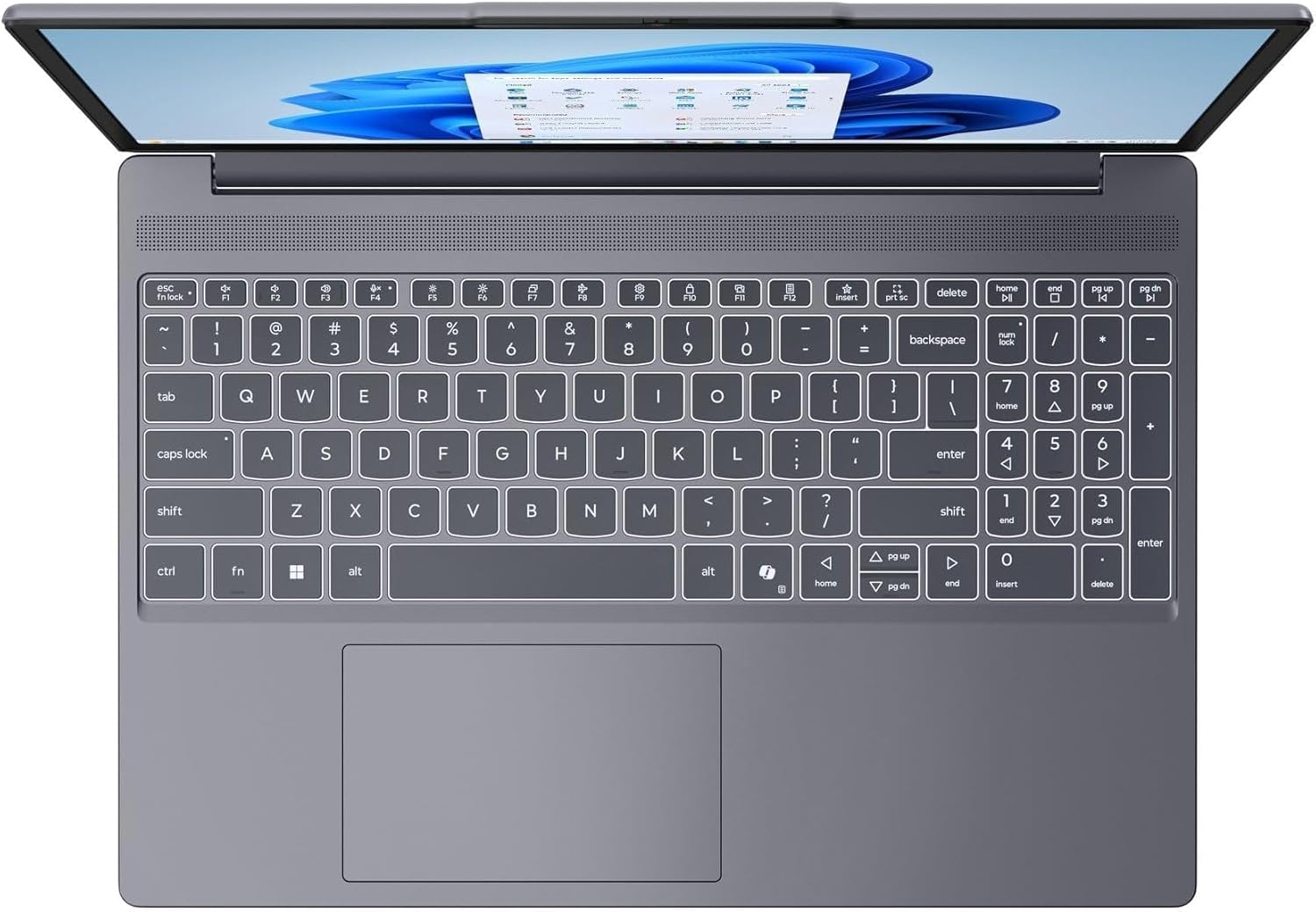
Esta imagen proporciona una vista de arriba hacia abajo. view of the laptop's full-size keyboard with a numeric keypad and the integrated touchpad. It shows the standard QWERTY layout along with function keys and dedicated navigation keys.
3.6 Laptop Exterior (Closed)
This image shows the top cover of the Lenovo IdeaPad Slim 3 laptop when closed, featuring the Lenovo brand logo centrally placed on the grey metallic surface.
3.7 Laptop Bottom View

This image displays the bottom panel of the Lenovo IdeaPad Slim 3 laptop, showing the ventilation grilles for cooling and rubber feet for stability.
4. Configuración
4.1 Encendido y carga inicial
- Conecte el adaptador de corriente: Conecte el adaptador de corriente al conector de alimentación de la computadora portátil y luego a un tomacorriente de pared.
- Cargar la batería: Deje que la computadora portátil se cargue durante al menos 30 minutos antes del uso inicial, o hasta que el indicador de batería muestre carga suficiente.
- Encendido: Abra la tapa de la computadora portátil y presione el botón de encendido ubicado en el costado o en la plataforma del teclado.
- Configuración de Windows: Siga las instrucciones en pantalla para completar la configuración de Windows 11 Home, incluido el idioma, la región, la conexión de red y la creación de la cuenta de usuario.
4.2 Conexión a una red
- Wifi: During Windows setup or later, click the Wi-Fi icon in the taskbar, select your network, enter the password, and click Connect.
- Ethernet (if applicable via adapter): Connect an Ethernet cable from your router/modem to a compatible USB-C adapter (not included) and then to the laptop's USB-C port.
5. Instrucciones de funcionamiento
5.1 Uso del teclado y el panel táctil
- Teclado: The laptop features a full-size keyboard with a numeric keypad. Use the Fn key in combination with function keys (F1-F12) for special functions like adjusting brightness, volume, or enabling/disabling Wi-Fi.
- Panel táctil: El panel táctil integrado admite gestos multitáctiles para navegar, desplazarse y hacer zoom. Consulte la configuración de Windows para personalizar los gestos del panel táctil.
5.2 Conexión de dispositivos externos
- Dispositivos USB: Connect USB peripherals (mouse, keyboard, external drives) to the available USB-A or USB-C ports.
- HDMI/DisplayPort: Use the HDMI port or USB-C (with DP 1.2 support) to connect an external monitor or projector.
- Dispositivos Bluetooth: Enable Bluetooth in Windows settings to pair wireless headphones, speakers, or other Bluetooth accessories.
- Tarjeta SD: Insert an SD card into the dedicated SD card reader slot for data transfer.
5.3 Gestión de energía
- Modo de sueño: Cierre la tapa o presione brevemente el botón de encendido para poner la computadora portátil en modo de suspensión.
- Cerrar: Click the Start button, then Power, and select "Shut down" to turn off the laptop completely.
- Reanudar: Click the Start button, then Power, and select "Restart" to reboot the laptop.
6. Mantenimiento
6.1 Limpieza de la computadora portátil
- Pantalla: Utilice un paño suave y sin pelusa ligeramenteampLimpie con agua o un limpiador de pantallas. No rocíe el líquido directamente sobre la pantalla.
- Teclado y chasis: Utilice un paño suave y seco. Para la suciedad difícil, un paño ligeramente seco.amp Se puede utilizar un paño con una solución de jabón suave, asegurándose de que no entre líquido en las aberturas.
- Ventilación: Limpie periódicamente las rejillas de ventilación con aire comprimido para evitar la acumulación de polvo, que puede afectar el rendimiento de enfriamiento.
6.2 Cuidado de la batería
- Evite temperaturas extremas.
- No descargue completamente la batería con frecuencia.
- Si va a guardar la computadora portátil durante un período prolongado, cargue la batería entre el 50 y el 60 % aproximadamente.
6.3 Actualizaciones de software
- Compruebe periódicamente si hay actualizaciones de Windows a través de Configuración > Actualización de Windows.
- Visita el soporte oficial de Lenovo website for driver and firmware updates specific to your IdeaPad Slim 3 model.
7. Solución de problemas
| Problema | Posible solución |
|---|---|
| La computadora portátil no se enciende. | Ensure the power adapter is securely connected and the outlet is functional. Try a different outlet. If the battery is completely drained, allow it to charge for a while before attempting to power on. |
| La pantalla está en blanco o negra. | Check if the laptop is powered on. Adjust screen brightness using function keys. Connect an external monitor to check if the issue is with the laptop's internal display. |
| Problemas de conexión Wi-Fi. | Ensure Wi-Fi is enabled in Windows settings. Restart your router/modem. Check for updated Wi-Fi drivers on the Lenovo support websitio. |
| Rendimiento lento. | Close unnecessary applications. Check Task Manager for resource-intensive processes. Ensure Windows and drivers are up to date. Run a disk cleanup. |
| El teclado o el panel táctil no responden. | Restart the laptop. Check for driver updates. Ensure no physical obstructions are present. |
8. Especificaciones
| Característica | Detalle |
|---|---|
| Marca | Lenovo |
| Nombre del modelo | Idea Pad Delgado 3 |
| Tamaño de pantalla | 15.3 Inches WUXGA IPS |
| Resolución | 1920 x 1200 píxeles |
| Procesador | 13th Gen Intel Core i7-13620H (2.4 GHz, up to 4.9 GHz) |
| RAM | 24GB DDR5 RAM (Upgradable to 40GB) |
| Almacenamiento | 1TB NVMe M.2 SSD (Upgradable to 4TB) |
| Sistema operativo | Inicio de Windows 11 |
| Gráficos | Integrado |
| Conectividad inalámbrica | Wi-Fi 6 (802.11ax) |
| Bluetooth | Bluetooth 5.2 |
| Puertos | 2x USB-A (5Gbps), 1x USB-C (5Gbps, PD 3.0, DP 1.2), 1x HDMI, 1x Headphone/Mic Combo, 1x SD Card Reader, Power Connector |
| Webleva | HD Camera with Privacy Shutter |
| Audio | Dual 2W Speakers with Smart Noise Cancellation, Dual Mic Array |
| Batería | 50Wh, Rapid Charge Boost |
| Dimensiones (largo x ancho x grosor) | 13.52" x 9.43" x 0.7" |
| Peso | 3.51 libras |
| Características especiales | Privacy Shutter, Power Delivery, Military Grade Durability (MIL-STD 810H) |
9. Información de garantía
Your Lenovo Laptop Computer 2026 Edition (IdeaPad Slim 3) comes with a Garantía limitada. The specific terms and duration of your warranty may vary by region and purchase date. For detailed warranty information, including coverage, terms, and conditions, please refer to the warranty card included with your product or visit the official Lenovo support websitio:
https://support.lenovo.com/warranty
Se recomienda registrar su producto en Lenovo website to facilitate warranty claims and receive important updates.
10. Soporte
For further assistance, technical support, or to download the latest drivers and manuals, please visit the official Lenovo Support websitio:
You may also contact Lenovo customer service directly. Contact information can typically be found on the support webSitio para su región específica.