
1. Introducción
This manual provides detailed instructions for the safe and effective use of your iBstone Nova Hearing Aids. Please read this manual thoroughly before using your device and retain it for future reference.
The iBstone Nova Hearing Aids are designed to provide clear sound with advanced noise-cancelling technology, offering a comfortable listening experience for individuals with mild to severe hearing loss.

Image: iBstone Nova Hearing Aids (blue and red) with their charging case and packaging. This image illustrates the complete product package.
2. Qué incluye
Your iBstone Nova Hearing Aids package contains the following items:

Image: A visual representation of all items included in the iBstone Nova Hearing Aids package, arranged neatly.
- Estuche de carga
- iBstone Nova Hearing Aids (Left and Right)
- Anti-lost Strap
- Cepillo de limpieza
- Wax Guard Filters
- Cable de carga USB
- Manual de usuario (este documento)
- Assorted Silicone Ear Domes
- Dry Tablets (for moisture-proof compartment)
3. Configuración y primer uso
3.1 Carga del dispositivo
Before initial use, fully charge the hearing aids and the charging case.
- Place the hearing aids into their respective slots in the charging case. Ensure the blue aid is in the 'L' slot and the red aid is in the 'R' slot.
- Conecte el cable de carga USB al estuche de carga y a una fuente de alimentación.
- The charging case features a clear remaining battery display. Lights will indicate charging status. A full charge is indicated when all lights are off.
- A full charge takes approximately 1.5 hours and provides up to 80 hours of use with the charging case.

Image: Illustration of the charging case with hearing aids, showing charging indicators and battery duration information. It highlights the 1.5-hour fast charge for 80 hours of use.
3.2 Selecting and Attaching Ear Domes
Properly fitted ear domes are crucial for comfort and optimal sound quality, preventing feedback (whistling).
- Choose the ear dome size that feels most comfortable and creates a good seal in your ear canal. The package includes various sizes and styles.
- Gently attach the selected ear dome to the hearing aid.
3.3 Uso de los audífonos
The iBstone Nova hearing aids are designed for a slim, in-ear fit.
- Identify the Left (L) and Right (R) hearing aids. They are typically color-coded (blue for left, red for right) and marked.
- Gently insert the hearing aid into your ear canal, ensuring the upward direction marking is correctly oriented.
- Adjust the hearing aid until it feels secure and comfortable.

Image: A step-by-step guide illustrating how to choose ear domes, place the hearing aid in the ear canal, adjust for comfort, and use the function button. It shows a person comfortably wearing the device.
4. Instrucciones de funcionamiento
4.1 Encendido y apagado
- Encendido/apagado automático: Los audífonos se encienden automáticamente cuando se retiran del estuche de carga y se apagan cuando se vuelven a colocar en el estuche.
4.2 Adjusting Volume and Modes
The iBstone Nova features a single function button for all adjustments.
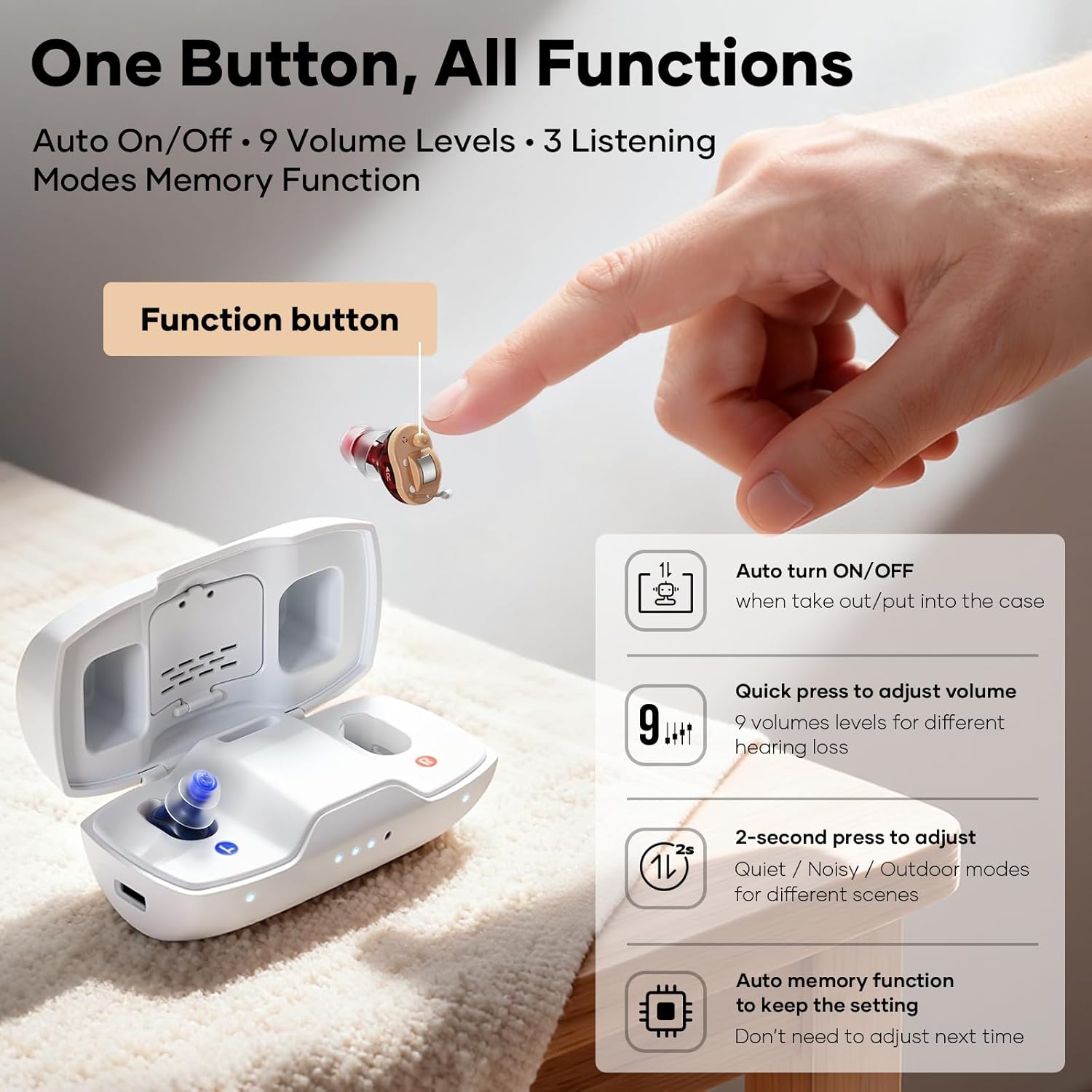
Image: Diagram illustrating the single function button on the hearing aid and its various operations: auto on/off, quick press for volume adjustment, 2-second press for mode adjustment, and auto memory function.
- Ajuste de volumen: A quick press of the function button cycles through 9 volume levels. Select the level that provides optimal clarity without discomfort.
- Selección de modo: Press and hold the function button for 2 seconds to switch between the 3 hearing modes:
- Modo silencioso: Optimized for calm environments.
- Noisy Mode: Enhances speech in environments with background noise.
- Modo exterior: Designed for open-air settings, reducing wind noise.
- Función de memoria: The device remembers your last used volume and mode settings.
5. Mantenimiento
Regular maintenance ensures the longevity and optimal performance of your iBstone Nova Hearing Aids.
5.1 Limpieza diaria
- After each use, gently wipe the hearing aids with a soft, dry cloth.
- Use the provided cleaning brush to remove any earwax or debris from the ear domes and sound outlets.
- No utilice agua ni soluciones de limpieza directamente sobre los audífonos.
5.2 Wax Guard Filters
Periodically check and replace the wax guard filters as needed to prevent earwax from entering the hearing aid and affecting sound quality.
- Refer to the specific instructions included with your wax guard filters for replacement procedures.
5.3 Control de humedad
The charging case includes a built-in moisture-proof compartment to help keep your hearing aids dry.
- Place the provided dry tablets into this compartment.
- Store your hearing aids in the charging case with the dry tablets when not in use to extend their lifespan.

Imagen: Un collage muestraasing the anti-lost strap, the built-in dehumidifying capsule in the charging case, the portability of the charging case, and the variety of ear domes for a custom fit.
6. Solución de problemas
If you encounter any issues with your iBstone Nova Hearing Aids, please refer to the following common solutions:
| Problema | Posible causa | Solución |
|---|---|---|
| Sin sonido o sonido débil |
|
|
| Silbido o retroalimentación |
|
|
| El audífono no se carga |
|
|
Si el problema persiste, póngase en contacto con el servicio de atención al cliente.
7. Especificaciones
- Número de modelo: Estrella nueva
- Fabricante: iBstone
- Tipo de batería: Rechargeable (1 A battery included per aid)
- Tiempo de carga: Aproximadamente 1.5 horas
- Tiempo de uso: Hasta 80 horas con estuche de carga
- Modos de audición: Quiet, Noisy, Outdoor (3 modes)
- Niveles de volumen: 9 niveles
- Reducción de ruido: Up to 26dB AI Noise Reduction
- Dimensiones del paquete: 6.1 x 3.9 x 1.8 pulgadas
- Peso del artículo: 8.4 onzas
8. Garantía y soporte
iBstone stands behind its products and is committed to user satisfaction.
- Atención al cliente: U.S.-based customer phone support is available to assist with any after-sales problems.
- Información de garantía: Please refer to the product packaging or contact iBstone customer service for specific warranty details.
- Contacto: For support, please refer to the contact information provided on the iBstone official websitio o embalaje del producto.

Image: A group of professionals in lab coats, representing the iBstone support team, emphasizing lifetime support and customer service.