
1. Bienvenido
Thank you for choosing the AWEI T1 Pro Wireless Bluetooth Headphones. This manual provides detailed instructions for setting up, operating, and maintaining your new earbuds. Please read this manual carefully before use to ensure optimal performance and longevity of your device.
2. Producto terminadoview
2.1. Contenido del paquete
- Auriculares inalámbricos (izquierdo y derecho)
- Estuche de carga
- Cable de carga USB
- Puntas para los oídos (varios tamaños)
- Manual de usuario
2.2. Earbud and Charging Case Components
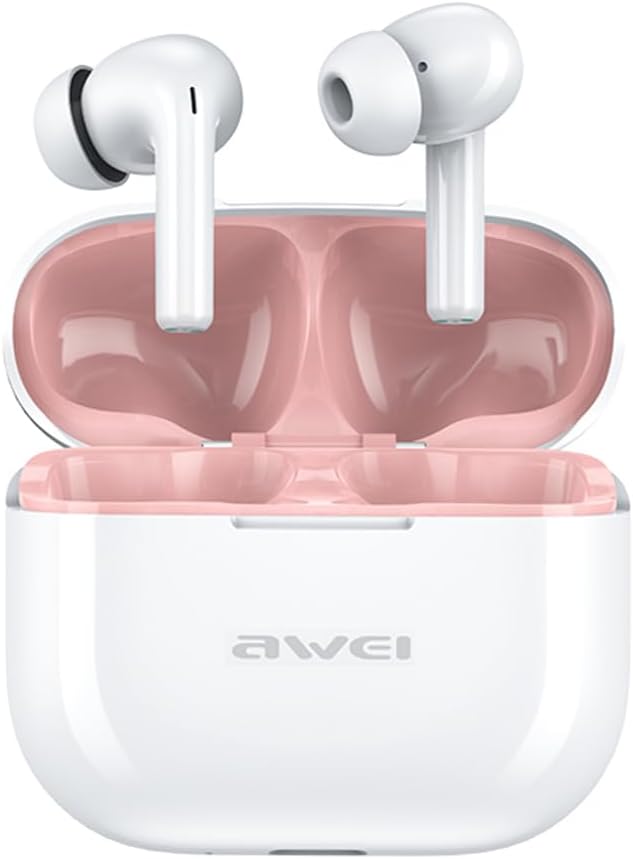
Image: The AWEI T1 Pro wireless earbuds are shown in their open charging case. The earbuds are white with a stem design, and the interior of the charging case is a light pink color. The AWEI logo is visible on the front of the white charging case.
The AWEI T1 Pro earbuds feature an ergonomic in-ear design for a comfortable and secure fit. The compact charging case not only protects the earbuds but also provides multiple charges on the go.
2.3. Características principales
- Calidad de sonido Hi-Fi: Equipped with 13mm speakers for an immersive audio experience and clear call performance.
- Tecnología Bluetooth 5.4: Ensures a faster, more stable signal transmission with low latency and a wireless range of up to 10 meters. (Note: Some packaging may indicate Bluetooth 5.3, but the device supports 5.4 for enhanced performance).
- Control táctil inteligente: Intuitive touch sensors on each earbud allow for easy control of music playback, calls, and voice assistant activation.
- Batería de larga duración: Enjoy up to 7 hours of continuous playback per charge. The 300mAh charging case extends total playtime to 36 hours in dual-ear mode or up to 60 hours in single-ear mode. The case fully charges in approximately 1 hour via Type-C.
- Diseño impermeable IPX6: Resistant to sweat and rain, making them suitable for sports and outdoor activities.

Image: A detailed diagram illustrating the internal components of an earbud speaker, labeled as 'Drive Units HiFi Stereo', highlighting the layered structure of the audio driver for high-fidelity sound.

Image: A stylized depiction of a microchip labeled '5.3 Bluetooth', surrounded by circuit board elements, emphasizing lower latency and increased stability in wireless communication.

Image: A black earbud is shown next to a smartphone displaying a music player interface. Text indicates 'Touch Control Wake up Voice Assistant', illustrating how touch gestures on the earbud can control phone functions like answering calls or activating a voice assistant.

Image: A smartphone displaying a music player is shown alongside a transparent block, symbolizing extended power. Text highlights 'Full of Energy Long Battery Life', indicating the 300mAh charging case provides 7 hours of continuous use per charge.

Image: Two black earbuds are depicted, one dry and the other surrounded by water droplets, illustrating the 'No Fear of Sweat & Rain IPX6 Waterproof Rate' feature, which prevents water penetration during sports.
3. Configuración
3.1. Carga inicial
- Antes del primer uso, coloque ambos auriculares en el estuche de carga.
- Conecte el cable de carga USB tipo C provisto al puerto de carga del estuche y a una fuente de alimentación (por ejemplo, un adaptador de pared USB o un puerto USB de una computadora).
- The indicator lights on the charging case will show charging status. A full charge for the case takes approximately 1 hour.
- Asegúrese de que los auriculares estén completamente cargados antes del emparejamiento inicial.
3.2. Emparejamiento con un dispositivo
- Abre el estuche de carga. Los auriculares se encenderán automáticamente y entrarán en modo de emparejamiento.
- En su dispositivo (teléfono inteligente, tableta, computadora portátil), habilite Bluetooth.
- Buscar dispositivos Bluetooth disponibles.
- Select "AWEI T1 Pro" from the list of devices.
- Una vez conectado, escuchará un tono de confirmación y los auriculares estarán listos para usar.
- Los auriculares se volverán a conectar automáticamente al último dispositivo emparejado cuando se saquen del estuche, si Bluetooth está habilitado en el dispositivo.
4. Instrucciones de funcionamiento
4.1. Encendido y apagado
- Encendido: Abra el estuche de carga o mantenga presionada la zona táctil de ambos auriculares durante 3 segundos.
- Apagado: Coloque los auriculares nuevamente en el estuche de carga y cierre la tapa, o mantenga presionada la zona táctil de ambos auriculares durante 5 segundos.
4.2. Controles táctiles
| Función | Acción |
|---|---|
| Reproducir/Pausar música | Un solo toque en cualquiera de los auriculares |
| Próxima canción | Toque dos veces el auricular derecho |
| Canción anterior | Toque dos veces el auricular izquierdo |
| Subir volumen | Toca tres veces el auricular derecho |
| Bajar volumen | Toque tres veces el auricular izquierdo |
| Responder/Finalizar llamada | Un solo toque en cualquiera de los auriculares |
| Rechazar llamada | Mantenga presionado cualquiera de los auriculares durante 2 segundos |
| Activar Asistente de Voz | Long press on either earbud for 2 seconds (when not on a call) |
4.3. Realización y recepción de llamadas
When a call comes in, you can answer or reject it using the touch controls as described above. During a call, a single tap will end the conversation.
4.4. Reproducción de música
Control your music directly from the earbuds. Use single, double, or triple taps to play, pause, skip tracks, or adjust volume.
5. Mantenimiento
5.1. Limpieza
- Limpie periódicamente los auriculares y el estuche de carga con un paño suave, seco y sin pelusa.
- No utilice limpiadores abrasivos, alcohol ni disolventes químicos.
- Retire con cuidado cualquier cerumen o residuo de la malla del auricular y de los contactos de carga usando un hisopo de algodón seco o un cepillo pequeño y suave.
5.2. Almacenamiento
- Cuando no estén en uso, guarde siempre los auriculares en su estuche de carga para protegerlos del polvo y de daños.
- Guarde el dispositivo en un lugar fresco y seco, alejado de temperaturas extremas y de la luz solar directa.
5.3. Resistencia al agua
The AWEI T1 Pro earbuds are rated IPX6 waterproof, meaning they are protected against high-pressure water jets from any direction. This makes them suitable for workouts and light rain. However, they are not designed for swimming or submersion in water. Ensure the earbuds are dry before placing them back into the charging case to prevent damage.
6. Solución de problemas
6.1. Problemas comunes y soluciones
- Los auriculares no se emparejan con el dispositivo:
Ensure both earbuds are charged. Turn off and on your device's Bluetooth. Forget "AWEI T1 Pro" from your device's Bluetooth list and try pairing again. - Solo funciona un auricular:
Place both earbuds back into the charging case, close the lid, wait a few seconds, then open the lid and take them out. This should reset their connection. If the issue persists, try resetting the earbuds (refer to manufacturer's websitio para obtener instrucciones de restablecimiento específicas si es necesario). - No hay sonido o el volumen es bajo:
Check the volume level on both your device and the earbuds. Ensure the earbuds are properly seated in your ears. Try cleaning the earbud mesh for any obstructions. - El estuche de carga no carga:
Ensure the USB cable is securely connected to both the case and the power source. Try a different charging cable or power adapter. - Los auriculares no se cargan en caso de:
Ensure the charging contacts on both the earbuds and the case are clean and free of debris. Make sure the earbuds are correctly seated in the case.
7. Especificaciones

Image: A graphic displaying the technical specifications of the AWEI T1 Pro, including basic information, horn details, Bluetooth version, and battery capacities.
| Información general | |
|---|---|
| Nombre del modelo | T1 Pro |
| Tipo de producto | Auriculares estéreo TWS |
| Peso neto | 36 gramos |
| Dimensiones (caso) | 58*50*24 mm |
| Colocación de orejas | En el oído |
| Tipo de control | Control táctil |
| Nivel de resistencia al agua | Resistente al agua IPX6 |
| Control de ruido | Cancelación de ruido adaptativa |
| Especificaciones de audio | |
| Diámetro del altavoz | 13 mm |
| Sensibilidad | 100 ± 3 dB |
| Rango de respuesta de frecuencia | 20 Hz ~ 20,000 Hz |
| Impedancia | 32 ohmios |
| Conectividad | |
| Versión de Bluetooth | 5.4 (Image shows 5.3) |
| alcance inalámbrico | Hasta 10 metros |
| Protocolos soportados | HSP, HFP, A2DP, AVRCP |
| Dispositivos compatibles | Portátiles, tabletas, teléfonos móviles |
| Batería y carga | |
| Batería del estuche de carga | 300 mAh / 3.7 V |
| Capacidad de la batería del auricular | 45 mAh * 2 |
| Tiempo de reproducción de música | Hasta 7 horas (por carga) |
| Tiempo de conversación | Hasta 8 horas |
| Tiempo de espera | Hasta 300 horas |
| Tiempo de carga (estuche) | Aproximadamente 1 hora |
| Puerto de carga | USB tipo C |
8. Garantía y soporte
AWEI products are designed and manufactured to the highest quality standards. For information regarding warranty coverage, please refer to the warranty card included in your product packaging or visit the official AWEI website. If you encounter any issues or require technical assistance, please contact AWEI customer support through the contact information provided on the official websitio o su plataforma de compra.