
1. Introducción
Thank you for choosing the KODAK V500 Video Light. This professional-grade video light is designed to provide powerful, adjustable illumination for various photography and videography needs. Featuring a wide color temperature range from 2800K to 6500K, a high Color Rendering Index (CRI) of 96, and dimmable brightness, the V500 ensures accurate and versatile lighting. Its lightweight design, intuitive LCD display, and wireless remote control make it an essential tool for both studio and on-location use.
2. Instrucciones de seguridad importantes
Please read all safety instructions carefully before using the KODAK V500 Video Light. Failure to follow these instructions may result in electric shock, fire, or serious injury.
- No operate the light with wet hands or in wet conditions.
- No block the ventilation openings on the light fixture. Overheating can cause damage or fire.
- No look directly into the light source when it is operating at high brightness. This can cause eye damage.
- Keep the light away from flammable materials and liquids.
- Ensure the light is securely mounted on a stable stand before operation.
- Utilice únicamente el adaptador de corriente y los accesorios especificados.
- Disconnect the power supply before cleaning or when not in use.
- Este producto no es un juguete. Mantener fuera del alcance de los niños.
- If any malfunction occurs, immediately disconnect power and contact customer support.
3. Contenido del paquete
Verifique que todos los artículos estén presentes en su paquete:
- KODAK V500 Video Light Unit
- Control remoto inalámbrico
- Adaptador de corriente
- Reflector estándar
- Manual de instrucciones
4. Producto terminadoview
Familiarize yourself with the components of your KODAK V500 Video Light and its remote control.
4.1. KODAK V500 Video Light Unit
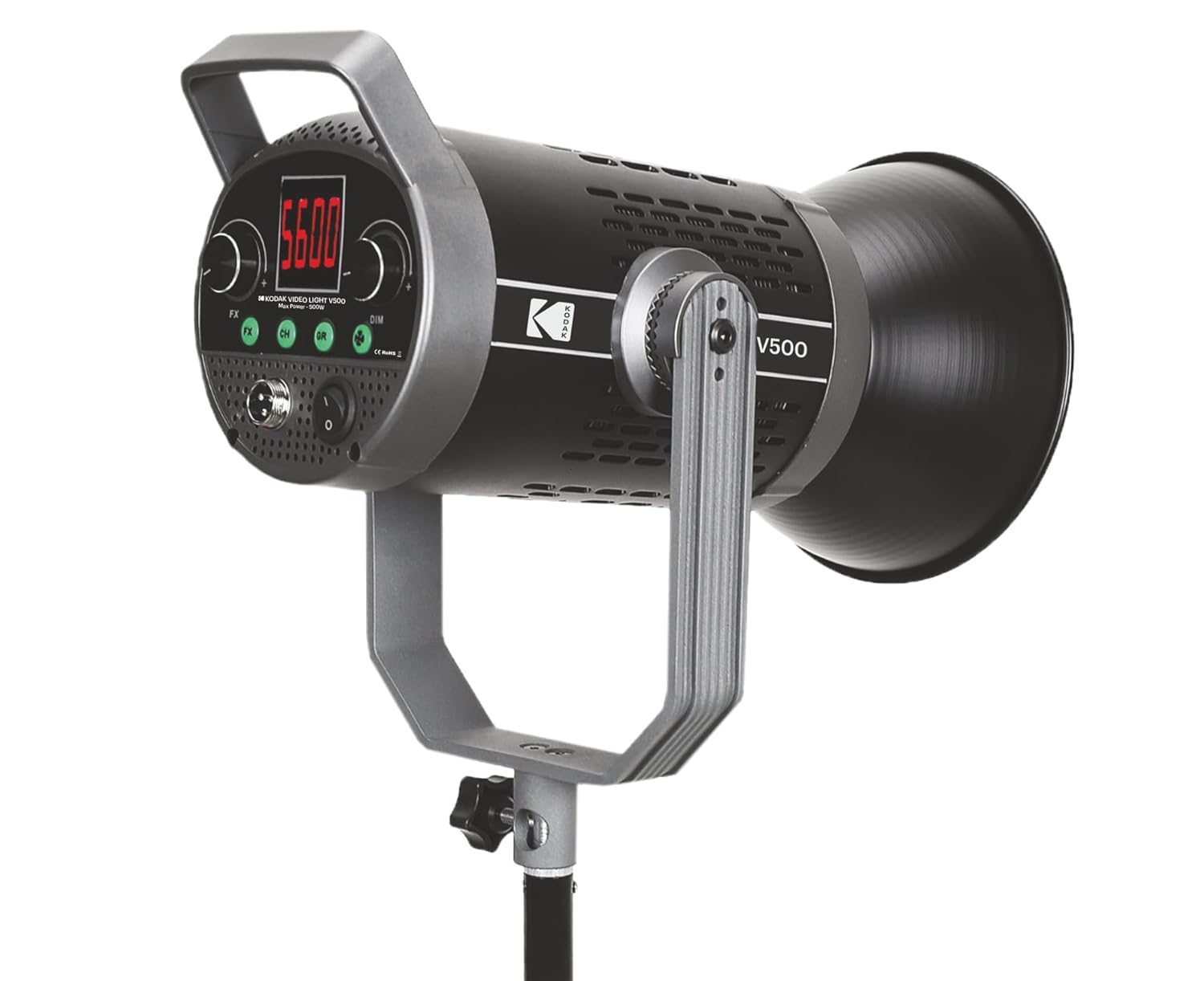
Figura 1: Frente view of the KODAK V500 Video Light with reflector attached, mounted on a light stand.

Figura 2: Rear control panel of the KODAK V500 Video Light.
- Reflector: Directs and focuses the light output.
- Fuente de luz LED: High-power LED array.
- Soporte de montaje: Allows attachment to a light stand and adjustment of tilt angle.
- Perilla de bloqueo: Secures the light's tilt angle.
- Pantalla LCD: Shows current settings such as color temperature, brightness, and channel/group.
- Botón FX: Activates special effects modes (if available).
- CH/GR Buttons: Selects the operating channel or group for wireless control.
- Marcación atenuada: Adjusts brightness intensity.
- Marcación CCT: Adjusts color temperature (Correlated Color Temperature).
- Entrada de energía (DC IN): Se conecta al adaptador de corriente.
- Interruptor de alimentación: Enciende o apaga la luz.
4.2. Control remoto inalámbrico

Figura 3: KODAK V500 Wireless Remote Control.
- Botón de encendido: Enciende o apaga la luz.
- CCT/MODE Button: Switches between Color Temperature adjustment and other modes.
- Botón de ajuste: Confirms selections or enters menu.
- Botones +/-: Adjusts values (brightness, color temperature) or navigates menus.
- Logotipo de KODAK: Identificación de marca.
5. Instrucciones de configuración
Follow these steps to set up your KODAK V500 Video Light for use.
- Montaje de la luz:
- Attach the KODAK V500 Video Light to a compatible light stand using the mounting bracket.
- Tighten the locking knob on the light stand to secure the light.
- Adjust the tilt angle of the light using the locking knob on the light's mounting bracket, then tighten to secure.
- Colocación del reflector:
- Align the reflector with the front of the light unit.
- Gire el reflector en el sentido de las agujas del reloj hasta que encaje firmemente en su lugar.
- Conexión de energía:
- Connect the power adapter cable to the DC IN port on the rear of the light unit.
- Conecte el adaptador de corriente a una toma de corriente adecuada.
6. Instrucciones de funcionamiento
Learn how to power on, adjust settings, and utilize the features of your KODAK V500 Video Light.
6.1. Encendido / apagado
Presione el Interruptor de encendido on the rear control panel of the light unit to turn the light ON or OFF. Alternatively, use the Botón de encendido en el control remoto inalámbrico.
6.2. Ajuste de brillo
The KODAK V500 offers dimmable brightness control:
- En la unidad de luz: Girar el Dial DIM clockwise to increase brightness and counter-clockwise to decrease brightness. The brightness level will be displayed on the LCD.
- Usando el control remoto: Presione el +/- Botones para ajustar el nivel de brillo.
6.3. Ajuste de la temperatura del color
The color temperature can be adjusted from 2800K (warm) to 6500K (cool):
- En la unidad de luz: Girar el Marcación CCT clockwise to increase the color temperature (cooler light) and counter-clockwise to decrease it (warmer light). The color temperature will be displayed on the LCD.
- Usando el control remoto: Presione el CCT/MODE Button to enter CCT adjustment mode, then use the +/- Botones para cambiar la temperatura del color.
6.4. Wireless Control (Channel and Group)
The KODAK V500 supports wireless control, allowing you to manage multiple lights simultaneously.
- Setting Channel (CH): Presione el Botón CH on the light unit or remote. Use the +/- Botones (on remote) or DIM/CCT Dials (on light) to select a channel (e.g., 1-16). Ensure all lights you wish to control together are set to the same channel.
- Setting Group (GR): Presione el Botón GR on the light unit or remote. Use the +/- Botones (on remote) or DIM/CCT Dials (on light) to select a group (e.g., A, B, C). This allows for independent control of lights within the same channel but different groups.
- Control remoto de emparejamiento: The remote should automatically pair with lights on the same channel and group. If not, ensure both the light and remote are set to the desired channel and group.
6.5. Efectos especiales (FX)
The KODAK V500 may include various special effects modes for creative lighting scenarios.
- Presione el Botón FX on the light unit to cycle through available special effects.
- Utilice el DIM/CCT Dials to adjust parameters within the selected effect, if applicable.
7. Mantenimiento
Proper maintenance ensures the longevity and optimal performance of your KODAK V500 Video Light.
- Limpieza: Use a soft, dry cloth to wipe the exterior of the light. For stubborn dirt, a slightly damp Se puede utilizar un paño y luego un paño seco. No No utilice productos químicos agresivos, disolventes ni limpiadores abrasivos.
- Almacenamiento: Cuando no esté en uso, guarde la luz en un lugar fresco y seco, lejos de la luz solar directa y de la humedad excesiva.
- Cuidado de la lente: Keep the LED light source clean and free of dust. Use a lens blower or a soft brush to remove dust. Avoid touching the LED surface directly.
8. Solución de problemas
If you encounter issues with your KODAK V500 Video Light, refer to the following common problems and solutions.
| Problema | Posible causa | Solución |
|---|---|---|
| La luz no se enciende. | No power supply; Power adapter not connected; Power switch off. | Ensure power adapter is securely connected and plugged into a working outlet. Check if the power switch is in the ON position. |
| El control remoto no funciona. | Remote batteries low/dead; Incorrect channel/group setting; Obstruction between remote and light. | Replace remote batteries. Ensure the remote and light are set to the same channel and group. Remove any obstructions. Operate within effective range. |
| No se puede ajustar el brillo ni la temperatura del color. | Controls locked; Malfunction. | Check if any lock function is active (refer to advanced settings if applicable). If the issue persists, contact customer support. |
| La luz parpadea o se comporta de manera errática. | Unstable power supply; Overheating; Internal fault. | Ensure a stable power source. Allow the light to cool down if it has been operating for an extended period. If the problem continues, discontinue use and contact support. |
9. Especificaciones
Detailed technical specifications for the KODAK V500 Video Light.
| Característica | Detalle |
|---|---|
| Número de modelo | V500 |
| Potencia de salida | 500 W |
| Rango de temperatura de color | 2800K - 6500K |
| Índice de reproducción cromática (IRC) | 96 |
| Ajuste de brillo | Regulable |
| Método de control | On-board controls, Wireless Remote Control |
| Dimensiones del producto (LxAnxAl) | 33.5 x 19.5 x 15.5 cm |
| Peso del artículo | 2.88 kilogramos |
| País natal | Porcelana |
10. Garantía y atención al cliente
KODAK products are manufactured to high-quality standards. For warranty information, please refer to the warranty card included with your product or visit the official KODAK website. For technical assistance, troubleshooting, or service inquiries, please contact KODAK customer support.
Contacto del fabricante:
BHATIA PHOTO INDUSTRIES PVT LTD
Floor No.3, Kundan House, Nehru Place, New Delhi, Delhi, 110019
Contacto: 9999535381
Email: Lapstuffmart204@gmail.com