
GameSir GameSir-G7 Pro
Manual de usuario del mando con cable GameSir G7 Pro
Modelo: GameSir-G7 Pro | Marca: GameSir
Introducción
The GameSir G7 Pro is a versatile gaming controller designed for seamless compatibility across multiple platforms, including Xbox Series X|S, Xbox One, PC, and Android devices. It features advanced technologies such as Mag-Res TMR sticks and Hall Effect analog triggers for precise and durable performance. This manual provides detailed instructions for setting up, operating, maintaining, and troubleshooting your G7 Pro controller.
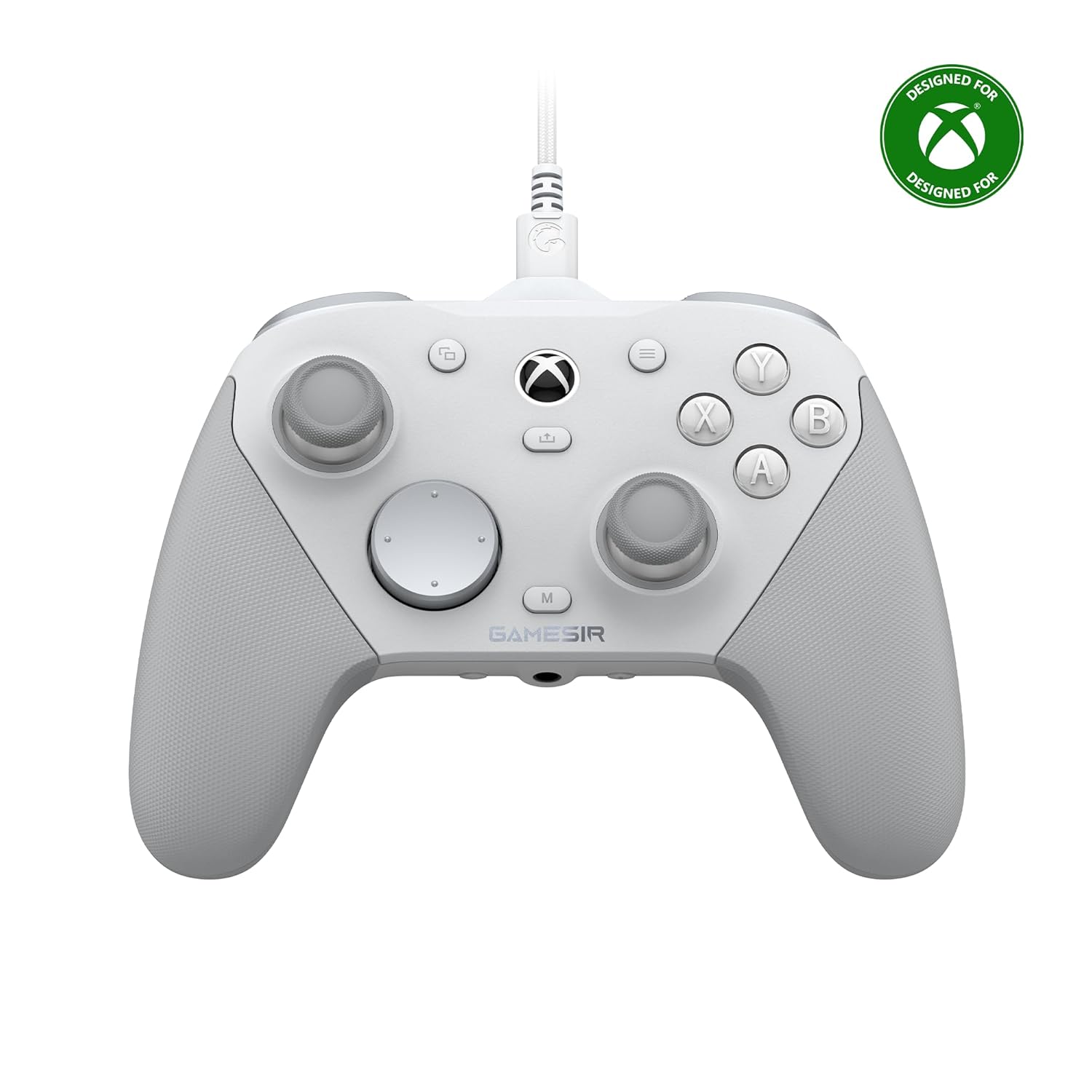
Imagen: Frente view of the GameSir G7 Pro Wired Controller in white, with the Xbox logo and GameSir branding visible.
Configuración
Conectividad
The G7 Pro offers three primary connection modes:
- Conexión por cable: For Xbox Series X|S and Xbox One, connect the controller directly using the provided USB-C to USB-A cable.
- Conexión inalámbrica 2.4G: For PC, use the included 2.4GHz wireless dongle.
- Conexión Bluetooth: For Android devices, connect via Bluetooth.
Effortlessly switch between modes using the convenient physical mode switch located on the back of the controller.

Image: Diagram illustrating the GameSir G7 Pro's tri-mode connectivity options: wired for Xbox, 2.4GHz wireless and wired for PC, and Bluetooth for Android.
Cargando
The G7 Pro includes a Smart Auto Start-Stop Charging Station and a built-in 1200mAh battery. To charge, simply place the controller on the station. Charging will begin automatically. Remove the controller from the station to resume gameplay.

Imagen: Primer plano view of the GameSir G7 Pro controller showing its 1200mAh rechargeable battery and the Smart Auto Start-Stop Charging Station.
Instrucciones de funcionamiento
TMR Sticks
The GameSir G7 Pro features Mag-Res TMR sticks, which combine the durability of Hall Effect technology with the linear precision of traditional potentiometer sticks. This design ensures stable polling rates, smooth movement, and eliminates stick drift, providing a reliable gaming experience with low power consumption.

Imagen: Detallada view of a GameSir Mag-Res TMR stick, highlighting its internal components and specifications like 1000Hz polling rate, 5M-cycles lifespan, 12-bit ADC chip, and 4096-level resolution.
Disparadores analógicos de efecto Hall
Experience unmatched smoothness and linear input with the precision-tuned Hall Effect analog triggers. These triggers provide accurate control for various in-game actions. Additionally, the controller features clicky Micro Switch trigger stops, allowing users to quickly switch between full analog range and a shorter, faster digital input based on their gaming preferences.

Image: Close-up of the GameSir G7 Pro's Hall Effect analog triggers, showing the mechanism for both smooth analog input and clicky Micro Switch trigger stops.
1000Hz Polling Rate on PC
For PC gaming, the G7 Pro supports an ultra-responsive 1000Hz polling rate. This high polling rate is available through both wired and 2.4G wireless connections, ensuring instantaneous input registration, minimal lag, and optimized performance for competitive gameplay.

Image: A person playing a racing game on a laptop using the GameSir G7 Pro controller, illustrating the 1000Hz polling rate feature on PC.
GameSir Nexus App
The G7 Pro is compatible with the upgraded GameSir Nexus app, which provides extensive customization options. This app allows you to adjust gyro settings, fine-tune stick curves, and map buttons to mouse functions, offering deeper control and personalization for your gaming experience.
PC Gyro Aiming & 4 Extra Buttons
A built-in gyroscope (PC-only) allows for precise and intuitive aiming by mapping to sticks, buttons, or mouse movements. The controller also features four customizable buttons (L5/R5 bumpers and two lockable back buttons) that can be programmed for macros or quick actions, enhancing your gameplay efficiency.
Customizable Faceplate and D-pads
The G7 Pro features a magnetic, detachable faceplate that can be customized. The package includes extra D-pads, allowing you to swap them to suit your ergonomic and tactile preferences.

Image: Contents of the GameSir G7 Pro package, including the controller, extra D-pads, cable retainer, 2.4GHz wireless dongle, Smart Auto Start-Stop Charging Station, and a 3m Type-C cable.
3.5mm Audio Jack
The controller is equipped with a 3.5mm audio jack, supporting audio output for both wired and 2.4G wireless connections, allowing for convenient headset use during gameplay.
Mantenimiento
To ensure the longevity and optimal performance of your GameSir G7 Pro controller, follow these maintenance guidelines:
- Limpieza: Utilice un paño suave y seco para limpiar el mando con regularidad. Para la suciedad difícil, limpie ligeramenteampLave el paño con agua o una solución limpiadora suave. Evite productos químicos agresivos o materiales abrasivos.
- Almacenamiento: Store the controller in a cool, dry place away from direct sunlight, extreme temperatures, and humidity. When not in use, placing it on its charging station can help keep it organized and charged.
- Cuidado de cables: Handle the USB-C cable with care. Avoid sharp bends or excessive pulling that could damage the cable or connectors.
- Cuidado de la batería: While the controller has a smart charging station, avoid completely draining the battery frequently to prolong its lifespan.
Solución de problemas
If you encounter issues with your GameSir G7 Pro controller, refer to the following common troubleshooting steps:
- El controlador no se conecta:
- Ensure the mode switch on the back of the controller is set to the correct platform (Xbox, PC 2.4G, or Android Bluetooth).
- Para la conexión por cable, pruebe con un puerto USB o cable diferente.
- For 2.4G wireless, ensure the dongle is securely plugged into your PC and try a different USB port.
- Para Bluetooth, asegúrate de que esté activado en tu dispositivo Android y que el mando esté en modo de emparejamiento. Elimina los emparejamientos anteriores e intenta volver a emparejarlo.
- Botones/sticks que no responden o se desvían:
- Asegúrese de que el controlador esté completamente cargado.
- Connect the controller to the GameSir Nexus App on PC to check for firmware updates and calibrate sticks/triggers if necessary.
- Limpie alrededor de los botones y palancas para eliminar cualquier residuo.
- Audio Issues (3.5mm Jack):
- Asegúrese de que sus auriculares estén completamente conectados al conector de 3.5 mm.
- Check audio settings on your console/PC/Android device to ensure the controller's audio output is selected.
- Try a different headset to rule out a headset issue.
- Problemas de carga:
- Ensure the controller is correctly seated on the charging station.
- Verify the charging station is receiving power.
- Try charging the controller directly with the USB-C cable.
If issues persist, please contact GameSir customer support for further assistance.
Presupuesto
| Característica | Detalle |
|---|---|
| Número de modelo | GameSir-G7 Pro |
| Conectividad | Con cable (USB-C), inalámbrico 2.4G, Bluetooth |
| Compatibilidad | Xbox Series X|S, Xbox One, Windows, Android |
| Palos | Joysticks GameSir Mag-Res TMR |
| Desencadenantes | Disparadores analógicos de efecto Hall con topes de disparo de microinterruptor |
| Tasa de sondeo (PC) | 1000 Hz (con cable y 2.4 G inalámbrico) |
| Batería | 1200 mAh recargable (incluida) |
| Dimensiones | 4.06 x 2.28 x 5.98 pulgadas |
| Peso | 1.1 libras |
| Conector de audio | 3.5mm (Wired & 2.4G supported) |
| Botones adicionales | 4 customizable (L5/R5 bumpers + lockable back buttons) |
Garantía y soporte
For detailed warranty information and customer support, please refer to the official GameSir website or the documentation included with your product. You can also contact GameSir customer service directly for technical assistance or inquiries regarding your G7 Pro controller.
GameSir oficial Websitio: www.gamesir.hk
Documentos relacionados - GameSir-G7 Pro
 |
Mando GameSir T7: Características, especificaciones e instrucciones Información detallada sobre el mando GameSir T7, incluyendo sus joysticks y gatillos de efecto Hall, motores de vibración, diseño ergonómico, conectividad y especificaciones técnicas. Aprende a conectarlo, controlar el volumen, silenciar el micrófono y calibrarlo. Incluye una comparación con otros modelos de GameSir. |
 |
GameSir G7 Pro Tri-Mode Controller User Manual Comprehensive user manual for the GameSir G7 Pro Tri-Mode controller, including setup instructions for Windows, Android, and Xbox, volume control, button mapping, and calibration procedures. |
 |
Mando para juegos GameSir-T4k: Manual de usuario y guía de configuración Manual de usuario detallado del control transparente para PC GameSir-T4k. Descubre sus características, diseño del dispositivo, métodos de conexión para PC, Nintendo Switch y Android TV Box, personalización de botones, función turbo y calibración. Incluye joysticks de efecto Hall y gatillos analógicos. |
 |
GameSir G7 Pro Tri-Mode Wireless Controller for Xbox, PC, Android | Enhanced Esports Features Discover the GameSir G7 Pro Tri-Mode controller, featuring Mag-Res TMR sticks, Hall Effect triggers, 1000Hz polling rate, and customizable faceplates for an unparalleled esports gaming experience on Xbox, PC, and Android. |
 |
Mando inalámbrico GameSir G7 Pro: manual y especificaciones Manual completo y especificaciones técnicas del control inalámbrico GameSir G7 Pro. Descubre sus características, compatibilidad con Xbox y PC, botones personalizables, gatillos de efecto Hall y opciones de personalización avanzadas a través de la app GameSir Nexus. |
 |
Manual de usuario y características del mando con cable GameSir G7 SE Guía completa del controlador con cable GameSir G7 SE, que cubre el contenido del paquete, el diseño del dispositivo, el control de volumen, la configuración del botón trasero, la calibración del joystick y el gatillo, y la personalización a través del software GameSir Nexus. |
Ask a question about this manual
Ask about setup, troubleshooting, compatibility, parts, safety, or missing instructions. Manuals+ will review the question and use this page’s manual context to help answer it.